Share It On:
 Don't let your tech stall your hustle; discover why businesses outgrow accounting solutions and how to upgrade your stack effortlessly.
Your accounting app worked perfectly when the business was small. A handful of invoices per month, one person handling approvals. Fast forward to today, and that same setup is quietly costing you money, time, and probably a few grey hairs.
This thing is, accounting software was never designed to manage the process around finances. It records transactions. It generates reports. It files taxes. But the moment your business needs multi-step invoice approvals, expense controls, or audit trails that actually hold up under scrutiny, your accounting app hits a wall.
And you’re not alone in hitting it. As per an analysis of over 3,150 buyer conversations, 46% of businesses are still relying on non-specialized tools or workarounds to fill the gaps their current software can’t cover (Gartner Digital Markets). That’s nearly half of all buyers admitting their existing setup isn’t enough.
So what exactly goes wrong, and what can you actually do about it?
Why does Businesses Outgrow Their Accounting App
It’s tempting to blame the software, but this isn’t really a software failure. It’s a category mismatch.
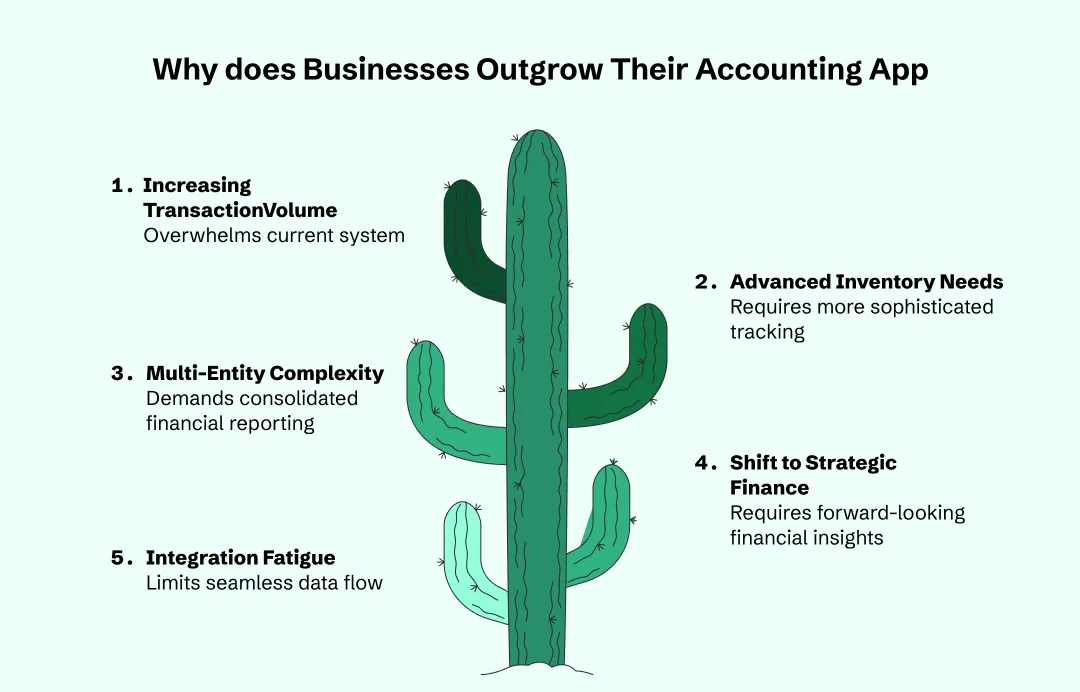
1. Increasing Transaction Volume
At the start, five invoices a day was a win. Now, you’re dealing with hundreds or thousands. Best accounting apps designed for freelancers simply cannot process that much data without crashing or slowing down your entire team’s productivity.
2. Advanced Inventory and Tracking
If your business involves physical goods, basic accounting tools often treat inventory as an afterthought. As you scale, you need "real-time" tracking across multiple warehouses, which is a major reason why businesses outgrow accounting solutions that only handle the basics.
3. Multi-Entity Complexity
Are you opening a second location or a new subsidiary? Most entry-level apps are "single-entity" by design. Trying to consolidate books for two different companies in a basic app is like trying to solve a Rubik’s Cube while blindfolded—it’s just not going to happen efficiently.
4. The Shift to Strategic Finance
In the beginning, you just needed to know if you were in the black. Now, you need forecasting, burn-rate analysis, and "what-if" scenarios. Basic apps focus on the past (bookkeeping), while growing business accounting needs require tools focused on the future (financial planning).
5. Integration Fatigue
You’ve probably added a CRM, a project management tool, and a payment gateway. If these things don't "talk" to your accounting app perfectly, you end up with data entry errors. Eventually, the "glue" holding your tech stack together starts to fail.
Signs To Know When Your Businesses Outgrow Accounting Solutions
Outgrowing your accounting app doesn’t happen overnight. It creeps in. And because it’s gradual, most teams don’t notice until the pain is hard to ignore.
1. The Spreadsheet Phase
If your team spends half their day exporting data to Excel just to create a report that actually makes sense, you’ve officially hit accounting software workflow limitations. When "manual workarounds" become your standard operating procedure, your app isn't working for you—you’re working for it.
2. Continuous Lagging
Ever tried to pull a report and had enough time to go make a coffee before it loaded? Basic apps weren't built for massive transaction volumes. When the system starts "spinning" every time you enter a bulk batch of invoices, the infrastructure is waving the white flag.
3. The Mystery of the Missing Data
When different departments start keeping their own "side-car" ledgers because the main app is too restricted, you end up with siloed data. This is a classic sign of accounting software workflow gaps where your "left hand doesn't know what the right is doing," leading to massive reconciliation headaches.
4. Audit and Compliance Anxiety
As you grow, the tax man gets more interested. If your current setup doesn't have a bulletproof audit trail or can't handle complex tax jurisdictions, you’re basically playing with fire. If the thought of a surprise audit makes you sweat, your current tech is likely too thin.
The "User Ceiling" Headache
Nothing kills the flow like having to share passwords because your app caps you at three users. If you can’t give your sales lead access to invoices without also showing them the entire company’s payroll, your permissions logic is officially out of date.
The Fix Isn’t Replacing Your Accounting App
The good news is, you probably don’t need to rip out your accounting platform. What you need is to extend it.
The most practical approach for businesses that have outgrown their accounting app’s native capabilities is to layer purpose-built automation on top of it. This means keeping accounting app as your system of record.
However, adding a dedicated workflow layer that handles the processes your accounting app was never designed for: multi-step approvals, budget validation, duplicate detection, and audit logging.
A growing number of finance teams take exactly this approach, plugging approval automation tools into their existing stack. The accounting app stays as the ledger. The workflow tool handles the decision-making process before anything hits that ledger.
This layered approach is becoming the standard for a reason. It’s faster to deploy than an ERP migration, it’s cheaper, and it doesn’t force your team to learn an entirely new system. Your accountant still logs into QuickBooks. Your finance controller just gets an approval workflow that actually enforces the controls the business needs.
What to Look For When Extending Your Accounting Stack
Not all add-ons are created equal. If you’re evaluating tools to close the gaps your accounting app can’t, here’s what actually matters:
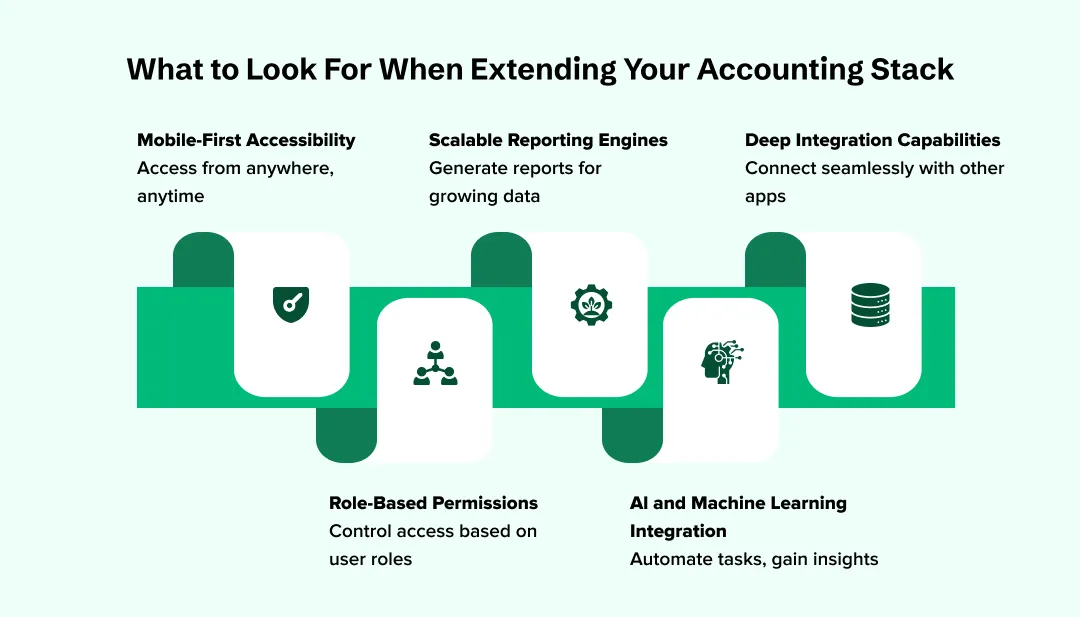
1. AI and Machine Learning Integration
The future is automated. You want tools that leverage AI in finance to automatically categorize expenses, flag weird anomalies, and predict cash flow dips before they happen. If it doesn’t have some level of "smart" automation, skip it.
2. Deep Integration Capabilities
Don't just look for "an app." Look for an ecosystem. You need accounting software integration tools that offer two-way syncing with your entire tech stack. This ensures that when a salesperson closes a deal in the CRM, the invoice is drafted automatically.
3. Mobile-First Accessibility
The role of mobile apps in finance has shifted from "nice-to-have" to "must-have." Your team should be able to approve expenses, check real-time dashboards, and snap receipt photos while on the move, not just when they're chained to a desk.
4. Role-Based Permissions
Security is a big deal as you scale. You need advanced accounting features for businesses that allow for granular permissions. You should be able to let an intern enter data without letting them see the company’s bank balance or payroll details.
5. Scalable Reporting Engines
You need more than just a P&L. Look for "dimensional reporting" that lets you slice your data by department, project, or location without creating 50 different versions of your chart of accounts.
The Cost of Doing Nothing
It’s easy to defer this decision. The accounting app is working “well enough.” The workarounds are annoying but manageable. The spreadsheet is a bit unwieldy, but everyone knows where it is.
But the numbers tell a different story. Research from Ardent Partners shows that organizations using advanced automation in their accounts payable process achieve 79% lower processing costs compared to their peers. They also report processing cycle times that are 79% faster. These aren’t marginal gains. They’re the difference between a finance team that’s constantly firefighting and one that’s actually contributing to strategic decisions.
And the risks compound. Every invoice that gets approved without proper review is a potential duplicate payment. Every expense that bypasses budget controls is money that could have been flagged before it left the account. Every missing audit trail is a conversation with your auditor that you’d rather not have.
Making the Transition Without Disrupting Your Team
The practical playbook for most growing businesses looks like this:
1. Data Cleaning
Before you move an inch, clean your data. Don't migrate junk from your old system to the new one. Use this as an opportunity for accounting process automation for finance teams by setting up clean, standardized rules from day one.
2. The Parallel Run Strategy
Never "pull the plug" on your old system overnight. Run your new cloud based accounting solutions for businesses alongside your old one for at least one full month. This lets you catch discrepancies before they become "Board Meeting" level problems.
3. Investing in Team Buy-In
People hate changing their workflows. To avoid a mutiny, focus on the "why." Show them how the new system eliminates the boring manual tasks they hate. Cloud based accounting solutions for businesses should make their lives easier, not more complex.
4. Budgeting for the Long Game
Don't just look at the monthly sub. Consider the total cost of upgrading accounting software, including implementation and training. A "cheap" setup that takes six months to get right is way more expensive than a premium one that works in two weeks.
5. Choosing the Hybrid Path
Sometimes, the best move isn't a total replacement. You can extend accounting software capabilities by keeping your core ledger and plugging in powerful automation layers. This "hybrid" approach gives you enterprise-level power without the trauma of a full migration.
The Bottom Line
Outgrowing your accounting app isn’t a failure. It’s a signal that your business is maturing. The companies that handle it well are the ones that recognise the gap early, resist the urge to over-engineer the solution, and pick targeted tools that extend what they already have.
Your accounting software is still the foundation. It just needs some reinforcement. The approval workflows, budget controls, and audit trails that growing businesses need aren’t features your accounting app forgot to build. They’re a different category of software entirely. And the sooner you treat them that way, the sooner your finance team stops being the bottleneck and starts being the backbone.
Frequently Asked Questions
What are the main signs businesses outgrow accounting solutions?
When manual data entry feels like a full-time job and your reports are always late, you've hit a wall. High transaction volumes often lead to system lag, highlighting accounting software workflow limitations that prevent real-time financial visibility for founders.
How do I effectively extend accounting software capabilities?
You can extend accounting software capabilities by integrating "best-of-breed" apps for payroll, inventory, or CRM. Using accounting software integration tools ensures data flows seamlessly between systems, filling in the growing business accounting needs without a total system overhaul.
Why is AI in finance becoming a necessity for startups?
AI in finance eliminates the grunt work of transaction coding and fraud detection. By implementing accounting process automation for finance teams, businesses can scale their operations significantly without having to constantly hire more back-office staff to manage the workload.
What is the true cost of upgrading accounting software?
Beyond the subscription, the cost of upgrading accounting software includes data migration and team training. However, using the best accounting automation solutions for startups typically pays for itself through reclaimed time and a massive reduction in human error.
What is the role of mobile apps in finance today?
The role of mobile apps in finance is about decentralized speed. Modern cloud based accounting solutions for businesses allow managers to approve expenses and view cash-flow dashboards on the go, ensuring that decision-making never stalls due to desk-dependency.

Uncover executable insights, extensive research, and expert opinions in one place.
Related Content