
We are not biased. We test and review every product. Here’s our Methodology.

Transmore makes wireless file transfers easier than ever. This review covers its features and performance in both Android and iOS environments.

MobileAppDaily Certified Rating
4.1 out of 5
Available on:
Let Your Product Take the Center Stage with Our Review
Manish

Written By Manish

Meet Manish Chandra Srivastava, the Strategic Content Architect & Marketing Guru who turns brands into legends. Armed with a Marketer's Soul, Manish has dazzled giants like Collegedunia and Embibe before becoming a part of MobileAppDaily. His work is spotlighted on Hackernoon, Gamasutra, and Elearning Industry. Beyond the writer’s block, Manish is often found distracted by movies, video games, artificial intelligence (AI), and other such nerdy stuff. But the point remains, if you need your brand to shine, Manish is who you need.

Explore More By Author

Transmore Review: Features You’ll Love (or Not) of this File-Sharing App
Transmore Banner

At this point, there is a regular need for transferring data from one device to another. It may be from the smartphone to the system or vice-versa. But many a time, the data gets corrupted or lost while transferring and if you are handling some sensitive data, you need to be extra careful.

Transmore is a new app in the app stores that can help you send files like photos and videos to your PC, share with colleagues, transfer data from one phone to another. The app is simply amazing.

The app is just not limited to file sharing, it also offers cloud storage to the user, which makes it easier to access the file at any given moment.

In short, it streamlines the file transfer between the devices. The app is made compatible with multiple platforms like iOS, Android, and Win/Mac computers.

Tobee Wu, the founder, and CEO of Wondershare Technology states,

"Our drive to create a simpler world through better technology starts at the top."

Pros and Cons of Transmore

Pros

  • Simple and user-friendly interface for quick file sharing
  • Supports a wide range of file types including photos, videos, contacts, and documents
  • Secure transfer using a 6-digit key or QR code
  • Allows link-based sharing with multiple recipients
  • Cross-platform support for both Android and iOS
  • Offers up to 20 GB transfer with a $7.99/month subscription
  • Full user guide available for step-by-step help

Cons

  • Free version limits transfers to 10 MB per session
  • Requires app installation and login on both sender and receiver devices
  • No explicit mention of end-to-end encryption
  • Links expire after 7 days with no option to extend
  • Subscription is required to access higher transfer limits and premium features
  • Auto-renewal billing may be inconvenient for some users
  • An unused free trial is forfeited once a subscription is purchased

Notable features of the app

Here are some of the best features of Transmore app that set it apart from others:

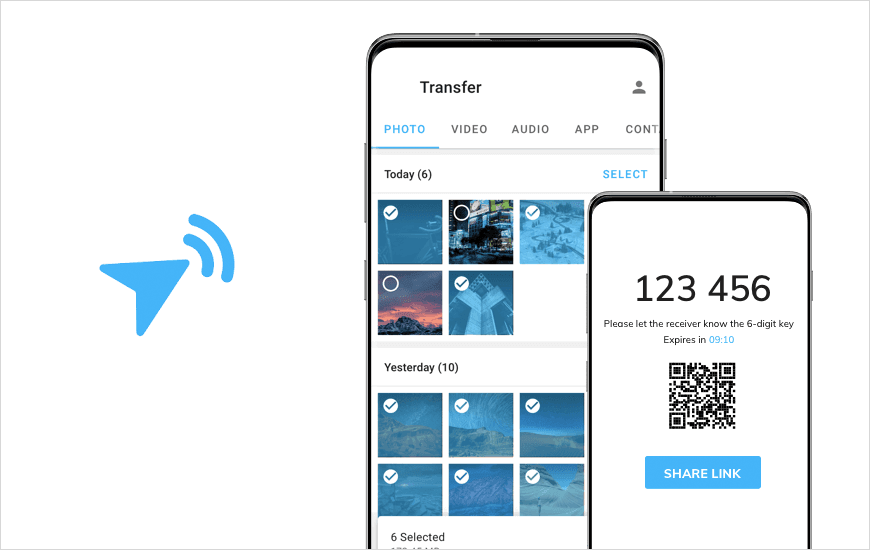
  • Send and receive: A security key that lets you send and receive files. It will be generated after selecting files. When the key is entered on the receiving device, files will be sent instantly.
  • Share Link: You can generate a link and share with multiple people. Links are valid for 48 hours or longer.
  • Cross-platform sharing: Transfer data between devices with different operating systems, i.e. iOS to Android.

How to Start with Transmore App?

To use this file transfer app, the user has to register first. It can be done with the Google account as well. On logging in, the app will display a list of photos, videos, apps, and more, which are located on the device.

To send the file, just tap on the file and ask the receiver to scan the QR code or enter the six-digit digital key, which will be displayed on the screen. Remember, the code expires in 10 minutes. So, make sure to get the code scanned before that.

If the receiver is not around, a shareable link of the file can be created which can further be shared over various channels like WhatsApp, Instagram, Snapchat, Messages, Gmail, and more.

To receive a file, simply scan the code or enter the six-digit digital key and you are good to go.

Supported file types

Following are the various files types that are being supported by the app and can be transferred over the app:

  • Photos
  • Contacts
  • Documents
  • Music
  • Videos
  • Apps

How Files are Transferred Over Transmore?

  • Real Time File Transfer: It enables the user to transfer files using a 6-digit key in real time.
  • Device to Device Transfer: Transfer files between devices by scanning the QR Code.
  • Share Files via Link: Creates a link to transfer and share files with multiple people.

Transmore Subscription Plans

Transmore allows you to transfer 100 MB of files gratis at a time. If the amount of transferred files exceeds 100 MB at a time, you can upgrade your quota to 1 GB by subscribing to our service ($5.99 / 1 month, $15.99 / 3 months, or $59.99 / 1 year). The subscription can also unlock other features of Transmore.

Our Take

Transmore app seems to be an ideal pick for transferring data from one device to another. With its user-friendly interface and features, the user will find this app easy to operate. Also, the app is quite new to the app stores, so it will take some time before users come up with expectations and complaints. Stay tuned with mobileappdaily and if you want us to review your app, contact us today!

Why Trust MobileAppDaily?

For us, Product Reviews mean diving headfirst into the functionality of each digital product, whether it’s an app, software, or website. Our process centers around hands-on testing of each tool we pick. From scrutinizing features to testing vulnerabilities of security standards, the goal remains to help you find products that don’t just work but truly elevate your experience. In a nutshell, if we’re recommending a product, it’s because we believe it’ll genuinely make your digital life easier.

  • Products Reviewed - 4,000+
  • No. Of Experts - 20+
  • Categories - 65+
Explore Our Methodology

Customer Reviews

Rate the product based on your experience?

How was your experience with the product?

Also Reviewed By Us

MobileAppDaily’s POV on the Transmore App

As someone who frequently juggles files between devices for app testing and content collaboration, I found TransMore to be a refreshingly simple file transfer app. A few teammates and I decided to try it out during a recent project where we had to exchange multiple media files across Android and iOS devices. The setup was quick—just a sign-up and a few taps to get started.

The app’s standout feature is its straightforward file sharing using a 6-digit key or QR code, which felt both secure and seamless. We also appreciated the link-sharing option, which allowed us to send files to multiple people at once, especially helpful in our team setting. For casual transfers under 10MB, the app works smoothly and without any noticeable lag.

That said, the app does hit a few limitations. For one, the 10MB free transfer cap is quite restricting, especially when dealing with videos or larger design files—which meant we had to upgrade to the paid plan pretty quickly. At $7.99/month, the premium version unlocks 20GB transfer capacity and additional features but may feel pricey for users who don’t transfer files regularly.

Also, both sender and receiver need to have the app installed and be logged in, which isn’t always convenient when sharing with clients or non-tech-savvy users. Overall, TransMore is a great tool for fast and secure file sharing in a team environment, but the free version might feel a bit limiting for anyone dealing with larger files on a daily basis.

Feature

FEATURE

4.2

Supports file transfers, QR sharing, and link sharing. Requires login on both devices. The free limit is only 10MB.

Pricing

PRICING

3.5

The free version is limited. Premium plan is useful but may feel expensive for light users.

Performance

PERFORMANCE

4.3

Transfers are quick and smooth. Works well across Android and iOS.

UI/UX

UI/UX

4.4

Simple and clean interface. Easy to use with minimal setup.

Final Verdict!

TransMore is a solid option for users looking for a simple, cross-platform file-sharing solution. It performs well in terms of speed, security, and ease of use—especially for quick, everyday transfers between phones. The ability to generate secure codes and share links adds flexibility, making it ideal for both personal and small-team use.

However, the free version comes with tight limits, and the premium plan might not be justifiable for casual users. If you frequently transfer larger files and value convenience, TransMore’s paid features are worth exploring. For everyone else, it’s a clean, functional app that gets the job done—no cables, no hassle.

Latest Products

Delve into our comprehensive yet easy-to-consume guides, which provide insights that help scale business faster and prevent unseen pitfalls.

Related Products

Cut through the clutter and explore related digital products that deliver on performance.

Fill in the details, and our team will get back to you soon.

Contact Information
+ =

Fill in the details, and our team will get back to you soon.

Contact Information
+ * =