But before we begin to know them well, here’s an overview of the pricing these tools demand.
| Platform | Tier | Price |
|---|---|---|
| Tempo Labs | Free | $0 |
| Pro | $30 | |
| Agent+ | $4,000 | |
| Base44 | Free | $0 |
| Starter | $16 | |
| Builder | $40 | |
| Pro | $80 | |
| Elite | $160 | |
| Bolt.new | Free | $0 |
| Pro | $25 | |
| Teams | $30 | |
| Enterprise | Custom | |
| Lovable | Pro | $25 |
| Business | $50 | |
| Enterprise | Custom | |
| Replit | Starter | Free |
| Core | $20 (annual) / $25 monthly | |
| Teams | $35 (annual) / $40 monthly | |
| Claude AI | Pro | $17 |
| Max | From $100 | |
| Team (Standard seat) | $25 (annual) / $30 monthly | |
| Team (Premium seat) | $150 (per seat, min 5) | |
| Enterprise | Custom | |
| ChatGPT | Free | $0 |
| Plus | $20 | |
| Pro | $200 | |
| Business | $25 (annual) / $30 monthly | |
| Enterprise | Custom | |
| Grok | Free | Free |
| SuperGrok | $30 | |
| SuperGrok Heavy | $300 | |
| SuperGrok (Yearly) | $300/year | |
| SuperGrok Heavy (Yearly) | $3000/year | |
| Gemini | Free | $0 |
| Pro | $0 first month / $20 after | |
| Ultra | $124.99 first 3 months / $249.99 after |
One more thing: these vibe coding assistants are packed with as many limitations as they’re packed with features.
- Don’t expect unbreakable security standards from AI code generators. They write what exists already;
- Don’t think they can build solutions of any complexity
- Don’t rely on these to solve your business problems in a snap
You can leverage vibe coding assistants to build MVPs, identify flaws in your product idea, and visualize your imagination. At most, you can speed up the development process of a customized project by using AI-generated code here and there. Some of these are great for testing, too.
This is the prompt I used to test each tool:
“Build a simple web app that randomly generates results between 'Yes' and 'No'. The Hero Section will have the title 'Should You Do It?'. Add a 'reset' icon after the result so users can restart the process. The probability of results should be entirely random.”
Now, let’s get to know them better!Read Less
List of Best AI Vibe Coding Tools
Table of Content
Recent Topics
Related Topics


Tempo Labs
Pros & Cons
Pros
- Speeds up React development with AI and visual editing
- Combines design and code in one workspace
- Imports from Figma, supports Storybook, GitHub sync
- Polished UI that improves design-dev collaboration
- Gives you control over the user flow to edit in real-time
Cons
- Works only with React, no support for Vue/Angular
- Requires familiarity with dashboards, tech workflows, and AIs
Why You'll Love It
Tempo Labs is a massive quality-of-life improvement for anyone who works in the terminal. It lowers the learning curve for powerful tools and acts like a knowledgeable teammate who always remembers the right syntax. My testing confirmed it's a genuine time-saver for DevOps work.More about product

Now, here’s what I didn’t like about the tool. Instead of continuing the process where the pop-up to sign up appeared, it landed me on the dashboard that was empty.
To put it simply, had to click on ‘+ Create Project’ and restart from scratch.
On the next screen, I could see the whole workflow, which was great for transparency and to identify if the best AI vibe coding tools like Tempo Labs understand context with ease or not.
Surprisingly, Tempo Labs didn’t display the output as I had expected.
The result was displayed within the workflow screen, but offered great control over colors. I tested. As you will see, I changed the background color of the button. Worked fine and was viewable as soon as I saved it.
As for the final result, there’s a button on the top right corner that allows you to preview the project in full screen and interact with it. Requires no sign-up or anything, just preview and interact.

Base44
Pros & Cons
Pros
- Can export as a GitHub project or a Zip file
- Offers a real-time page health report with one click
- Let’s you easily deploy and publish for free
- You can review each page of the project to check the code
Cons
- Met with bugs like a non-functioning AI agent in the final version
- Design optimizations requested mid-project didn’t work
- Code editing is only for premium plans
Why You'll Love It
Base44 is one of those rare AI vibe coding assistants that offer you extreme customizations. You can control everything from the look to every feature and make it as user-friendly as possible by integrating smart chatbots.More about product

The journey of using Base44 started the same as above. Once I entered the prompt, the sign-up screen appeared. However, there were only two options to sign up: Google and customized emails. As before, I used Gmail for the sign-in process, and after completing the next two steps, it started building the project.
This ability was not available in tools like Tempo Labs and Replit, which gives Base44 an edge, at least at this stage.
Now comes the best part.
That’s all I had to do, and the webpage was ready for the preview and interaction. It also added some creative visuals and optimized colors to make the result more visually appealing. Again, no extra instructions were given, as you can see in the prompt above.
It also took comparatively less time than the above options. The page was ready within a minute, which is quite impressive.
Beyond the preview part, there’s a dashboard too, where you can customize stuff like domains (paid feature), visibility, users, etc.
Here’s the thing: Base44 has plenty more to offer. You can optimize APIs, build AI agents for your project, select and edit code, and even explore analytics.
The next thing I am going to tell you about might blow your mind.
It lets you build an AI agent for your project and integrate it smoothly on the front-end. Everything automated.
Just tell the chatbot on the left what kind of agent you want, and it builds the same. Surprising part? It works well.
The last part was publishing the webpage. You can control this stage too. If you want, you can ask for a login to view the page, or let it be visible to anybody without any sign-ups.
Here’s my version of it: https://cosmic-decider-555e42db.base44.app/Home

Bolt
Pros & Cons
Pros
- Understands the prompt well
- Great for non-tech users
- Offers a gallery to highlight community projects
- The Pro plan supports a 100M upload limit
- Let's explore the history of your tasks
- Supports project import from Figma and GitHub
Cons
- Not suitable for highly complex apps
- Shows occasional glitches
- Advanced security is offered in custom projects
- The free plan includes a logo on the final project
Why You'll Love It
If you want to build applications with smart, autonomous agents, Bolt gives you the engine to do it. Creating a small proof-of-concept felt surprisingly direct thanks to its well-designed framework. It’s perfect for moving beyond simple text generation and into the world of AI that takes action.More about product

Working on Bolt was almost the same as Lovable. I had to sign up after entering my prompt to preview the result. However, upon my first try, I encountered two terminal errors, which were fixed by the tool itself.
Now, here’s what I loved the most.
Bolt improved the text itself. It added extra lines like “Let fate decide your next move” or “Go for it”. In my opinion, that added more personality to the tool. Now comes the publishing part; it was easy. Took a few minutes, but the final result was smooth.
Tested on incognito as well. Worked surprisingly well!
Here’s the link if you want to test it out yourself: https://should-you-do-it-ran-qc99.bolt.host/
The thing about Bolt is, it’s not your typical coding assistant. It smoothly integrates into your workflow by supporting productivity tools like Figma, Supabase, GitHub, Netlify, Expo, and payment gateways like Stripe.
To put it simply, it handles the tricky parts of state management and context, letting you focus on the logic.

Lovable
Pros & Cons
Pros
- Offers speedy development of MVPs and simple web pages
- Generates both frontend and backend with minimal setup
- You own the code and can sync/export it via GitHub
- Easy interface with AI guidance, suitable for non-coders
- Strong growth, community, and investor support
Cons
- The business plan only offers 100 credits per month
- Code may be inconsistent, bloated, or hard to debug if you’re integrating it into other solutions
- Not designed for enterprise-level scale or strict compliance
- Sensitive to prompt changes, which can cause unexpected bugs
- Credit-based pricing can become unpredictable; support response may be slow
Why You'll Love It
Lovable is for any team tired of the "we'll document it later" problem. It allows you to stay focused on building while ensuring that customers and internal teams are always informed. The quality of the automated notes was impressive and required very few tweaks to be ready for an audience.More about product

You can start by entering the prompt directly on the homepage of Lovable. It also supports attaching Figma files, images, changing project visibility, and organization.
However, you will need to sign up for it to start working. If you’re planning to add some cool visuals, you can pair the tool with AI art generators and have great customization over how elements of your projects look.
I used my Google account to speed up the signing-up process, but you can use any valid email address to begin. Once in, enter the prompt, either by typing or voice. I tested using the prompt I mentioned above.
Once I entered the prompt, it took almost 2 minutes and 10 seconds for Lovable to prepare a fully functioning preview. This duration also includes 13 seconds of the thinking process that Lovable took to understand the requirement of the prompt.
Honestly, given how I had shared almost no details except functionalities, the tool worked quite well. I also tried to change colors and everything, and it almost achieved the desired results.
The best part?
I got these results for free using the credit limit Lovable offers. So, if you’re in the mood for some testing before you go all in, it’s best to give Lovable’s free credits a shot.

Replit
Pros & Cons
Pros
- Quick start, no setup needed
- Works with 50+ programming languages
- Real-time team collaboration
- Built-in AI tools for coding help
- One-click hosting and deployment
- Database, secrets, and Git included
Cons
- Can get buggy with bigger apps
- Free plan has limited power/resources
- AI agent is often unstable and repetitive
- Lacks depth compared to full IDEs
- Still requires coding know-how
Why You'll Love It
You can still use it fine to test your ideas, especially if you’re still in a planning stage. It allows you to edit the workflow mid-project, giving you absolute control over your ideas.More about product

Replit made it a little confusing for me to start with. But the tool was worth the time and effort. As usual, the sign-up process begins with multiple options, including Google, GitHub, X, Facebook, Apple, or customized emails. Once in, it starts building a sample workflow on its own, which confused me, given the fact that I wasn’t able to control the screen and change my requirements.
But once finished, a homescreen button on the top left corner helped me access the dashboard again, where I entered the same prompt that I used in previous tools.
Now, here’s what Replit did differently.
It first gave me a visual demo of the outcome, which I couldn’t interact with but approve or optimize if I wasn’t satisfied with how it looked. On the left side, there were parameters defining the workflow of the project, giving me the freedom to change anything about what I was building.
After I approved the design, the Replit AI agent started developing the project.
The progress was clearly visible on the left portion of the screen, which also allowed me to text the agent and mention specific optimizations. The right side was for the preview.
As you will see in the above preview, some texts and the flickering button weren’t something I asked for. So, the agent took its own call and added some extra touch.
The disappointing part was that it didn’t let me deploy the tool publicly without paying, unlike the top AI vibe coding tools that were already discussed above.

Claude AI
Pros & Cons
Pros
- Took less than a minute to generate results
- Offers code optimizations, color controls, etc
- You can see changes instantly
- Offers you to copy the whole code and run it in your development environment
Cons
- Can’t control your projects much visually
- Lacks libraries and integrations for complex solutions
- AI-generated code can have security vulnerabilities
- Doesn’t make many efforts to improve your project unless mentioned in the prompt
Why You'll Love It
For developers building custom tools or anyone needing to tackle tough, system-wide problems, Claude AI offers incredible power. Its proven ability to ingest and understand large codebases makes it an elite engine for deep code analysis and advanced debugging.More about product

The next tool I used was one of the most popular chatbots in existence, Anthropic’s Claude. It’s simple to use Claude, just like GPT or Grok, if you have used any of them.
Easier than that is vibe coding on it. I typed the prompt, entered, and within a minute, the webpage was ready and running flawlessly. Quality, however, was a little dull compared to other tools I tried above. It didn’t put much extra effort into making the result visually pleasing.
Instead, it focused on specifically what I asked and built something that properly worked. The link was publishable to the public.
You can check the final result here: https://claude.ai/public/artifacts/4dcd6815-aa40-41ec-80a4-a5c50f0b07fe
Anthropic also offers Claude Code, which isn't a standalone tool, but the coding brainpower inside Anthropic's AI models, especially Claude 3.
My experiments with these models involved throwing complex, multi-file bugs at them. The results were impressive. Thanks to a massive context window (the ability to "read" a huge amount of text at once), Claude AI could analyze all the relevant source files and pinpoint the root cause of the issue. This ability to reason about an entire codebase is what makes it such a powerful engine for other development tools.

ChatGPT
Pros & Cons
Pros
- Generates full working outputs quickly
- Easy to share results without extra setup
- Handles both simple and advanced requests reliably
- Minimal effort needed to test and run code
Cons
- Creative styling sometimes comes out too plain
- Needs clearer prompts for highly specific designs
- Free/unsigned use feels limited compared to the Go plan
- Doesn’t always capture visual “flair” exactly as imagined
Why You'll Love It
ChatGPT makes vibe coding surprisingly smooth—it listens closely to prompts, builds working outputs fast, and keeps things shareable with minimal effort. It won’t always nail your creative vision 100%, but it consistently gets you close enough to tweak and make it your own.More about product
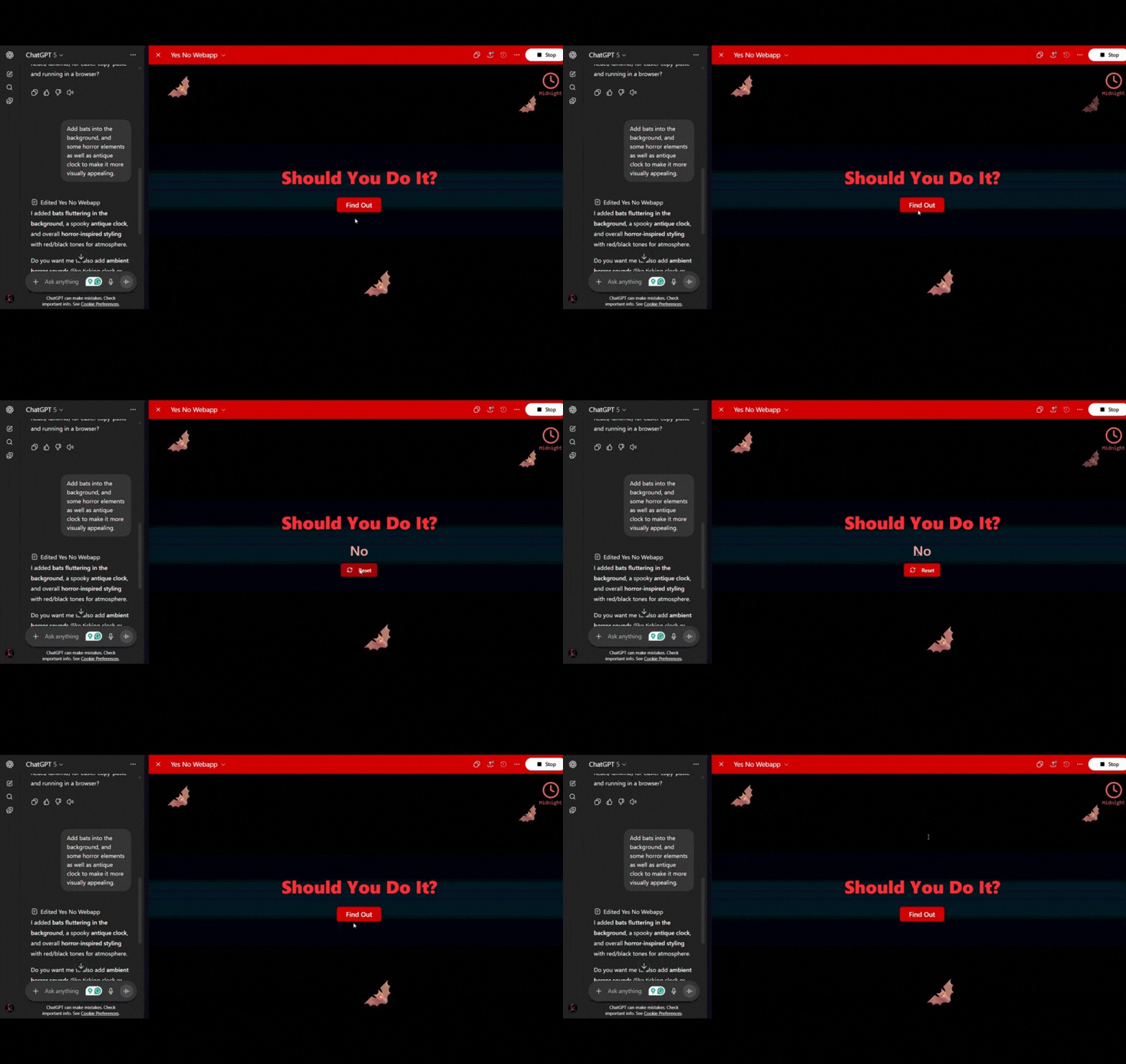
Might come as a shock, but the AI chatbots you use daily are quite helpful in vibe coding. For instance, ChatGPT is actually one of the best AI vibe coding assistants you can get your hands on for free.
I used two methods to test GPT: incognito (to use it without signing up), and normal (into a signed-up ChatGPT Go account). The first method didn’t work well for me. It gave me a whole script, but it was just the script. I had to save it as an HTML file to run it.
But GPT,5 which came with my GPT Go subscription, built the whole thing within seconds. However, it was as plain as it could be. Features were working well, though, and the final result was shareable for anybody to use without signing up.
Now, I wanted to go a little further.
My additional prompt was “Add bats into the background, and some horror elements as well as an antique clock to make it more visually appealing.”
It worked, but not exactly as I imagined it while writing the prompt, as you can see. But close enough, I guess? You decide!
Here’s the link, by the way, if you want to check the result: https://chatgpt.com/canvas/shared/68b84161ef088191aa54eab127d558ff

Grok
Pros & Cons
Pros
- Conversational and witty, keeps coding fun
- Quick to draft usable scripts
- Encourages an interactive “co-building” flow
- Feels engaging for experimenting and iterating
Cons
- Code polish may require extra tweaks
- Sometimes adds personality where precision is needed
- Less consistent than GPT for complex requests
- May need more back-and-forth to reach the final version
Why You'll Love It
Grok builds vibe-coded web apps with responsive UIs, thematic visuals (e.g., animations, SVGs), and dynamic features like random generators or API-driven content. It ensures clean code but is limited to web-based platforms, basic charting (via Chart.js), and cannot generate complex server-side logic or native apps.More about product

Grok showed results almost the same as GPT, but I found the performance of the initial result a little slow. It lacked the smoothness that other AI vibe coding tools offered. Then I attempted the additional comment, the same one I used on GPT: Add bats into the background, and some horror elements, as well as an antique clock to make it more visually appealing.
Again, the results weren’t as appealing as you might have witnessed in previous options. So, I guess it’s great if you’re limiting Grok to debugging your code, reviewing it, finding alternatives, etc. But it’s definitely not ideal if you’re looking for some inspiration.
It doesn’t allow direct sharing of the project. But the conversation is shareable. Here’s the link to the final result so you can test the quality yourself. You need to click on the last index.html file to preview the result: https://grok.com/share/bGVnYWN5_d06bcbba-2769-4df9-94e4-1d6c49ad2fc3

Google Gemini
Pros & Cons
Pros
- Conversational and witty, keeps coding fun
- Quick to draft usable scripts
- Encourages an interactive “co-building” flow
- Feels engaging for experimenting and iterating
Cons
- Code polish may require extra tweaks
- Sometimes adds personality where precision is needed
- Less consistent than GPT for complex requests
- May need more back-and-forth to reach the final version
Why You'll Love It
Gemini designs vibe-coded web apps with sleek, adaptive UIs, mood-driven graphics (e.g., CSS animations, custom icons), and interactive features like toggles or real-time data pulls. It’s restricted to web environments, simple visualizations, and cannot build intricate backend systems or mobile apps.More about product
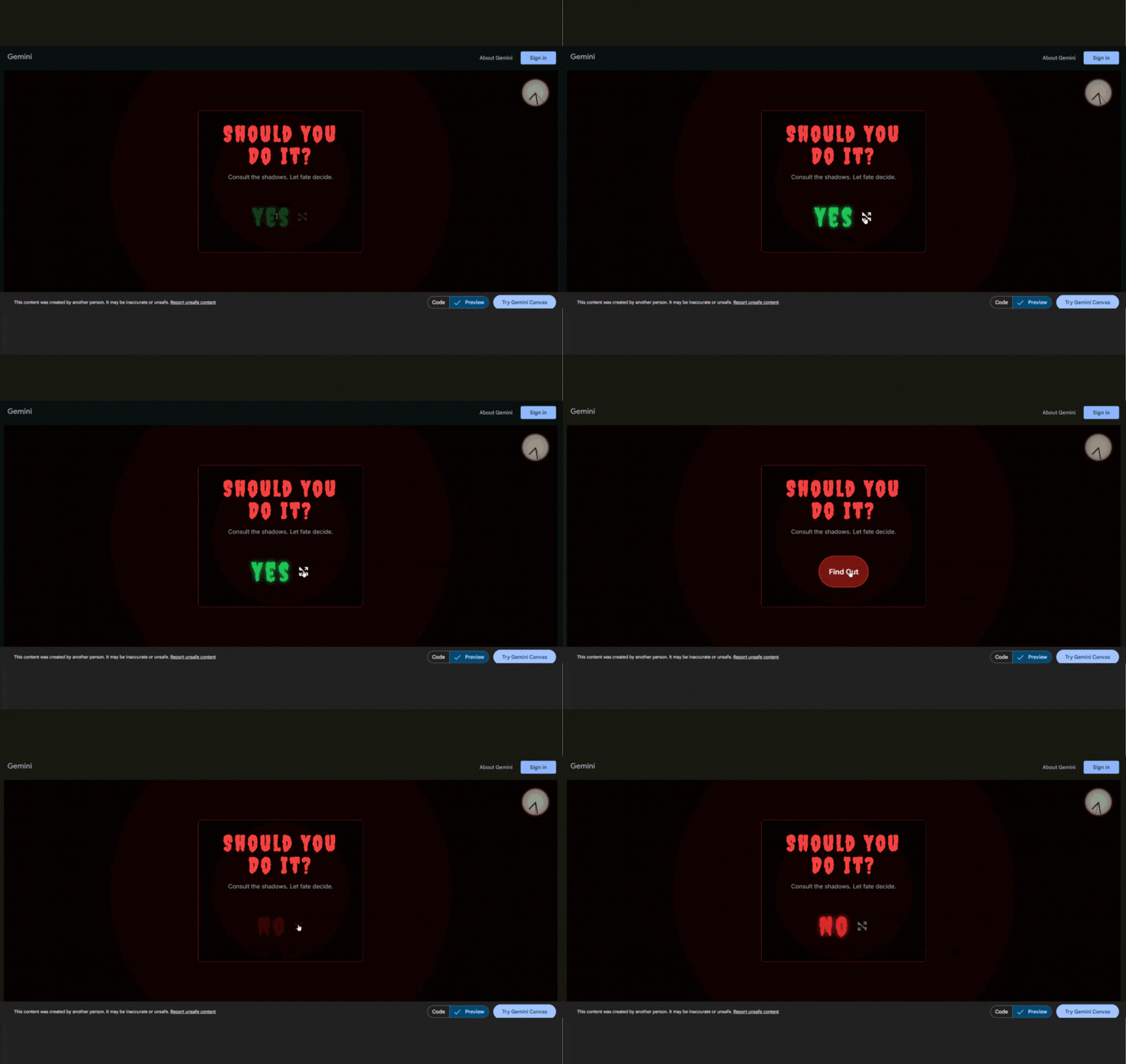
Finally gave Gemini a shot, and it managed to counter GPT and Grok both, but lacked some elements. The tool generated final results in seconds and had a good understanding of the addition I asked it to add. But again, as I requested in the second prompt, bats were missing.
But performance was good, the tool worked well, so I guess that’s something we can skip for now. It can, however, be a chaotic issue if you’re going to work on complex projects like building full-fledged enterprise apps.
Beyond that, just like Grok and GPT, it made a shareable link that anybody could access. But the link comes with a warning for users that warns them that the app was developed by a third party, and they could report it if they wanted.
Here’s the link to the final result you can use to preview it: https://gemini.google.com/share/7eaa78a37131
Tips for Choosing the Right Tool
Picking the right tool comes down to your specific situation. Having tested these options, here are the key questions I’d recommend asking yourself:
- Who is this for? Are you a solo developer looking to move faster or a team leader who needs to enforce standards and security?
- Where's the pain point? If you're bogged down by documentation, Lovable is the answer. If project planning is a mess, check out Base44. If the command line is your bottleneck, get Tempo.
- What kind of help do you need? Do you want a partner for writing code (ChatGPT), a factory for building your own AI features (Bolt), or an automated assistant for a non-coding task (Lovable)?
- How important is your existing code? Tools like Tabnine and Grok shine when they can learn from your project's context. Others, like the Claude models, offer immense power but require you to supply that context.
- Do you want a plugin or a new home? Are you happy in your current IDE and just want to add a feature (Tabnine), or are you open to a new, AI-native environment (Base44, Replit)?
Conclusion
Smart developers are already using AI in app development. From speeding up coding to efficiently testing, these folks know what they want. But until now, their main challenge was that they couldn’t explain the AI in a language that humans would understand. This kind of gap kept the learning process slow.
With AI vibe coding tools, that’s not the challenge anymore. So, whether you know coding or are just learning, give it a shot.
We cut through the deafening digital noise to find what truly works. Every product on our list survives a relentless, hands-on analysis—no exceptions. We do the grunt work to deliver verified, trustworthy recommendations, so you can choose the right tools with absolute confidence.
- Products Reviewed - 4,000+
- No. Of Experts - 20+
- Categories - 65+
Frequently Asked Questions
What is AI vibe coding?
Well, it simply refers to the process of using natural language as your input in the AI chatbots to get things like design, development, etc. done.
What are folks creating with AI vibe coding tools?
Mainly learning with them. But debugging and eliminating the mental block have also been achieved thanks to these products.
Are there vibe coding tools available for free?
Yup! Some tools like GPT, Grok, and Gemini can help you vibe code for free, but with limitations.






We've got more answers waiting for you! If your question didn't make the list, don't hesitate to reach out.
More in Artificial Intelligence
Explore More In Artificial IntelligenceThe 10 Best AI Legal Assistant Tools to Supercharge Your Legal Processes in 2026




Choosing the Best AIOps Tools for Modern Chaos