Share It On:
 Master Cloud Migration for Enterprises using the 7 Rs, hybrid strategies, and proven cost-saving best practices.
Enterprise cloud projects rarely collapse because the software fails. More often, problems build quietly. A deadline gets shortened. A legacy integration is skipped during testing. Two departments assume the other one owns a critical workflow.
Even when organizations allocate budget to cloud migration services, the real pressure appears once systems start moving. Old documentation turns out to be incomplete. Access rules conflict. Data flows that worked internally behave differently in a distributed environment.
At enterprise scale, migration forces hard operational decisions. Which applications stay isolated? Which compliance controls must be redesigned? And how will costs behave after traffic increases? Let’s break down everything you need to know about Cloud Migration for Enterprises without the tech jargon.
7 Strategies of Cloud Migration For Enterprises
When it comes to Cloud Migration Strategies, there isn't a one-size-fits-all "vibes" approach. You need a concrete plan. According to Grand View Research, the global cloud migration services market is expected to grow at a CAGR of 27.8% from 2025 to 2030. Here is how the big players are doing it:
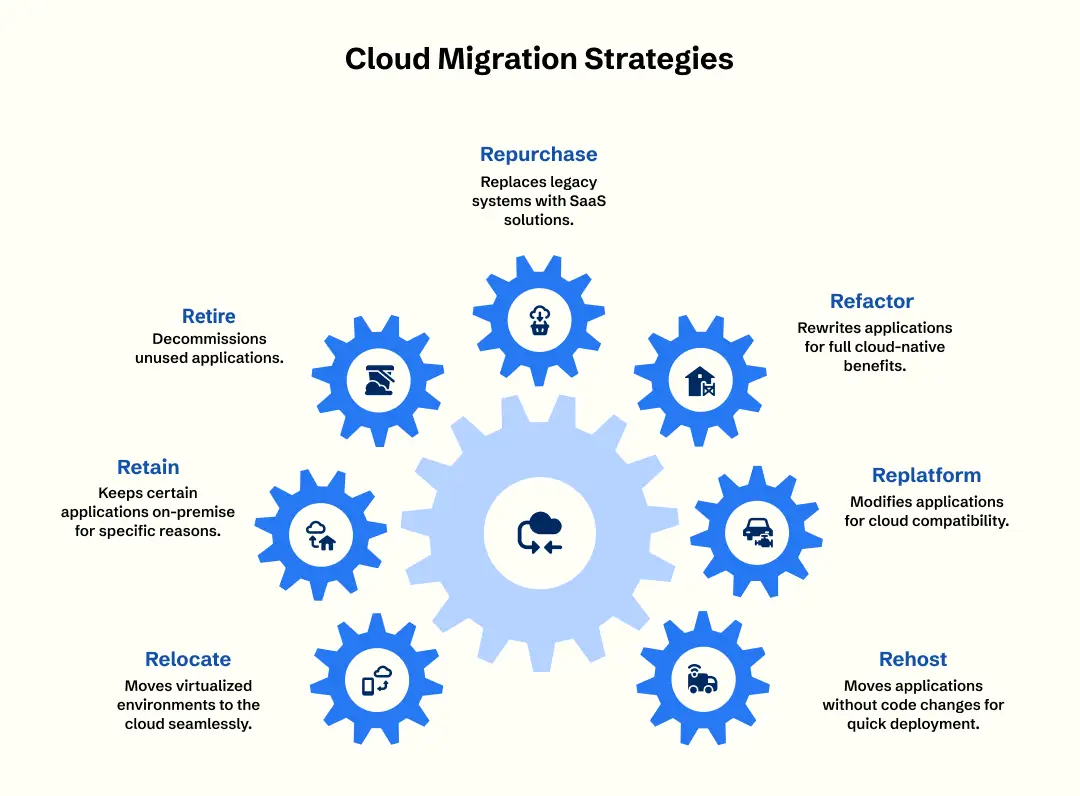
1. Rehost (Lift and Shift)
This is the "just get it there" move. You move your applications to the cloud exactly as they are without changing a single line of code. It’s the fastest way to get out of a physical data center, often used when an enterprise needs to scale quickly or meet a tight deadline. While it’s the lowest-effort move, it doesn’t leverage cloud-native features like autoscaling, meaning you might not save as much money as you’d hope.
2. Replatform (Lift and Reshape)
You’re not changing the core code, but you’re making a few tweaks so the app plays nice with the cloud environment. Think of it as a mini-makeover. For instance, you might swap out an on-premise SQL database for a managed cloud version. This provides a balance between speed and performance, allowing enterprises to benefit from cloud-managed services without the massive cost of a full rewrite.
3. Refactor (Rearchitect)
This is the heavy lifting. You’re rewriting parts of your app to take full advantage of cloud-native features like serverless computing or microservices. It's the priciest and most time-consuming strategy, but it pays off in long-term scalability and efficiency. Enterprises often choose this for "crown jewel" applications that are core to their business growth and need to be high-performing at all times.
4. Repurchase (Drop and Shop)
Sometimes, it’s easier to just ditch your old legacy system and buy a SaaS (Software as a Service) version. If your in-house HR portal is falling apart, moving to a modern cloud-based HR platform is a "Repurchase." This enterprise cloud migration strategy offloads all the maintenance and security to a third-party vendor, letting your IT team focus on things that actually move the needle for your business.
5. Retire
Some of your old apps are just taking up space. Research shows that a significant portion of enterprise IT portfolios consists of applications that are rarely used. If nobody’s used that weird reporting tool since 2018, just kill it off. This simplifies your environment and reduces your attack surface, ensuring you aren't paying to migrate "ghost" applications that serve no purpose.
6. Retain (Revisit)
Sometimes, for security, compliance, or "gravity" reasons, you just can’t move certain things yet. It’s okay to keep some stuff in-house for a bit. Maybe you have a massive legacy mainframe that would cost more to move than it's worth. Keeping these on-premise while migrating everything else allows for a steady transition without disrupting mission-critical, hard-to-move systems.
7. Relocate (Hypervisor-Level Move)
This is specific to moving VMware or similar instances to a cloud provider without changing the configuration or hardware. It’s niche but super handy for enterprises that want to keep their existing operational tools and training but want the underlying hardware to be in the cloud. It’s the ultimate "seamless" move for virtualized environments, requiring almost zero downtime.
Best practices for cloud migration for Enterprises
Following these industry gold-standards will keep your project on the rails and your stress levels at a manageable high.
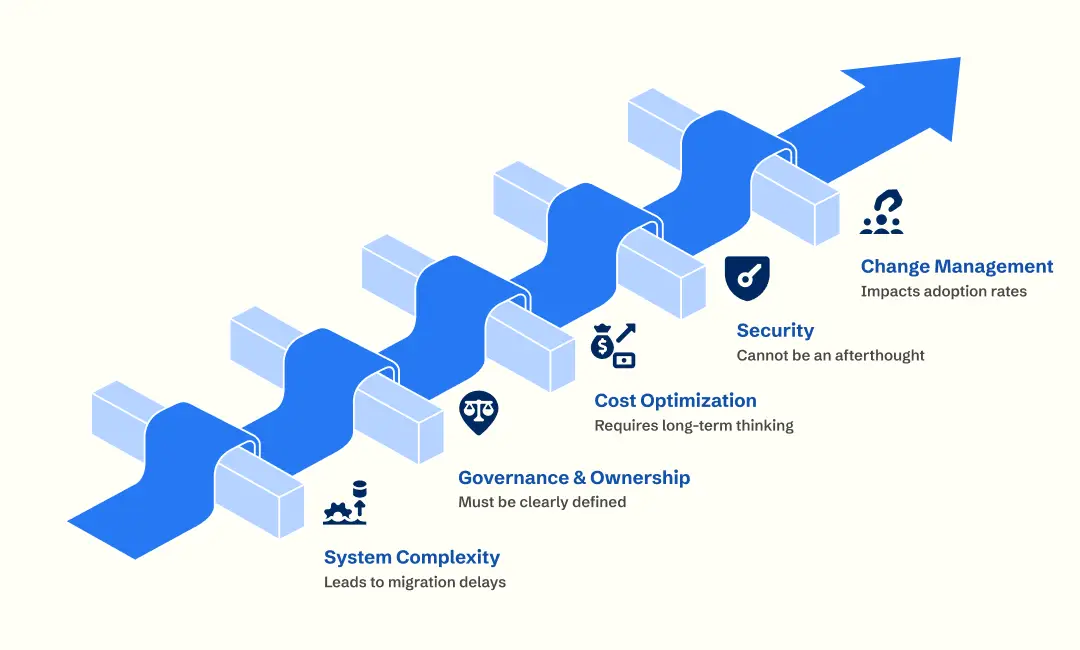
1. Underestimating System Complexity Leads to Delays
Large enterprises rarely run on a single platform. Over the years, systems multiply — finance tools connect to HR databases, customer portals rely on internal APIs, and reporting dashboards pull from legacy data stores. The architecture grows layered and tightly interdependent.
When one of those connections is overlooked during migration, delays follow. So, instead of discovering issues mid-transition, teams identify integrations, data flows, and hidden dependencies before workloads move. Phased migration helps even more. Moving applications in controlled stages allows stability testing before scaling changes across the organization.
2. Governance and Ownership Must Be Clear
Enterprise cloud programs often involve multiple departments — IT, security, operations, finance, and compliance. Without defined ownership, decision-making becomes fragmented.
Successful projects assign clear responsibilities for:
- Infrastructure architecture
- Security policies
- Budget control
- Vendor coordination
- Post-migration monitoring
When governance structures are established early, teams move faster and reduce internal friction.
3. Cost Optimization Requires Long-Term Thinking
The first cloud invoice rarely raises alarms. During cloud migration planning, projections feel reasonable and controlled. Budgets are approved, and everything appears predictable. The real picture only starts to emerge once workloads run in production for a few months.
Systems almost never behave exactly as estimated. Virtual machines stay online longer than necessary. Storage grows quietly in the background — logs, backups, temporary files that no one cleans up. Together, they reshape the cost structure.
Sustainable cost control in the cloud is less about perfect forecasting and more about consistent visibility.
For improved accountability, businesses use:
- Regular usage reviews
- Shared dashboard
- Open discussions between finance and engineering
Optimization is rarely about cutting resources overnight. More often, it is about gradually matching infrastructure capacity to actual consumption patterns.
4. Security Cannot Be an Afterthought
Teams sometimes focus on speed during migration and promise to “tighten security later.” In reality, later rarely comes without consequences. Access permissions remain overly broad, encryption settings vary between services, and monitoring is added only after incidents raise concern. Security decisions need to be made before workloads move. When these elements are postponed, teams end up adjusting live systems under pressure.
Cloud providers protect the infrastructure, but configuration, data exposure, and user access remain internal obligations. Confusion around that boundary creates blind spots. Keeping documentation updated and running automated compliance checks makes responsibilities explicit. Instead of reacting to audits, organizations stay prepared as part of normal operations.
5. Change Management Impacts Adoption
Cloud migration changes how people work, not just the tools they use. New interfaces, new processes, and unfamiliar workflows can slow teams down if no guidance is provided. When training is missing and communication is weak, resistance appears naturally.
Organizations that support employees through structured onboarding and practical knowledge sharing adapt faster. Teams understand the systems sooner, productivity stabilizes earlier, and the return on migration efforts becomes visible much quicker.
What Are The Benefits Of Migrating To The Cloud?
1. Scalability on Demand that is unmatched.
When your traffic surges, you do not have to go to the shops and purchase another server. You simply press a button (or allow AI to take care of it). The current state of cloud environments can be scaled horizontally and vertically within seconds. This is a revolution for companies that have seasonal peaks, so that the only capacity they pay for is what they utilize and not keep hardware that is not utilized throughout the year.
2. Massive Increase in Operational Dynamics.
You are able to implement new features within minutes as opposed to weeks. This will enable you to be ahead of the competition rather than catching up. In fact, a lot of organizations have upgraded their investments in clouds with the express aim of making them more agile. It transforms your IT department into a high-speed innovation machine that can change direction on a dime.
3. Improved Security and Compliance.
Billions are spent on security by cloud providers. The process of migrating frequently implies the transition between one on-premise location, which is a single door, and a multi-layered, AI-based security perimeter. The majority of providers provide in-house compliance certifications of HIPAA, GDPR, and SOC 2, which are notoriously hard to maintain among enterprises themselves. It would be like transferring your treasured things in the house safe to a hi-tech bank.
4. Robust Disaster Recovery
In case your physical office becomes flooded, you are sure that your data remains sound and healthy in a data center halfway across the world. Cloud-native disaster recovery supports failovers within almost an instant. Enterprises, rather than spending days to rebound when their hardware fails, can be back online in hours or even minutes, making a significant difference in how unexpected disasters affect the bottom line.
Enterprise Cloud Migration Challenges
The transition can be a bit of a pain if you aren't prepared for the hurdles. From "skill issues" to hidden fees, you need to know exactly what kind of fight you're walking into.
1. The Massive Skills Gap
Let’s be real: your current IT team might be pros at hardware but a bit green when it comes to cloud architecture. McKinsey research reveals that 87% of organizations either face skill gaps already or expect them within the next five years. Bridging this gap often requires intensive training or hiring external help, which can slow down the initial phases of the migration project.
2. Managing Legacy System Debt
Some old-school software just hates the cloud. Forcing these "crusty" apps to move can cause more bugs than a swamp in July. Legacy systems often have hard-coded configurations that don't play nice with dynamic cloud IPs. Figuring out whether to patch these apps or replace them entirely is a major headache that can lead to significant project delays.
3. Hidden Migration Costs
Enterprises often get blindsided by the "double-bubble" cost—paying for both on-premise and cloud infrastructure during the transition. Additionally, data egress fees (the cost of moving data out of the cloud) can stack up quickly if not managed. Without strict FinOps (Financial Operations) oversight, cloud bills can spiral out of control faster than you can say "serverless."
4. Data Security and Privacy Risks
Moving sensitive info over the internet is nerve-wracking. Misconfigurations during the migration process are a leading cause of data breaches. Ensuring that every S3 bucket is private and every API is encrypted requires a level of "security-by-design" that many enterprises aren't used to. It’s not just about the move; it’s about making sure the "moving truck" is armored.
5. Ensuring Business Continuity
You can't just flip a switch and hope for the best. Ensuring that the "old way" and the "new way" sync perfectly during the transition is tough. Data synchronization issues can lead to "split-brain" scenarios where different parts of the company are looking at different data. Maintaining a single source of truth during a phased migration is one of the biggest technical hurdles.
Cost of Cloud migration for enterprises
Talking about money is always a bit awkward, but you need to know the damage before you sign the check. Here is a realistic look at the investment required to get your enterprise airborne in 2026.
1. Estimated Migration Costs by Strategy
| Strategy | Typical Cost Range | Timeline | Expected ROI |
|---|---|---|---|
| Rehost (Lift & Shift) | $40,000 – $150,000 | 2 - 4 Months | Low/Moderate |
| Replatform | $100,000 – $250,000 | 3 - 6 Months | Moderate |
| Refactor (Rearchitect) | $200,000 – $600,000+ | 6 - 12 Months | High |
2. Data Migration Estimates
| Migration Scope | Estimated Cost | Main Cost Drivers |
|---|---|---|
| Small Database | $5,000 – $15,000 | Data volume, simple schema |
| Medium System | $20,000 – $60,000 | Interdependencies, testing |
| Enterprise Data Migration | $75,000 – $250,000+ | Compliance, data cleaning |
Turning Lessons Into Sustainable Cloud Strategy
Enterprise migration projects show that outcomes depend on preparation and consistency rather than tools alone. Careful planning, defined responsibilities, and steady execution usually determine whether the transition remains controlled or becomes reactive.
Partnering with cloud consulting companies provides organizations with guidance from engineers who have experience working on similar projects. This reduces uncertainty and reduces risk from further problem-solving.
Applying those practical lessons (phased implementation, early governance alignment, ongoing cost monitoring, and integrated security controls) supports a more stable transition.
That’s how businesses move forward in a more stable way.
Frequently Asked Questions
What’s new in cloud migration for enterprises?
The biggest trend is the shift from "cloud as a destination" to "cloud as an operating model." AI-driven automation tools are now doing the heavy lifting, and there’s a massive focus on FinOps to stop "cloud sprawl" and wasted spending.
What is cloud migration strategy and why is it needed?
A cloud migration strategy consulting is a high-level plan that dictates which workloads move to the cloud and how. Without it, you risk breaking dependencies, overspending, and suffering massive downtime. It’s the cloud migration roadmap that keeps your digital transformation from hitting a wall.
What is the best cloud migration strategy for a large company?
There is no single "best" strategy, but the hybrid cloud migration approach is usually the winner. It combines the security of on-premise hardware with the agility of the cloud. Most large firms use a mix of Rehosting and Refactoring to balance speed and power.
How to migrate an enterprise workload into the cloud safely?
Safety starts with a deep-dive audit and a solid landing zone. You should prioritize security by design, use automated migration tools to reduce human error, and always perform a pilot test with a non-critical application before moving the "crown jewels" of your business.
How enterprises plan a cloud data migration strategy without breaking the bank?
Enterprises plan by implementing FinOps principles from day one. This involves mapping out all costs, including hidden data egress fees, and setting clear budget guardrails. Often, they hire cloud migration consulting companies to ensure they don't make rookie mistakes that lead to cost overruns.

Uncover executable insights, extensive research, and expert opinions in one place.
Related Content