Share It On:
 In the reasoning models vs speed models debate, the skill isn't picking the smartest AI, it's picking the right one.
Reasoning models vs. speed models basically come down to a trade-off between depth and quickness. Reasoning models pause, work through a problem in steps, and then answer. Speed models skip the pausing part entirely. They read your prompt and fire back a response almost instantly, leaning on pattern recognition instead of step-by-step logic.
Neither one is "better" in some universal sense. The right pick depends entirely on what you're asking the model to do. Pick wrong, and you either waste money paying for horsepower you didn't need, or you ship something half-baked because you rushed a job that actually needed some thinking time.
If you're running a company or building a product on top of AI, this decision shows up in your cloud bill, your customer experience, and honestly, your sanity. So let's break it down properly.
Reasoning Models vs. Speed Models: Key Differences at a Glance
Here's the quick-reference version for anyone who wants the TL;DR before making a call:
| Basis | AI Native Product | AI Native Company |
|---|---|---|
| Scope | A single product or feature built with AI as its foundation | The entire organization, product, operations, decision-making, and culture are built around AI |
| What it means | This specific product cannot function, or makes no sense, without AI at its core | The company as a whole is structurally dependent on AI, not just one output of it |
| Example | A legacy enterprise software company launches one new AI-native module, say, an AI underwriting tool, while the rest of its product suite and internal operations remain unchanged | An insurance company where underwriting, claims processing, pricing, customer interaction, and internal reporting are all built around AI systems from the ground up |
| What can coexist with it | Traditional internal processes, legacy tech stacks, conventional hiring and org structures, none of that has to change for the product to qualify | Very little of the old operating model survives untouched; AI native companies tend to rebuild processes, not preserve them |
| Risk if mismatched | The product may outpace the company's ability to support, sell, or scale it, a great AI native feature stuck inside a slow, non-native organization | Harder to achieve, but the mismatch risk is lower once built, because the whole system is designed to move at the same speed |
| How to spot it | Ask: "Does this specific thing require AI to work?" | Ask: "Does the company require AI to run, or just to run this one thing?" |
Numbers will shift depending on which provider and model tier you're looking at. This table is about the shape of the trade-off, not gospel pricing. Still, it's a decent gut-check when you're doing your own AI model comparison.
What Are Reasoning Models?
Reasoning models, sometimes called AI reasoning models or reasoning LLMs, are built to slow down on purpose. Instead of spitting out the first plausible-sounding answer, they generate an internal chain of steps: breaking the problem apart, checking assumptions, sometimes even backtracking when something doesn't add up. You've probably seen this described as "chain-of-thought," and that's basically the mechanism at play.
How the "thinking" actually works
Under the hood, these models generate a scratchpad of intermediate reasoning before producing a final answer. It's a bit like watching someone solve a puzzle out loud, muttering through possibilities, discarding the ones that don't fit, before landing on a solution. The model isn't "conscious" of doing this in any human sense, but functionally, it behaves like it's working through the problem rather than recalling it.
Where you'll bump into them
Most major AI labs now ship some version of a thinking-enabled model, usually as a distinct mode or tier you can toggle on. You don't need to memorize brand names to get the concept — what matters is that these inference models trade raw speed for accuracy on anything that has multiple steps, tricky edge cases, or genuinely novel logic.
The catch
Nothing's free. Reasoning takes longer. We're talking several seconds to almost half a minute, depending on complexity, and it costs more per response since the model is generating (and paying for) all those extra "thinking" tokens behind the scenes. If your use case doesn't actually need that depth, you're just burning cash for nothing.
What Are Speed Models?
On the flip side, you've got fast AI models (the sprinters). These are built for near-instant responses, and they get there by leaning almost entirely on pattern matching learned during training. No internal debate, no backtracking, just: recognize the pattern, produce the output.
Pattern-matching over deliberation
Think of a customer service rep who's answered the same question a thousand times. They don't need to "think" about it anymore, the answer's basically muscle memory. That's roughly the vibe of a speed model. It's not dumb, it's just optimized for the 80% of requests that don't require deep analysis.
Where they shine
These models tend to be the workhorses behind chatbots, autocomplete features, quick classification tasks, and anything where a user is sitting there waiting on a screen. Nobody wants to stare at a loading spinner for twenty seconds just to get a one-line answer.
The trade-off
Because they skip the deliberation step, speed models can stumble on multi-part problems, tricky logic puzzles, or anything requiring them to hold several constraints in their head at once. Ask one to do multi-step math or untangle a gnarly legal clause, and things can go sideways fast.
Also Read: ChatGPT Review
The Cognitive Science Behind It: System 1 vs. System 2
If any of this sounds oddly familiar, it's because it mirrors something psychologists have talked about for decades. Daniel Kahneman's Thinking, Fast and Slow splits human cognition into two modes:
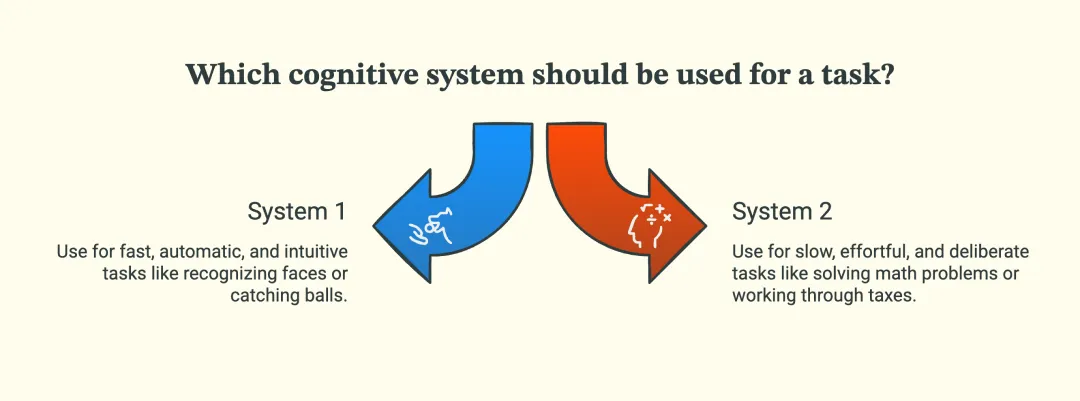
- System 1 (fast, automatic, intuitive): Recognizing a face or catching a ball
- System 2 (slow, effortful, deliberate): Solving a hard math problem or working through your taxes
AI researchers borrowed this framing almost wholesale, and honestly, it fits pretty well. Speed models behave a lot like System 1: quick, pattern-driven, occasionally overconfident. Reasoning models behave more like System 2: slower, more methodical, and generally more accurate on problems with real complexity. However, these are statistical systems, not brains, but it's a useful mental shortcut when you're trying to decide which mode fits your task.
When to Use Speed Models
Go fast when:
- You're dealing with high volume and low individual risk — think autocomplete, tagging, simple FAQ responses.
- The task is basically recognition or retrieval: "Does this match," "which category," "pull this field out."
- Users are staring at a screen, and every extra second of latency chips away at their patience.
- Getting it "mostly right, instantly" beats getting it "perfectly right, eventually."
A support widget answering "what are your business hours" doesn't need a deep-thinking model chewing through the question for ten seconds. That's overkill, plain and simple.
When to Use Reasoning Models
Slow down when:
- The task has multiple steps or constraints that need to be juggled together — think scheduling logic, multi-hop research, or debugging a gnarly piece of code.
- You're operating in a regulated or high-stakes space (finance, healthcare, legal) where a wrong answer is expensive or dangerous.
- The problem is genuinely novel and won't be solved by pattern-matching against something the model's seen a thousand times before.
- You'd rather pay more upfront than deal with the cleanup cost of a bad answer later.
If you're asking a model to draft a contract clause, model out a pricing strategy across five variables, or debug a race condition, that's squarely reasoning-model territory.
A Decision Framework for Choosing Between Them
When you're stuck deciding, run through these three questions:
1. What's your error budget?
If a wrong answer costs you a refund and an apology email, that's a very different risk profile than a wrong answer costing you a lawsuit. Match your model choice to how much a mistake actually costs you.
2. Is this pattern-matching, or is it multi-step logic?
Ask yourself honestly: could a sharp intern nail this in five seconds by recognizing the pattern? Or does it require them to sit down, work through several steps, and double-check their own logic? The answer tells you which model type you need.
3. What does the correction loop cost?
If a fast model gets it wrong, how painful is fixing it? Sometimes it's trivial — a quick regenerate. Other times, a bad output cascades into downstream systems and becomes a much bigger cleanup job than it needs to be.
Bonus read: SearchGPT vs Google Search
The Real Cost Equation: Why "Slower" Sometimes Ships Faster
Here's the part a lot of teams miss when they're doing their AI model comparison spreadsheets: raw inference latency isn't the same thing as time-to-reliable-output.
Say a speed model answers in two seconds but gets it wrong 30% of the time on a complex task. Now you've got a human reviewing it, catching the error, and re-running it, the mistake slips through, and someone downstream has to clean it up.
Add up the review time, the re-runs, the support tickets from bad outputs, and that "fast" two-second response can end up costing you way more time (and money) than a reasoning model that took twenty seconds but nailed it the first time.
This is the "iteration tax," the hidden cost of cheap-but-wrong outputs multiplying through your workflow. It's easy to overlook because it doesn't show up on the API invoice; it shows up in your team's calendar and your customers' patience.
The Hybrid Approach: Routing Between Fast and Reasoning Models
Here's where things get genuinely interesting, and honestly, where most serious production systems are heading in 2026: nobody's picking one model type and sticking with it for everything. The smart move is routing.
Layer 1 - triage: A fast model handles the initial request, does a quick read on complexity, and either answers directly (for the easy 80%) or flags it as "this needs deeper analysis."
Layer 2 - escalation: Anything flagged gets handed off to a reasoning model that can actually sit with the problem and work it out properly.
This two-tier setup gets you the best of both worlds. Cheap and fast for routine stuff, thorough and careful for the tricky 20% that actually needs it.
There's also a newer architectural trend worth knowing about. Some providers now ship "unified thinking-mode" models, where a single model has a dial you can turn to control how much it deliberates, rather than maintaining two totally separate models.
Same brain, adjustable depth. It's a neat solution to the deployment headache of running two separate systems side by side.
How to Test This in Your Own Workflow
Here's a simple way to figure out what actually works for your use case:
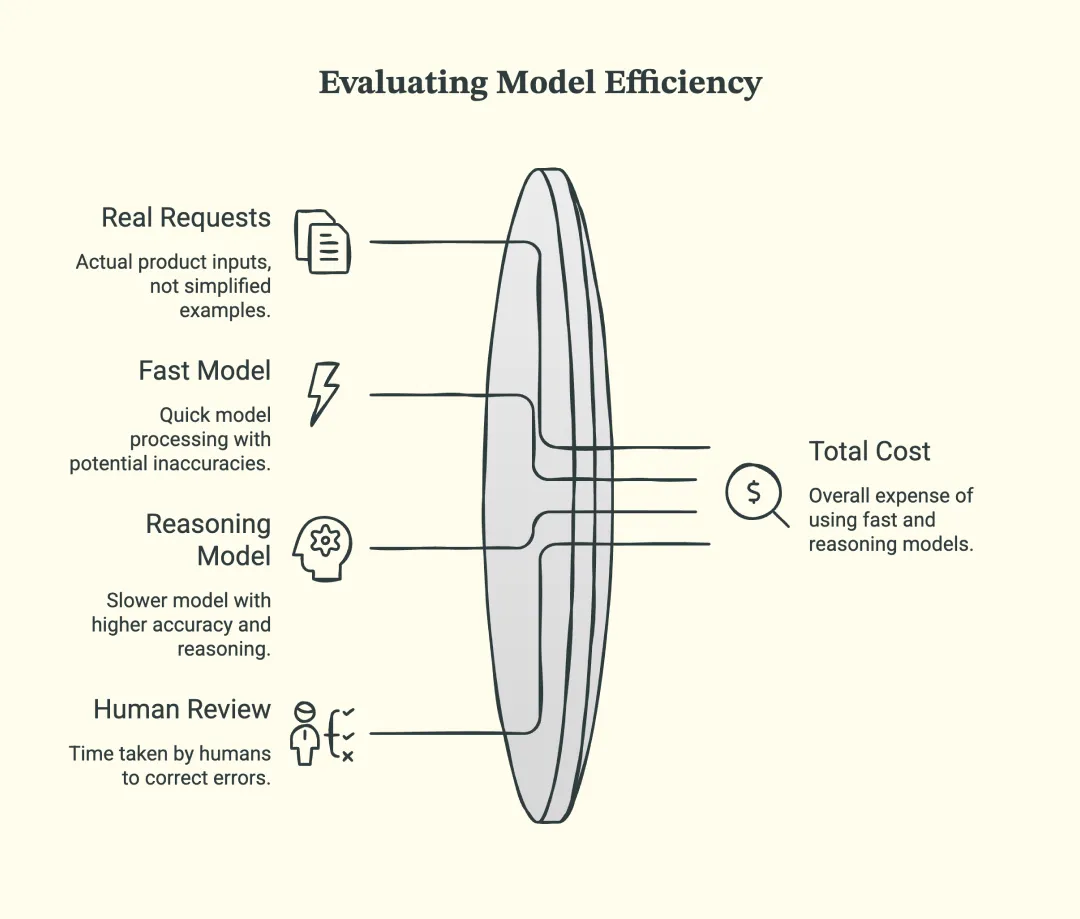
- Pull together a batch of real requests your product handles, not toy examples, actual messy inputs.
- Run them through a fast model and a reasoning model side by side.
- Score the outputs for accuracy, then time how long it takes a human to catch and fix the mistakes from each.
- Do the math on total cost: API spend plus review/correction time, for both options.
More often than not, the answer isn't "always use X" it's "use fast for these three request types, and reasoning for these other two." That's fine. That's normal. That's basically how every mature AI product ends up looking.
Common Mistakes to Avoid
1. Defaulting to reasoning models "just to be safe"
This feels responsible, but it quietly torches your budget and slows your product down for tasks that never needed the extra horsepower in the first place.
2. Defaulting to speed models purely for cost
Cheap per-call pricing looks great in a spreadsheet until you tally up the hidden cost of errors slipping through (refunds, support tickets, reputational damage).
3. Treating your model choice as a one-time decision
Models get updated constantly, and your product's needs shift too. What made sense six months ago might be leaving performance (or money) on the table today. Revisit this every so often instead of setting it and forgetting it.
Wrapping Up
At the end of the day, choosing between a reasoning LLM and a fast, pattern-matching one isn't about finding the smartest model on paper — it's about matching the tool to the actual job in front of you. Run the cheap, fast option where mistakes are cheap and speed matters. Bring in the deliberate, reasoning-heavy option where getting it right the first time actually pays for the extra wait.
And if you're building something that has to handle both quick questions and genuinely hard ones? Don't force a single model to do both jobs. Route between them. That's not a workaround — at this point, it's just how good AI products are built.
Frequently Asked Questions
What are reasoning models?
These are the models optimized for near-instant answers. Instead of deliberating, they lean on pattern recognition from training to produce a response right away. Great for high-volume, straightforward tasks where waiting around isn't worth it — less great for anything that needs multi-step logic.
What are speed models in AI?
They're AI models built to work through a problem in steps before giving you an answer, rather than replying instantly. Picture someone showing their work on a math problem instead of just blurting out a number. That extra step usually means better accuracy on anything with real complexity, at the cost of a slower, pricier response.
When should you use reasoning models?
These are the models optimized for near-instant answers. Instead of deliberating, they lean on pattern recognition from training to produce a response right away. Great for high-volume, straightforward tasks where waiting around isn't worth it — less great for anything that needs multi-step logic.
Should developers choose reasoning or speed models?
Reach for them when the task involves multiple steps or constraints, when you're working in a high-stakes area where mistakes are costly, or when the problem is genuinely novel rather than something a model's seen a thousand times. Basically, anywhere getting it right matters more than getting it instantly.
Are reasoning models always more accurate?
Neither, exclusively most production systems end up using both, routing simple requests to a fast model and escalating the trickier ones to a reasoning model. If you're building something and can only pick one to start, test against your real traffic first and let the error rate and cost numbers make the call, rather than guessing upfront.

Uncover executable insights, extensive research, and expert opinions in one place.
Related Content