


Claude AI Review: An Honest Take From a Reluctant Daily User

Claude and I have a complicated relationship. There have been days when I've been deep into a project, finally getting somewhere, only to be greeted by a message limit, telling me to come back later. I've rolled my eyes at it, complained about it, and briefly threatened to switch back to other AI tools. But then, the limit reset, I opened Claude again, and carried on as if nothing had happened.
That's probably the biggest compliment I can give it.
I didn't start out intending to become a Claude user. It was just another AI tool my team and I were using as an experiment. At the time, I was juggling different apps for writing, research, and document analysis. Somewhere along the way, I stopped juggling, and Claude AI became the place where most of that work happened.
This Claude AI review isn't based on a few prompts and a checklist of features. It's based on months of real use. Sometimes it gave me exactly what I needed on the first try. Other times, it made me wonder how an AI that smart could miss something so obvious.
Claude is Anthropic's AI assistant, but calling it a conversational AI chatbot feels a bit undersized these days. For a lot of people, it's becoming a workspace, a research partner, an editor, and occasionally an extra brain for figuring things out.
Whether it's worth paying for depends entirely on how you work. So that's what this Claude AI review is about: where the tool genuinely shines, where it falls short, and who will get the most value from it.
About Claude AI
Claude is an AI assistant built by Anthropic, a company founded by former OpenAI researchers with a strong focus on AI safety. It works like ChatGPT or Gemini; you talk to it, it responds, but it's a distinct product with its own character.
It runs across a web app, desktop apps (Mac and Windows), and mobile apps (iOS and Android), all syncing the same conversations. A range of models sits underneath, switchable depending on whether you need speed or deeper reasoning.
Beyond chat, Claude has expanded into a set of connected tools: a coding agent in your terminal, a desktop agent that works directly on your files, and integrations that bring it into apps you already use.
What it's built for: reading, writing, analysis, coding, and working through problems step by step. It takes text and images as input and returns text. It does not generate images, audio, or video.
Pros and Cons of Claude AI
Pros
- Best writing quality I've used. It holds a tone and follows instructions instead of flattening everything into the same generic voice
- Strong reasoning on complex, multi-step problems. It thinks things through instead of grabbing the nearest answer
- Artifacts and Projects change your actual workflow, not just your chats
- Claude Code and Cowork move it from answering questions to doing the work
- The free tier is genuinely usable, and memory works on it, too
Cons
- No image, audio, or video generation at all. If visual creation is part of your work, you'll need a second tool
- Usage limits apply even on paid plans. Long coding sessions or back-to-back heavy tasks can hit the ceiling and make you wait
- Computer use is impressive but inconsistent, and needs supervision
- The top Max tier gets expensive fast for what's still a single AI ecosystem
- Projects can choke on context when you load too many files into one
Key Features of Claude AI
Some features look impressive on the landing page. Others don't seem like a big deal until you've used them. Here’s a complete list of Claude features that might look basic at first, but are great for multiple use cases-
1. A model lineup you actually choose from (4.7/5)
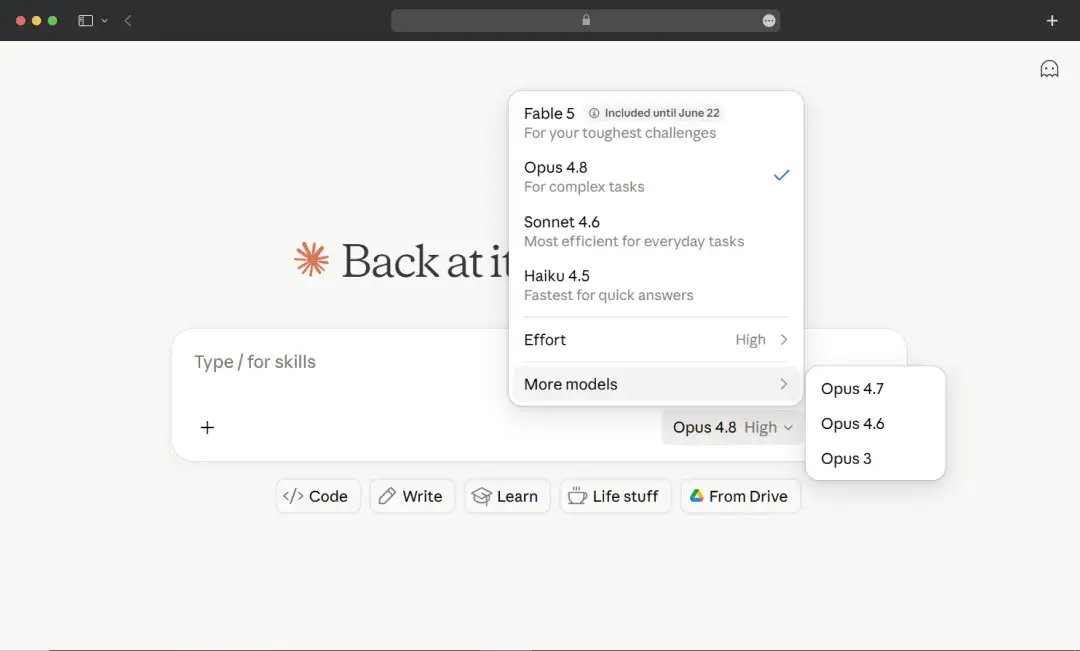
Claude isn't one model. There's a fast, affordable option for quick tasks, a balanced everyday model, and a heavyweight reasoning model for research-heavy projects, plus Anthropic's newest model sitting at the top of the picker.
| Model | Best For |
|---|---|
| Opus | Complex reasoning, coding and agentic tasks |
| Sonnet (balanced) | Everyday tasks, smart & fast |
| Haiku | High-volume, simple, speed-critical tasks |
In practice, I leave it on the balanced model for most of the day and bump up to the strongest one when I'm doing analysis I can't afford to get wrong. Being able to make that trade-off yourself, instead of the tool deciding for you, matters more than it sounds.
2. Artifacts (4.2/5)
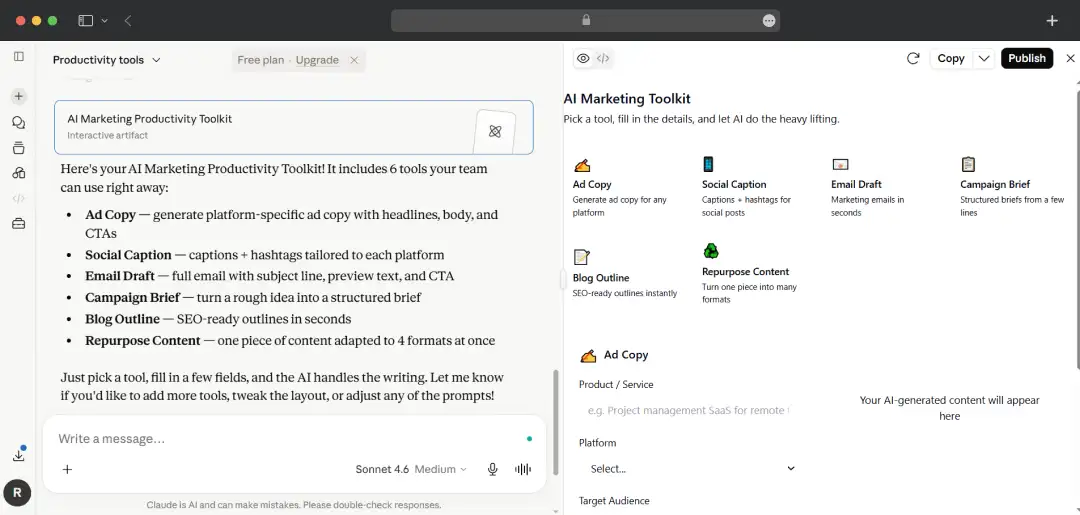
This is the feature that changed how I use AI. When Claude generates something substantial, like a document, a chunk of code, a chart, or a small web app, it opens in a side panel you can edit and iterate on, separate from the chat.
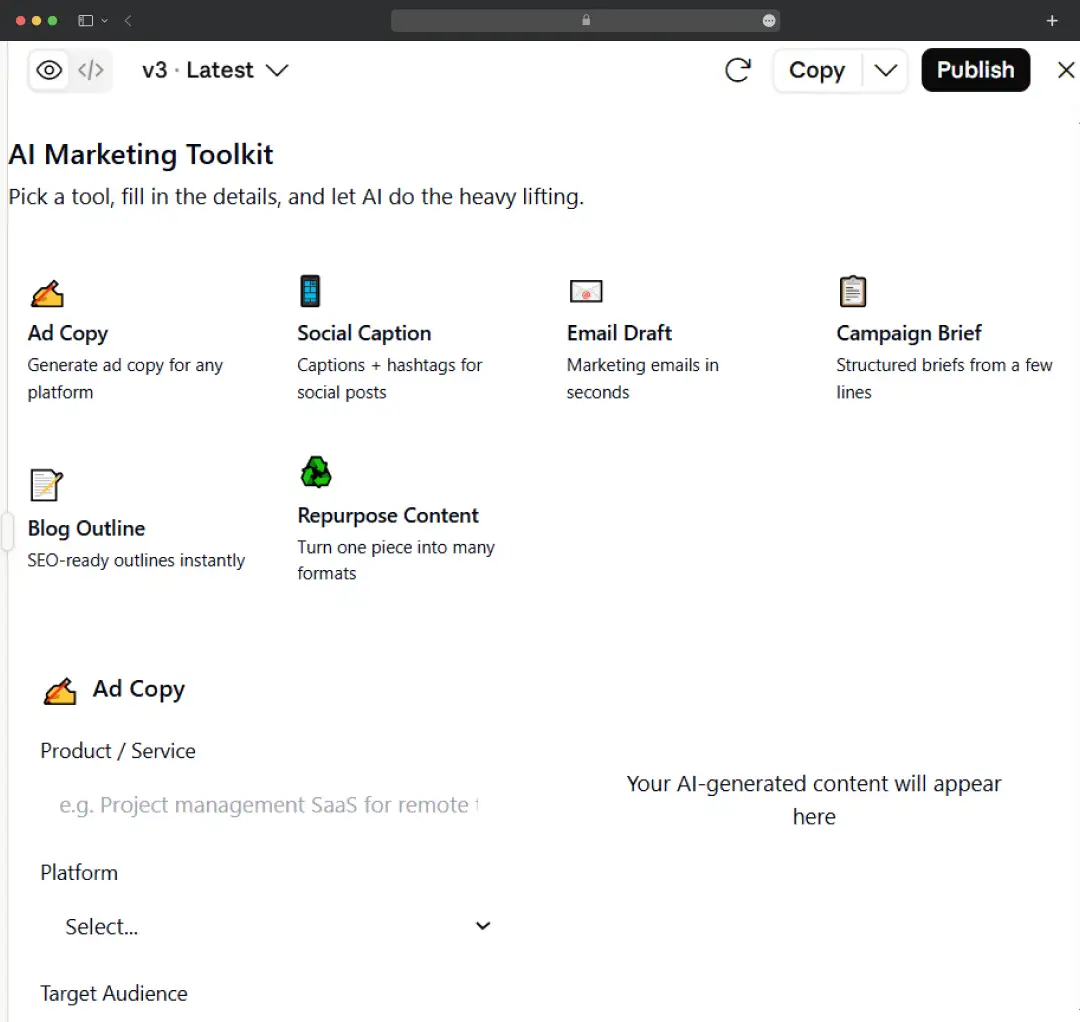
As an experiment, my team and I have built a productivity tool to generate social media captions, ad copy, blog outlines, and much more. In 2026, these got genuinely powerful: artifacts can now save data between sessions, and they can call Claude's own API from inside themselves. That means you can build a working mini-app, a tracker, a quiz or a calculator that actually runs its own AI logic.
3. Projects (4.3/5)
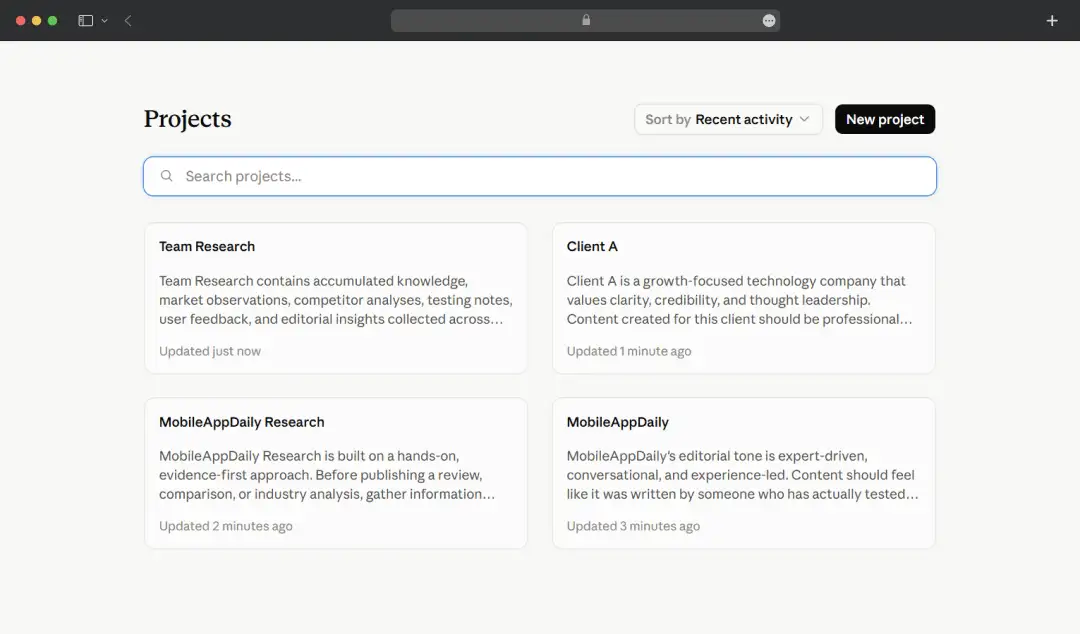
Projects are saved workspaces. You drop in your files and a set of instructions once, and every new chat inside that project starts already knowing the context. My team and I have made separate projects for different clients.
What I particularly like about this feature is that there is no need to paste the same brief and brand guidelines at the top of every conversation. The one catch is that loading a project heavy with files eats into the space available for the actual conversation, so make sure to keep yours lean.
4. Memory (4.0/5)
Claude remembers relevant details from past conversations and carries them forward, so it stops asking you the same setup questions every time. It builds a running summary you can view and edit, and you can tell it to forget things. It's available even on the free tier. This is the kind of feature you don't notice until you go back to a tool that doesn't have it and feel the friction return.
5. Claude Code (4.1/5)
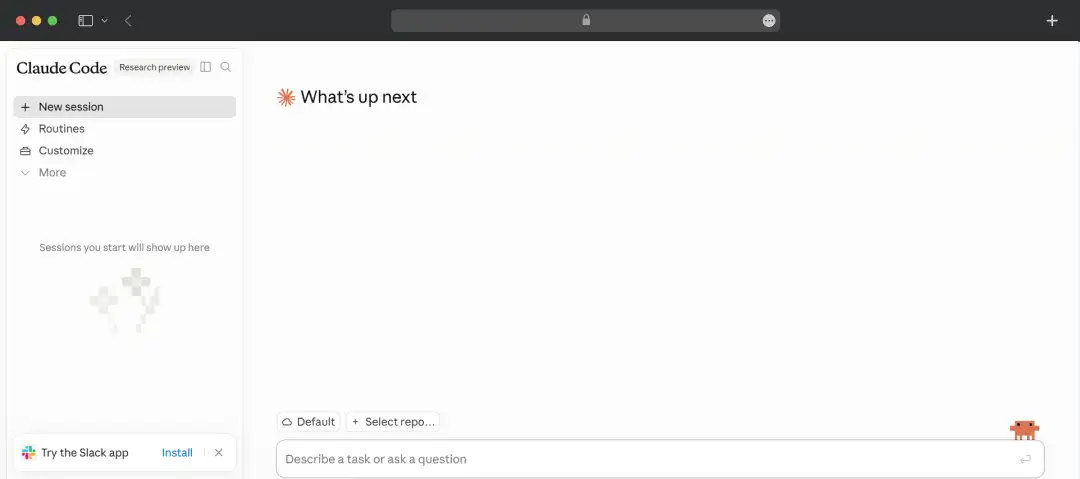
If you write code, this is the headline act. Claude Code runs in your terminal, reads your whole codebase, writes and edits files, runs commands, and handles git. It's an agent, not autocomplete. You can hand it a real task and walk away. It supports subagents, plugins, and hooks for people who want to wire up serious workflows.
Also Read: Best AI Agents for Coding
6. Cowork (4.2/5)
Cowork is the version of that idea for people who don't live in a terminal. It's a desktop agent you point at a folder, and it reads, edits, and creates files on its own to finish multi-step tasks. Think of it as delegating work rather than chatting. One honest warning: it can modify your files without asking first, so make sure to back things up before turning it loose on anything important.
Note: You can access this feature through Claude’s desktop app with a Pro or Max plan only.
7. Computer use (3.9/5)
Both Cowork and Claude Code can now actually operate your screen, opening apps, clicking, filling forms and navigating a browser. It's the most futuristic and the most uneven feature in the set. When it works, it feels like magic. When it doesn't, you're watching it fumble a button for thirty seconds. Useful, but I supervise it.
8. Connectors and app integrations (4.0/5)
Claude’s integration lets you plug into the tools you already use through connectors, so it can pull from Gmail, Google Calendar, Drive, Slack and others, and it works inside Excel and Word with Microsoft 365 support.
There's also Claude Design for putting together visuals without design software. The Excel integration in particular surprised me: it reads a workbook, explains the logic, and updates assumptions while leaving your formulas intact.
9. Document and image analysis (4.1/5)
You can throw PDFs, images, spreadsheets, and long documents at it and ask real questions. I've used it to pull figures out of a forty-page report and to make sense of a screenshot of an error message. It reads what's in front of it well, and the citations in the document work make it easy to check that it isn't making things up.
10. Web search and research (4.0/5)
Claude searches the live web when a question needs current information, and there's a deeper research mode that works through a topic across many sources and hands back a synthesized answer. This closes the usual gap where an AI is confidently stuck in the past.
Claude Fable 5: Claude’s New Flagship Model
Claude Fable 5 is new enough that I could not test it to its full potential. But what I can give you right now is what it’s built for, how it actually performs once you are in it, and where it differs from the rest of the models.
Claude Fable 5 is Anthropic’s most capable publicly available model. Through this model, Anthropic has Mythos-class intelligence accessible outside a locked research program.
| Metric | Value |
|---|---|
| Mythos-Class | First public model released at this capability tier. |
| <5% | Percentage of sessions that trigger a safety fallback response. |
| $10 / $50 | Cost per million input tokens and output tokens, respectively. |
I. Fable 5 vs. Mythos 5
The name Fable 5 for this model comes from a Latin word - Fabula, meaning ‘that which is told’. With this smart naming, Anthropic is telling you exactly what you are getting and how this model is different from Mythos.
| Version | Description |
|---|---|
| Claude Fable 5 | This is the public version available through the Claude API, app, and subscription plans. The model's safety classifiers remain active. High-risk queries related to biology, cybersecurity, and chemistry automatically fall back to Opus 4.8 for additional safety controls. |
| Claude Mythos 5 | This is the same underlying model but with cybersecurity-specific safeguards removed. Access is restricted to vetted organizations through Project Glasswing. Eligible organizations primarily include critical infrastructure providers, biology laboratories, and cybersecurity research teams. |
II. What is Claude Fable 5 Actually Better At?
Anthropic has published concrete evidence of the model’s exceptional capabilities from early access testing. Here’s where this model truly excels-
| Capability Area | Performance Highlight |
|---|---|
| Software Engineering | Stripe used Fable 5 to complete a codebase-wide migration in a single day, a task the company estimated would have required an entire engineering team working for more than two months manually. |
| Knowledge Work | Became the first model to exceed 90% on Hex's core analytics benchmark, delivering a 10-point improvement over Opus 4.8. |
| Vision | Successfully completed Pokémon FireRed using a vision-only harness. Earlier Claude models required additional helper systems and complex tooling just to make meaningful progress. |
| Long-Context Memory | Maintains focus across millions of tokens during extended agentic workflows. When provided with persistent file-based memory, performance improved three times more than Opus 4.8 under the same conditions. |
III. How to Access Fable 5?
| Pricing & Availability | Details |
|---|---|
| Input Pricing | $10 per million input tokens. |
| Output Pricing | $50 per million output tokens. |
| Prompt Caching Discount | Up to 90% discount on repeated context through prompt caching. |
| Available On | Claude API, Amazon Bedrock, Google Cloud Vertex AI, and Microsoft Azure Foundry. |
| Subscription Access | Included for users on Pro, Max, Team, and Enterprise plans. |
Important Note: After June 22, 2026, Fable 5 will be removed from standard subscription plans and will require credits to access.
Claude AI Model Family
Claude’s AI models are organized into 4 different tiers- Fable 5, Opus, Sonnet, and Haiku. You can easily switch between any model mid-conversation. Let’s have a look at what these models have to offer-
| Model Family | Model | Positioning | Best For | Context Window |
|---|---|---|---|---|
| FABLE | Claude Fable 5 | Most Capable | Long-horizon agentic tasks, software engineering, vision workloads, and scientific research. | Millions of tokens |
| OPUS | Claude Opus 4.8 | Most Capable (Previous Generation) | Complex reasoning, advanced coding, and long-horizon agentic workflows. | 1M tokens |
| SONNET | Claude Sonnet 4.6 | Best Balance | Everyday professional work including writing, analysis, research, and software development. | 200K tokens |
| HAIKU | Claude Haiku 4.5 | Fastest and Most Affordable | High-volume workloads, classification, extraction, automation, and lightweight processing tasks. | 200K tokens |
1. Claude Fable 5
Claude Anthropic’s most recent and most powerful model yet! This is a Mythos-class model with safeguards specifically tuned for general use. It leads the pack on long-horizon agentic tasks, from compressing months of engineering work into days to beating Pokémon FireRed using vision alone.
2. Claude Opus 4.8
This is Anthropic's previous flagship model, which still remains a go-to for complex reasoning, coding, and multi-step agentic work within the standard model lineup. It even acts as the safety net for Fable 5, stepping in to answer whenever Fable's filters flag a query.
3. Claude Sonnet 4.6
The everyday workhorse of the Claude family, fast enough for real-time use, smart enough for nuanced tasks. It sits in the middle of the lineup, balancing performance and efficiency, making it the default choice for most developers and professionals who don't need frontier-level power on every query.
4. Claude Haiku 4.5
Claude's most lightweight and fastest model, built for speed and cost-efficiency. It's designed for high-volume, lower-complexity tasks, think quick summarization, classification, or real-time customer interactions, where response time and token cost matter more than raw capability.
Fable vs. Opus vs. Sonnet vs. Haiku
Here is a quick comparison table for the 4 models offered by Claude AI-
| Basis | Claude Fable 5 | Claude Opus 4.8 | Claude Sonnet 4.6 | Claude Haiku 4.5 |
|---|---|---|---|---|
| Tier | Mythos-class | Flagship | Mid-range | Lightweight |
| Best For | Long-horizon agentic tasks, software engineering, vision, and scientific research. | Complex reasoning, coding, and multi-step agentic workflows. | Everyday professional and developer tasks. | High-volume, fast-turnaround, and simpler workloads. |
| Context Window | Millions of tokens | 1M tokens | 200K tokens | 200K tokens |
| Speed | Moderate | Moderate | Fast | Fastest |
| Pricing Tier | Most Expensive ($10/M input, $50/M output) | High | Moderate | Most Affordable |
| Strengths | State-of-the-art reasoning, vision capabilities, autonomous research, and coding at scale. | Deep reasoning, nuanced analysis, and long-running agentic workflows. | Balanced performance, speed, and efficiency. | Exceptional speed and cost efficiency. |
| Ideal For | Enterprises, researchers, and engineers working on highly complex workloads. | Power users, developers, analysts, and technical professionals. | Developers and professionals requiring a dependable daily-use model. | Customer support, classification, extraction, and real-time applications. |
| API String | claude-fable-5 |
claude-opus-4-8 |
claude-sonnet-4-6 |
claude-haiku-4-5-20251001 |
Note: Since Claude Fable 5 was only launched on June 9, 2026, detailed head-to-head benchmark data against the other models is still limited. The comparison below is based on what Anthropic has officially shared so far.
Understanding Claude’s Pricing and Subscription Plans
Claude’s pricing is split along two different axes. The first one is who is paying- individuals or teams. The second one is based on how they use it- on a flat monthly subscription through Claude AI’s platform or directly via the Claude API on a pay-per-token basis.
As a general user, I would recommend you go for the subscription model, and if you are a developer, the API route is perfect for you. Here’s a closer look at the actual pricing-
I. Individual
| Plan | Price (Billed Monthly) | What Do You Get? |
|---|---|---|
| Free | $0 | Web, desktop, iOS, and Android access. Text generation, image understanding, and web search. Basic projects. Rolling daily usage limits. |
| Claude Pro | $20/month | Approximately 5× more usage than the Free plan. Access to Claude Code (terminal experience). Claude Cowork on desktop. Unlimited projects and MCP connectors. Extended reasoning models. |
| Claude Max* | Max 5×: $100/month Max 20×: $200/month |
Max 5× provides approximately 25× the usage of the Free plan. Max 20× provides approximately 100× the usage of the Free plan. Priority routing during peak traffic periods. Early access to new models and features. Includes everything available in Claude Pro. |
*Max plans are only billed monthly; no annual discounts are available as of June 2026.
II. Team and Enterprise
| Plan | Pricing | Key Features |
|---|---|---|
| Standard Seat (Team) | $25/seat/month | Centralized billing & admin controls SAML SSO and audit logs Shared Projects across the team |
| Premium Seat (Team) | $125/seat/month | Everything in Standard Claude Code included Designed for engineering teams building on Claude |
| Enterprise | Custom pricing (contact Anthropic sales) | All Team features plus dedicated support and tailored integrations Data residency, compliance, and enterprise-grade security controls Claude Security Beta access (included during the beta period) |
III. Model Access By Plan
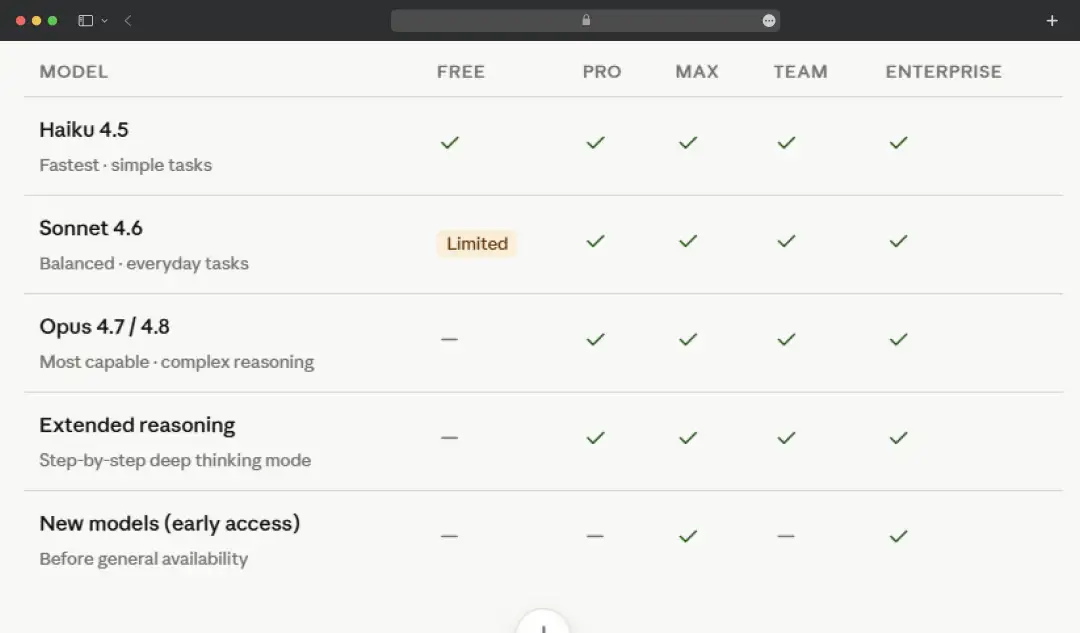
All paid plans (Pro, Max, Team, Enterprise) include access to the full model family. The Free tier has access to Sonnet and Haiku, but with tighter rolling limits, Opus is a paid-only model.
IV. API Pricing | Pay Per Token
| Model | Positioning | Input Cost (per MTok) | Output Cost (per MTok) |
|---|---|---|---|
| Opus 4.7 | Most capable; designed for complex tasks | $5.00 | $25.00 |
| Sonnet 4.6 | Balanced model; default choice for most builds | $3.00 | $15.00 |
| Haiku 4.5 | Fastest model; optimized for high-volume workloads | $1.00 | $5.00 |
*MTok = million tokens. API pricing is independent; you can use the API without a Claude.ai subscription and vice versa.
What Does the Claude AI Tool Actually Do?
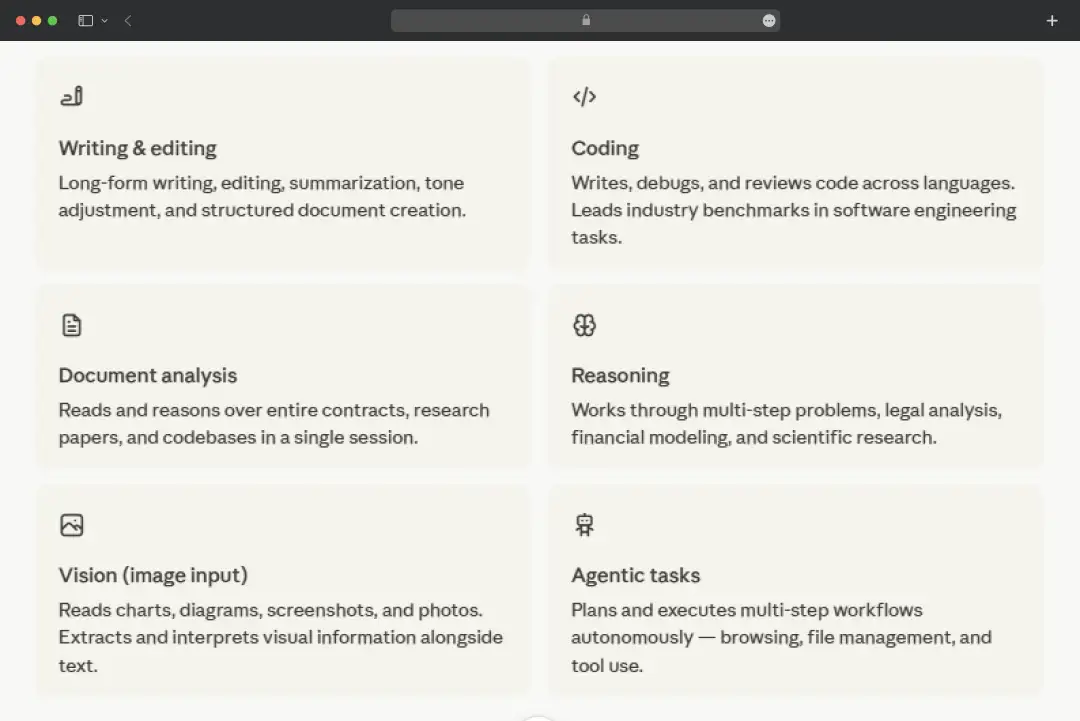
The reason why Claude stuck with me for such a long time was not some feature in particular; it was the tool’s range. The same tool you will open to fix a paragraph is the one you can use to fix an Excel sheet. And the best part? Claude is competent for both.
1. Writing and Editing
Writing is the strongest thing that Anthropic’s AI tool does. Long-form drafting, editing passes, summarizing something dense into something readable, shifting tone to match a brand, and building structured documents that hold together. It is one of the best AI writing tools which keeps a unique voice instead of flattening everything, which is the part most tools get wrong.
2. Coding
It writes, debugs, and reviews code across pretty much every language you'd throw at it, and it ranks at or near the top of the software-engineering benchmarks rather than just claiming to. Useful whether you're a developer shipping real work or someone who just needs a broken script explained and fixed.
3. Document Analysis
Hand it an entire contract, a research paper, or a sprawling codebase, and it reads and reasons over the whole thing in one session. No chopping a file into pieces to fit. It pulls out what matters and answers questions against the full document, which is where a lot of the day-to-day time savings actually come from.
4. Reasoning
This is what separates it from a glorified autocomplete. It works through genuinely multi-step problems, holding the thread across legal analysis, financial modeling, and scientific research instead of grabbing the nearest plausible answer. When the cost of being wrong is high, this is the capability you're really paying for.
5. Vision (Image Input)
You can feed it charts, diagrams, screenshots, and photos, and it reads them properly. I've used it to make sense of a screenshotted error and to pull numbers straight out of a chart image. It interprets the visual alongside any text you give it, so the two work together rather than separately.
6. Agentic Tasks
The newest frontier and the most ambitious. It plans and runs multi-step workflows on its own: browsing, managing files, and using tools to actually finish a job rather than just describe how. It's powerful and still the most uneven part of the set, so I keep an eye on it, but the direction is clear.
What Claude Does Not Do?
By now, Claude probably sounds like the AI tool that can do it all. And to be fair, it gets surprisingly close. But the longer I used it, the more I noticed a few cracks. Whether it's usage limits, occasional blind spots, or missing features, there are some limitations worth knowing about before you fully commit to it-
| Limitation | What it means in practice |
|---|---|
| No media generation | It can't create images, audio, or video. It reads images you give it, but text in and text out is the whole game, so you'll still need a separate tool for visuals. |
| Usage limits on every plan | Even paid tiers cap how much you can do in a rolling window. Heavy days of long coding sessions or back-to-back complex tasks can hit the ceiling and leave you waiting it out. |
| A knowledge cutoff | Its training only runs up to August 2025. Web search fills the gap for current events, but turn that off and it's working from an outdated picture of the world. |
| Confident mistakes | Like any AI, it can be wrong while sounding completely sure of itself. For anything factual or numerical, you check the output rather than trust it blindly. |
| Hands-off autonomy | The agentic and computer-use features are impressive but inconsistent. You can't fully walk away yet, so plan to supervise rather than fire-and-forget. |
| Heavy Projects slow down | Load too many files into a single Project and the context fills up, squeezing the actual conversation. Lean Projects work far better than stuffed ones. |
| Real-time data | It isn't a live dashboard or a feed. Even with search, it's pulling and reading pages, not streaming up-to-the-second prices, scores, or metrics on its own. |
My Real Life Experience with Claude
Specs and features can only tell you this much. So, to give you a more holistic Claude review, I went beyond the Claude AI login screen and put the tool to work on real-life tasks. I used it for my everyday workflow and tested it across three scenarios, each run on Sonnet 4.6.
1. Turning One Blog Post Into Different Types of Content
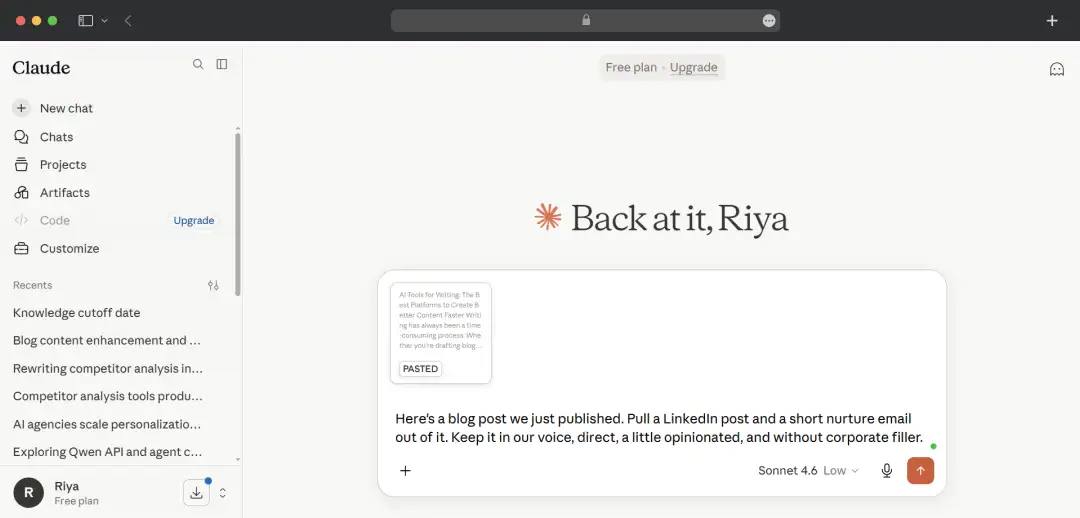
I dropped in a 1,200-word blog post and asked Claude to pull a LinkedIn post and a short nurture email out of it, both in our brand voice.
It gave me 2 different options for LinkedIn. However, I felt that both the options were solid on substance but landed too "LinkedIn," heavy on line breaks and one of those punchy one-word opening lines I can't stand.
I told it to drop the gimmicks and write like a person who's bored of LinkedIn formatting, and the second pass was genuinely usable with light edits.
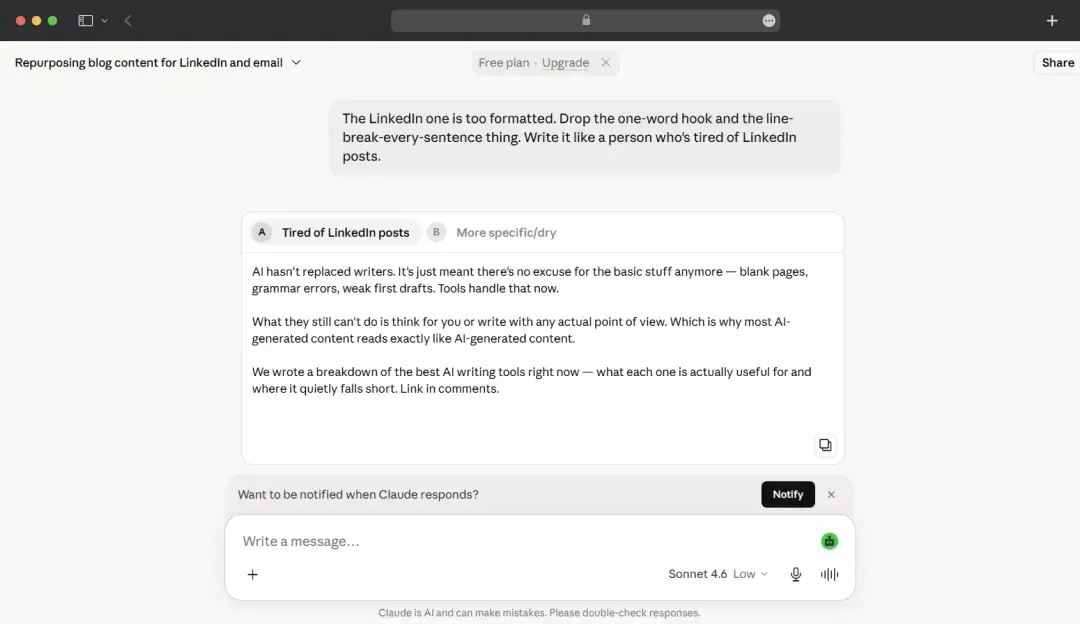
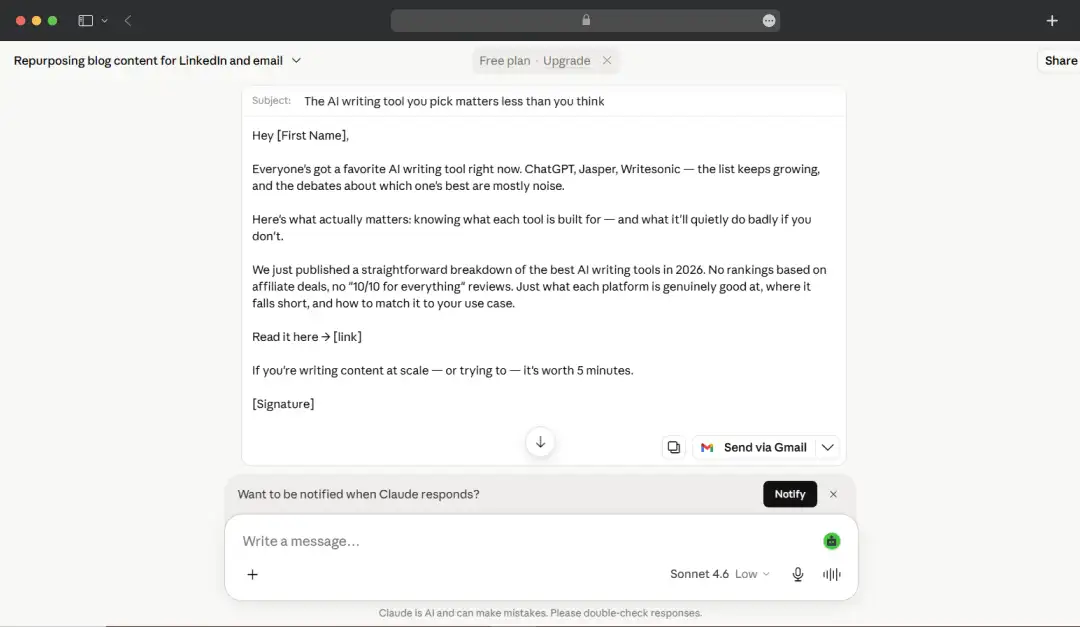
The email needed almost nothing. What stood out is that it actually kept the voice consistent across both formats instead of resetting to generic marketing-speak the second I switched the task.
| Category | Details |
|---|---|
| Time Taken | Approximately 7–8 minutes, including manual edits and refinement. |
| What I Liked | With the Gmail connector enabled, Claude can place the completed email directly into Gmail as a draft, eliminating the need to copy and paste content manually. |
| What to Be Mindful Of | The default writing style can occasionally feel overly polished or gimmicky. In most cases, a follow-up prompt is needed to make the tone sound more natural and aligned with your voice. |
2. Pressure Testing a Value Proposition
This is where the tool truly earned my respect. I pasted the hero copy from a landing page we were arguing about internally and asked Claude to tell me what was weak about it, not to rewrite it.
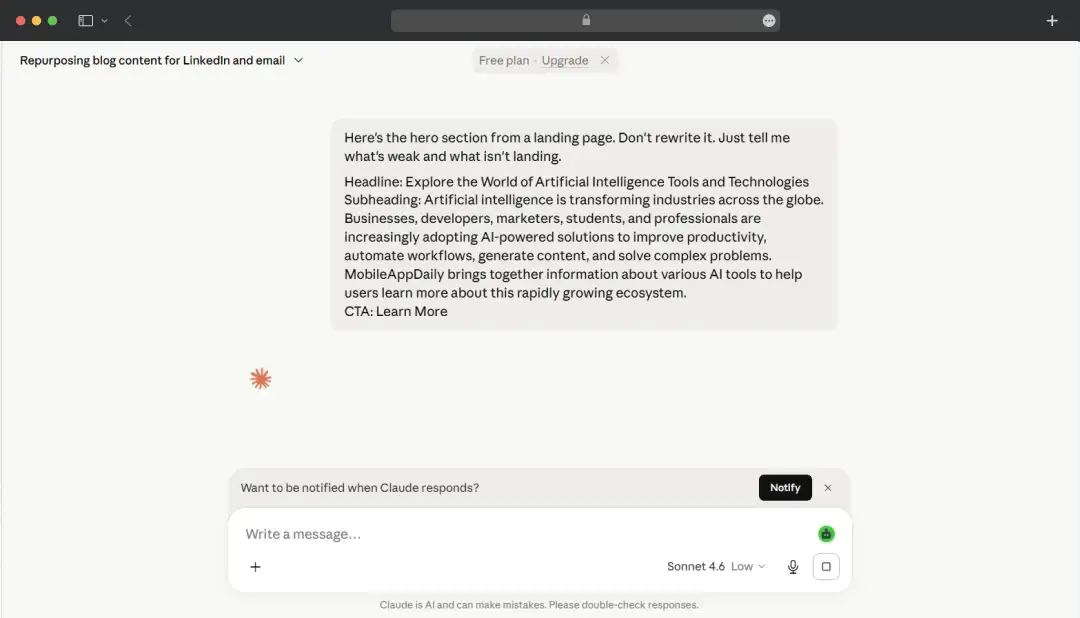
Instead of politely improving everything, it flagged that the main benefit line was vague enough to belong to any competitor. It also highlighted where the copy was going in the right direction.
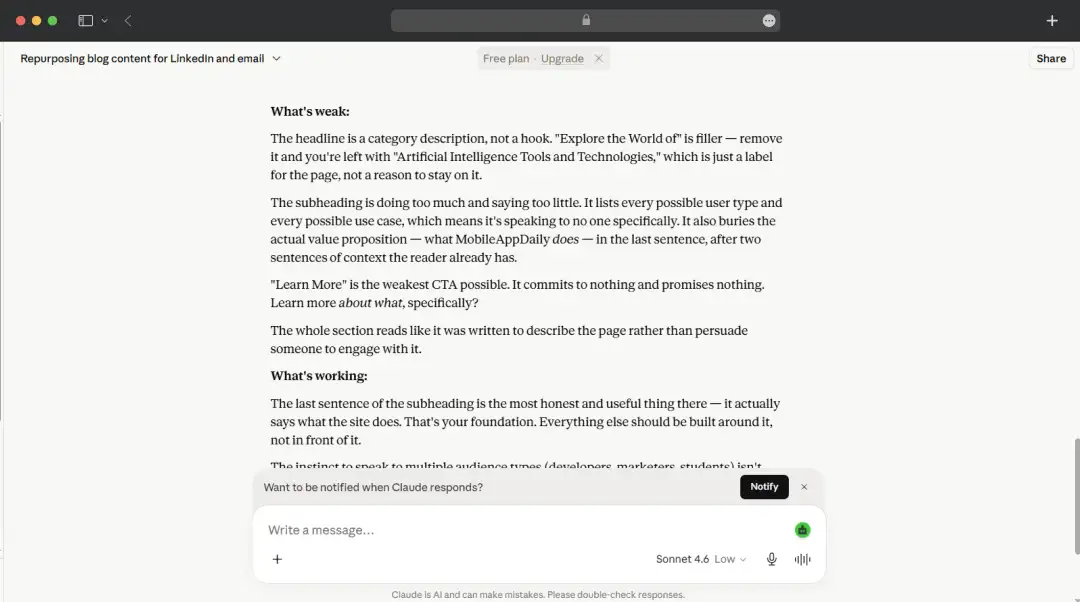
This is something that your marketing strategist will definitely point out, but an AI tool might skip. You can also give the tool information about the target audience to get a sharper critique.
| Category | Details |
|---|---|
| Time Taken | Around 5 minutes from initial prompt to final review. |
| What I Liked | It didn't simply praise the content or suggest superficial improvements. Instead, it identified an actual mistake in the copy and provided meaningful feedback that improved the final output. |
| What to Be Mindful Of | The quality of the critique depends heavily on the context you provide. Treat its feedback as a strong second opinion rather than a final verdict, and validate important recommendations before acting on them. |
3. Spinning up ad variations at speed
For the grind work, I asked for fifteen Google ad headlines and ten email subject lines for the same campaign.
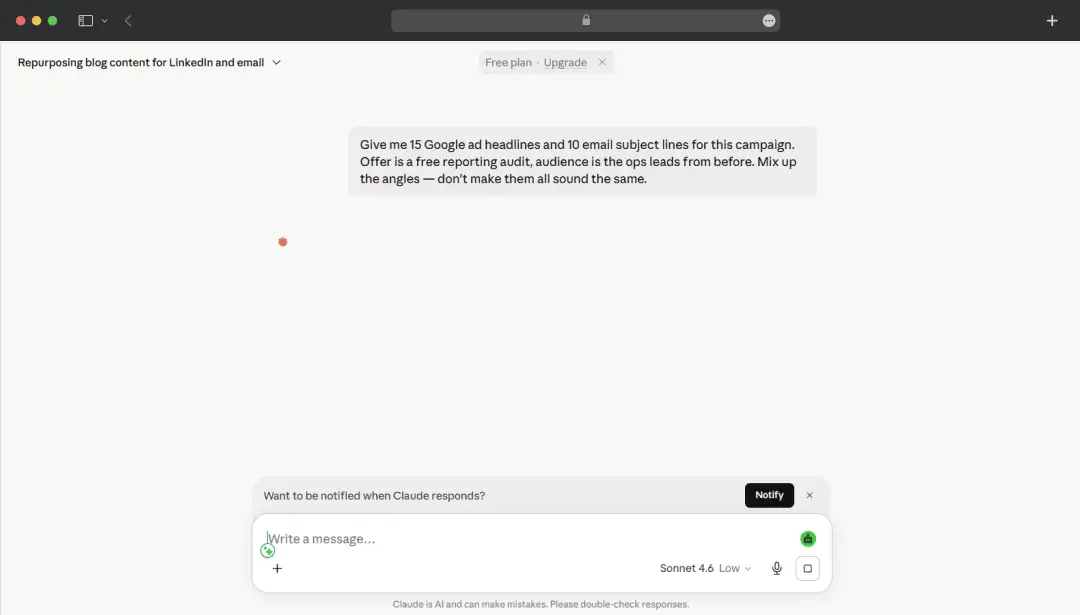
I'd assumed it would just run with it. Instead it stopped and asked:
What's the product/service the free reporting audit is for? And who's the "ops leads from before", I don't have a previous conversation with that context. A sentence on what they do and what pain point the audit addresses will get you much sharper copy.
So I filled it in! The speed was the obvious win, the whole batch came back in well under a minute.
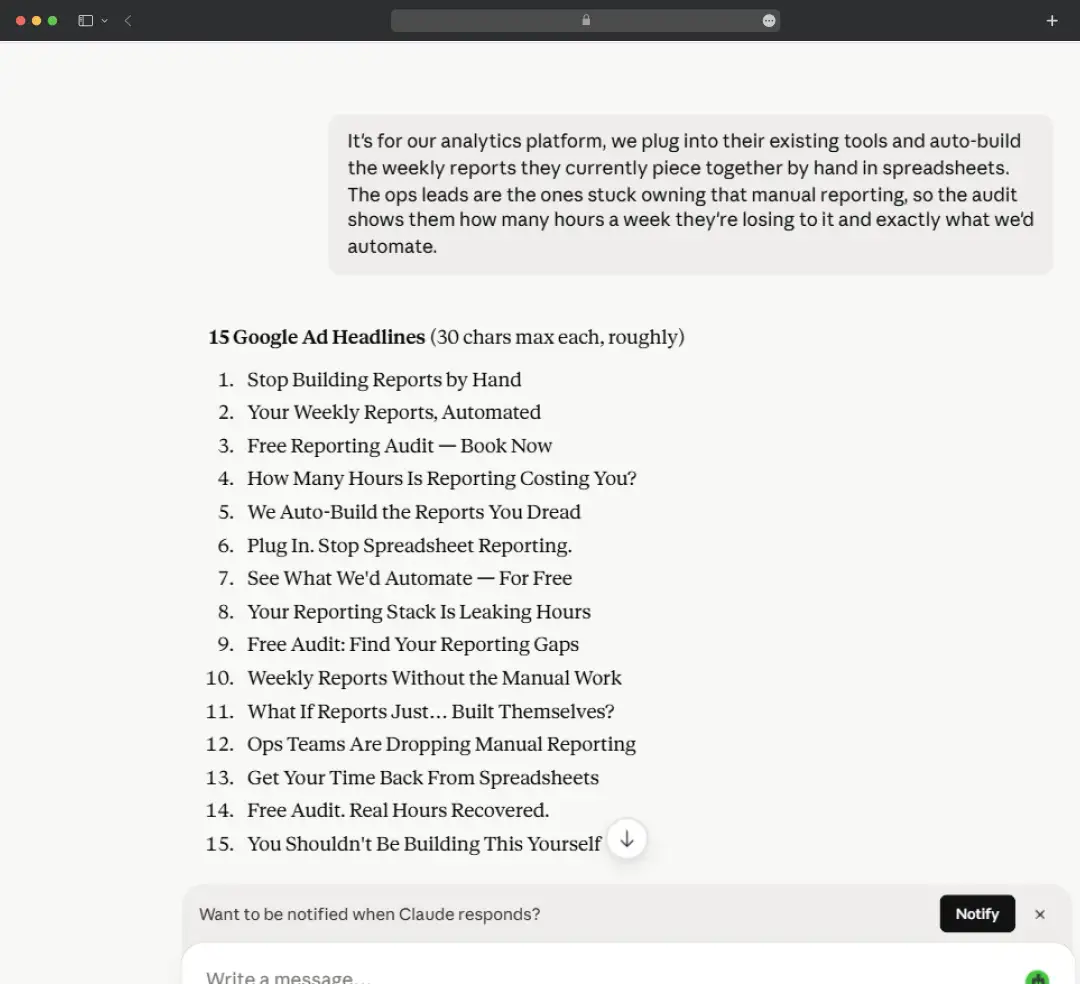
Quality was mixed in an honest way: maybe a third were generic filler I deleted on sight, but five or six were strong enough to go straight into testing, and a couple were angles I hadn't considered.
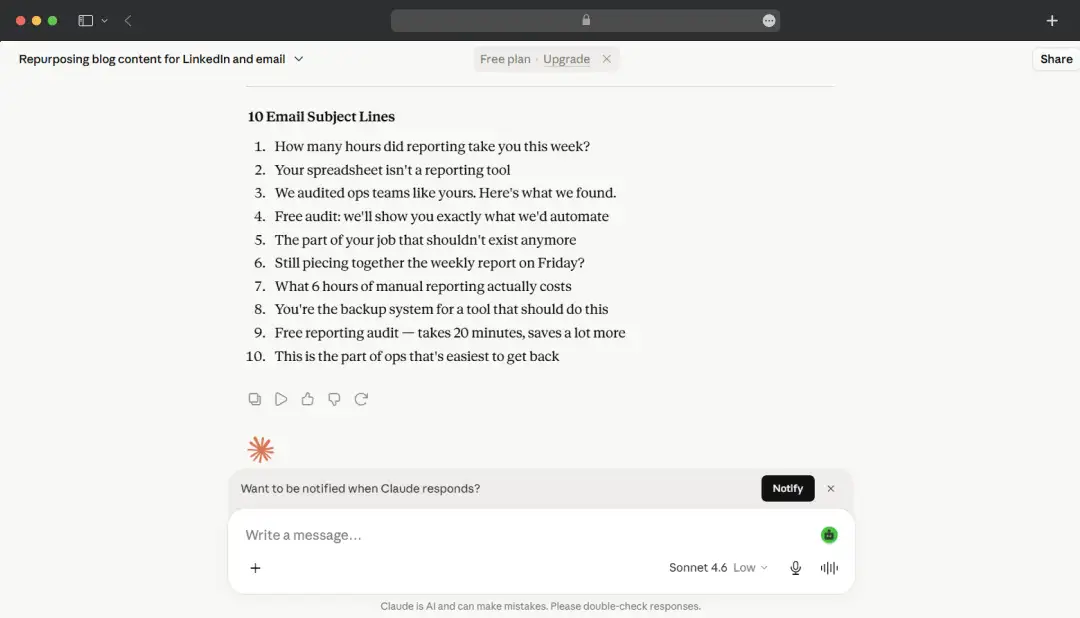
For volume work where you're going to A/B test anyway and just need a strong starting pile, that hit rate is more than fine.
| Category | Details |
|---|---|
| Time Taken | The response was generated in approximately one minute. |
| What I Liked | Instead of fabricating details, it recognized the missing context and clearly explained what additional information would improve the quality and accuracy of the output. |
| What to Be Mindful Of | Even when provided with strong inputs, expect to review and trim a portion of the generated content. Human editing remains essential, and the raw output should not be published without a quality check. |
My Takeaway
- After spending time with all three tests, my biggest takeaway was that this is the best AI assistant that works effectively when you treat it like a collaborator rather than a tool that magically knows what you want.
- If your prompt is vague, the output will usually be decent but nothing memorable. The moment you add context, challenge its assumptions, or tell it exactly what's missing, the quality jumps significantly.
- Throughout the experiment, I never felt like I was fighting the platform to get where I wanted. The back-and-forth felt surprisingly natural, almost like working with a capable teammate who gets better once you point them in the right direction.
- One underrated setting worth paying attention to is the Effort level, available right next to the model selector in Claude.ai. It comes in four levels: Low, Medium, High, and Max, where higher effort means better answers but faster consumption of your daily limits. For routine or simple tasks, dropping it to Low is an easy way to stretch your credit limit further without noticeably sacrificing quality.
Customer Reviews
How was your experience with the product?














