Share It On:
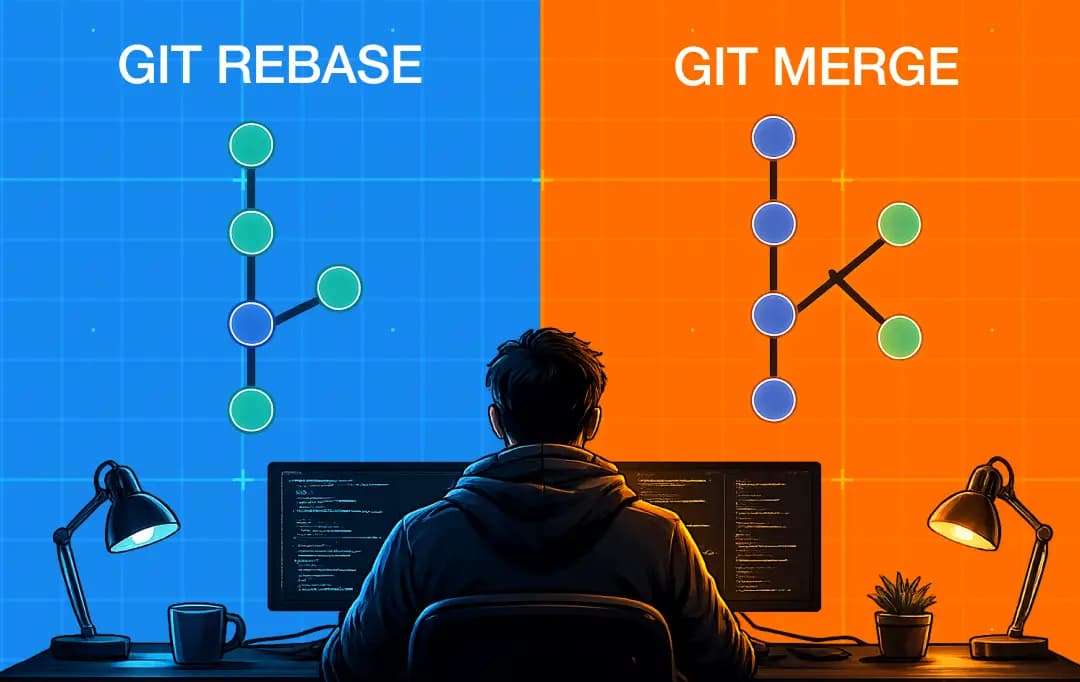 Choosing between Git Rebase and Git Merge? This guide breaks down their differences, use cases, and trade-offs to help you streamline version control.
You've probably had this exact moment. You open a pull request, and the senior developer's first comment is "Please rebase before merging." You pause. You're not sure if it's safe, so you ask in Slack. Someone tells you it depends, but nobody tells you what.
Git rebase and git merge both primarily do the same thing: they bring changes from one branch into another. The argument isn't about what they do. It's about what they leave behind, who gets affected when you pick wrong, and which one your team should make the default.
This article answers all of that.
A clear explanation of what each command actually does to your code, real scenarios that tell you which one to use and when, the one rule you cannot break without affecting your teammates' work, and a framework for setting your team's convention, so this argument doesn't have to happen every sprint. By the end, you'll know exactly which to use, when to use it, and how to defend that choice the next time it comes up.
Git Rebase vs. Git Merge: The Basic Difference
Both commands answer the same question: how do I get the changes from one branch into another? But they answer it differently enough that the resulting commit history looks completely different in each case. That's what makes the merge vs rebase discussion so important. Here's the scenario both commands will operate on.
Suppose you have a main branch with three commits on it (A,B,C). You created a feature branch from commit B and added 2 of your own commits to it (say X and Y). While you were working, your teammate added a new commit (D) to the main branch.

You now want your feature work integrated into the latest version of the main branch. This is where the rebase vs merge decision comes into play, as each approach integrates changes in a fundamentally different way.
I. Git Merge
If you decide to run the Git Merge while on main, it takes the features from your main branch and combines them with the main by creating a new commit- a merge commit. This merge commit will have two parents, one parent is the latest commit on main (D) and the other will be the latest commit (Y) on your feature branch.
The original commit on both branches stayed exactly where they were. Nothing gets rewritten.
II. Git Rebase
When you run git rebase while on your feature branch, Git does something fundamentally different. It takes your feature commits (X and Y), temporarily sets them aside, moves your branch's starting point to the latest commit on main (D), and then replays your commits on top of that new base, one at a time, in order. This process is one of the key git rebase benefits, as it creates a cleaner, more linear project history.

Difference Between Rebase and Merge
The difference between git merge and git rebase goes beyond how they combine branches. Each comes with its own strengths, trade-offs, and ideal use cases.
| Aspect | Git Merge | Git Rebase |
|---|---|---|
| What it does | Combines two branches by creating a new commit that joins them | Moves your branch's commits onto the tip of another branch, replaying them in order |
| Effect on commit history | Preserves the original history of both branches exactly as it happened | Rewrites history by creating new commits with new hashes |
| Resulting graph shape | Branched, with parallel lines joining at a merge commit | Linear, with no branching visible |
| Creates a merge commit | Yes, with two parent commits | No |
| Original commits preserved | Yes, with their original hashes intact | No, original commits are replaced by new ones |
| Safe on shared branches | Yes, doesn't affect anyone else's history | No, rewriting shared history breaks teammates' local copies |
| Conflict resolution | Resolved once, in a single merge commit | Resolved commit by commit during the replay |
| Easier to reverse | Yes, a single merge commit can be reverted cleanly | Harder, since multiple new commits need to be undone |
| Better for | Shared branches, preserving the development narrative | Local cleanup, keeping the main history linear and readable |
Bonus Read: Software Development Guide
Advantages and Disadvantages of Git Rebase and Git Merge
When comparing the git rebase vs. merge pros and cons, it's important to look beyond the mechanics of combining branches. Each approach offers distinct advantages and trade-offs that can affect collaboration, commit history, and day-to-day development workflows.
Git Merge Pros and Cons
| Pros | Cons |
|---|---|
| Preserves the exact development history, including parallel work | Commit history becomes cluttered with merge commits over time |
| Safe to use on branches that other developers have access to | Reading a busy commit log requires filtering out merge noise |
| Conflicts are resolved once, in a single merge commit | Reverting a merged feature requires reverting the merge commit specifically |
| Easier to revert a complete feature integration | Doesn't reflect the cleaner, linear narrative many teams prefer |
| No learning curve, the default Git workflow most developers already know | The merge commit itself adds nothing to the code, only to the graph |
| Works the same way across every Git platform without special configuration | Can make git bisect slower because it has to step through merge commits |
Git Rebase Pros and Cons
| Pros | Cons |
|---|---|
| Produces a clean, linear commit history that's easier to read | Rewrites history, which is dangerous if the branch is shared |
| Easier to follow with git log and easier to bisect for bugs | Conflicts can surface multiple times, once per commit being replayed |
| Removes the "merge branch X into Y" noise from the main branch | Has a steeper learning curve, especially for developers new to Git |
| Let's you tidy up a feature branch before opening a pull request | Harder to undo, multiple new commits need to be reversed individually |
| Makes the commit log feel like a clear progression of features | Force-pushing after a rebase can break teammates' local copies |
| Surfaces conflicts earlier, where they're often easier to resolve | Loses the "this was developed in parallel" context once history is rewritten |
When to Use Git Merge - Real Scenarios
| Situation | Why Merge |
|---|---|
| The branch has been pushed and teammates have pulled it | Rebase rewrite commit hashes. Force-pushing a rebased branch breaks everyone's local copy. Merge doesn't touch existing history. |
| Integrating into a long-lived branch like main or develop | A merge commit records when a feature landed and where it came from. Rebase removes that context, making history harder to trace later. |
| The team has developers still learning Git | A misused rebase on a shared branch can cost the team a full day of recovery. Merge has no equivalent failure mode at the same skill level. |
| The feature's history actually matters | Some changes, a long refactor, a staged security fix, are better understood in sequence. Rebase flattens that story. Merge keeps it. |
When to Use Git Rebase - Real Scenarios
When evaluating rebase vs. merge, it's easy to focus on the situations where rebase goes wrong. In practice, though, rebase is often the better choice for maintaining a clean project history. Here are the scenarios where it is the best choice-
| Situation | Why Rebase |
|---|---|
| The branch is yours alone and hasn't been pushed | No remote copy, no teammates depending on your commits. You can rebase freely, squash messy commits, and restructure without affecting anyone. |
| Updating your branch with the latest main before a PR | Rebasing onto main puts your commits cleanly on top of current main. Merging main in adds an extra merge commit and clutters the PR diff. |
| Cleaning up commits before sharing your work | Interactive rebase (git rebase -i) lets you combine, reword, and drop commits before anyone sees them. Done before pushing, it carries no risk. |
| The team enforces a linear main history | Some teams use rebase-and-squash-merge so main stays clean, one commit per feature or fix. If that's your team's convention, rebase is how you follow it. |
Using Git Rebase and Merge Together: The Hybrid Approach
In practice, most teams don't choose, they use both, leveraging the rebase and git merge benefits where each is designed to excel.
1. Develop locally with rebase
As you build a feature, use git rebase origin/main to keep your branch current with teammates' changes. Since it hasn't been pushed yet, rewriting is safe.
2. Clean up before the PR
Run git rebase -i to squash typo fixes, drop WIP commits, and polish commit messages before opening the pull request.
3. Integrate with merge
Once the PR is approved, merge or squash-merge into main, preserving history at the point it matters, without touching shared branches.
4. The rule of thumb
Rebase for local cleanup (safe, high payoff). Merge for integration (safe, creates a record worth keeping).
This is the pattern most teams converge on after feeling the cost of getting it wrong in both directions. This acknowledges that the merge vs rebase decision is rarely all-or-nothing in real-world development workflows.
The Golden Rule of Rebasing and What Happens When You Break It
One rule matters more than every other piece of advice in this article combined.
Never rebase a branch that other people have pulled.
It doesn't matter where you are in your career, whether you're still figuring out how to code an app or you've been shipping production code for years. The damage looks the same either way.
Most Git disasters on a team, the lost commits, the broken local copies, the frantic Slack threads, trace back to someone breaking this single rule. Here's what's actually happening underneath.
Why force-push is the trigger:
- When you rebase a branch and push it, you have to force-push, the rebased branch has completely new commit hashes
- Git rejects a normal push because the two histories don't match
- Running git push --force overwrites the remote with your new version
What goes wrong for your teammates:
- If no one else has pulled the branch, no harm done
- If a teammate already pulled it, their local copy points to commits that no longer exist on the remote
- The next time they pull, Git can't reconcile the two histories
- The outcome ranges from an hour of confusion to genuinely lost work
What recovery actually costs:
- The affected teammate has to find their lost commits through git reflog
- They then cherry-pick those commits back onto the new branch
- Any conflicts during the cherry-pick have to be resolved manually
- If multiple teammates were working off the shared branch, the recovery has to be coordinated across all of them
- A single force-push on a shared branch can cost a team half a day of unplanned work
The safer way to force-push:
- Use git push --force-with-lease instead of plain git push --force
- The lease variant refuses to overwrite the remote if anything has changed since you last pulled
- This catches the most common version of the mistake before it does damage
The rule, in one line: If there's any chance someone else has pulled the branch, don't rebase it.
A Note on AI Coding AgentsOne change worth mentioning, because it's reshaping how teams think about commit history in 2026. AI agents for coding or advanced tools like Cursor, Claude Code, Copilot, and Codex now generate commits on developers' behalf with increasing frequency, and the commits they produce often don't follow the same conventions a human developer would. They tend to be more numerous, more granular, and less likely to combine related changes into logical units. This makes the rebase-and-squash workflow more valuable than it used to be, because it gives developers a way to clean up AI-generated commit noise before code reaches main. Teams that previously got away with looser conventions on commit hygiene are finding that AI-assisted development surfaces those gaps quickly. The convention you set today should account for the fact that a meaningful portion of your team's commits may be generated, not authored, and that the human reviewer's job now includes deciding whether the commit structure itself makes sense, not just whether the code does. |
Git Merge and Rebase: Common Mistakes and How to Recover
Most rebase and merge mistakes are recoverable if you know what to look for. Regardless of where you stand on rebase vs merge, the recovery techniques are often more important than the mistake itself. So, here are the common mistakes and relevant recovery steps for each.
| Team Profile | Recommended Workflow | Key Rules |
|---|---|---|
| Small & senior (<10 devs, all comfortable with Git internals) |
Rebase-heavy | Rebase feature branches before PRs; squash-merge into main; keep history linear |
| Mid-sized, mixed experience (10–50 devs, varied seniority) |
Hybrid | Rebase locally encouraged; force-pushes to shared branches forbidden; squash-merge or standard merge on PRs |
| Large or high junior turnover (50+ devs, ongoing onboarding) |
Merge-only on shared branches | Rebase allowed only on personal feature branches; squash-merge for PR integration; prioritise safety over clean history |
| A long-lived codebase will be read by future devs years from now | Preserve merge commits on main | Keep integration history visible for future debugging |
| Short-lived or experimental project | Squash-merge | Prioritise a clean, skimmable log; preserving development narrative has low long-term value |
Key principle: git reflog is the safety net behind almost every recovery — it retains roughly 30 days of branch movements. Mistakes become unrecoverable only when someone runs cleanup commands (e.g. git gc --prune=now) before understanding what went wrong.
Conclusion
Most teams spend too long debating when to use git rebase vs merge. The actual problem is usually that nobody documented a preference in the first place.
Messy commit histories rarely trace back to the wrong command. They come from leaving the convention undefined, which means every developer makes their own call on every pull request.
Pick a rule. Write a short paragraph in your engineering handbook, when to rebase, when to merge, how pull requests get integrated, then configure branch protection rules to match. Teams with clean histories aren't unusually opinionated. They just settled this early.
Frequently Asked Questions
What is git rebase?
Git rebase is a command that moves a sequence of commits from one branch onto the tip of another branch, replaying them in order. It produces a linear commit history by creating new commits with new hashes, which is why rebasing a shared branch is unsafe.
What is git merge?
Git merge is a command that combines two branches by creating a new commit — called a merge commit — that has two parent commits, one from each branch. It preserves the complete history of both branches without rewriting any existing commits.
Is git rebase dangerous?
Rebase is only dangerous when used on branches that other people have pulled. On your own local branches that haven't been shared, rebase is completely safe and is one of the most useful tools in Git.
Should I rebase before every push?
Not necessarily. Rebase before opening a pull request if you want a clean PR for reviewers, and rebase your local branch to stay current with main during long-running work. You don't need to rebase every time you push to your own remote feature branch.
What's the difference between a regular merge and squash-merge?
A regular merge creates a merge commit and preserves every commit from the feature branch. A squash-merge combines all the feature branch commits into a single new commit on the target branch and discards the original commits. Squash-merge produces a cleaner main history at the cost of losing the development sequence.
Does GitHub support both rebase and merge workflows?
Yes. GitHub's pull request interface offers three merge methods — "Create a merge commit," "Squash and merge," and "Rebase and merge." Repository admins can restrict which methods are available, which is how teams enforce their convention.

Uncover executable insights, extensive research, and expert opinions in one place.
Related Content