


ChatGPT Review: I Use It Every Day: Here's Where It Actually Stands in 2026
Reviewing ChatGPT feels slightly absurd. It's the tool that put “AI” into everyday conversation, the one your manager and your teenage cousin both have open in a tab right now. So what's left to say about it?
Quite a bit, as it turns out. The ChatGPT I've been using lately barely resembles the chatbot I first signed up for. The model picker has been stripped down and rebuilt, and the pricing has sprouted a confusing set of new tiers.
Features like agents, deep research, and video generation have turned a text box into something closer to a control panel for getting work done.
I've spent the last few weeks pushing it through real tasks: long drafts and messy research, even an attempt to make it sort through my inbox. This ChatGPT review explains what this AI tool holds up, what it doesn't, and who should actually be paying for it.
Pros and Cons of ChatGPT
Pros
- The broadest feature set of any consumer AI tool, writing, coding, research, voice, image, and video in one place
- The free tier now runs on a genuinely capable default model
- Strong everyday output quality with very little prompting effort
- A huge ecosystem of custom GPTs, connectors, and integrations
- The auto-router means most people never have to think about which model to pick
- Agent mode and deep research handle multi-step work that used to need three tools
Cons
- Pricing has fragmented into six-plus tiers that are genuinely hard to keep straight
- Still confidently wrong sometimes (I never publish anything from it unchecked)
- Message and usage caps bite even on paid plans during heavy days
- Constant model churn keeps changing the product underneath you (Canvas being phased out is the latest example)
What Makes ChatGPT a Leading AI Assistant?
The thing I keep coming back to is how much now lives inside a single window. Here are a few ChatGPT AI’s features that do most of the heavy lifting in my week-
1. The model system and auto-router
OpenAI killed off the old alphabet soup of model names. Today, it's three modes: Instant, Thinking, and Pro, all built on the GPT-5.5 family. These modes come with a router that picks the right one based on your question. For most prompts, I don't even touch the picker at all, which is a relief after years of guessing whether I needed o3 or 4.o or something else.
2. Deep Research
Hand it a question, and it goes off, reads dozens of sources, and comes back with a structured, cited brief. On ChatGPT Plus, you get a limited number of runs per month. It's slow (think five to fifteen minutes), but for scoping a topic I don't know well, it has saved me genuine hours.
3. Agent Mode
This is the feature that still surprises me. It can browse, click, fill forms, and string together steps to actually finish a task rather than just describe how to do it. It's not flawless, and you have to train it quite a bit. But watching it book and compare things across sites felt like a real shift from ‘assistant’ to ‘operator.’
4. Sora and image generation
Video generation through Sora is built in, and image creation now runs on the newer Images 2.0 model after the older DALL·E models were retired. The ChatGPT image generator produces high-quality images for quick social or mockup work. However, I wouldn't hand the output straight to a designer, but for a first pass, it's more than fine.
5. Voice and multimodal input
The voice mode is good enough. You can also feed it screenshots, photos, PDFs, and spreadsheets, and it reads them properly rather than guessing.
6. Memory and personalization
It remembers context across conversations and, on paid web plans, can pull from your past chats and connected accounts to personalize answers. Useful, occasionally a little uncanny, and worth checking the privacy settings on.
7. Custom GPTs and connectors
You can build your own tailored versions of ChatGPT for a specific job and connect tools like Drive and Gmail. For a small team, a well-built custom GPT can replace a stack of half-written internal docs.
One change worth flagging: Canvas, the side-panel editing workspace, is being retired. Writing and code now show up as editable blocks directly in the chat instead. I liked Canvas, so this one stings a little.
ChatGPT Plugins, Apps, and Connectors
If you came here looking for the old ChatGPT plugin store, it's gone. OpenAI shut the original plugin marketplace down, and the word ‘plugin’ now technically only survives inside Codex, where approved tools get packaged for developers. What replaced it is bigger and a lot more useful, even if the naming has become a mess.
There are three ways to extend AI, ChatGPT now, and they're worth keeping straight:
1. Apps
These are interactive, third-party experiences that run inside the chat itself. Ask about music, and Spotify can surface right there; mention a trip and Expedia or Booking can appear; Zillow, Canva, Figma, and many others work the same way.
ChatGPT either suggests one at the right moment or you call it by name. The real difference from the old plugins is that these render proper interfaces inside the conversation instead of just passing text back and forth.
2. Connectors (which OpenAI now also calls "apps")
In late 2025, connectors got folded under the same apps umbrella. These are the integrations that pull your own data into ChatGPT, Gmail, and Google Drive, so it can search, reference, and run deep research across your actual files. On Business and Enterprise plans, they can take write actions now, not just read.
3. Custom GPTs
This is ChatGPT’s no-code option. You bundle your own instructions, files, and tone into a tailored version of ChatGPT and either keep it private or publish it to the app directory. For repeated work, this is the one most people will actually touch.
How to Use ChatGPT?
Getting started with ChatGPT takes about two minutes, but a few habits separate casual use from getting real value. The platform is designed to be intuitive; simply type a question, task, or prompt, and ChatGPT generates a response instantly.
However, learning how to write clear prompts, provide context, and refine outputs can significantly improve the quality and usefulness of its responses.
1. Pick the right plan
Once you complete your ChatGPT login, you can use the tool for free. Move to Plus once you hit the message limits or want Deep Research, Sora, and Agent Mode, which is where the tool gets genuinely useful.
2. Stop overthinking the model
For everyday tasks, leave it on the default and let the router decide. Manually switch to Thinking only when you're handing it something genuinely hard, like complex code or layered analysis.
3. Give it context, not just a command
The single biggest quality jump I got was from writing prompts that include who the output is for, what tone I want, and an example of "good." Treat it like briefing a sharp but literal assistant.
4. Use the right tool for the job
Ask it to search the web for anything current. Use Deep Research when you need a sourced overview. Reach for Agent Mode when a task has multiple steps you'd rather not do by hand.
5. Build a custom GPT for repeat work
If you keep pasting the same instructions, bake them into a custom GPT once and stop repeating yourself.
6. Always verify the facts
This is non-negotiable. It's a brilliant drafter and a confident liar in equal measure. I check every name, number, and quote before anything leaves my screen.
Testing ChatGPT for Real-World Use Cases
Here are two hands-on scenarios I walked through to see what ChatGPT actually delivers when given a real job to do. These cover some of the most common reasons people turn to ChatGPT, from image generation to meeting summaries, content creation, coding assistance, and research support.
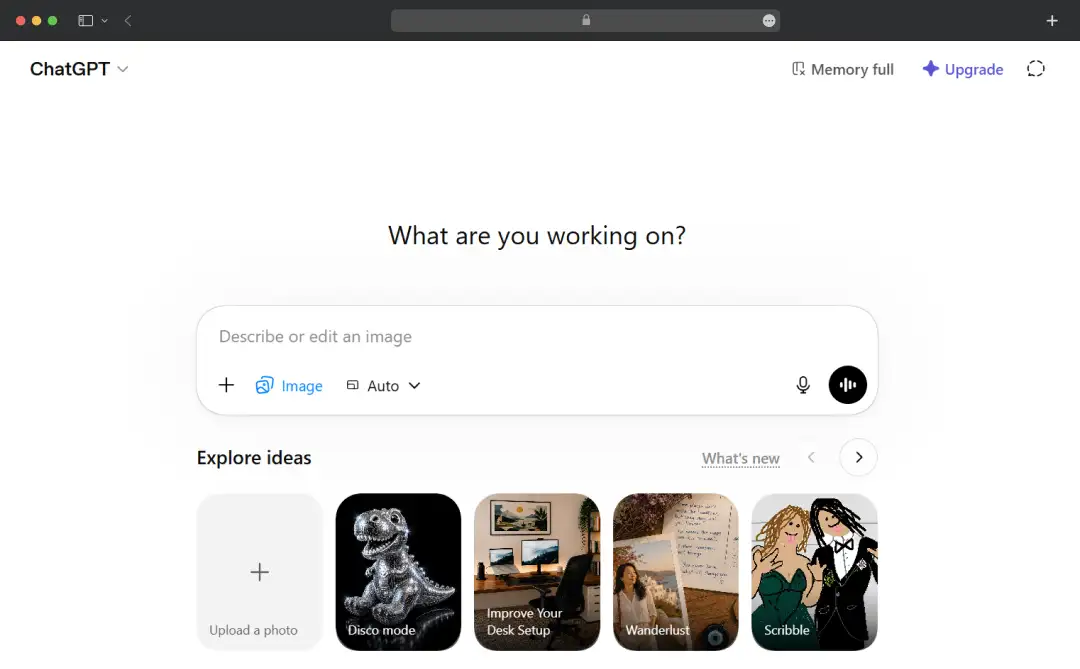
I typed out a prompt with as much detail as I could:
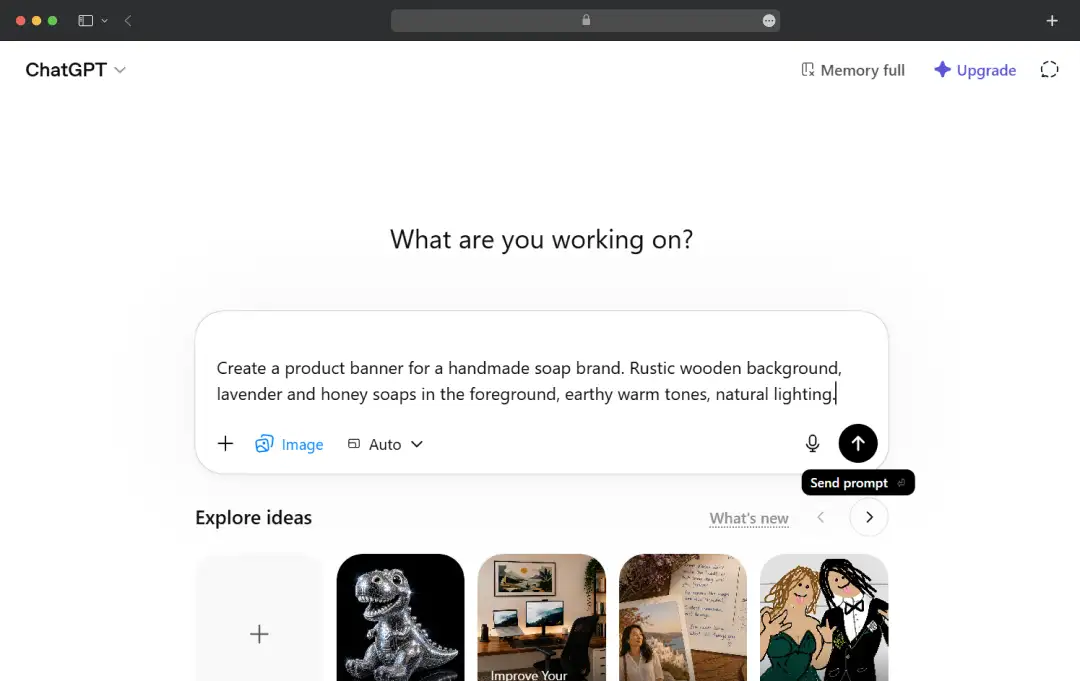
"Create a product banner for a handmade soap brand. Rustic wooden background, lavender and honey soaps in the foreground, earthy warm tones, natural lighting."
The image appeared directly in the chat within seconds. It was a strong first attempt, the tones and composition were close to what I had in mind.
You can also follow with necessary edits, if required. But I was quite satisfied with the image, so I stopped.
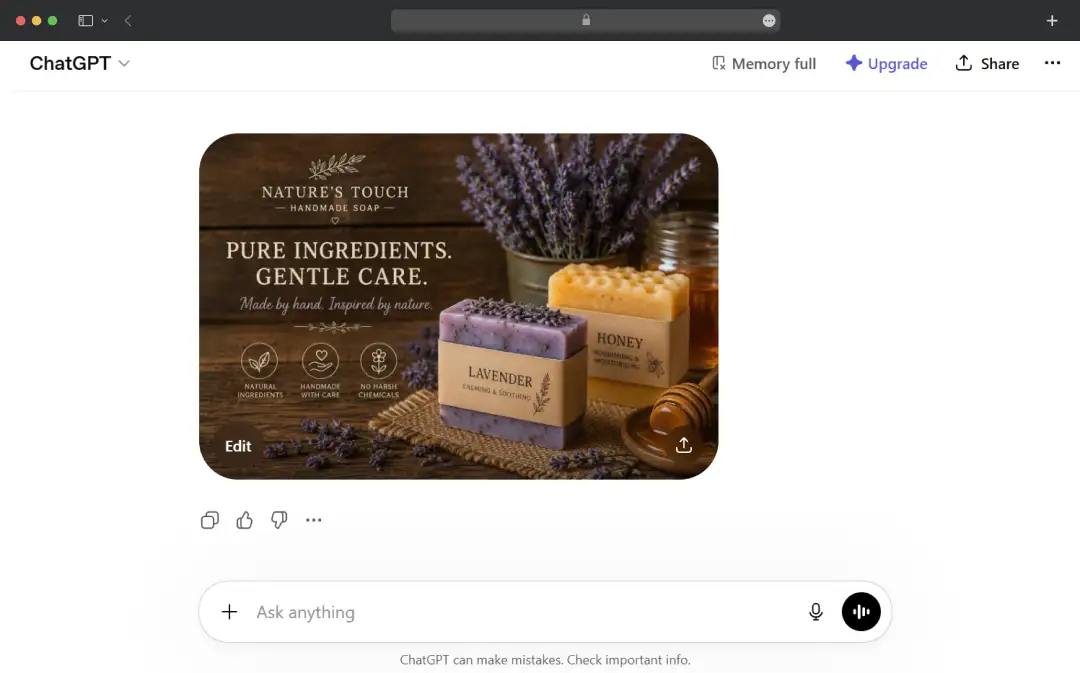
I then clicked the download icon and saved it. Start to finish, it took under two minutes.
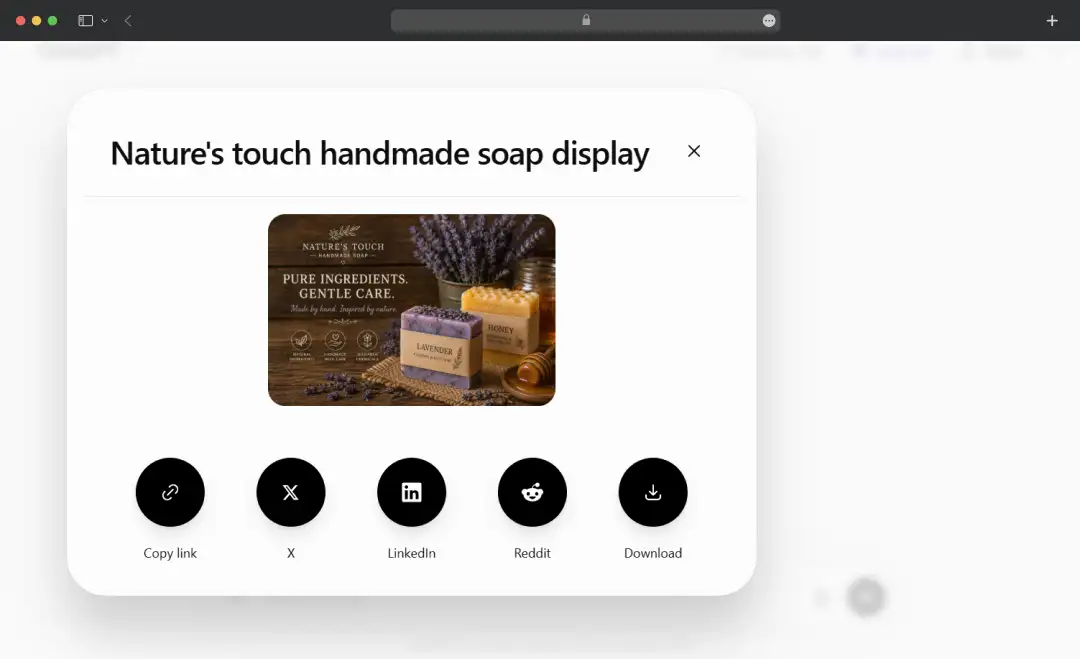
What Worked:
The detailed prompt provided strong creative direction. Plus, with follow-up instructions, it is easy to fine-tune the image without starting over.
Watch Out For:
Text generated inside images can be inconsistent or inaccurate. For the best results, create text-free visuals and add copy later using graphic design tools such as Canva.
Also Read: Deepseek vs. ChatGPT
2. Turning Messy Meeting Notes into a Structured Action Plan
Right after a meeting, I copied my raw notes, scattered bullet points, half-finished sentences, no formatting, and pasted them straight into ChatGPT with this prompt: "Here are my notes from today's product sync: [paste notes]. Clean this up and extract action items."
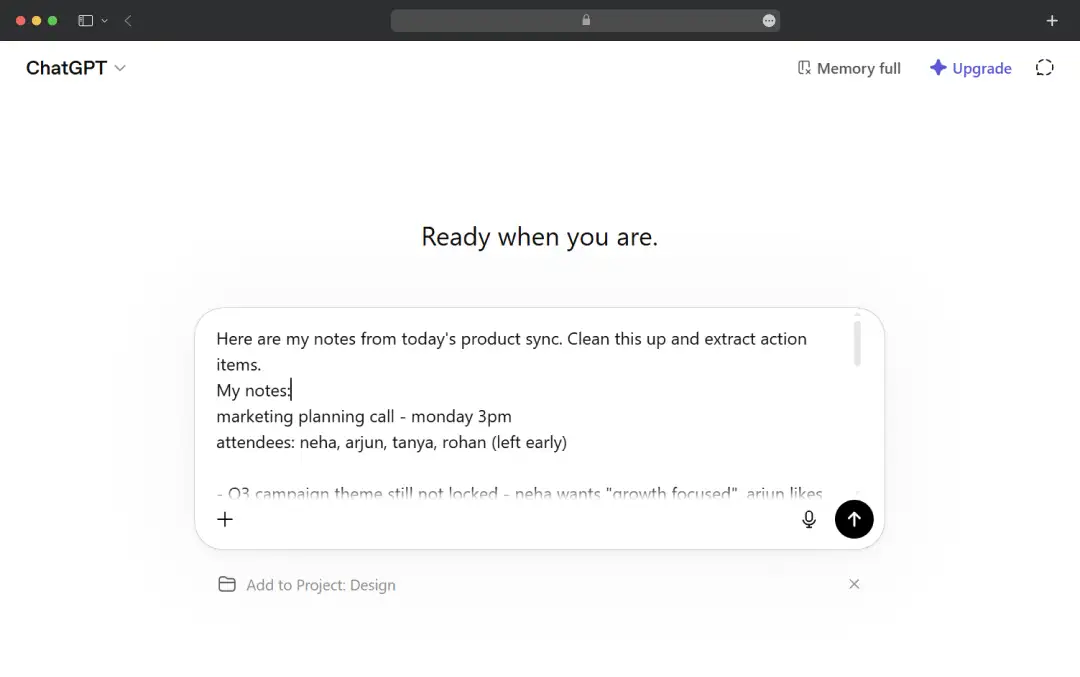
What came back surprised me a little. It didn't just tidy things up, it pulled out key decisions, flagged open questions, and organized action items into a table. Where I'd mentioned people by name in the notes, it had already assigned tasks to them.
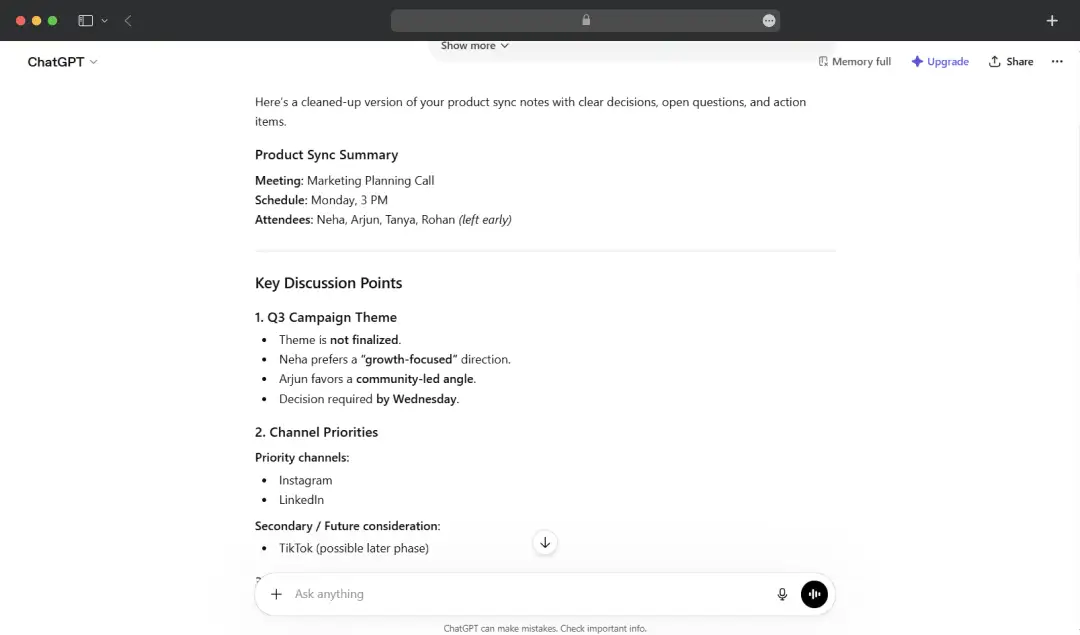
I then pushed it further:
"Rewrite the action items as a Notion-ready table with columns: Task, Owner, Deadline."
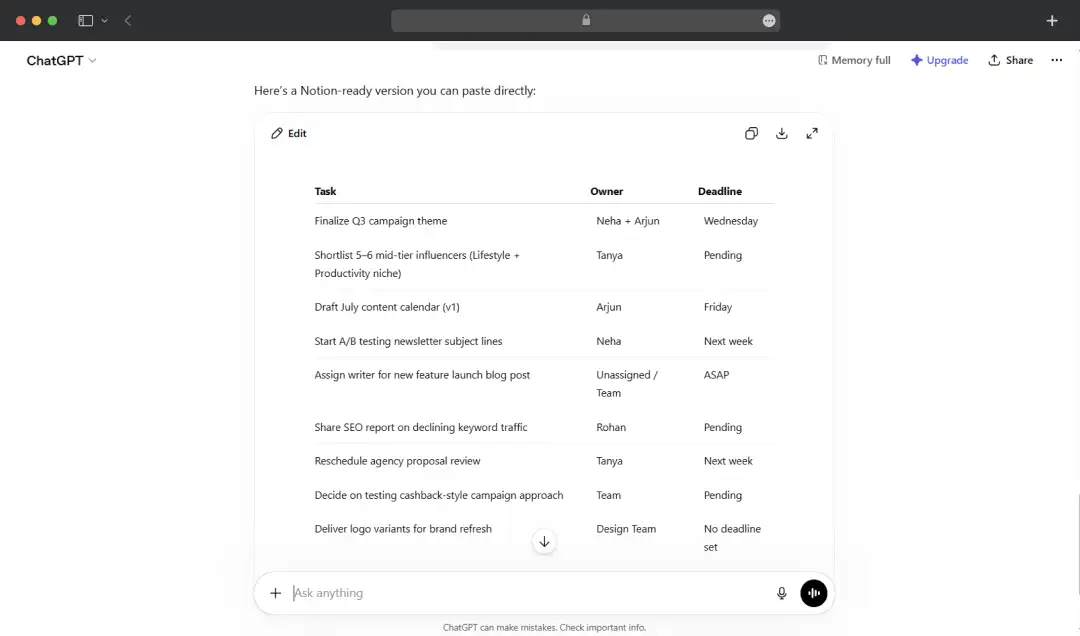
Done in seconds.
Then I asked it to draft a follow-up email using the same notes, and that came back clean and ready to send with minimal editing.
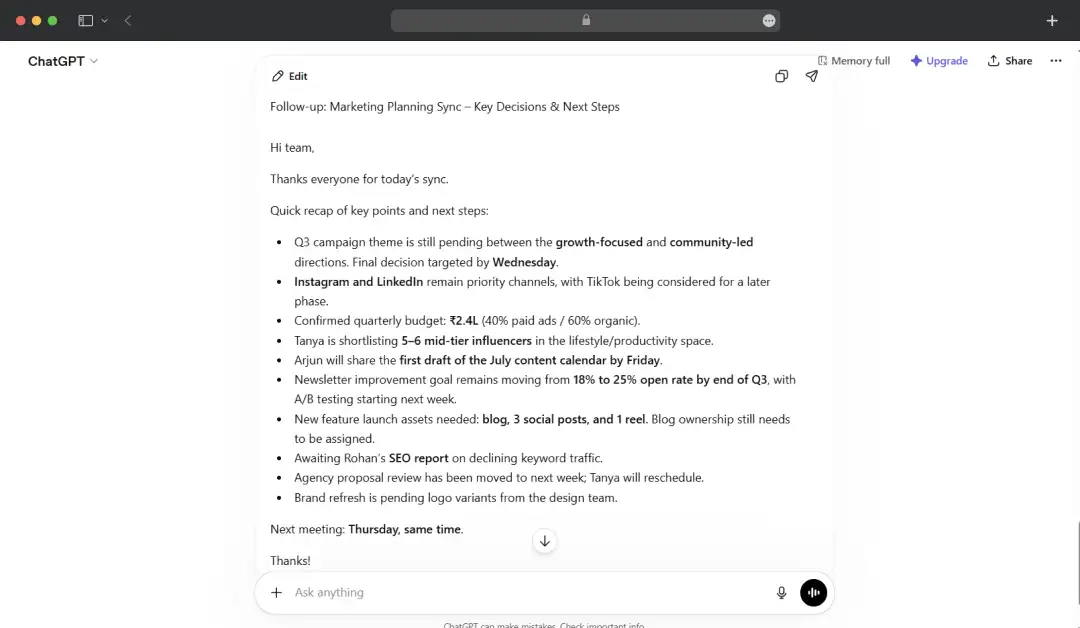
What Worked:
Even disorganized and fragmented notes were transformed into a clear summary with actionable next steps. Using chained prompts (notes → tasks → email) streamlined the entire post-meeting workflow.
Watch Out For:
The quality of the result depends on your ChatGPT prompts. The tool may occasionally infer task owners, priorities, or deadlines that were not explicitly mentioned in the notes. Review the output carefully before sharing it with your team.
Understanding ChatGPT Use Cases by Industry and User Personas
From everyday productivity to helping developers build an app using ChatGPT, the platform has multiple use cases across industries. Here’s a quick overview-
I. By Industry
| Industry | Primary Use Cases |
|---|---|
| Marketing & Advertising | Content creation, campaign ideation, ad copy generation, SEO optimization and audience research. |
| Education | Personalized tutoring, lesson planning, study assistance and quiz generation. |
| Healthcare | Administrative support, medical documentation, patient communication drafts and research summaries. |
| Software Development | Code generation, debugging, documentation, testing assistance. |
| Customer Service | Automated responses, ticket summarization and knowledge base creation. |
| E-commerce & Retail | Product descriptions, customer support, inventory insights and sales copy. |
| Finance & Banking | Financial report drafting, market research, compliance documentation and data analysis. |
| Human Resources | Job descriptions, interview questions and employee onboarding materials. |
| Legal Services | Contract review assistance, legal research summaries and document drafting. |
| Media & Publishing | Article writing, editing, content repurposing and script generation. |
| Real Estate | Property listings, market analysis, client communication and lead nurturing. |
| Manufacturing | SOP creation, process documentation, training materials and quality reporting. |
| Travel & Hospitality | Itinerary creation, customer support, travel recommendations and multilingual communication. |
| Consulting | Research synthesis, presentation creation, business analysis and proposal drafting. |
| Nonprofits | Grant writing, donor communication, fundraising campaigns and volunteer coordination. |
II. By User Persona
| User Persona | Primary Use Cases |
|---|---|
| Students | Homework assistance, exam preparation, note summarization and research support. |
| Teachers | Lesson planning, assignment creation, grading assistance and educational content development. |
| Content Writers | Blog writing, editing, content ideation and SEO optimization. |
| Digital Marketers | Campaign planning, social media content, email marketing and keyword research. |
| Business Owners | Strategy planning, customer communication, process documentation and market research. |
| Entrepreneurs | Business plans, pitch decks, competitive analysis and brainstorming. |
| Software Developers | Coding assistance, debugging, documentation and code reviews. |
| Customer Support Agents | Response drafting, ticket summarization and customer communication. |
| Sales Professionals | Prospecting emails, sales scripts, proposal writing and follow-ups. |
| HR Managers | Recruitment content, policy drafting and employee communication. |
| Researchers | Literature reviews, data interpretation and report generation. |
| Consultants | Client presentations, industry research and proposal development. |
| Designers | Creative briefs, UX copywriting, concept ideation and content structuring. |
| Freelancers | Client communication, project proposals, content creation and productivity support. |
| Executives | Strategic planning, report summaries, meeting preparation and decision support. |
| Data Analysts | Data interpretation, report writing, SQL assistance and dashboard explanations. |
| Healthcare Professionals | Documentation support, research summaries and patient education materials. |
| Legal Professionals | Legal research, contract summaries and compliance documentation. |
| Customer Success Managers | Onboarding materials, customer communication and account reviews. |
| General Consumers | Everyday questions, travel planning, personal productivity and learning new skills. |
Understanding ChatGPT Pricing
Pricing is where most users (including me) lose patience. There are now several tiers, and they shift often enough that I'd check the live page before buying. Here's roughly where things stand in mid-2026:
| Plan | Price | What You Get |
|---|---|---|
| Free | $0 | GPT-5.5 Instant, tight message limits, ads in the US. |
| Go | $8/month | Higher limits than Free, still ad-supported in the US. |
| Plus | $20/month | GPT-5.5, Deep Research, Sora, Codex, Agent Mode, and far higher limits. |
| Pro (lower) | $100/month | GPT-5.5 Pro with roughly 5× the usage available on Plus. |
| Business | $20/seat/month | 2-seat minimum, no training on your data by default, admin controls, and SSO. |
| Enterprise | Custom | Usage-based pricing, all frontier models, no usage caps, compliance, and data residency controls. |
A Detailed Comparison of ChatGPT Models
OpenAI offers multiple ChatGPT AI models designed for different use cases. Understanding the strengths of each model helps businesses and individuals choose the right AI experience based on their performance, speed, and complexity requirements.
1. GPT-5
GPT-5 is OpenAI’s flagship model, offering the strongest reasoning, coding, analysis, and multimodal capabilities. It is designed to handle complex workflows, deep research, business tasks, and sophisticated problem-solving with greater accuracy and reliability.
2. GPT-5 Thinking
GPT-5 Thinking is optimized for tasks that require deliberate reasoning and multi-step analysis. It spends more time evaluating information before responding. This ChatGPT OpenAI model is ideal for research, strategic planning, advanced mathematics, and complex coding challenges.
3.GPT-4o
GPT-4o is a fast, multimodal model capable of processing text, images, audio, and voice interactions. It delivers strong performance across general-purpose tasks while maintaining low latency and a highly interactive user experience.
4. GPT-4.1
GPT-4.1 is particularly strong in coding, instruction following, and technical workflows. It offers improved precision for software development, debugging, documentation, and structured business applications.
5. GPT-4.5
GPT-4.5 focuses on delivering more natural conversations, improved creativity, and enhanced contextual understanding. It is well-suited for content creation, brainstorming, customer interactions, and creative projects.
ChatGPT AI Models Comparison Table
| Feature | GPT-5 | GPT-5 Thinking | GPT-4o | GPT-4.1 | GPT-4.5 |
|---|---|---|---|---|---|
| Primary Focus | Advanced reasoning and multimodal intelligence | Deep analytical reasoning | Real-time multimodal interactions | Coding and instruction following | Natural conversations and creativity |
| Reasoning Ability | Excellent | Best-in-class | Very Good | Very Good | Good |
| Coding Performance | Excellent | Excellent | Very Good | Excellent | Good |
| Content Creation | Excellent | Very Good | Very Good | Good | Excellent |
| Research & Analysis | Excellent | Excellent | Good | Very Good | Good |
| Image Understanding | Yes | Yes | Yes | Limited | Limited |
| Voice Capabilities | Yes | Yes | Yes (optimized) | No | No |
| Speed | Fast | Moderate | Very Fast | Fast | Fast |
| Complex Problem Solving | Excellent | Excellent | Good | Very Good | Good |
| Business Workflows | Excellent | Excellent | Very Good | Very Good | Good |
| Creative Writing | Very Good | Good | Very Good | Good | Excellent |
| Best For | Enterprise AI, research, coding and analysis | Strategic planning, advanced reasoning and STEM tasks | Daily AI use, voice assistants and multimodal interactions | Software development and technical teams | Marketing, writing and customer engagement |
| Ideal User Type | Businesses, researchers and developers | Analysts, engineers and researchers | General users and professionals | Developers and technical teams | Marketers, writers and creators |
| Relative Cost | High | High | Moderate | Moderate | Moderate |
Which ChatGPT Model Should You Choose?
- Choose GPT-5 if you need the most capable model for business, research, coding, and complex decision-making.
- Choose GPT-5 Thinking when accuracy and deep reasoning are more important than response speed.
- Choose GPT-4o for a balanced mix of speed, multimodal capabilities, and everyday productivity.
- Choose GPT-4.1 if your work revolves around software development, debugging, and technical documentation.
- Choose GPT-4.5 for creative writing, marketing content, brainstorming, and natural conversational experiences.
Customer Reviews
How was your experience with the product?














