Share It On:
 I expected this comparison to have a clear winner. Instead, testing Perplexity and ChatGPT revealed some surprising strengths and trade-offs. Here's what I found.
A few weeks ago, I was pulling together a competitive app landscape piece and asked ChatGPT to give me the latest download rankings for a few AI tools. It delivered, clean formatting, confident numbers.
Two of those figures were outdated by an entire product cycle. I caught it only because I'd seen fresher data elsewhere that morning. If I hadn't, it would've gone straight into the draft.
That small moment is really the whole comparison.
The ChatGPT vs Perplexity debate looks straightforward on the surface: you ask, you get an answer. But spend enough time with both on actual work, not demo prompts, and you start seeing where each one quietly breaks down.
I've been running both as daily drivers for months across research, drafts, and quick fact-checks. Here's what they're actually built for, and which one earns the tab depending on what's in front of you.
Perplexity vs. ChatGPT: The Simple ‘One-Line’ Difference
Perplexity is an answer engine. You ask a question and get an answer in return. As soon as you ask the question, the engine searches the web and gives a defined answer backed by a valid source.
Conversely, if you're wondering what ChatGPT is, it's best described as a general-purpose AI assistant that's built for far more than search. It writes, it codes, it crunches spreadsheets, it generates images, it spins up little agents to run tasks, and it'll talk a problem through with you for an hour. Search is one feature buried among dozens.
A Quick Perplexity vs. ChatGPT Features
Here’s a quick side-by-side comparison of these free AI chatbots-
| Criteria | ChatGPT by OpenAI | Perplexity AI Search Engine |
|---|---|---|
| Primary Purpose | Conversational AI built for writing, coding, brainstorming, and complex problem-solving | AI-powered search engine that retrieves and synthesizes real-time, sourced information |
| Real-Time Web Access | Available but not enabled by default; works best on paid plans with browsing enabled | Core feature, always live, with answers grounded in current web results |
| Source Citations | Limited citations depending on mode; users may still need to verify information independently | Inline citations on factual answers, making sources easy to trace |
| Reasoning & Long-Form Tasks | Excellent for nuanced reasoning, lengthy documents, and complex prompts | Strong at quick synthesis but less suited for deep reasoning chains or long creative tasks |
| Image Generation | Built-in image generation on paid plans | Supports image generation through models like Nano Banana and others on paid plans |
| File & Document Handling | Can analyze PDFs, images, spreadsheets, and code files with advanced capabilities on paid plans | Supports file uploads on Pro plans but offers less comprehensive document analysis |
| Memory & Personalization | Can remember preferences and prior conversations across sessions | No persistent memory; each conversation starts fresh |
| Pricing | Free tier · Plus: $20/month · Pro: $200/month | Free tier · Pro: $20/month |
| Best For | Writing, coding, creative projects, business workflows, and tasks requiring depth over real-time data | Research, fact-checking, current events, and queries where up-to-date information is essential |
|
My Choice: If you need an answer, open Perplexity. If you need to do something with that answer, open ChatGPT. |
Perplexity AI vs. ChatGPT: Pros and Cons
Both tools were built for different jobs, so their strengths and weaknesses sit in almost opposite places. Here's the honest pros-and-cons breakdown, side by side.
I. ChatGPT Pros and Cons
| ChatGPT Pros | ChatGPT Cons |
|---|---|
| Best-in-class reasoning for long, multi-step problems | Only cites sources when web search is used, and citations may not be present in every response |
| Strong writing and creative capabilities with fine control over tone, voice, and structure | Can be inaccurate on recent events or rapidly changing topics if current information isn't available |
| Can write, review, debug, and explain code, with support for file-based analysis | Some privacy controls and data settings require manual review and adjustment by users |
| Can remember preferences and past conversations when memory features are enabled | Ads may appear on certain lower-tier plans in supported regions |
| Supports image generation, PDF analysis, spreadsheet review, and multimodal workflows | Advanced plans can become expensive for high-volume users |
| Large integration ecosystem including Microsoft tools, APIs, custom GPTs, and third-party workflows | Many advanced features are limited to paid subscriptions |
II. Perplexity Pros and Cons
| Perplexity Pros | Perplexity Cons |
|---|---|
| Inline citations on factual answers, making it easy to verify sources | Source quality can vary, and not all cited sources carry the same level of authority |
| Live web access by default, making it well-suited for current and time-sensitive queries | Can still produce factual errors despite using real-time sources |
| Multi-model access, allowing users to leverage models from OpenAI, Anthropic, Google, and others | Generally weaker for long-form writing and creative content generation compared to dedicated conversational AI tools |
| Advanced research features can compare and synthesize outputs from multiple frontier models | Limited capabilities for code execution and deep document analysis |
| Excellent for research, fact-checking, market intelligence, and news discovery | Less robust memory and personalization features than some conversational AI platforms |
| Includes an AI-native browsing experience across supported devices | Privacy controls and query retention policies may be less transparent to some users |
Perplexity vs. ChatGPT Pricing: What Are You Paying For and How Much?
Both AI tools, ChatGPT and Perplexity, charge $20 for paid plans. But the similarity between the tools ends right here. What each platform locks behind the paywall and what it leaves accessible for free says a lot about what each of these is actually built for. Here is a detailed breakdown of the pricing tiers offered by both these tools-
| Criteria | ChatGPT by OpenAI | Perplexity AI Search Engine |
|---|---|---|
| Primary Purpose | Conversational AI built for writing, coding, brainstorming, and complex problem-solving | AI-powered search engine that retrieves and synthesizes real-time, sourced information |
| Real-Time Web Access | Available but not enabled by default; works best on paid plans with browsing enabled | Core feature, always live, with answers grounded in current web results |
| Source Citations | Limited citations depending on mode; users may still need to verify information independently | Inline citations on factual answers, making sources easy to trace |
| Reasoning & Long-Form Tasks | Excellent for nuanced reasoning, lengthy documents, and complex prompts | Strong at quick synthesis but less suited for deep reasoning chains or long creative tasks |
| Image Generation | Built-in image generation on paid plans | Supports image generation through models like Nano Banana and others on paid plans |
| File & Document Handling | Can analyze PDFs, images, spreadsheets, and code files with advanced capabilities on paid plans | Supports file uploads on Pro plans but offers less comprehensive document analysis |
| Memory & Personalization | Can remember preferences and prior conversations across sessions | No persistent memory; each conversation starts fresh |
| Pricing | Free tier · Plus: $20/month · Pro: $200/month | Free tier · Pro: $20/month |
| Best For | Writing, coding, creative projects, business workflows, and tasks requiring depth over real-time data | Research, fact-checking, current events, and queries where up-to-date information is essential |
What Are You Paying For?
The monthly cost for both platforms is roughly the same. So, what really drives the differences? Here’s what each platform prioritises with their paid and free plans-
I. The Models
Perplexity doesn't make its own brain; it routes your query to whichever frontier model fits, so you can run the same question through OpenAI's GPT, Anthropic's Claude, or Google's Gemini and compare.
On its top tier, there's a feature called Model Council that fires one question at three of them simultaneously and then reconciles where they agree and where they split. ChatGPT runs OpenAI's own stack, currently GPT-5.5, with a heavier GPT-5.5 Pro variant reserved for the expensive tiers.
II. The Money
Both anchor on a similarly priced Pro plan, which is where the overwhelming majority of people should sit. ChatGPT goes lower with an $8 Go plan (it shows ads in some regions now) and climbs to $100 and $200 power tiers for people running parallel workloads all day.
Perplexity's ceiling is a $200 Max plan that gives access to its autonomous agent, premium model, and a report-and-spreadsheet builder called Labs.
III. The Browser
Now, this is something most users are unaware of. Perplexity ships Comet, one of the best AI-native browsers that can read across all your open tabs and take actions on a page for you. It used to be paywalled behind the top tier; it's free now, across desktop and mobile.
ChatGPT also has its own AI browser, Atlas. Like Comet, Atlas can access and understand information across open tabs, assist with web-based tasks, and work alongside AI agents. The key difference is that Atlas is built as part of the wider ChatGPT ecosystem, while Comet is positioned as a browser-first product.
|
My Choice: With similar starter packs, both are fair. But Perplexity's Pro plan punches harder for research-first users, and ChatGPT's is the better call if you want one tool that handles everything. |
Perplexity vs. ChatGPT Citations: Which AI Engine Can You Trust?
In my experience, this is arguably the only parameter where both models differentiate the most. If you're comparing what Perplexity AI is and what ChatGPT is, this is where the distinction becomes the clearest. Here's how Perplexity and ChatGPT differ:
Perplexity cites by default. Each and every answer comes with numbered inline sources. The platform allows you to click on every link, do the research, or directly copy and paste the link to your own work. So, if you are working on a research-heavy project, this could be a great advantage.
ChatGPT cites when it searches, and it searches on its own for current, comparison, and price-type queries. When it isn't searching, the base model just predicts from training data with no real retrieval.
That said, Perplexity’s citation mode is not perfect. The quality of sources it pulled for my research work varied and was not up to the mark in many instances. A link to a thin blog post carries the same inline number as a peer-reviewed paper. So, while it gives you the source, it doesn't always give you the right one.
|
My Choice: Perplexity, by default. Not because it's always right, but because it shows its work. With ChatGPT, you only know it searched when it tells you, and sometimes it doesn't tell you. |
ChatGPT vs. Perplexity: Comparison of Integrations
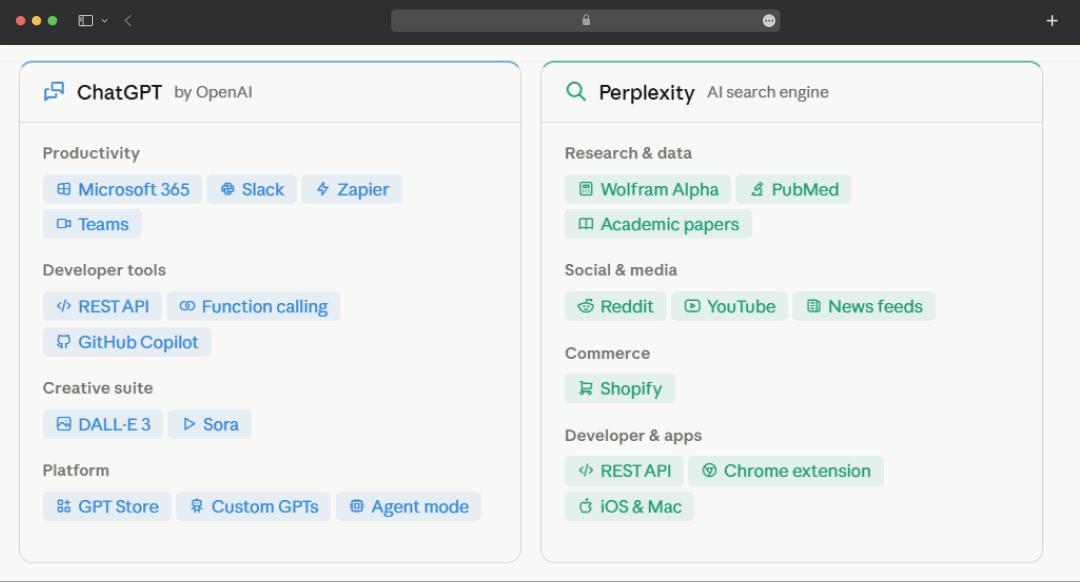
ChatGPT is built for workflow. If you want to use ChatGPT for business, this is where it stands out. It plugs into Microsoft's ecosystem, Slack, Zapier, and a growing library of third-party apps via the GPT Store. The API's function calling means developers can wire it into nearly anything they build.
Perplexity integrates differently, not into your apps, but into where answers live. Wolfram Alpha for calculations, Reddit and YouTube for real-world context, and academic databases for research. Its Focus modes act as built-in source filters, routing queries to the right data channel automatically.
One goes wide with apps. The other goes deep with sources.
Perplexity vs. ChatGPT Comparison of Security
Privacy between these two tools is not a dramatic difference, but it is a meaningful one, and it matters more depending on what you are feeding into your prompts-
| Basis | ChatGPT | Perplexity |
|---|---|---|
| Trains on Your Data by Default | Consumer chats may be used to improve models unless training is disabled | User queries may be used for product improvement unless privacy controls are adjusted |
| Training Opt-Out | Available through Data Controls and privacy settings | Privacy controls are available, though options may vary by plan |
| Conversation & Query Storage | Chat history is stored by default and can be managed through settings | Search queries are stored to support product functionality and improvement |
| Business & Enterprise Privacy | Business and Enterprise plans do not use customer content for model training by default | Business-focused privacy controls are available, though enterprise offerings are more limited |
| GDPR Compliance | Supports GDPR compliance and privacy rights requests | Supports GDPR compliance and privacy rights requests |
| Data Deletion | Users can request deletion and manage data through privacy controls | Data deletion requests are supported through privacy processes |
| Overall Transparency | Provides detailed privacy documentation and user-facing controls | Privacy documentation and controls are available and continue to evolve |
- ChatGPT uses your conversations to train its models by default. The opt-out exists, but it is buried in settings, and most users have never touched it. Turn off chat history, and your data stops being used for training, but you lose the ability to reference past conversations.
- The Team and Enterprise tiers handle this better; training on user data is off by default, which is why most businesses using ChatGPT at scale are on those plans.
- Perplexity is less transparent here. It stores search queries and uses them to improve the product, but the controls are not clearly surfaced. In 2024, the company also drew criticism for its web crawlers ignoring robots.txt directives on publisher sites.
- Though this is not a direct user data concern, but a signal worth noting about how the company approaches data boundaries in general.
|
My Choice: ChatGPT, as it gives you a clearer path to opt out and stronger enterprise-grade protections. Perplexity's privacy story is still catching up. |
Perplexity vs. ChatGPT Use Cases
The easiest way to understand the Perplexity vs ChatGPT differences is to look at what each tool does best in real-world situations. While both can answer questions and generate content, they tend to shine in very different workflows. Below are the use cases where each platform has a clear advantage.
| Use Cases | ChatGPT | Perplexity | Best Pick |
|---|---|---|---|
| Content Writing & Copywriting | Strong tone control, long-form depth, and broad stylistic flexibility | More research-oriented and less focused on creative writing | ChatGPT |
| Coding & Debugging | Excellent for code generation, debugging, explanations, and technical workflows | Can answer coding questions but is less specialized for development tasks | ChatGPT |
| Real-Time Research | Can access current information when web search is used | Built around live web search and current information retrieval | Perplexity |
| Fact-Checking | Useful for analysis but factual claims should be verified independently | Provides source-backed answers with visible citations | Perplexity |
| Academic Research | Strong for summarization, synthesis, and explanation | Particularly useful for locating and citing source material | Perplexity |
| Brainstorming & Ideation | Excellent for creative thinking, strategy sessions, and idea generation | Capable, but primarily optimized for information retrieval | ChatGPT |
| Image Generation | Integrated image generation and editing capabilities | Supports image generation through selected models on paid plans | ChatGPT |
| Current News & Events | Can provide current information when connected to live sources | Designed around live, citation-backed news and web content | Perplexity |
| Data & Document Analysis | Strong support for PDFs, spreadsheets, images, and complex file analysis | More limited for deep document and data workflows | ChatGPT |
| Competitive Intelligence | Strong for synthesis, strategy, and analysis | Real-time sourcing makes it especially useful for market and competitor monitoring | Perplexity |
|
My Choice: I run both. ChatGPT for anything that needs depth, creativity, or heavy lifting. Perplexity every time there is a factual claim I need to stand behind. Picking one over the other is the wrong question; knowing which tab to open first is the right one. |
Bonus Read: Top GEO Tools in 2026
Perplexity vs. ChatGPT: Which One Should You Open by Job
The difference between Perplexity AI and ChatGPT stops being theoretical as soon as you have a real job to do. Feature comparison tables only tell part of the story. I tried both platforms across different scenarios, and here's how the split plays out in practice across different use cases:
1. Research
|
Prompt: I'm building a competitive brief. Give me the current pricing tiers for Notion, ClickUp, and Asana, the biggest feature each has shipped in the last six months, and any recent funding or acquisition news. Cite a source for every claim. |
Going into this test, I expected Perplexity to have the edge. Its reputation is built around web search and sourcing, so I assumed it would be more accurate for research-heavy queries. Surprisingly, that wasn't what I found.
When I ran the same prompt on both platforms, the responses looked very similar at first glance. Both ChatGPT and Perplexity provided source links to back up their answers. However, when I verified the information, I noticed that Perplexity had listed incorrect pricing for Asana.
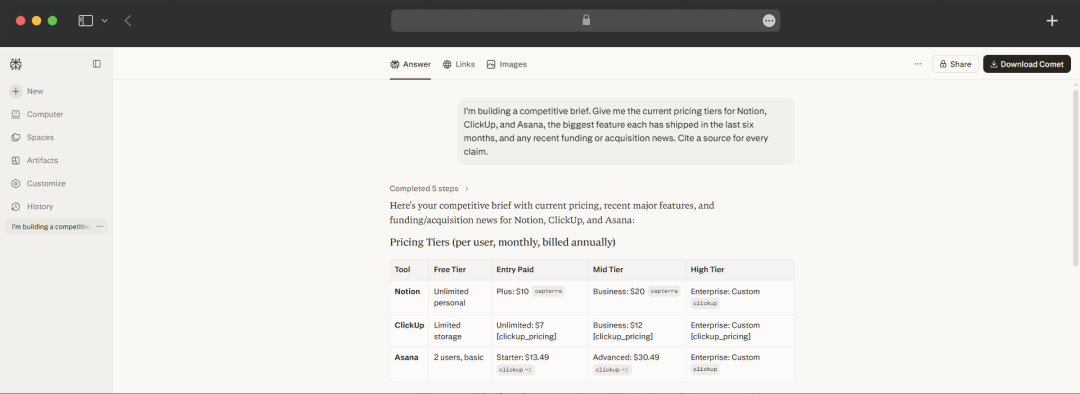
That difference mattered. For broad research tasks, exploring a topic, discovering new angles, or building a list of resources, Perplexity still does a good job of pulling information from a wide range of sources. But when I needed a specific fact to be accurate, such as a current price or a concrete number, I found myself double-checking its answers more often.
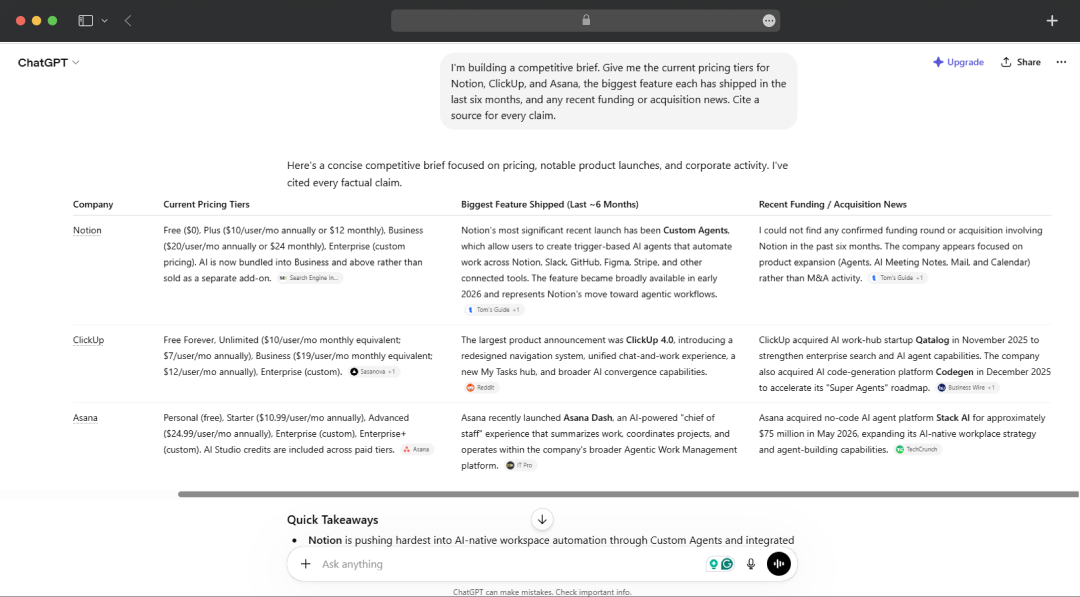
The incorrect Asana pricing was a clear example. The response looked credible, the source was attached, and the format was right, but the number itself was wrong. In my testing, ChatGPT was more reliable when it came to getting those precise details right, which was unexpected given my initial assumption.
2. Writing Anything that Needs a Voice
|
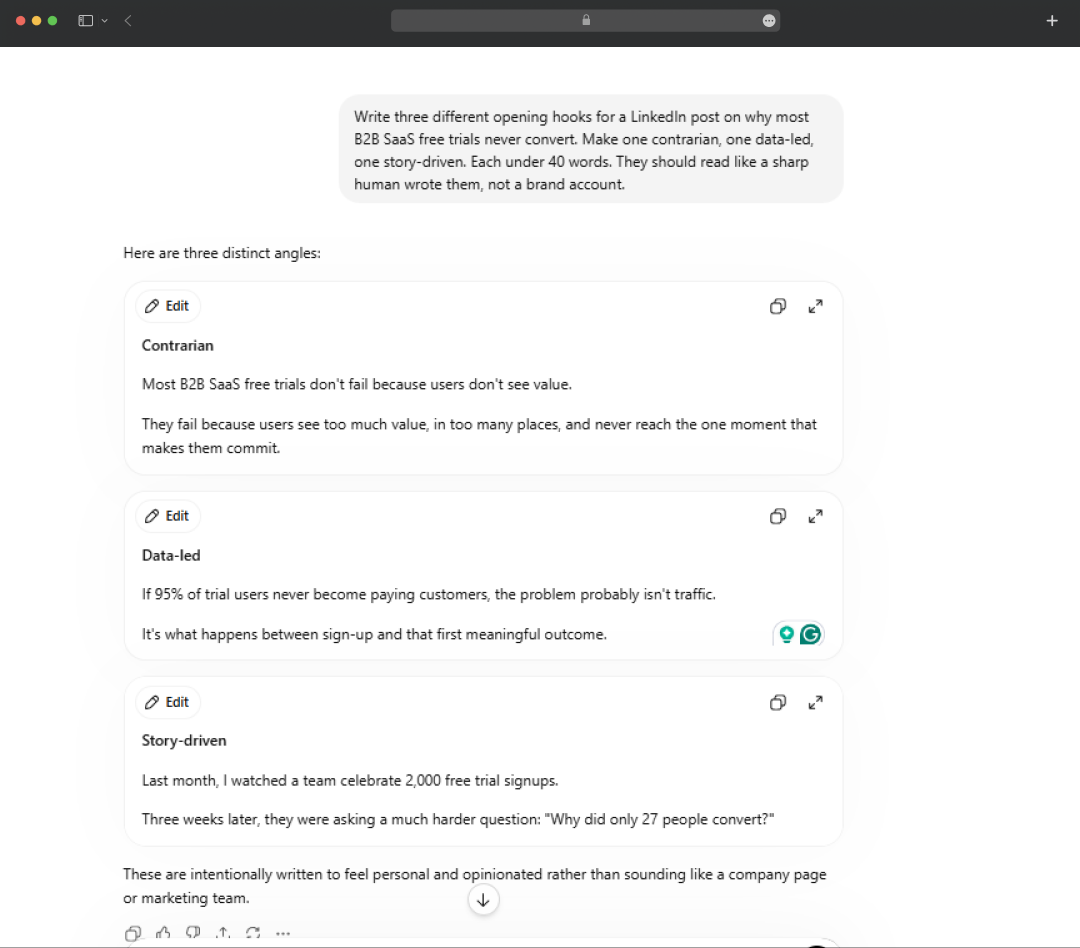
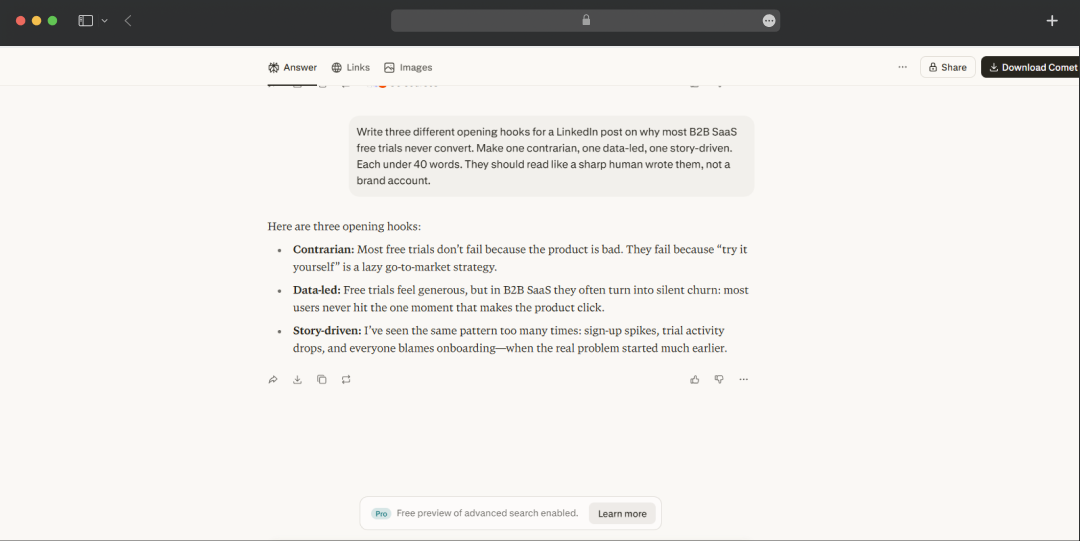
Prompt: Write three different opening hooks for a LinkedIn post on why most B2B SaaS free trials never convert. Make one contrarian, one data-led, one story-driven. Each under 40 words. They should read like a sharp human wrote them, not a brand account. |
For this scenario, without a doubt, ChatGPT took the lead. Drafts, email rewrites, and a punchy introduction that needs multiple angles or distinct voices, ChatGPT always proves itself worthy. It is thus considered one of the best AI essay generators and an exceptional tool for writing, as it perfectly handles tone, structure, and creative expression, which Perplexity simply cannot match.
Perplexity, on the other hand, delivers accurate paragraphs, but it doesn't adapt its writing style as well, making different pieces of content sound alike.
3. Staring Down a Spreadsheet
|
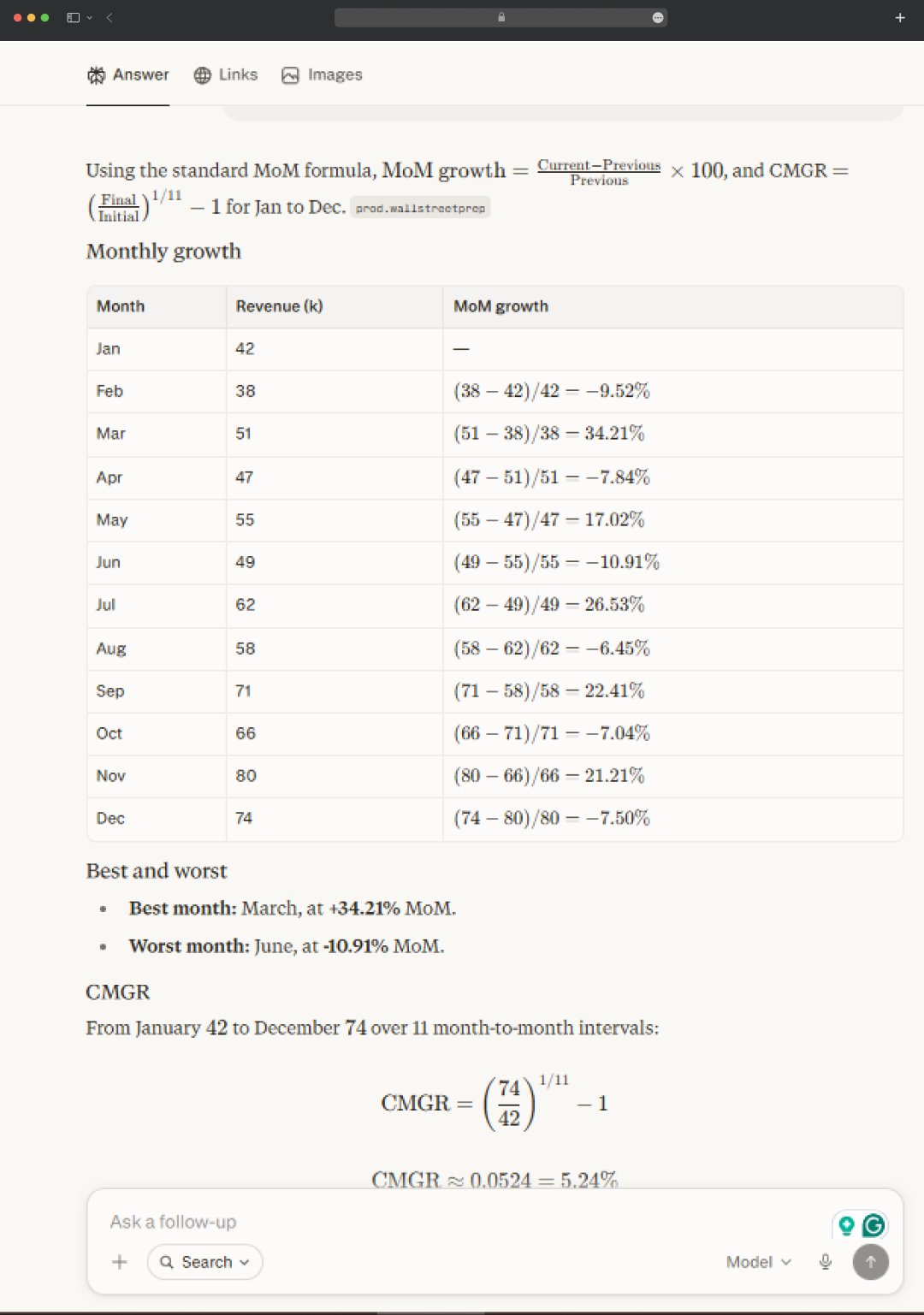
Prompt: Here's the monthly revenue for 2026 (in thousands): Jan 42, Feb 38, Mar 51, Apr 47, May 55, Jun 49, Jul 62, Aug 58, Sep 71, Oct 66, Nov 80, Dec 74. Calculate month-over-month growth for each month, flag the best and worst months, and give me the compound monthly growth rate. Show the calculations. |
This one was a tie for me. I fed both the AI tools with a clean year of monthly revenue and asked for the compound growth rate. Both the platforms quickly reasoned straight through it and handed me similar numbers.
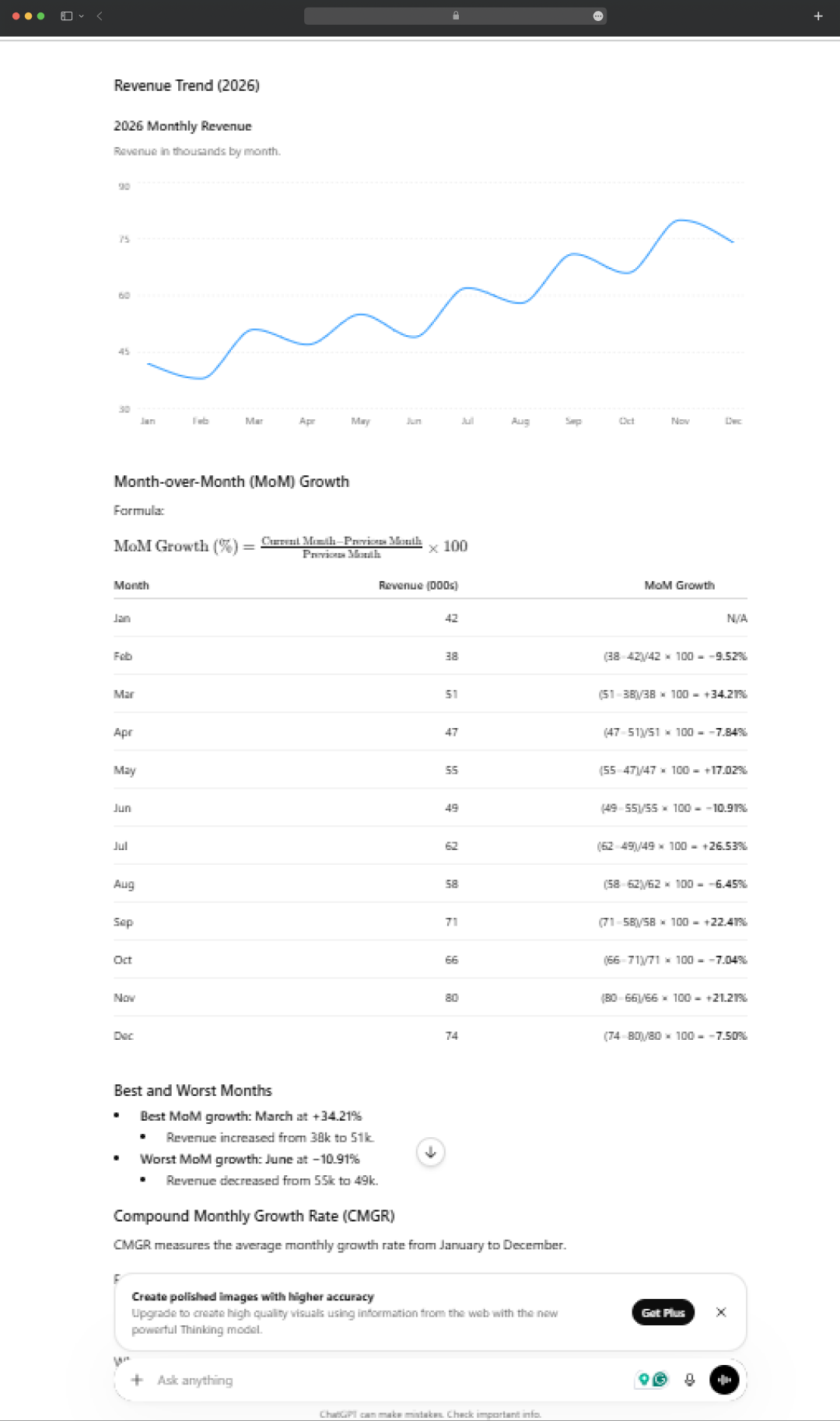
However, I do believe that this was an easy mode for both tools. If you push past easy mode and upload a thousand-row export with blank cells, three different date formats, and a stray word sitting in a number column, the whole thing turns on one capability.
ChatGPT can still run real code on the file, clean it, compute, chart it, and flag the outlier you'd have missed. While Perplexity, which can't execute anything, is back to estimating. The bigger and messier the data, the wider that gap gets.
4. Thinking Out Loud
|
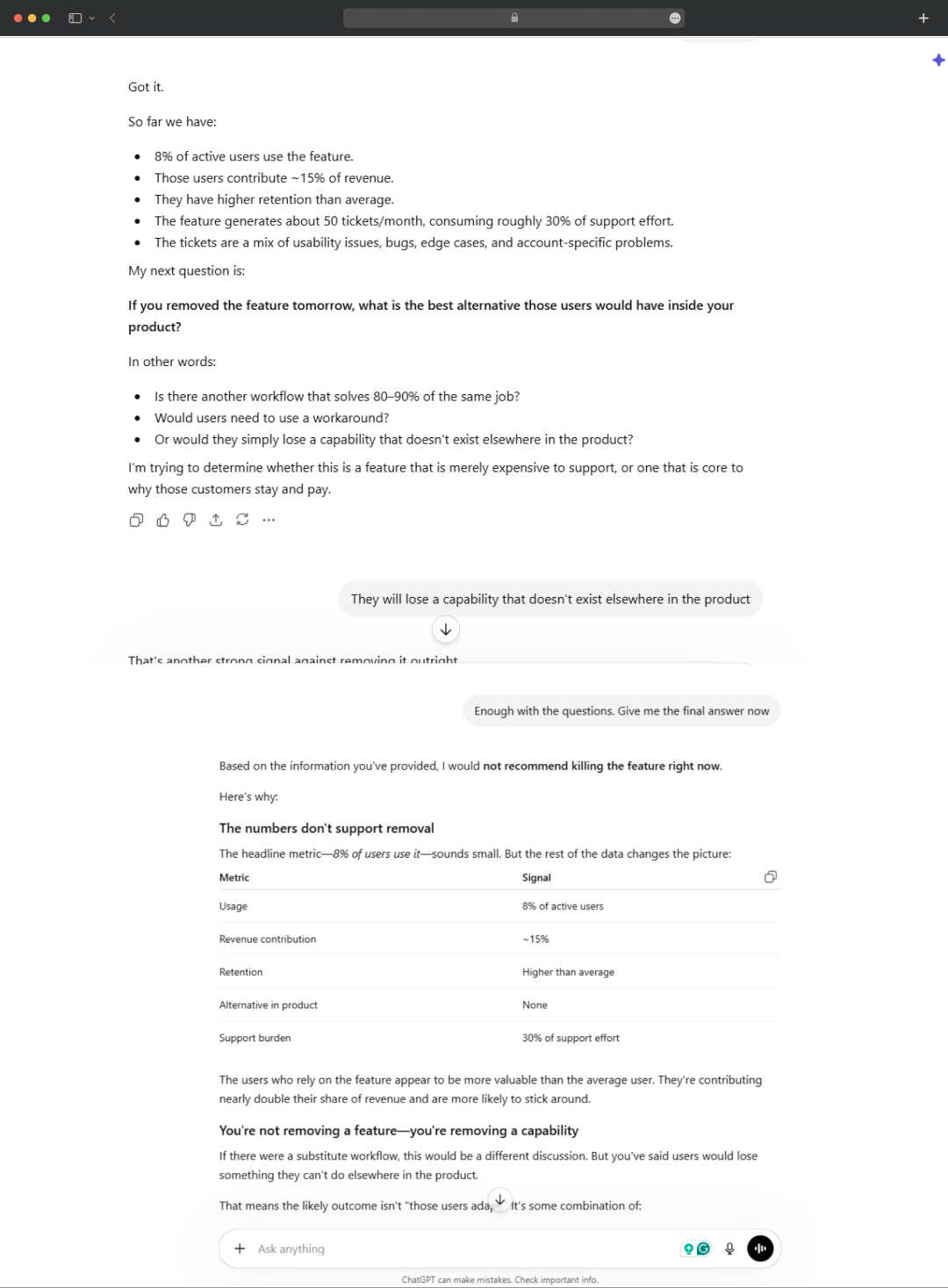
Prompt: I'm deciding whether to kill a product feature that about 8% of users love, but that generates 30% of our support tickets. Don't give me a verdict yet. Ask me the questions you'd need answered to actually advise me, one at a time. |
For conversations that require reasoning rather than research, ChatGPT has a clear advantage. Not every session starts with a question that needs a web search. Sometimes you're trying to make a decision, work through an idea, refine a strategy, or simply think through a problem from multiple angles.
In those situations, ChatGPT feels more like a collaborative partner. It can challenge your assumptions, explore different perspectives, and maintain the context of a long back-and-forth discussion without losing track of earlier details.
Perplexity, on the other hand, is optimized for finding and synthesizing information from the web. It's excellent when you need answers, sources, or quick research, but it often defaults to searching for information rather than engaging in a deeper exploratory discussion.
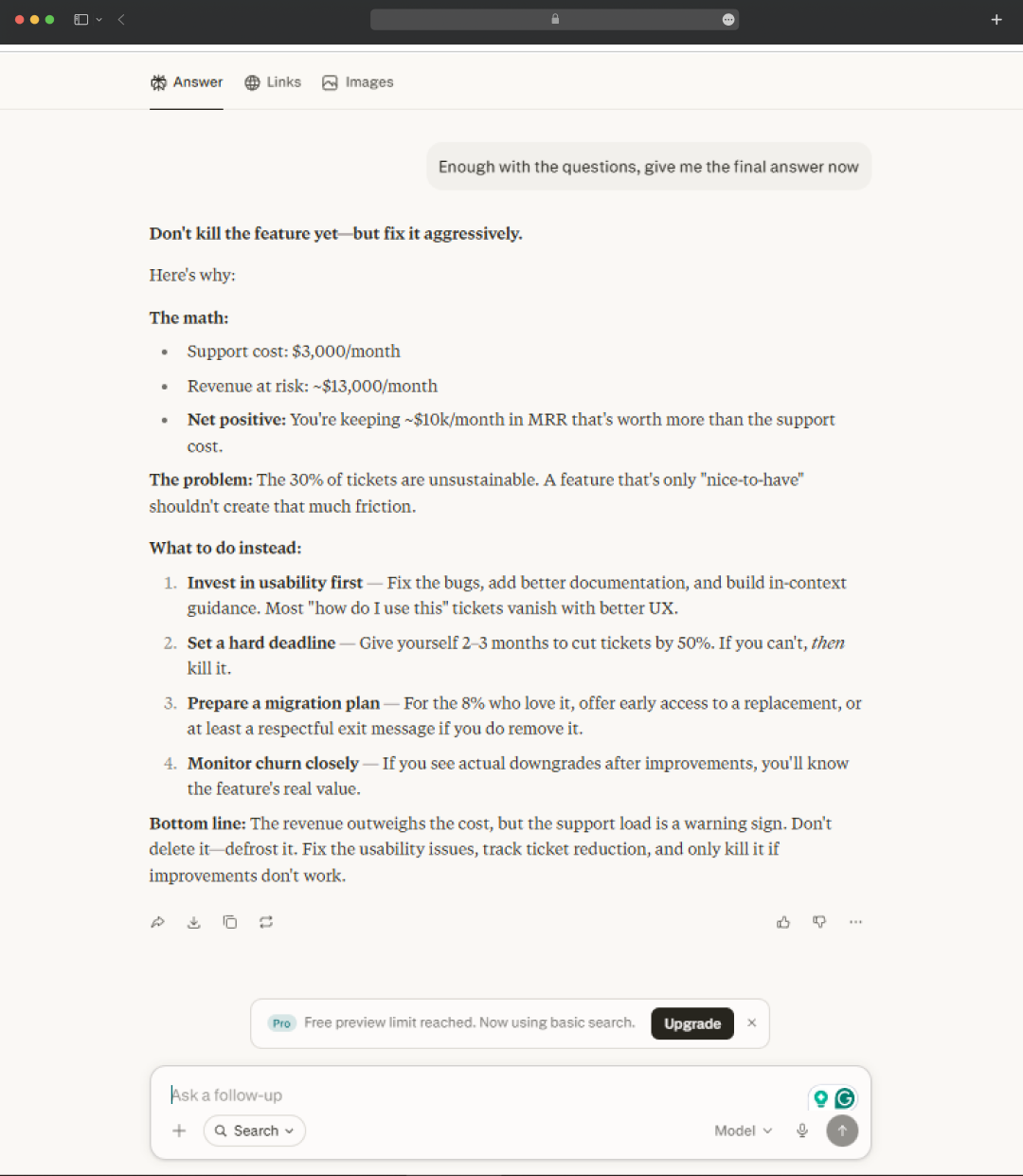
When the goal is to think through a problem instead of looking one up, ChatGPT tends to be the stronger companion.
5. A Fast True Answer for a Specific Problem
|
Prompt: I'm deciding whether to kill a product feature that about 8% of users love, but that generates 30% of our support tickets. Don't give me a verdict yet. Ask me the questions you'd need answered to actually advise me, one at a time. |
Perplexity, but with a caveat. When I need a quick answer about a current event, company update, product launch, or any topic that benefits from fresh information, Perplexity is often the faster option.
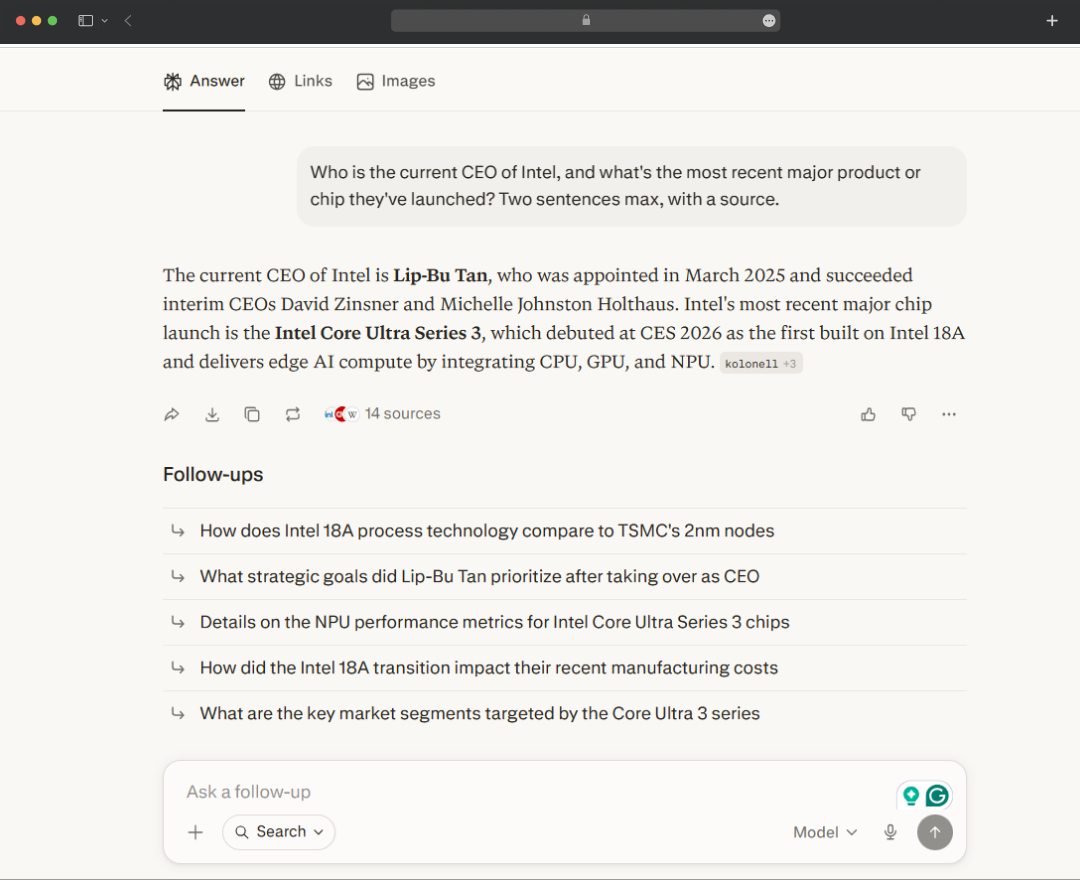
Its ability to pull information from multiple sources and present citations alongside the answer makes the experience incredibly convenient. In many cases, you can get what you're looking for in a single prompt without having to open multiple tabs or run follow-up searches.
ChatGPT can also search the web and cite sources, but it generally feels less optimized for rapid information retrieval. Where ChatGPT shines is in helping you analyze, interpret, and reason about the information after you've found it. It tends to be stronger when the task involves deeper exploration rather than simply surfacing an answer.
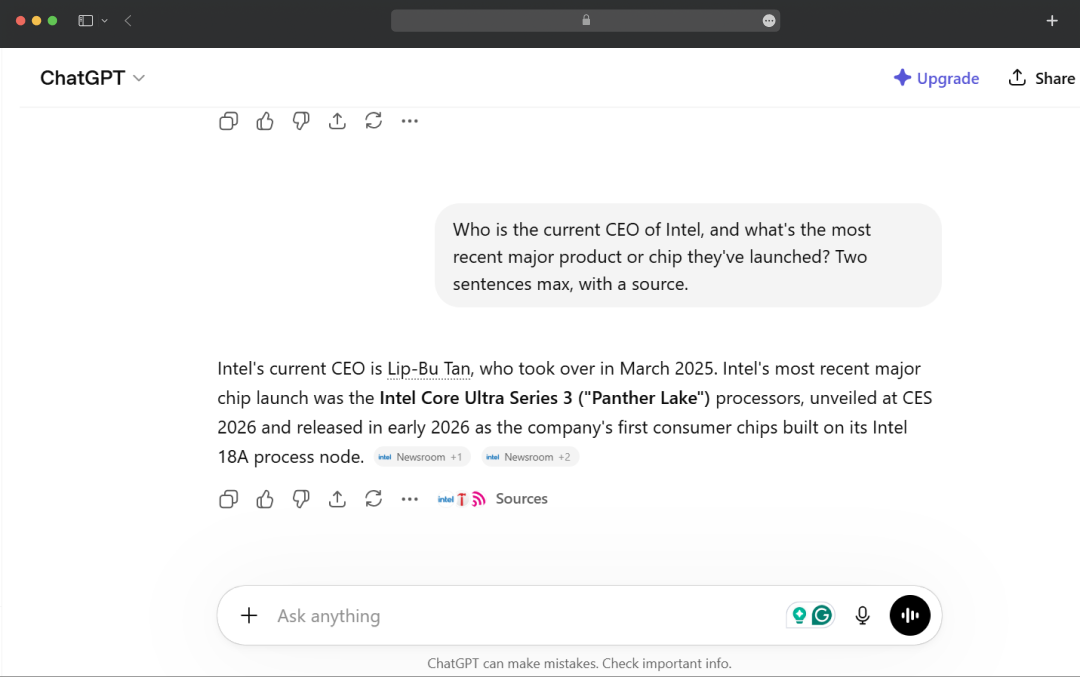
However, speed and citations shouldn't automatically be confused with accuracy. A well-formatted answer with sources can still contain mistakes, misinterpretations, or references that don't fully support the conclusion being presented.
So, Where Should You Invest Your Time (and Money) In?
After all my research and testing, I don't think these two tools are rivals. They're just built for different things.
Yes, the lines are blurring. ChatGPT keeps adding search, and Perplexity keeps adding writing features. But the core difference still holds.
If you can only pay for one, follow your workflow. Do you spend most of your time creating, writing, building, or analyzing? Go with ChatGPT. Do you need fast, broad research? Go with Perplexity, just treat its citations as a starting point, not the final word.
And if you find yourself choosing both, that's not indecision. It's just recognizing two tools that were never trying to do the same job, and neither of which deserves your blind trust.
Frequently Asked Questions
What is Perplexity vs ChatGPT?
ChatGPT is a conversational AI built for writing, coding, and complex problem-solving. Perplexity is an AI-powered search engine that pulls real-time, cited answers directly from the web. Same surface-level experience, very different under the hood.
When to use Perplexity AI vs ChatGPT?
Use Perplexity when you need current, sourced information, research, fact-checking, news, or anything where accuracy has real consequences. Use ChatGPT when the task requires depth, writing, analysis, coding, or creative work that benefits from extended reasoning.
Perplexity AI vs ChatGPT: Which is better?
Neither is objectively better; they are built for different jobs. ChatGPT wins on reasoning, creativity, and workflow integration. Perplexity wins on real-time accuracy and sourcing. The right answer depends entirely on what you are trying to do.
Is Perplexity better than ChatGPT for research?
For research that demands current, verifiable information, yes. Perplexity's inline citations and live web grounding mean you can trace every claim. ChatGPT's training data can lag, and it rarely surfaces its sources unprompted.
Can Perplexity replace Google?
For a large chunk of queries, it already does, synthesising results and delivering a direct answer without the tab-hopping. That said, for local search, shopping, and navigational queries, Google still has the edge.

Uncover executable insights, extensive research, and expert opinions in one place.
Related Content