

Gemini Review: The Deep Research Feature Is Impressive, If You Have the Patience for It
Gemini needs no introduction at this point. Google's AI assistant has been around long enough for most people to have formed an opinion, or at least a first impression. But first impressions and actual, day-to-day usability are two different things.
As someone who uses AI apps and tools as part of a writing workflow, I wanted to dig deeper than the surface-level verdict most people land on.
I tested Gemini across the tasks that actually matter in a writing job, research, drafting, summarizing, and brainstorming, to figure out where it genuinely earns its place and where it still has room to grow. In this Gemini review, here's what regular use actually looks like.
Google Gemini Overview
Google Gemini is Google's flagship family of generative AI models and the consumer-facing platform built on top of them. Formerly known as Google Bard, the product was rebranded to Gemini AI in early 2024 and has since evolved into one of the most capable and widely deployed AI platforms in the world.
By mid-2026, the Gemini app surpassed 900 million monthly users and is available in over 230 countries across more than 70 languages, making it arguably the most globally accessible AI assistant on the market.
What sets Gemini apart from rivals is its deep, native integration with Google's broader ecosystem, Search, Gmail, Docs, Drive, Sheets, Slides, Chrome, and Android. Plus, its multimodal capabilities span text, image, audio, and video.
Pros and Cons of Gemini
Pros
- Most generous free tier among major AI platforms, includes Deep Research, Gemini Live, and basic image generation at no cost
- Native integration across Gmail, Docs, Drive, Sheets, and Android creates a compounding productivity advantage for Google ecosystem users
- 1-million-token context window is the largest available in the consumer AI market
- Gemini 3.5 Flash is one of the fastest AI models available, consistently outpacing Claude and often ChatGPT on response speed
- Deep Research produces structured, cited, multi-section reports that genuinely rival hours of manual research
- Multimodal capabilities, text, image, audio, and video, handled through a single unified architecture
- Nano Banana 2 image generation is built directly into the interface with useful in-chat refinement
Cons
- Best features, Gemini Spark, higher Deep Research limits, Veo 3.1 video generation, are locked behind Pro or Ultra plans
- Writing quality, while very good, is slightly formulaic compared to competitor’s more natural prose output
- Ultra plan at $100/month is only compelling value for users deeply embedded in Google's ecosystem
- Gemini Spark, one of its most exciting features, is currently limited to US-based Ultra subscribers only
- Can hallucinate on niche or rapidly evolving topics, fact-checking outputs remains necessary for professional use
A Closer Look at Gemini’s Features
Google Gemini features go well beyond what most AI assistants offer, and that gap has widened considerably over the past year. From autonomous research agents to native video generation and deep Workspace integration, here's a closer look at what's actually inside the platform.
1. Deep Google Ecosystem Integration
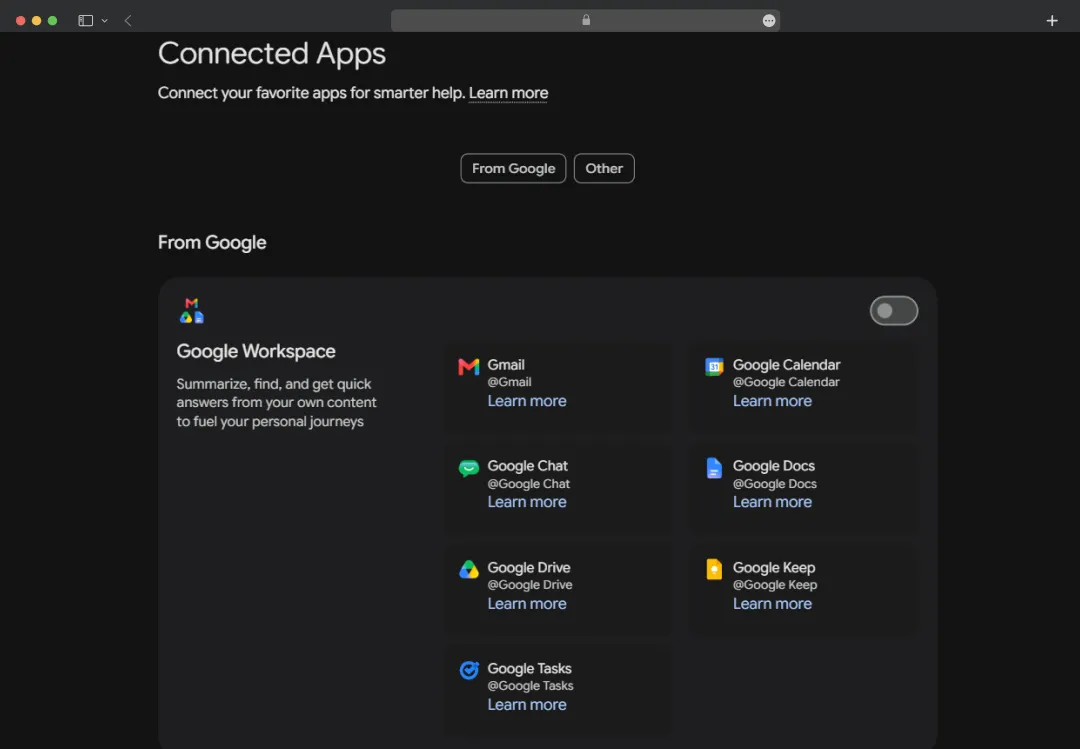
This is Gemini's single greatest competitive advantage. Unlike standalone virtual AI assistants, Gemini is woven into virtually every product Google ships. Within Gmail, it can draft emails, summarize long threads, and suggest replies.
Within Google Docs and Sheets, it assists with writing, data analysis, and formatting. Within Google Drive, it can search, summarize, and synthesize content from files the user already owns. Within Search, it powers AI Mode, a next-generation search experience with agentic capabilities.
If you are already living inside Google's ecosystem, this integration creates a compounding productivity effect that no competitor can yet replicate at scale.
2. Gemini Spark: The 24/7 Autonomous Agent
One of the most significant announcements at I/O 2026, Gemini Spark is a cloud-based autonomous agent that operates persistently in the background, even when the user's phone is locked.
It can manage inboxes, schedule appointments, execute multi-step tasks, and connect the dots across Gmail, Calendar, Drive, and other Google services, all under the user's direction. Spark is currently rolling out to Google AI Ultra subscribers in the US, with broader availability planned over the summer of 2026.
3. Daily Brief
Daily Brief is a personalized morning digest feature that pulls together the user's Gmail, Calendar, and most important pending tasks into a single, intelligent overview.
Rather than simply summarizing information, it prioritizes tasks and suggests next steps, turning the start of the day from a reactive scramble into an action plan. It is available to AI Plus, Pro, and Ultra subscribers in the US.
4. Gemini Live
Gemini Live enables real-time, low-latency voice conversations that feel closer to a natural phone call than a robotic Q&A exchange. It supports fluid, back-and-forth dialogue with the ability to interrupt, redirect, and ask follow-up questions mid-sentence, a significant step beyond voice mode implementations in earlier AI assistants.
5. Deep Research
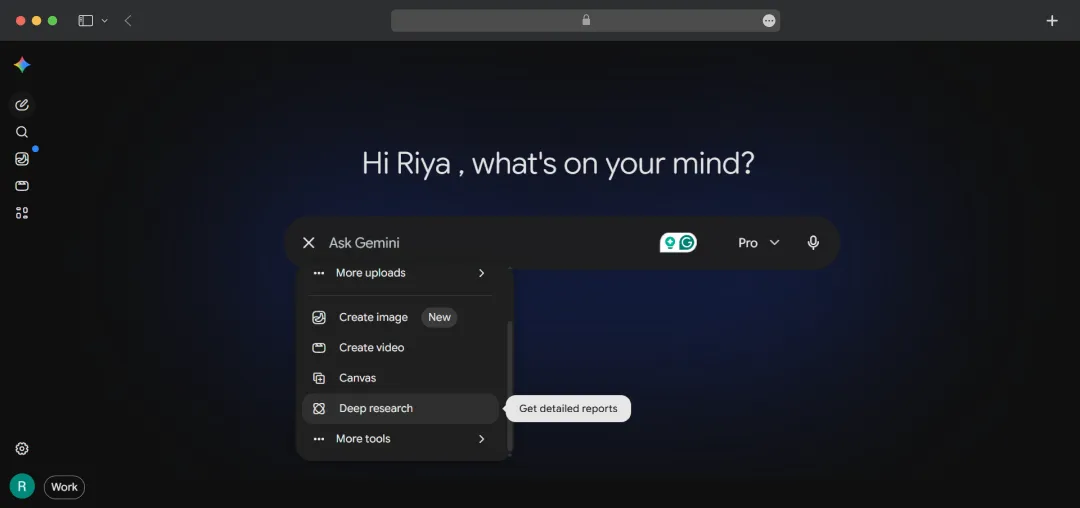
Deep Research is Gemini's autonomous research agent. Given a topic or question, it formulates a multi-step research plan, conducts web queries, synthesizes findings from multiple sources, and produces a structured report with citations.
The free tier allows 5 Deep Research sessions per month; paid subscribers get significantly higher limits (20 per day for AI Pro). It is widely regarded as one of the best automated research tools available on any AI platform.
6. Gemini Gems
Gemini Gems is a personalization feature that lets users create custom versions of Gemini tailored to specific roles, tasks, or workflows. Each Gem can be configured with a distinct set of instructions, a defined persona, and relevant context, turning Gemini into a focused assistant for things like content editing, coding support, or customer research.
Gems are available across Gemini Advanced and Google Workspace, making it easy to save, reuse, and share task-specific AI setups without re-prompting from scratch every session.
7. Massive Context Window (1 Million Tokens)
Gemini's 1-million-token context window is the largest available among mainstream consumer AI platforms. In practical terms, this means Gemini can read and reason over entire books, large codebases, extensive legal documents, or extensive conversation histories without losing track of details. This is a genuine differentiator for professionals working with long documents or large datasets.
8. Gemini Canvas
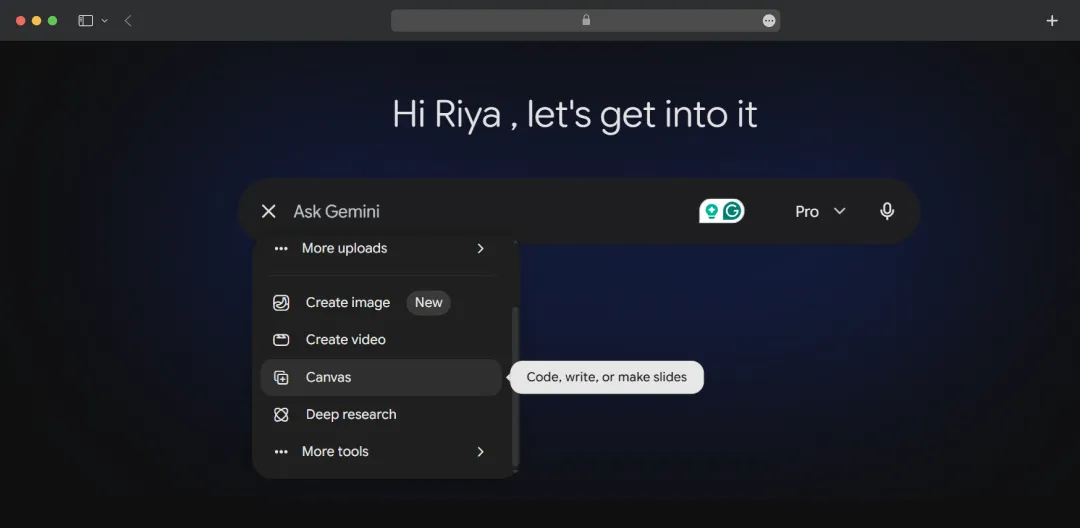
Canvas is a collaborative writing and editing space that allows users to draft, refine, and iterate on long-form content with Gemini AI. It offers a cleaner experience for document-centric tasks than the standard chat interface and supports inline editing, version control, and export.
9. NotebookLM
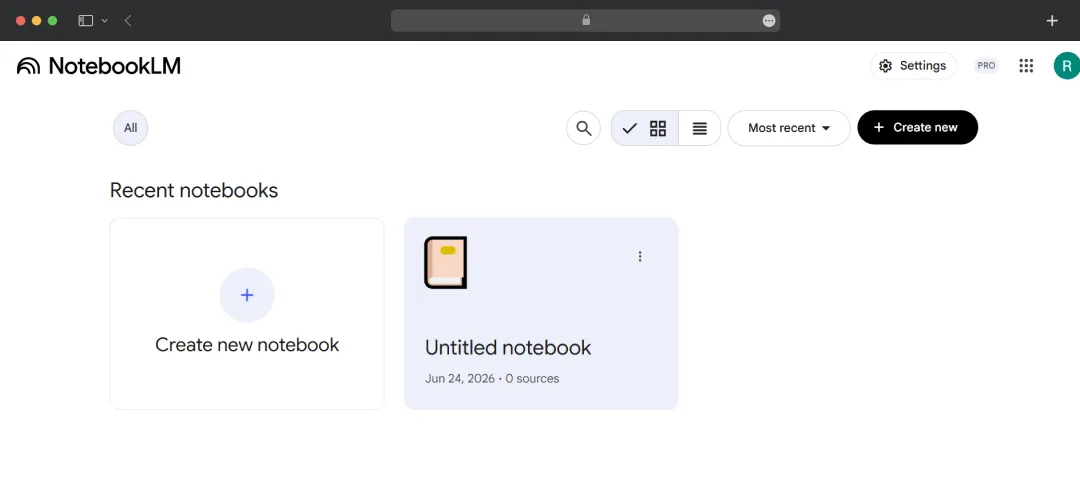
NotebookLM is an AI-powered research notebook that allows users to upload source documents, research papers, PDFs, and notes, and then interact with that material through Gemini.
It supports Audio Overviews, AI-generated podcast-style summaries of source materials, and is particularly valuable for students, researchers, and knowledge workers. Pro subscribers get 5× the Audio Overview access compared to the free tier.
10. Google Flow and Veo
Google Flow is an AI-native filmmaking tool powered by Veo 3.1, Google's video generation model. It allows users to create cinematic, high-quality video content from text prompts, reference images, and existing video clips.
Gemini Omni, announced at I/O 2026, extends these capabilities further, making it possible to generate, edit, and remix video content using purely natural language instructions.
11. Gemini Code Assist and Jules
For developers, Gemini Code Assist provides in-IDE coding assistance, code review, and documentation generation. Jules is an asynchronous coding agent, available in beta to Pro and Ultra subscribers, that can take on longer, multi-step coding tasks and execute them in the background while the developer focuses on other work.
12. Neural Expressive UI
At I/O 2026, Google unveiled a redesigned interface called Neural Expressive, rolling out globally across web, iOS, and Android. It replaces the traditional wall-of-text response format with a more dynamic presentation: key information appears in bold at the top, and additional content, including images, timelines, and interactive elements, unfolds as the user scrolls.
The design features fluid animations and vibrant colors, reflecting the platform's shift toward a richer, more immersive user experience.
Understanding Gemini Pricing and Subscription Plans
Google Gemini’s subscription plans were significantly restructured at Google I/O in May 2026, with a new tiered lineup and a notable price reduction at the Ultra level.
If you're weighing Gemini free vs. paid, the free tier is genuinely capable for casual use, but the gap widens quickly once you need higher Deep Research limits, video generation, or Workspace integration.
| Plan | Price | Key Inclusions |
|---|---|---|
| Free | $0/month | Gemini 3.5 Flash (daily quota), limited Gemini 3.1 Pro access, basic image generation, 5 Deep Research reports/month, Gemini Live voice mode, 15 GB Google One storage |
| Google AI Plus | $7.99/month | Enhanced Gemini 3.1 Pro access, more NotebookLM Audio Overviews, 200 GB Google One storage |
| Google AI Pro | $19.99/month | Gemini 3.1 Pro with Deep Research (20 sessions/day), Veo 3.1 video generation, 1,000 monthly AI credits, Gemini Code Assist, Jules coding agent, upgraded NotebookLM, Gmail and Docs integration, 2 TB Google One storage |
| Google AI Ultra | $100/month | 5× higher usage limits vs Pro, Gemini 3.5 Flash priority, 20 TB storage, YouTube Premium, $100/month Google Cloud credits. Gemini Spark (US-only) exclusive |
| Google AI Ultra (Heavy) | $200/month | 20× Pro usage limits, designed for the heaviest users. All Ultra inclusions apply |
| Gemini API (Developer) | Free + paid tiers | Free key via Google AI Studio for prototyping; paid tiers include Standard, Batch, Flex, and Priority inference. Gemini 3.5 Flash priced below comparable frontier models |
| Google Workspace Add-On | $14/user/month | Activates Gemini AI inside Gmail, Docs, Sheets, and Slides for business teams on Google Workspace |
Who is Gemini Suitable For?
Based on most Gemini reviews by users, the real value of the platforms depends heavily on how and where you work. It doesn't try to be best at everything, but for certain workflows it pulls way ahead from other paid and free AI chatbots in the market. Here’s who all :
| User Type | Why Gemini Works for Them |
|---|---|
| Google Workspace Users | Native AI integration across Gmail, Docs, Drive, and Sheets makes it the most seamless choice for anyone already in Google's ecosystem |
| Researchers | Deep Research and NotebookLM offer some of the best document-centric AI available, with up to 5 free Deep Research reports per month on the free tier |
| Content Creators & Marketers | Veo 3.1 video generation and strong multimodal capabilities make it a practical tool for visual content workflows |
| Android Users | Native OS-level integration means Gemini works across the device, not just inside a browser tab |
| Developers | Strong fit for teams building on Google Cloud, Firebase, or Android, with Gemini Code Assist, Jules coding agent, and competitive API pricing |
| Heavy Document Users | The 1-million-token context window is unmatched in the consumer market — ideal for processing large codebases, long reports, or multi-source research |
| Budget-Conscious Users | The free tier is one of the most capable among all major AI platforms, covering most casual and moderate use cases without a subscription |
| Students & Academics | Deep Research, long-context summarization, and NotebookLM make it well-suited for literature reviews, essay research, and studying across large reading lists |
Gemini’s Model Family
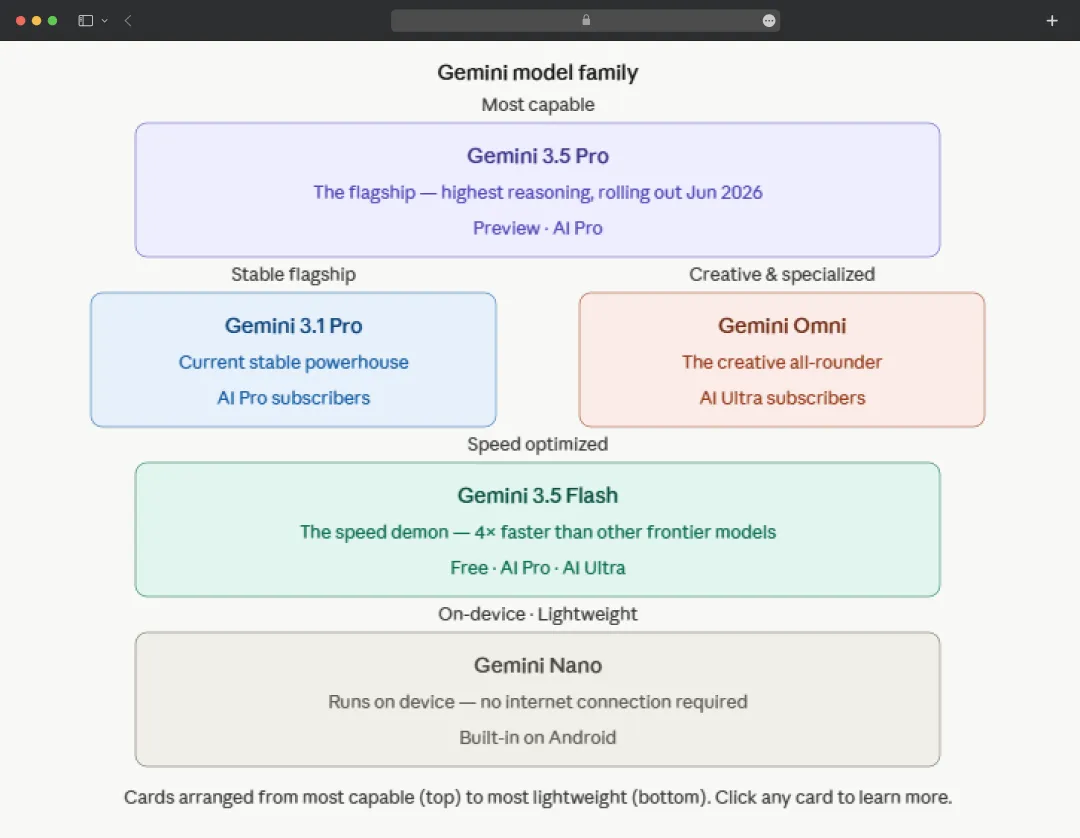
At the heart of this conversational AI platform is a tiered family of models designed for different use cases and compute profiles. Here are the key Gemini models you need to know-
| Gemini Model | Description |
|---|---|
| Gemini 3.5 Flash | This is the newest and fastest model in the family, optimized for agents, coding, and complex long-horizon tasks |
| Gemini 3.5 Pro | This is the high-end flagship rolling out through June 2026. It is designed for frontier reasoning, multimodal tasks, and enterprise-scale workflows |
| Gemini 3.1 Pro | This remains the current stable flagship, available to Google AI Pro subscribers. It represents a significant step up from earlier generations, outperforming Gemini 3 Pro 2× on the ARC-AGI-2 benchmark |
| Gemini Omni | This is an entirely new category, a groundbreaking model that accepts any input (text, image, audio, video) and produces dynamic video as output |
| Gemini Nano | This serves on-device AI needs, powering local inference on Android handsets and edge hardware without requiring a cloud connection |
Also Read: How to Use Gemini AI Models
Google Gemini’s Performance and Benchmark
Behind every AI assistant’s real-world behavior are the benchmark scores that tell us how well a model actually reasons, writes codes, or handles different use cases. While I believe that benchmark scores are not the best criteria for evaluating a model. A model that scores well in the labs might still frustrate users.
Here’s how Gemini ranks-
| Benchmark | What It Tests | Gemini 3.1 Pro |
|---|---|---|
| GPQA Diamond | Graduate-level science reasoning | 94.30% |
| ARC-AGI-2 | Abstract novel reasoning | 77.10% |
| SWE-bench Verified | Real-world software engineering | 63.80% |
| HumanEval | Standard code generation | 94.50% |
| CharXiv | Chart/figure comprehension | 84.20% |
| Context Window | Input capacity | 1M tokens |
- Speed: Gemini 3.5 Flash is noticeably faster than Claude and often faster than ChatGPT, particularly on straightforward queries.
- Context Window: The 1-million-token context window remains unmatched in the consumer AI market, a significant advantage for long-document and multi-source tasks.
- Multimodal Capability: Leads the field on image reasoning, video understanding, and rich media generation. Gemini Omni represents a meaningful step forward in video generation, specifically.
- Overall Positioning: Consistently the "safe all-rounder" in head-to-head comparisons, rarely the best in any single category, but rarely the worst either. Tends to place first or second across most task types in blind testing.
- Strongest Use Cases: Google Workspace-heavy workflows, deep research tasks, and multimodal processing, areas where Gemini AI regularly outperforms rivals.
*Where Competitors Pull Ahead: Claude produces more natural-sounding prose and cleaner code, making it the stronger pick for writing and software engineering. ChatGPT's GPT-5.4 leads on structured business reasoning, computer use, and broader ecosystem integrations.
How Does Gemini AI Work?
Understanding what happens under the hood helps explain why this AI research assistant behaves the way it does, why it is fast, why it handles images and video natively, and why it can hold context across an entire codebase or document library.
1. Transformer Architecture
Built on Google's own 2017 transformer design, which processes entire inputs in parallel using self-attention, enabling the speed and scale modern AI requires.
2 Mixture of Experts (MoE)
Instead of activating the full network for every query, Gemini routes each token to a small subset of specialized "expert" sub-networks. This is why Gemini Flash stays fast and affordable without sacrificing reasoning depth.
3. Native Multimodality
Unlike models that bolt image and audio processing on top of a text model, Gemini processes all modalities, text, images, audio and video, through a single unified architecture. This is why it can reason across inputs simultaneously rather than just describing them separately.
4. Google TPU Infrastructure
Trained and served on Google's custom eighth-generation Tensor Processing Units, purpose-built for transformer workloads. This hardware directly enables the 1-million-token context window, fast response times, and extended thinking modes without crippling latency.
5. Serving Modes
Handles requests across four configurations: standard response, token-by-token streaming, thinking mode (silent chain-of-thought reasoning before output), and agentic mode (connects to external tools and APIs to complete multi-step tasks). Deep Research, Gemini Spark, and Jules all run in agentic mode.
6. Training and Safety
Post-training pipeline includes supervised fine-tuning, RLHF, and adversarial red-teaming. Safety filters, instruction classifiers, and function-call monitors run at inference time as additional layers of protection.
Comparing Gemini Against Other Generative AI Models
To put Gemini AI in proper context, I compared it against three other generative AI tools that most of us are choosing between- ChatGPT, Claude, and Grok. Here’s a quick overview-
| Criteria | Gemini (Google) | ChatGPT (OpenAI) | Claude (Anthropic) | Grok (xAI) |
|---|---|---|---|---|
| Context Window | 1M tokens | 128K tokens | 1M tokens | 131K tokens |
| Multimodal Support | Text, image, audio, video | Text, image, audio | Text & image only | Text & image only |
| Writing Quality | Very good, slightly formulaic | Good, structured output | Best-in-class, most natural prose | Casual tone, decent quality |
| Coding Ability | Strong, best for large codebases | Best for engineering tasks | Cleanest, most idiomatic code | Capable, rapidly improving |
| Response Speed | Fastest (Gemini Flash) | Very fast | Moderate | Very fast |
| Free Tier | Most generous, Flash, Deep Research, Live | GPT-4o with daily limits | Very limited | Requires X account, heavy limits |
| Ecosystem Integration | Native in Gmail, Docs, Drive, Android | Plugins, GPT Store, broad API | API-first, limited native integrations | X/Twitter only |
| Agentic Capabilities | Leading, Spark, Deep Research, Jules | Strong, Operator agents, computer use | Strong, tool use, Claude Code | Early stage, limited scope |
| Pro Plan Pricing | $19.99/mo + 2TB storage | $20/mo | $20/mo | $30/mo (via X Premium+) |
Bonus Read: Claude AI vs. ChatGPT vs. Gemini
Testing Gemini AI in Real-World Scenarios
Specs, features, and benchmarks only go so far. What really matters is how Gemini actually performs when you sit down to use it. Here are 2 different scenarios, I tested this tool in-
I. Running Deep Research Report on a Business Topic
I went to gemini.google.com and selected “Deep Research” from the left-hand panel. This switches Gemini out of standard chat mode and into its autonomous research agent.
*Worth knowing: free users get 5 Deep Research sessions per month, and AI Pro subscribers get 20 per day.
I typed in my research prompt and kept it specific rather than vague:
"Research the current state of AI regulation in the European Union, cover the EU AI Act, its risk tiers, enforcement timeline, and what it means for businesses operating in Europe."
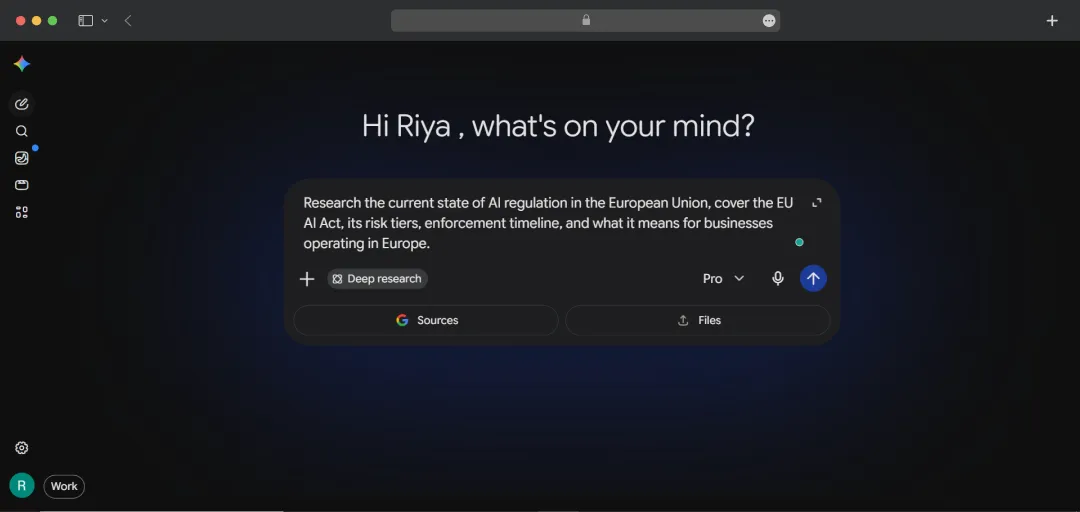
My tip here is to be as precise as possible. If you give it a broader promp, the output will be less focused.
I reviewed and edited the research plan before it started. This is the part that surprised me most. Gemini did not immediately start searching. It first generated a structured plan, along with the types of sources it planned to consult and the sections the final report would include. I read through it and then hit confirm.
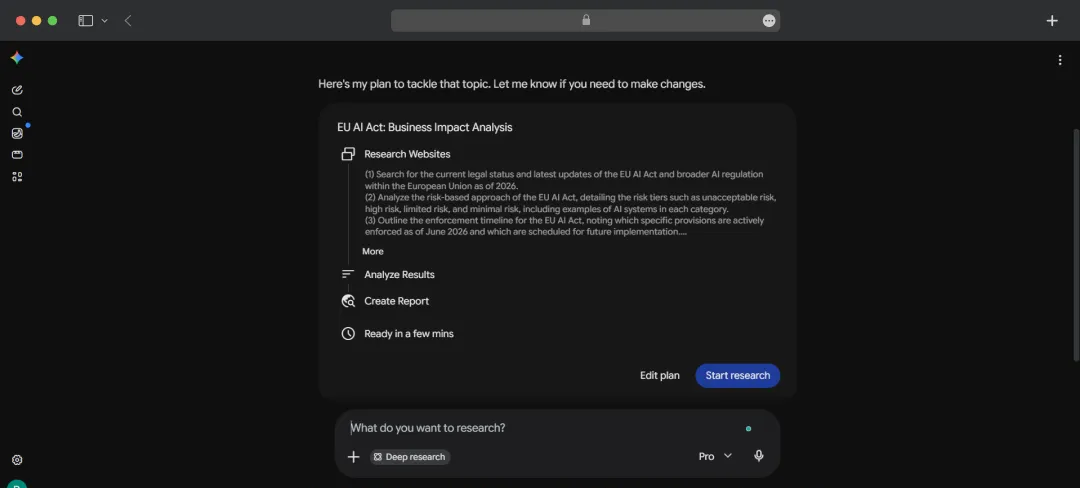
As soon as I confirmed the plan, Gemini ran the process in the background. And then I waited. And waited. Twenty minutes in, the report still hadn't landed, no result, no error message, just the loading indicator doing its thing. I'll be honest: I didn't have the patience for it. For a feature that's supposed to save you time, sitting in front of a spinning screen for over 20 minutes defeats the purpose entirely.
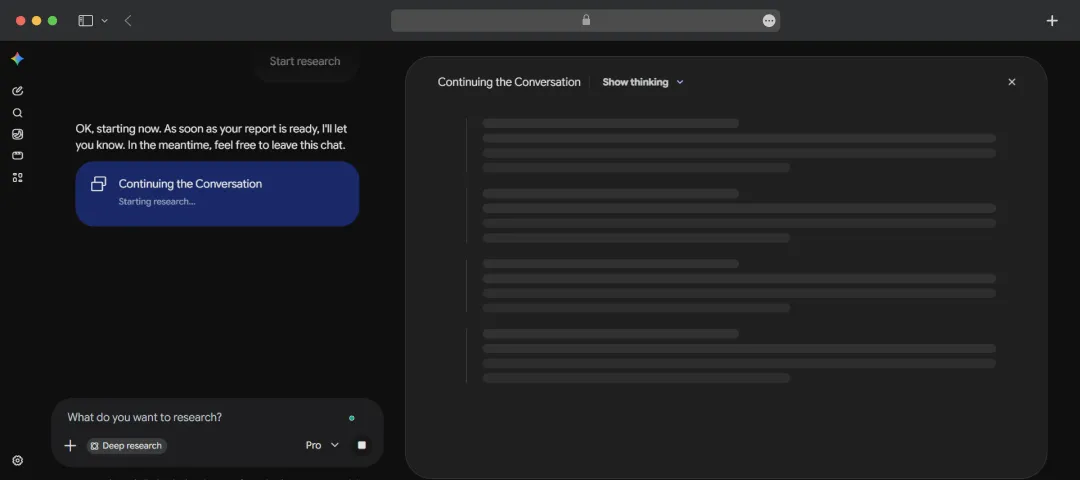
My verdict: This appears to be a free-tier throttling issue rather than a reflection of what Gemini’s Deep Research actually delivers, paid users report significantly faster turnaround. But that's exactly the point. If you're evaluating Gemini on the free plan, Deep Research may frustrate more than it impresses. The feature itself is genuinely powerful; the free-tier experience, however, needs work.
II. Generating an Image with Gemini’s Nano Banana 2
Gemini has its own image generation tool built right into the interface, no third-party integrations, no switching tabs. Powered by Nano Banana 2, it's accessible directly from the Create Images section in the sidebar.
I clicked the image generation icon from the left sidebar inside the Gemini app, which opened the Create Images interface with Nano Banana 2 as the default model.
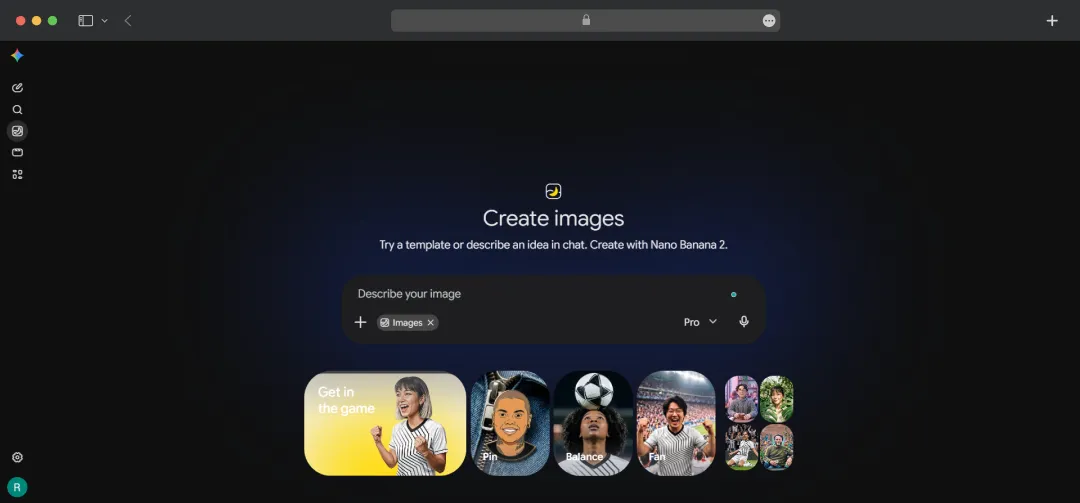
I typed the prompt directly into the description bar and hit generate. No additional settings to configure, the interface keeps it minimal.
My Prompt: "A solo female traveller sitting at a quiet rooftop café in Kyoto at golden hour, warm light hitting ceramic coffee cups on the table, soft bokeh background of traditional tiled rooftops, cinematic and editorial in style."
Gemini returned beautiful within seconds. The lighting and overall mood were handled well, the golden hour warmth came through clearly across most outputs.
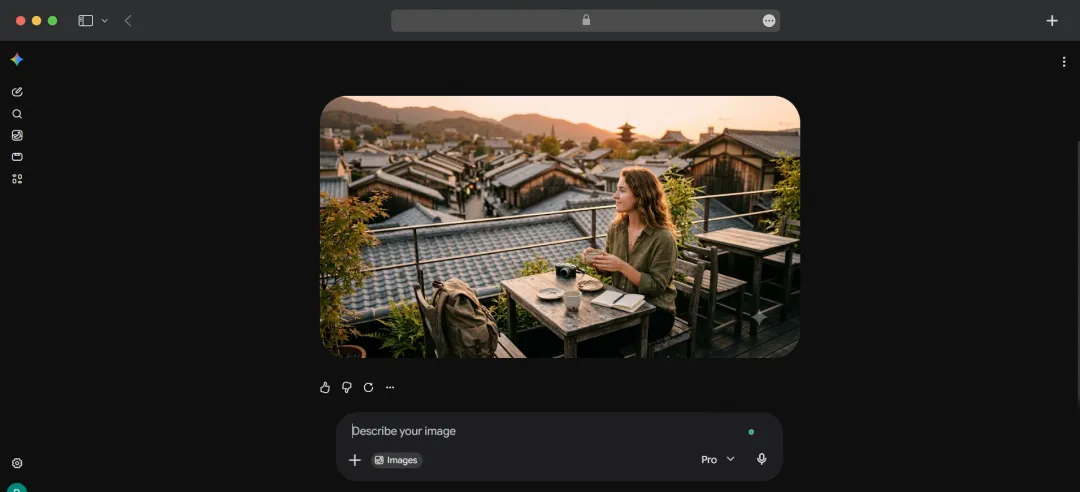
I followed up with "make the background more detailed, show more of the Kyoto rooftops" directly in the chat, and Nano Banana 2 adjusted without needing a full re-prompt. That in-chat refinement is genuinely useful.

My verdict: Nano Banana 2 is competent and fast, and the in-chat iteration makes the workflow smoother than most standalone image tools. It's not at the level of Midjourney for artistic output, but for editorial, content, and everyday creative use, it holds up well, especially on the free tier.
Customer Reviews
How was your experience with the product?














