
The answer is yes, and not just one option. Today’s family tracking apps go far beyond basic location sharing. From smarter safety alerts and driving insights to more flexible privacy controls, the alternatives are designed to give you greater control without feeling intrusive.
In this guide, we’ll explore the best apps like Life360 that help you stay connected, informed, and secure, while offering features that may suit your lifestyle even better.
A Quick Glance Over the Best Apps Like Life360
Before diving into the details, here’s a quick side-by-side look at the best apps like Life360. This comparison table highlights key features, pricing, and what each app does best, so you can quickly narrow down your options.
| App Name | Primary Focus | Real-Time Tracking | Geofencing Alerts | Screen Time Control | Pricing Model |
|---|---|---|---|---|---|
| Google Family Link | Device management & parental controls | Yes | Yes (Basic) | Yes | 100% Free |
| GeoZilla | GPS tracking & driving safety | Yes | Yes | No | Freemium |
| iSharing | Location sharing & SOS panic alerts | Yes | Yes | No | Freemium |
| Glympse | Temporary, privacy-focused location sharing | Yes (Timed) | No | No | 100% Free |
| Familo | Family locator & private group chat | Yes | Yes | No | Freemium |
| Bark | Content monitoring & cyberbullying prevention | Yes | Yes | Yes | Paid |
| FamiSafe | Comprehensive parental & device controls | Yes | Yes | Yes | Paid |
| Kidslox | Screen time limits & app blocking | Yes | Yes | Yes | Freemium |
| Qustodio | Digital wellbeing & strict web filtering | Yes | Yes | Yes | Freemium |
| OurPact | Screen time scheduling & family locator | Yes | Yes | Yes | Freemium |
Read Less
List of the Similar Apps Like Life360

Pros & Cons
Pros
- Let's parents remotely lock devices instantly, useful in real-time discipline scenarios
- Provides visibility into app install intent before kids download anything
- Integrates directly with the Google Play ecosystem for tighter control
- Activity insights are tied to actual app usage patterns, not just screen time
Cons
- No passive location alerts like “arrived at school” or “left home”
- Doesn’t support monitoring of messages, calls, or social platforms
- Limited usefulness for teens who rely heavily on non-Google apps
- Lacks contextual alerts (no risk detection or behavior flags)
Why You'll Love It
Along with reliable location tracking, Google Family Link gives you unparalleled control over your child's digital habits. This completely free app, like Life360, lets you monitor screen time, approve or block app downloads, and remotely lock devices.More about product
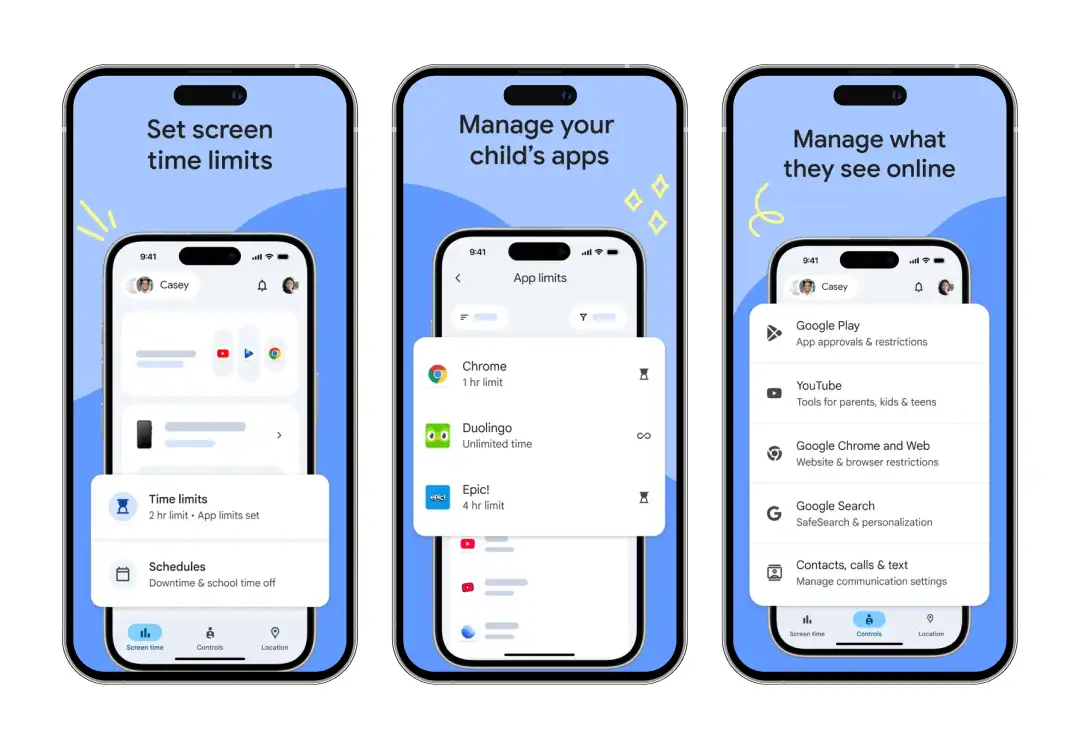
Google Family Link stands out as a powerful parental control alternative to Life360 by offering an incredibly robust, all-in-one device management and location-sharing ecosystem. The app is built around keeping families connected, providing real-time GPS tracking on a live map.
If you wish to manage digital well-being alongside physical safety, Family Link allows you to set granular daily screen time limits and establish strict device bedtimes. Along with this, it helps you establish a safer online environment with built-in content filters.
It gives you the authority to hide specific apps on their device, require parental approval for any new downloads or in-app purchases from the Google Play Store, and manage content restrictions.
This is one of the best apps similar to Life360 that combines dependable physical tracking with comprehensive digital supervision in a single app.

Pros & Cons
Pros
- Offers driving behavior insights (speeding, harsh braking) add a safety layer beyond tracking
- The crash detection feature can automatically notify emergency contacts
- Smart location timelines help reconstruct daily movement patterns
- Designed more for safety-first families than casual location sharing
Cons
- Less effective indoors or in low-signal environments
- Limited tools for managing kids’ digital habits
Why You'll Love It
GeoZilla does something most family trackers don't: it works with both phone GPS and dedicated hardware GPS trackers. So if your kid is too young for a phone, you can clip a small tracker to their bag and still see them on the same family map.More about product
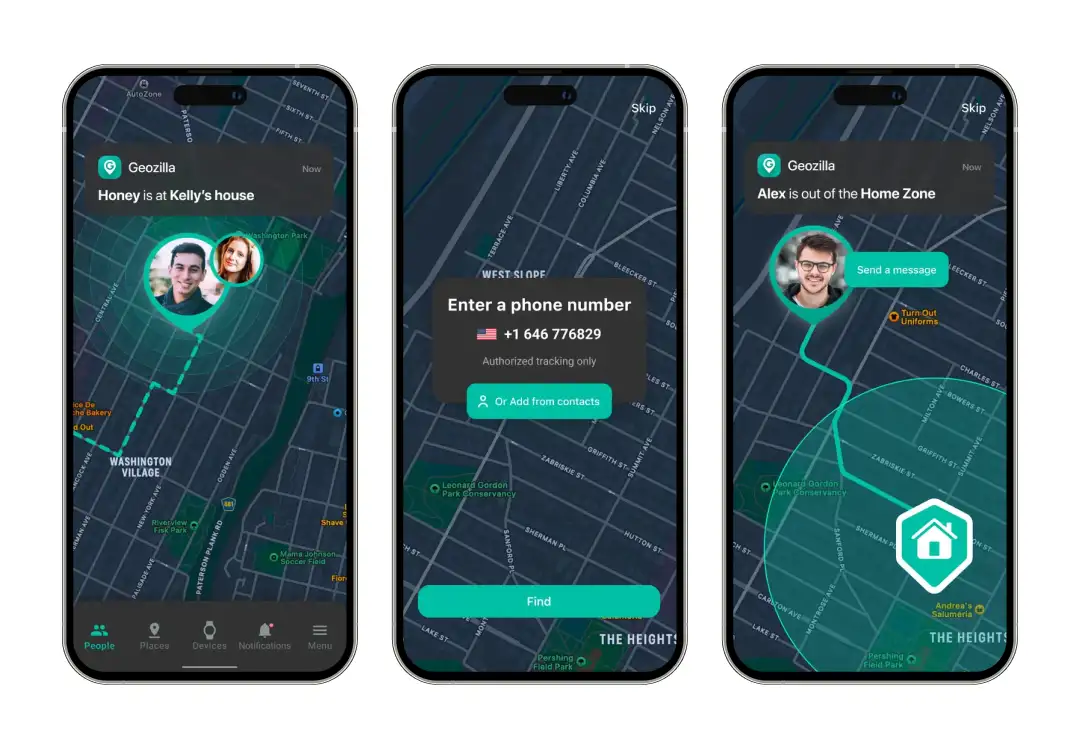
GeoZilla is a family location-sharing and safety app that goes beyond basic phone tracking. You can create private family circles where every member has to accept an invite and actively consent to sharing their location before anything gets shared. This consent-first approach is baked into the entire experience.
You get live GPS tracking, location history (up to two weeks on premium), and customizable geofence alerts for places like home, school, and work. There's also a low battery alert, so you're not left wondering why your kid's dot just disappeared from the map.
Where GeoZilla gets more interesting is its safety features. The app uses your phone's motion sensors to detect potential car crashes and automatically alerts your emergency contacts with your location. It also tracks driving habits like speeding, sudden braking, and phone use behind the wheel.
The app even pairs with Wear OS smartwatches, so you can check locations directly from your wrist. If you want a Life360 alternative that handles both phone-based and hardware-based tracking for pets, kids, cars, or elderly family members from a single app, GeoZilla is worth a try.

Pros & Cons
Pros
- Dedicated panic alert sends real-time distress signals with exact coordinates
- Location updates are fast and responsive during movement
- Allows selective sharing (not all members see everything)
- Works well in group scenarios beyond just families
Cons
- The voice messaging feature can feel redundant compared to regular apps
- No filtering or monitoring of online activity
- Notifications can become frequent without customization
Why You'll Love It
iSharing has a unique feature, an inactivity alert. If someone in your circle hasn't moved for an unusually long time, you'll get a notification. That makes it especially useful for families keeping tabs on elderly parents or anyone with health concerns.More about product
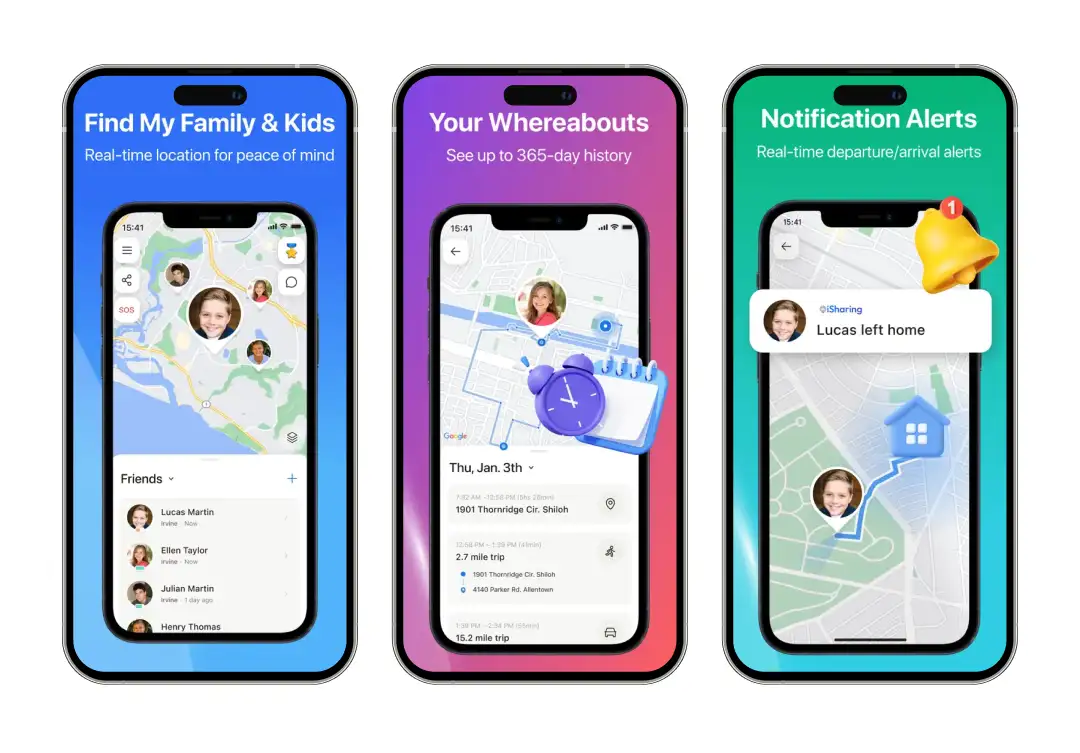
Trusted by over 50 million users globally, iSharing is a GPS location tracker built around real-time family connection. The core experience revolves around a private map where your family members appear as live dots, and you can set up Place Alerts for custom zones like school, home, or the gym.
What really separates iSharing from other apps like Life360 is its communication features. There's a built-in walkie-talkie that lets you send instant voice messages to anyone in your circle without needing to make a phone call.
For parents of teen drivers, the app provides detailed driving reports covering speed, hard braking, rapid acceleration, and even phone usage while driving. And unlike most trackers that give you a few days or weeks of location data, iSharing's premium tier stores up to a full year of GPS timelines with routes and timestamps.
The app also integrates Google and Apple Maps Street View, so instead of just seeing a dot on a flat map, you can actually look at the real-world surroundings of your family member's location. If you are looking for apps better than Life360 that work across iPhone, Android, iPad, and even have a web app for checking in from your laptop, iSharing is definitely the best choice.

Pros & Cons
Pros
- Time-bound sharing ensures the location automatically disappears after a set duration
- No login friction, perfect for one-time coordination
- Ideal for situations like rides, deliveries, or meetups
- Strong privacy model with zero long-term data retention
Cons
- No persistent tracking—requires manual sharing every time
- No alerts, history, or safety-triggered notifications
Why You'll Love It
Glympse flips the script on location sharing. Instead of tracking someone 24/7, you share your location temporarily, for as few as five minutes or as long as twelve hours, and it automatically expires. The best part? The person you share with doesn't even need the app.More about product
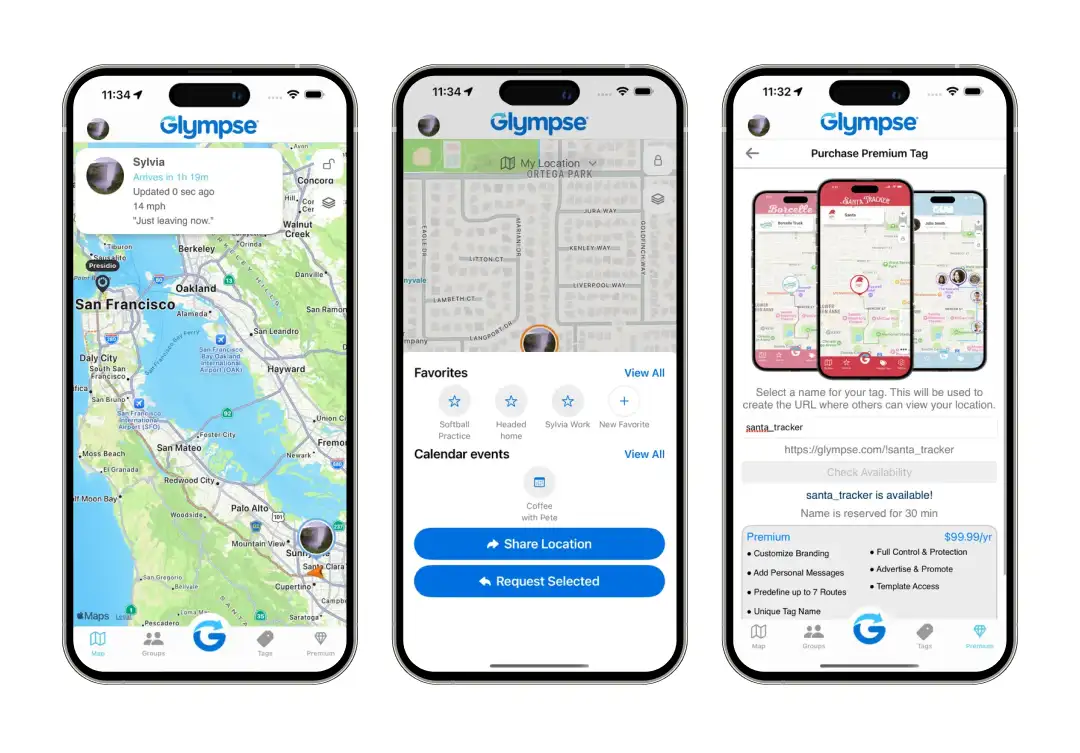
If the idea of constant location tracking makes you uncomfortable, but you still want a way to let people know where you are, Glympse is literally built for you. Its entire philosophy revolves around temporary, user-controlled sharing.
The experience is simple. You open the app, choose a contact, set a timer, and hit send. Your recipient gets a link via text, email, or any messaging app, no downloads, no sign-ups, no accounts required on their end.
They see your live dot moving on a map with a real-time ETA that adjusts as you drive. When the timer runs out, your location disappears completely. For families, Glympse offers Private Groups, which are invite-only circles where members can share and request each other's locations.
This works well for coordinating school pickups, family road trips, or checking that a teen made it to their destination safely. There are also public Tags for events like fun runs, food trucks, or carpool groups, where multiple people can broadcast their location on a shared map.
It's not the app for parents who want around-the-clock monitoring, but if you value privacy and want location sharing that respects boundaries, it's one of the cleanest alternatives to Life360 out there.
Bonus Read: 10+ Best Family Locator Apps for Smartphones

Pros & Cons
Pros
- “Places” feature triggers alerts based on real-world routines (school, office, etc.)
- Emergency SOS includes location + immediate family notification
- Designed specifically for tight-knit family circles, not broad sharing
- Supports structured family groups with controlled visibility
Cons
- Struggles with precision in crowded urban environments
- Limited insights beyond location-based activity
- Fewer integrations with external services or platforms
Why You'll Love It
Along with pinpoint accuracy, Familo provides a streamlined, lightweight interface that works exceptionally well even in areas with poor cellular reception. Its opt-in approach makes it a good fit for families with older teens or adults who'd resist more heavy-handed tracking.More about product
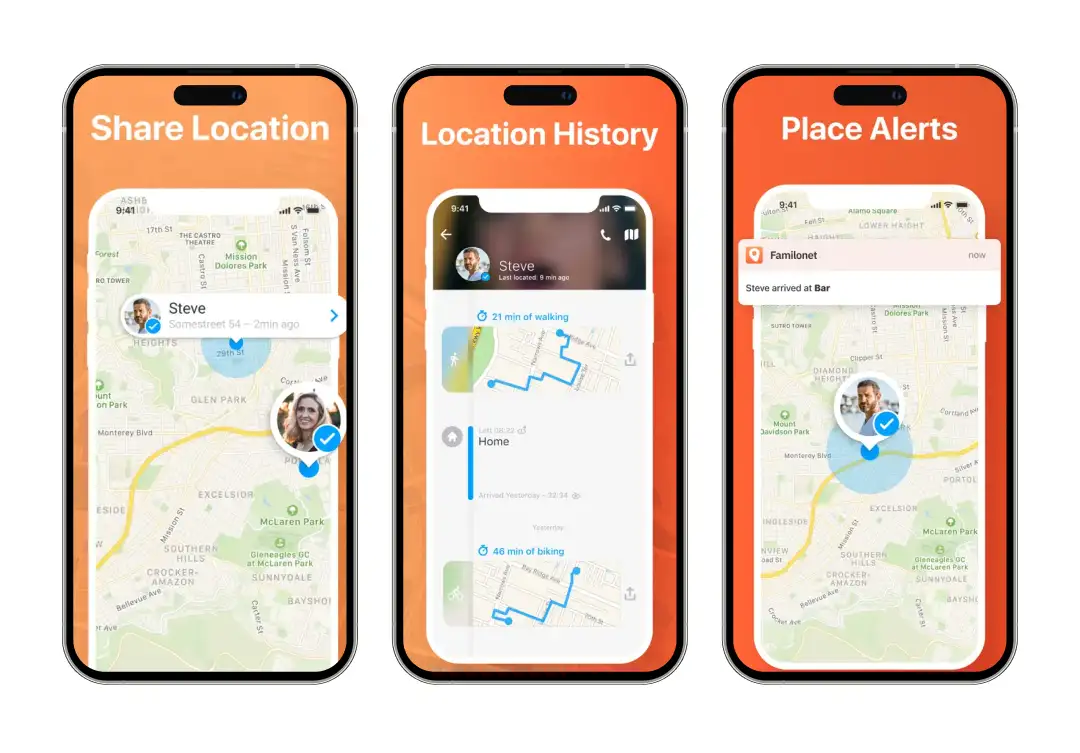
Familo is a GPS family locator designed to do one thing really well: keep your family connected on a shared map. Everyone in the circle gets real-time location updates, and you can set up Intelligent Places, saved locations like home, school, or the office, that trigger automatic notifications when someone arrives or leaves.
Every family member has to download the app, accept the invitation, and grant location permissions before any sharing begins. Each person also controls who can see their location and can turn off visibility whenever they want.
In emergencies, there's a Panic Button that instantly sends your current GPS location to everyone in your group. The built-in private chat supports text messages, images, and voice messages, so you can keep all family communication inside one app.
Familo is notably light on battery, which is a common complaint with always-on GPS apps. It also keeps a small app size of around 35 MB, runs well on older devices, and supports multiple groups so you can have separate circles for immediate family, extended relatives, or friend groups. It's free to use, with a premium tier available for extras.

Pros & Cons
Pros
- AI scans tone and intent in conversations, not just keywords
- Covers a wide range of platforms, including email and niche social apps
- Focuses on early detection of risks like bullying or self-harm signals
- Sends summarized alerts instead of overwhelming raw data
Cons
- May flag false positives due to context misinterpretation
- Doesn’t prioritize real-time location visibility
- Requires trust-building, as monitoring can feel invasive
Why You'll Love It
Bark doesn't just track your kid's location; it reads the room. Using AI, it scans texts, emails, and over 30 social media platforms for signs of cyberbullying, predatory behavior, depression, and even suicidal ideation, then sends you an alert only when something actually looks concerning.More about product
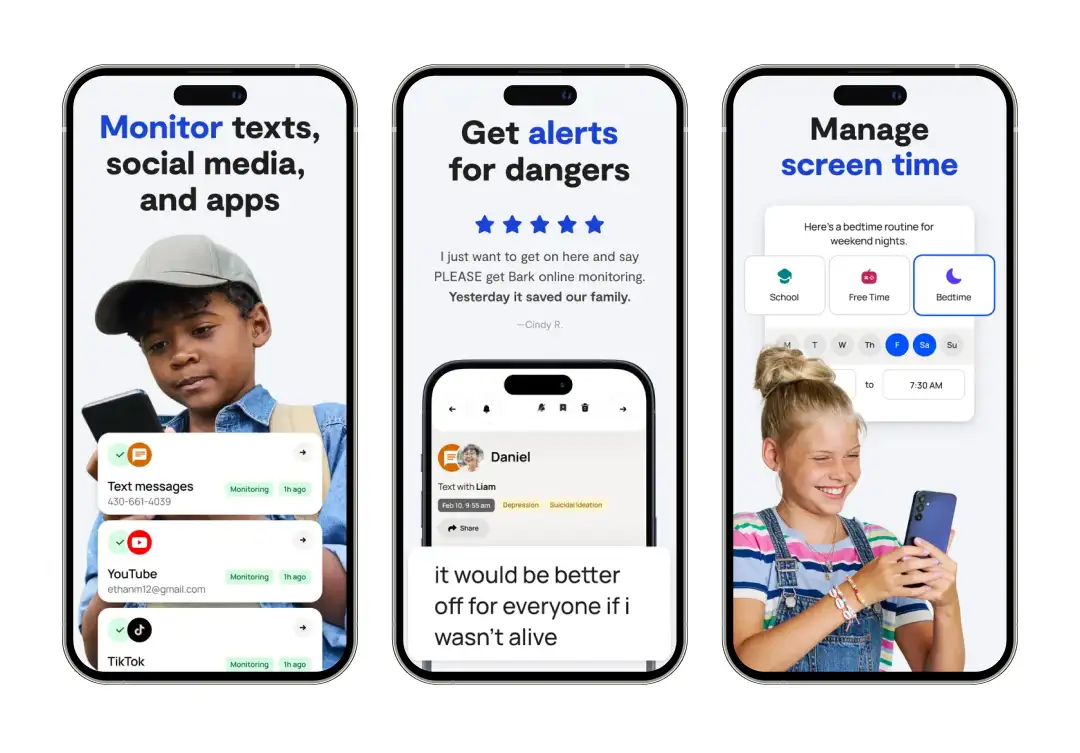
Bark takes a fundamentally different approach to family safety compared to Life360. Where Life360 is primarily a location tracker, Bark is a content monitoring powerhouse that also happens to have GPS tracking built in.
The app's AI engine scans activity across social media platforms like Instagram, Snapchat, TikTok, Discord, YouTube, and Gmail, over 30 apps in total. But instead of giving parents a full readout of every conversation, Bark uses contextual analysis and natural language processing to identify when something is actually risky.
On the screen time side, you can set schedules for when apps and internet access are available, block specific websites or entire categories, and filter content across devices. The location tracking feature includes live GPS, geofenced alerts, and a check-in system where your child can share their whereabouts on request.
Bark works across iPhones, Android phones, tablets, Chromebooks, Amazon Fire tablets, and even desktop computers. The pricing starts at $14 per month or $99 per year for the premium plan, which covers unlimited children and devices in a single family.

Pros & Cons
Pros
- Detects risky content patterns across apps, including suspicious keywords
- Combines screen behavior + physical location into one dashboard
- Tracks driving habits alongside digital activity
- Offers timeline-based activity breakdowns for better context
Cons
- Monitoring depth may feel excessive for younger kids
- Interface can feel data-heavy for quick checks
Why You'll Love It
FamiSafe by Wondershare goes deeper than most parental control apps thanks to its AI-powered content detection. It doesn't just flag keywords; it uses semantic analysis to catch risky conversations, suspicious images, and even sensitive emojis.More about product
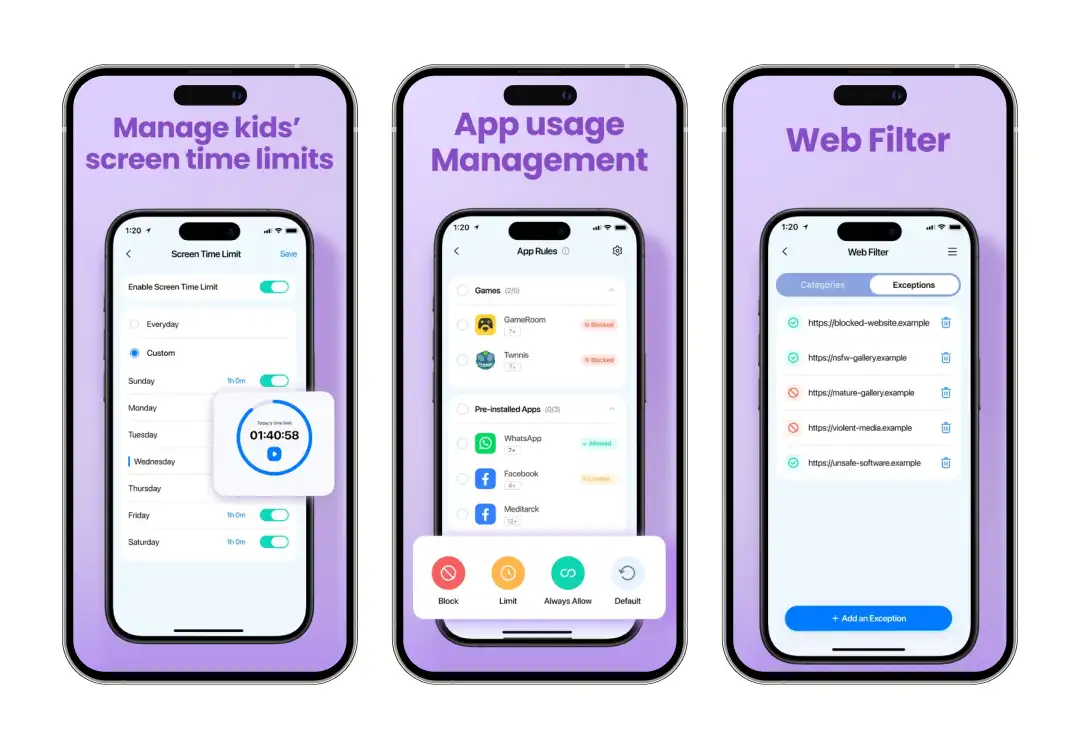
FamiSafe is among the best full-spectrum parental control apps that cover digital safety and physical tracking from one dashboard. You get real-time GPS tracking, geofenced zones with arrival and departure alerts, location history, and an SOS panic button your child can tap to instantly share their coordinates when they feel unsafe.
What sets FamiSafe apart is its monitoring depth. The app's AI scans social media activity, chat messages, and even photo galleries for inappropriate or harmful content.
It also lets you set custom screen time limits by day of the week, block individual apps or entire categories (like dating apps or gambling sites), filter web content, and remotely view your child's screen through periodic or on-demand screenshots. The Screen Viewer and one-way audio features add another layer of oversight for parents who want more visibility.
FamiSafe premium plans start with a 3-day free trial, and a single paid account can connect to 5 or more devices with support for multiple parents through sub-accounts.

Pros & Cons
Pros
- “Modes” (Lock, Child, Parent) allow instant environment switching on the device
- Tracks movement routes rather than just static locations
- Encourages behavior shaping with reward-based screen access
- Works well for structured routines and discipline systems
Cons
- Limited insight into communication behavior (texts/social apps)
- Location tracking is not as refined as dedicated GPS apps
- Fewer real-time alerts compared to safety-focused apps
- Not built for emergency or crisis monitoring scenarios
Why You'll Love It
Along with essential family tracking, Kidslox utilizes a brilliant 3-way toggle switch that lets you instantly change a device's restriction level with a single swipe. This app makes it incredibly easy to transition a phone from free play to homework mode to complete lockdown in seconds.More about product
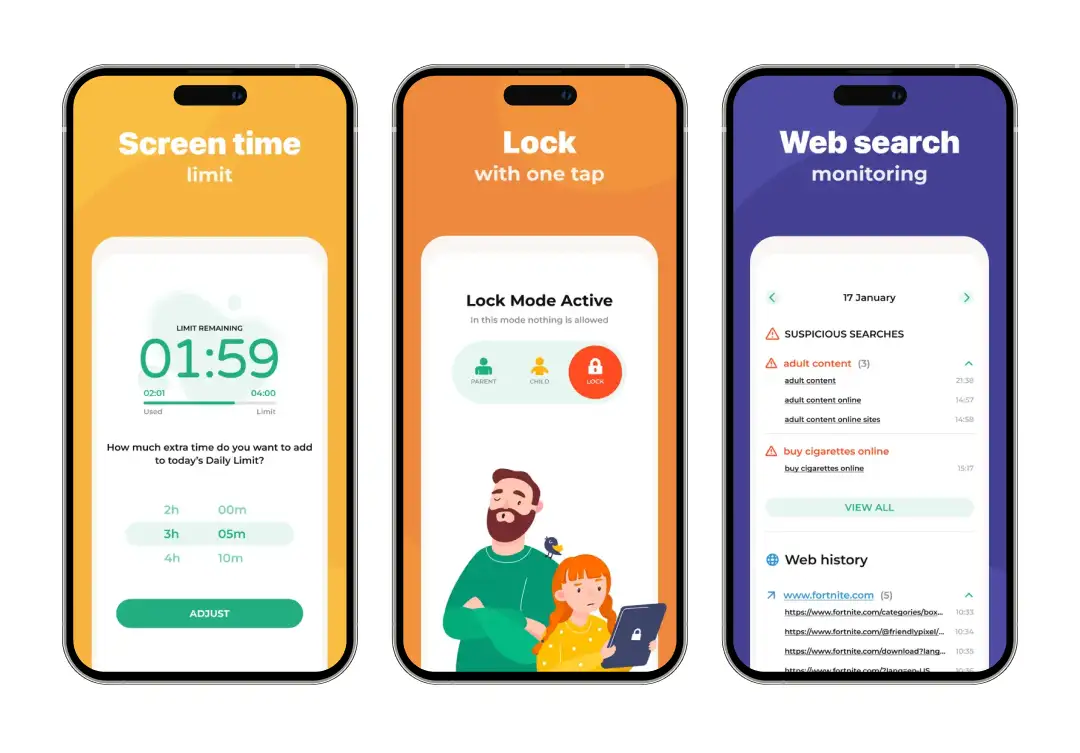
Kidslox started as a screen time tool, and it still carries that DNA. The core experience revolves around three modes: Parent Mode (unrestricted), Child Mode (customizable restrictions), and Lockdown Mode (everything blocked).
You set daily time limits, schedule device-free windows for homework, dinner, or bedtime, and the phone locks itself when the limit is reached. There's also a Screen Time Rewards feature where kids earn extra minutes by completing chores or assignments, a clever way to turn screen time into a motivator instead of a constant fight.
On the content side, you can block individual apps, disable in-app purchases, and even turn off the camera if the endless selfie stream is getting out of hand. For location tracking, Kidslox provides a real-time family map with geofencing support.
You can set zones like home and school and get instant alerts when your child arrives or leaves. Location history goes back seven days, so you can review routes, stops, and time spent at each place.
One account covers up to 10 devices. Pricing is on the affordable side compared to competitors, with a lifetime subscription option if you'd rather pay once and be done with it.

Pros & Cons
Pros
- Provides detailed breakdowns of how time is spent across categories (not just apps)
- Monitors calls and messages with contextual logs
- Strong web filtering engine with real-time blocking capability
- Combines digital behavior insights with physical location tracking
Cons
- Data-heavy reports can feel overwhelming without filtering
- Requires a consistent setup to maintain accuracy
- Not the most lightweight solution for quick, casual use
Why You'll Love It
Qustodio is probably the most detailed reporting tool in the parental control space. It doesn't just tell you how much screen time your kid used; it gives you a minute-by-minute activity timeline, daily and weekly email reports, per-app usage breakdowns, and even YouTube-specific monitoring that shows exactly which videos were watched.More about product
Trusted by millions of parents worldwide, Qustodio is a mature, polished parental control platform that works across iOS, Android, Windows, Mac, Chromebook, and Kindle.
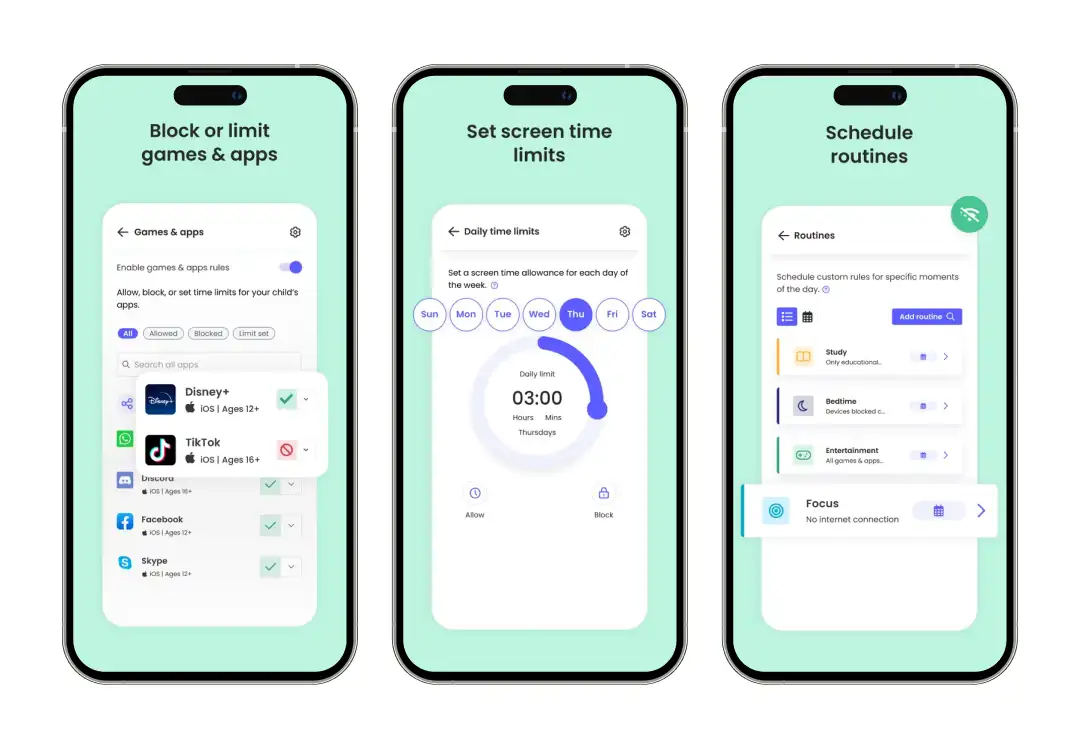
At its core, Qustodio gives you web filtering across 29 content categories, app blocking with individual time limits, daily screen time caps, and custom schedules called Routines that you can toggle depending on whether it's a school day, weekend, or vacation.
The Family Pause button instantly shuts down internet access across all connected devices, great for getting everyone to the dinner table without a negotiation. Where Qustodio really shines is in its monitoring and reporting.
The Activity Timeline gives you a real-time, chronological log of everything happening on your child's device. You can see which apps are being used, what websites are being visited, and what YouTube videos are being watched.
This is one of the best tracking apps like Life360 that offers AI-powered social media monitoring for WhatsApp, Instagram, and Line, which flags potentially harmful messages and sends you an alert with context. Qustodio also allows per-child customization, so you can apply different rules for your 8-year-old than your 15-year-old under one account.
Plans range from a free tier (1 device with basic features) to the Complete Plan at $99.95/year for unlimited devices and full feature access, including a 30-day free trial with no credit card required.

Pros & Cons
Pros
- Allows visual monitoring through periodic screenshots of device activity
- Granular app blocking—down to specific time windows per app
- Handles multiple children/devices efficiently in one dashboard
- Strong scheduling system for automating routines
Cons
- Screenshot feature may raise privacy concerns
- Setup on iOS can be technically demanding
Why You'll Love It
OurPact stands out for one reason most parents immediately appreciate: you can block apps, internet, and even text messages on your child's iPhone with a single tap, and the blocked apps literally disappear from the home screen.More about product
Built by Eturi Corp and launched in 2015, OurPact has carved out a reputation as one of the strongest parental controls for Apple devices specifically. While most competitors offer watered-down iOS features due to Apple's restrictions, OurPact found workarounds that give parents genuinely useful control over iPhones and iPads.
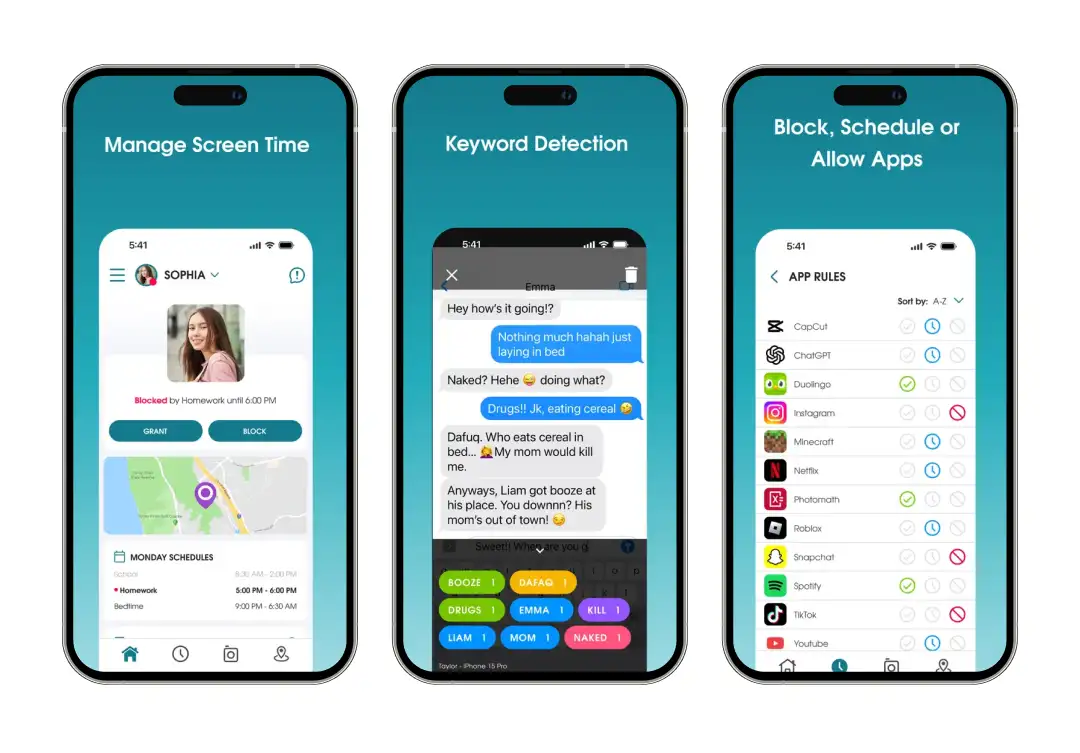
The app's feature set revolves around App Rules, which let you block or allow specific apps on a schedule or permanently. You can set up block schedules that align with your family's routine, homework hours, dinner time, bedtime, and the device automatically switches modes at those times.
The View feature is where OurPact gets its edge on monitoring. It captures periodic or on-demand screenshots of your child's device, encrypted and stored in a gallery you can browse from the parent dashboard.
Setting up the app requires a computer and USB cable for initial pairing, which is a bit more involved than other apps, but once that's done, everything is managed remotely from the parent app. Plans start free (limited to 1 device and 5 blocked apps), with Premium at $6.99/month and Premium+ at $9.99/month for screenshot features.
Why do you need to consider other apps like Life360?
Life360 works well enough for a lot of families, but it's not the right fit for everyone. Whether it's the battery drain, the aggressive upselling, or privacy concerns about how your data is handled, there are real reasons people start looking elsewhere. Here's what usually pushes families to explore alternatives:
1. The free plan keeps getting thinner
Crash detection, driving reports, and extended location history all require a subscription with Life360. If you don't want to pay $14.99 or more per month just to get the full experience, you'll find apps on this list that offer similar features at a lower price, or for free.
2. Battery drain is a constant complaint
Life360 is known for being rough on battery life, especially on Android devices. Because it runs GPS tracking in the background around the clock, your phone can lose 15-20% more battery per day than usual.
3. Not every family needs 24/7 tracking
Constant location monitoring can feel invasive, especially for older teens, partners, or elderly family members who value their independence. Some alternatives let you share your location temporarily or on your own terms instead of broadcasting it every second of the day.
4. You might need more than just location tracking
Life360 is primarily a location app. If you also want screen time controls, content monitoring, social media alerts, or app blocking, you'll need something more comprehensive. Several location apps like Life360 on this list combine GPS tracking with full parental controls in a single package.
5. Cross-platform support can be hit or miss
Life360 works on both iOS and Android, but the experience isn't always consistent across devices. Some families with mixed device households find that certain features behave differently depending on the platform.
How did MobileAppDaily select these apps?
We didn't pick apps similar to Life360 at random or pulled from a sponsored lineup. Our editorial team evaluates each product through hands-on testing, feature-by-feature analysis, and a review of real user feedback from the App Store, Google Play, and independent review platforms.
Our evaluation method factors in core functionality, ease of setup, cross-platform compatibility, privacy practices, pricing transparency, and how well each app actually delivers on what it promises.
Apps that gate essential features behind hidden paywalls, have unresolved security concerns, or show a pattern of poor reliability in user reviews are filtered out. The goal is a list that reflects what's genuinely worth downloading, not what's paying the most for placement.
Wrapping Up!
By now, you've probably noticed that best means something different for everyone. A parent with a 10-year-old needs Bark or FamiSafe. A college student checking in with mom needs Glympse. Someone watching over a grandparent needs iSharing.
The point isn't to find the perfect app, it's to find the one that fits how your family actually lives. Most of these apps, like Life360, are free to try, so download one, use it for a week, and see if it makes your life easier!
We cut through the deafening digital noise to find what truly works. Every product on our list survives a relentless, hands-on analysis—no exceptions. We do the grunt work to deliver verified, trustworthy recommendations, so you can choose the right tools with absolute confidence.
- Products Reviewed - 4,000+
- No. Of Experts - 20+
- Categories - 65+
Frequently Asked Questions
Is there a completely free alternative to Life360?
Yes. Google Family Link is entirely free with no premium tiers. Glympse and Familo also offer solid free versions, though some advanced features may require a paid upgrade.
Which one of the Life360 alternatives is best for tracking elderly parents?
iSharing is a strong pick because of its inactivity alerts -- it notifies you if a family member hasn't moved for an extended period. GeoZilla also works well since it supports dedicated GPS trackers that don't require a smartphone.
Can my child disable or uninstall these tracking apps?
Most of these apps have tamper protection built in. Bark, FamiSafe, and OurPact all include features that prevent kids from uninstalling the app without a parent's PIN or password.
Which app uses the least battery?
Familo and Glympse are both known for being light on battery. Glympse is especially efficient since it only uses GPS during active shares rather than running in the background 24/7.
Do any of these apps work without the other person knowing?
No, and they shouldn't. Every app on this list requires the other person's consent and active participation to share their location. Tracking someone without their knowledge isn't just unethical, it's illegal in most places.






We've got more answers waiting for you! If your question didn't make the list, don't hesitate to reach out.


