
Perplexity AI Review: Search Engine, Chatbot, or Both?
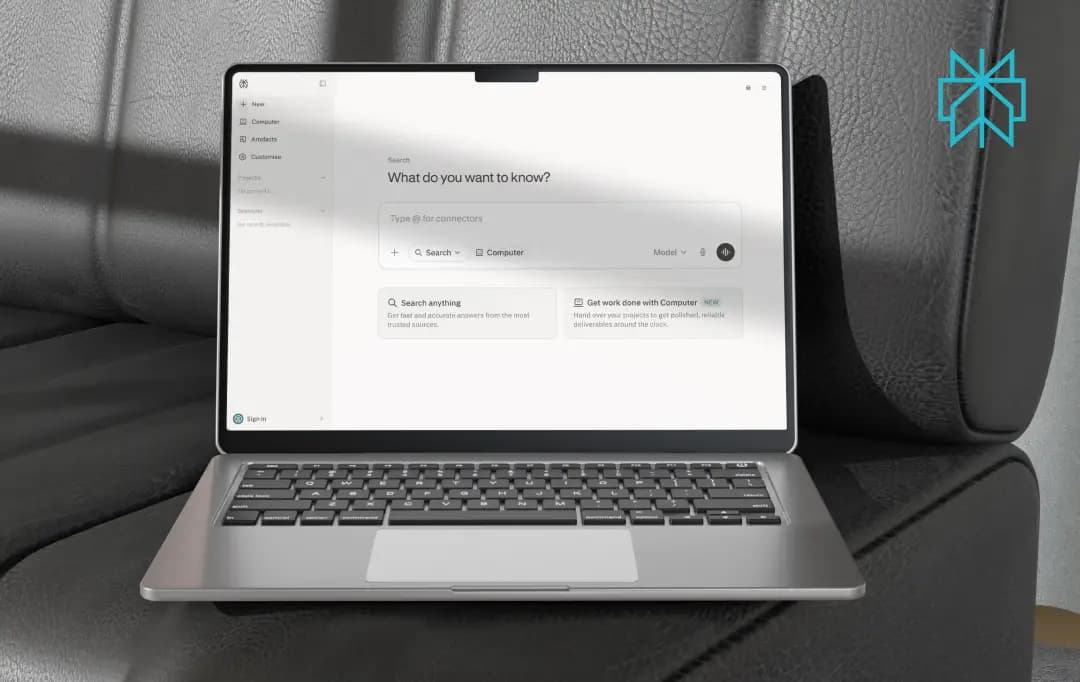
Perplexity used to be easy to describe: a search engine that answers in paragraphs instead of links, with citations attached. That description is outdated. What you're using in 2026 is a router that picks the best model for each query, a browser that acts on pages instead of just rendering them, and a memory layer that carries context across sessions instead of resetting every time you open a new tab.
The question isn't whether Perplexity AI is “better than Google” anymore; that comparison stopped being useful a while ago. The real question is whether it's earned a permanent seat next to other AI platforms in your actual workflow, or whether it's still riding on the citations trick that made it famous. This Perplexity AI review answers that and much more.
Pros and Cons of Perplexity AI
Pros
- Citations are attached at the sentence level, so you can actually verify claims instead of trusting a vague source's footer
- Genuinely faster than manually opening 8-10 tabs for comparison or fact-checking tasks
- Lets you pick between different underlying models depending on the task
- The Comet browser integration means you don't have to keep switching tabs to search
- No more ads mixed into answers, which makes results feel less like sponsored content
Cons
- Free tier caps you fast
- Creative writing and long, meandering conversations feel stiffer than what you get from other tools
- Image generation is decent for a quick visual, but noticeably behind dedicated tools
- Usage limits on images and Pro Search aren't clearly displayed
- Some regional restrictions on features like image generation, depending on where you're logging in from
What Does Perplexity AI Offer?
Before getting into pricing, it's worth walking through what actually makes up the Perplexity AI app, since most of the value shows up in features you don't really notice until you've used the tool for a few weeks. Here's what each one is actually useful for, based on how Perplexity AI features hold up in real tasks rather than a first click-around.
1. Real-time web search with sentence-level citations
This is the feature the entire Perplexity AI tool is built around. Ask it about something current, a product launch, a policy change, a data point, and it pulls together numbers from several sources and flags where they disagree.
Every sentence carries a small numbered tag you can click to jump straight to the source. This makes it far easier to verify the data and catch an error.
2. The Perplexity Assistant
The Perplexity AI assistant description on the official site undersells it a little. It's less chatbot and more a task-doer that can pull information from open tabs, a calendar, or an ongoing thread and act on it, especially inside the Comet browser.
For something like planning a short trip, it can pull flight prices, cross-reference a calendar, and draft a rough itinerary without any manual copy-pasting between tools. It's not flawless; multi-step tasks sometimes need a follow-up nudge to actually finish, but it's clearly built for more than answering one-off questions.
3. Model selection across multiple LLMs
As part of the wider Perplexity AI chatbot features, Pro users aren't locked into one model. You can manually switch between several frontier models depending on whether you want a faster, cheaper answer or a slower, more careful one for something technical.
This is best-suited for code-related or technical questions, where switching models can produce a noticeably more precise answer than sticking with the default.
4. Perplexity AI image generation capabilities
This one tends to fly under the radar, but it's built right into the search flow. You can ask for a visual mid-conversation without opening a separate app, and the prompt gets routed to one of a few different image models behind the scenes, with the option to set a preferred one in settings.
For quick concept images or something to drop into a rough draft, it does the job well enough. Anyone needing commercial-grade, consistent, or highly detailed artwork will still want to invest in dedicated AI image generators.
5. Spaces and Collections for project-based work
For anything beyond one-off searches, Spaces let you group related threads, uploaded files, and custom instructions into a single project. That means not having to re-explain context every session, which sounds minor but adds up noticeably over a few weeks of ongoing research or writing work.
6. Comet browser integration
The Comet browser is where the Perplexity AI assistant feels most different from a regular search tab. It's context-aware of whatever page is open, so questions about an article or report can be asked without copying any text over.
It's particularly useful for comparison shopping or working through long reports, since it can summarize what's on-screen without switching windows.
7. Deep Research mode
For longer, multi-step research questions, Deep Research runs a more thorough pass across sources and produces something closer to a structured brief than a quick answer.
It's a genuine time-saver on tasks like competitive research or literature reviews. Though it runs noticeably slower than a standard query, so it's not the mode to reach for on something quick.
How Does Perplexity AI Work?
I mostly use Perplexity for research and drafting, so this is what the actual workflow looks like in practice rather than a generic explanation of the technology. Once you get past the first search or two, the pattern becomes pretty repeatable, and it's a lot faster than the usual back-and-forth of Googling, opening tabs, and piecing things together manually.
1. Start with a specific question, not a keyword
Perplexity works best when you ask it something the way you'd ask a person, rather than typing a short search term. A full, specific question gives it more to work with when deciding which sources to pull from.
2. It searches the live web in real time
Instead of relying only on trained knowledge, it goes out and reads current pages, reports, and articles related to the question, which is what makes it useful for anything time-sensitive.
3. It synthesizes an answer from multiple sources
Rather than summarizing one page, it pulls together information from several sources at once and flags where they agree or contradict each other.
4. Every claim gets a citation
Each sentence carries a small numbered tag linking back to where that specific piece of information came from, so it's easy to double-check anything before using it in a draft.
5. You can keep the thread going
Follow-up questions stay in context, so you can narrow down, ask for more detail, or challenge a claim without starting over.
6. Turn the research into a draft
Once the information is gathered and verified, you can ask it to organize the findings into an outline or a rough draft, which is usually where most of the time-saving actually shows up.
Testing it with a real prompt:
To see the workflow in action rather than just describe it, I ran the following prompt:
"I'm writing an article on How LLMs Are Redefining Content Strategy in 2026. Give me the most recent data and statistics on this from credible sources, summarize the key points, and then draft a 200-word introduction I can use as a starting point."
Here's how that played out, step by step:
1. The prompt goes in
Typed the request into the search bar exactly as above, keeping it specific rather than a short keyword search.
2. Perplexity pulls current sources
Within a few seconds, it returned a set of recent articles and reports on the topic, all pulled from live web results rather than older, static data.
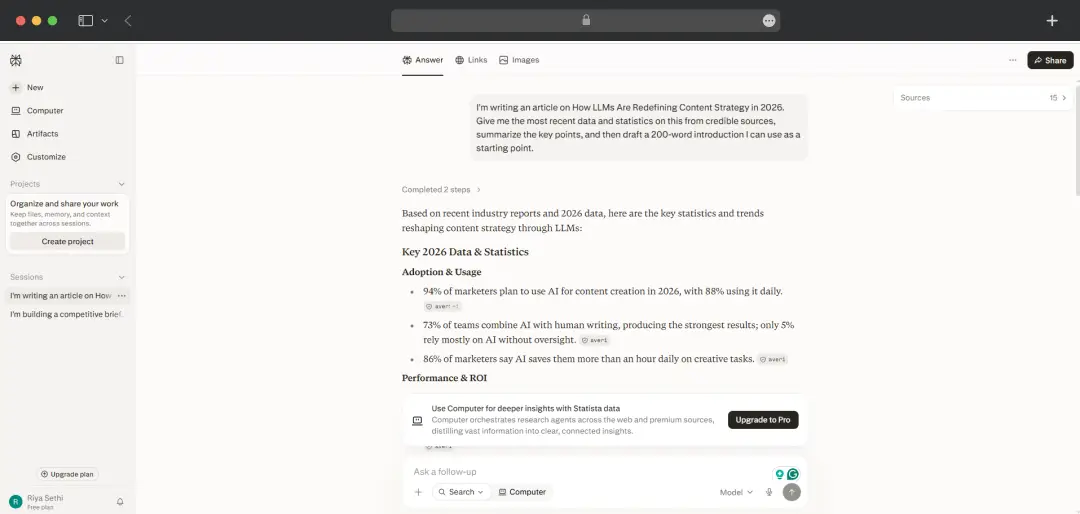
3. It summarizes the key data points
The response laid out the most relevant statistics in a short, readable summary, with each figure carrying its own citation link back to the original source.
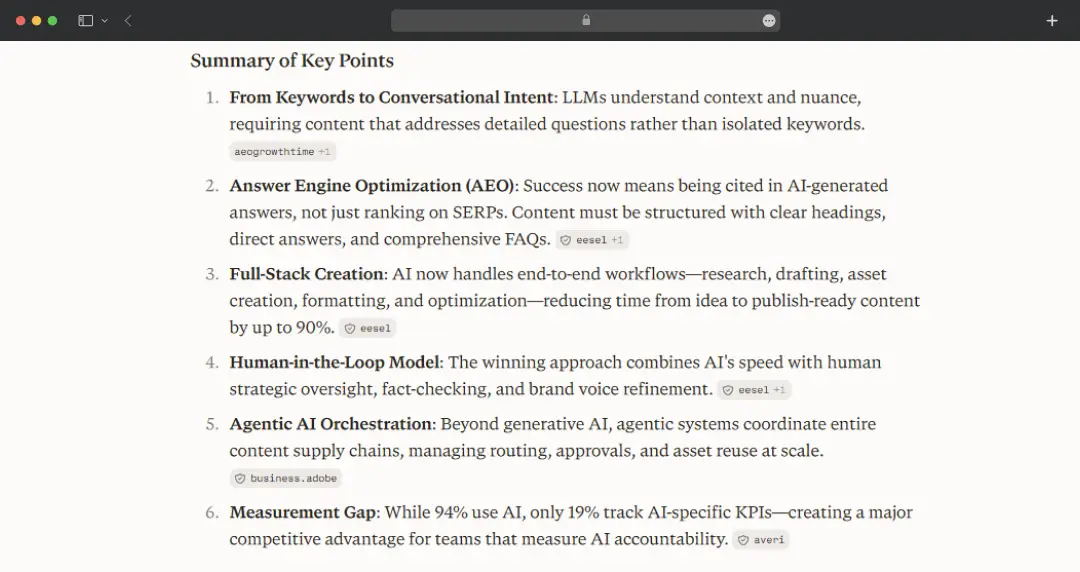
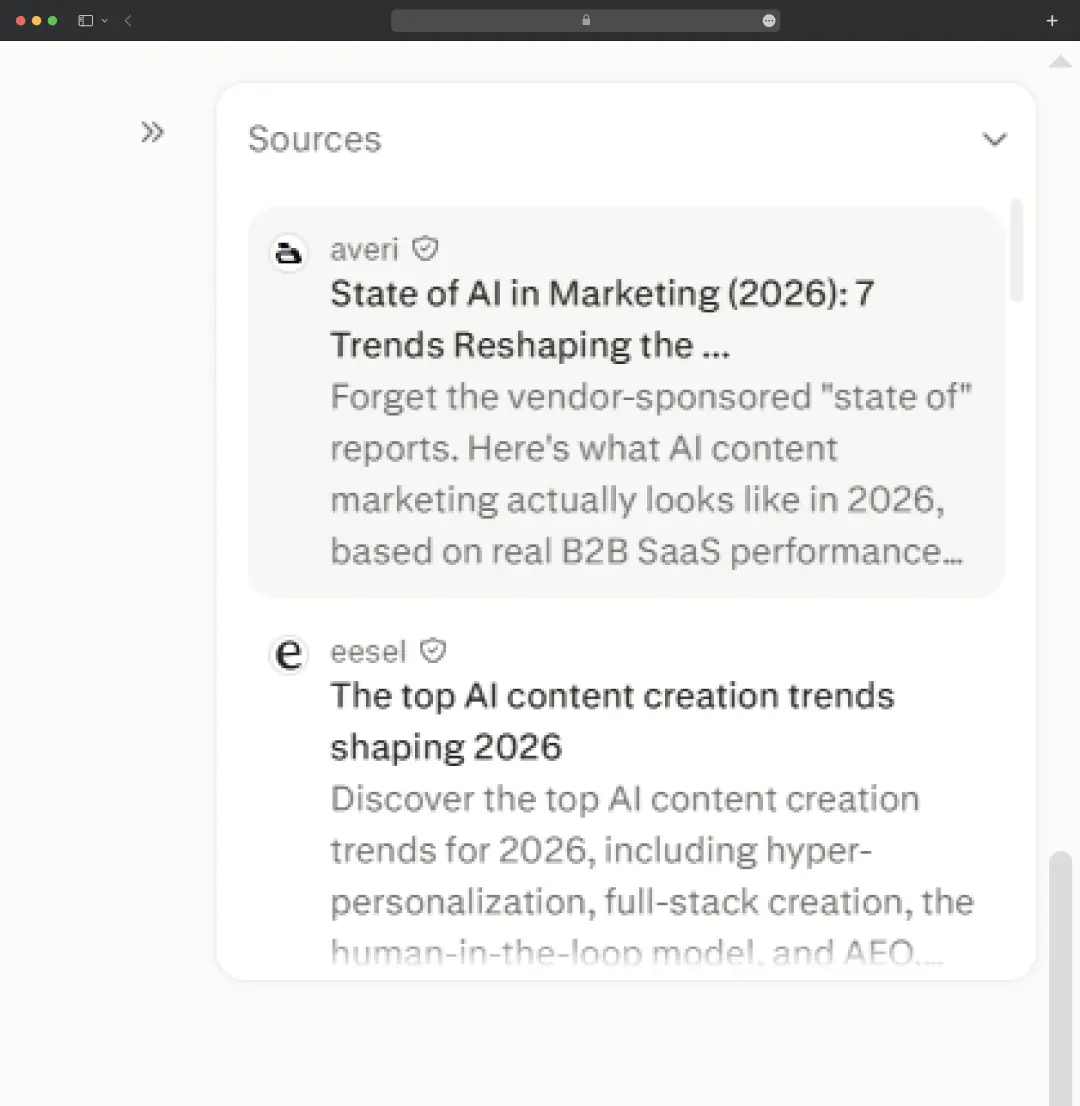
4. Sources get checked

Clicking through a couple of the citations confirmed the numbers matched what was actually reported, rather than being paraphrased loosely or misquoted.
5. It drafts the introduction
Based on the summarized research, it put together a 200-word introduction that read like a usable first draft, not perfect, but a solid starting point that didn't need to be built from scratch.
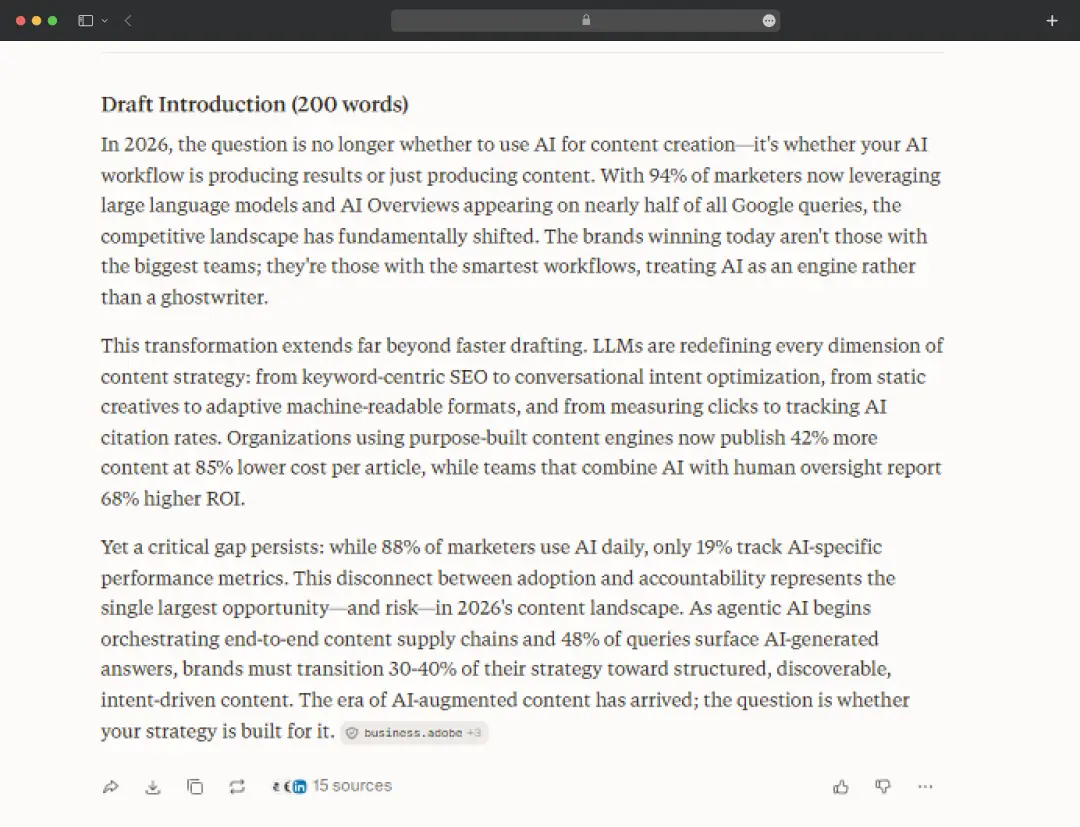
6. The output gets refined
A quick follow-up asking it to tighten the tone and cut repetition adjusted the draft without losing any of the sourced information.
Understanding Perplexity AI Pricing
Now for the part everyone actually wants to know: what does it cost, and is it worth paying for. So, the Perplexity AI’s free tier is genuinely usable day-to-day, not a crippled trial version.
Where it gets limiting is once you start relying on the deeper features regularly, which is where the paid tiers come in. here’s a quick overview of Perplexity AI pricing-
I. PERSONAL
| Plan | Price | What You Get |
|---|---|---|
| Free | $0 | Unlimited standard search, a limited number of Pro Searches per day, basic access to the Perplexity AI website and app |
| Pro | $17/month (billed annually) | Unlimited Pro Search, access to multiple AI models, file uploads, limited Deep Research, and image generation |
| Max | $167/month (billed annually) | Highest usage limits, access to flagship models, advanced agentic features, and priority access to new releases |
II. EDUCATION
| Plan | Price | What You Get |
|---|---|---|
| Education Pro | $9/month (billed annually) | Access to Perplexity Computer, Claude Sonnet 5, Gemini 3.1 Pro, and more. Increased document upload times and usage limits for everyday use |
III. BUSINESS
| Plan | Price | What You Get |
|---|---|---|
| Enterprise Pro | $34/seat | Guaranteed no training on your data, search across the web, files, and apps. SOC 2 Type II, HIPAA, GDPR, and PCI DSS compliance |
| Enterprise Max | $271/seat/month | Run deep investigations at any scale, work with massive data sets and files, priority access to new features |
Who is Perplexity For?
Perplexity isn't built to be everything for everyone, and it doesn't try to be. It works best when the task involves finding, verifying, or synthesizing information from the web, and it's less suited to open-ended creative work. Here's how it tends to fit into different kinds of use.
| Who It's For | How Perplexity Helps |
|---|---|
| Students | Speeds up research for papers and assignments, with citations that make it easy to trace claims back to a real source instead of copying unverified text |
| Content creators and writers | Helps with fact-checking, gathering background for a piece, and generating quick supporting visuals without switching between multiple tools |
| Professionals and analysts | Cuts down time spent cross-referencing reports, market data, or competitor information across a dozen open tabs |
| Developers | Model selection makes it useful for technical questions where switching to a more precise model gives a noticeably better answer |
| Everyday users | Works as a faster, cleaner alternative to a traditional search engine for quick, sourced answers without the ad clutter |
| Teams and businesses | Spaces and Collections keep research organized by project, which helps when several people need the same context without re-explaining it each time |
Customer Reviews
How was your experience with the product?