
We are not biased. We test and review every product. Here's our Methodology.

Granola promises to remember every meeting so you don't have to. Here's what happened when we tested its AI note-taking in real workflows.

MobileAppDailyCertified Rating
4.1 out of 5
Available on:
Why Trust MobileAppDaily?

For us, Product Reviews mean diving headfirst into the functionality of each digital product, whether it's an app, software, or website. Our process centers around hands-on testing of each tool we pick. From scrutinizing features to testing vulnerabilities of security standards, the goal remains to help you find products that don't just work but truly elevate your experience. In a nutshell, if we're recommending a product, it's because we believe it'll genuinely make your digital life easier.

  • Products Reviewed - 4,000+
  • No. Of Experts - 20+
  • Categories - 65+
Explore Our Methodology
Riya

Written By Riya

Riya turns everyday tech into effortless choices! With a knack for breaking down the trends and tips, she brings clarity and confidence to your downloading decisions. Her experience with ShopClues, Great Learning, and IndustryBuying adds depth to her product reviews, making them both trustworthy and refreshingly practical. From social media hacks and lifestyle upgrades to productivity boosts, digital marketing insights, AI trends, and more—Riya’s here to help you stay a step ahead. Always real, always relatable!

Explore More By Author

Granola AI Review: I Handed Over My Meetings to an AI, and It Flipped the Script
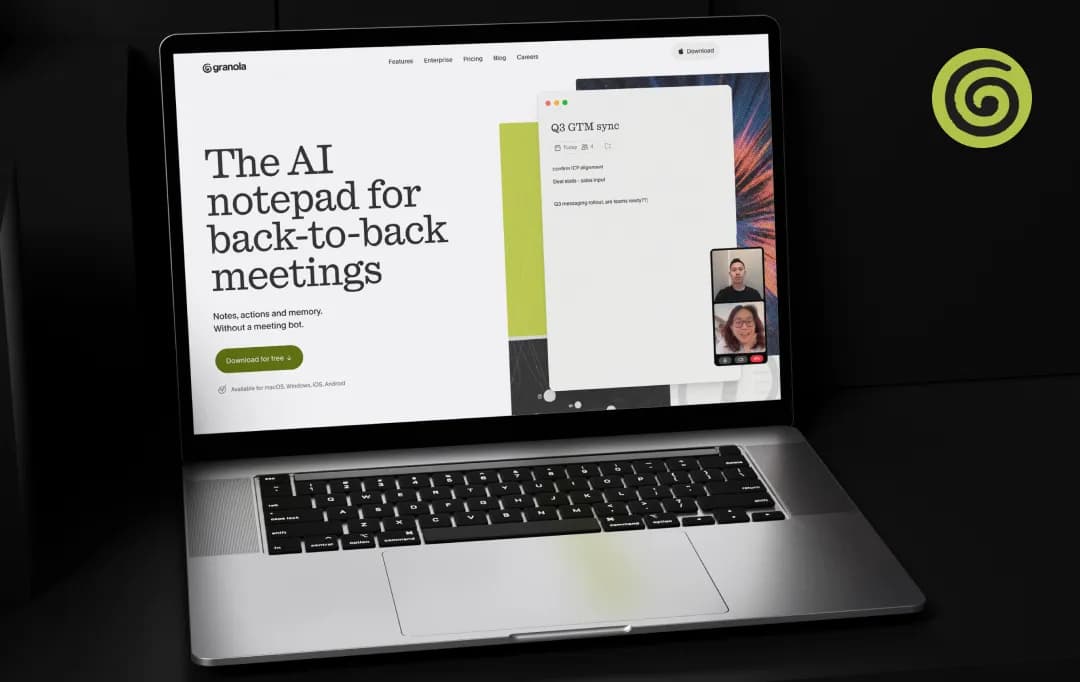
Granola AI

I've sat through enough meetings where I'm either half-listening while typing notes or fully listening and then scrambling to remember what got decided 20 minutes later. So when a colleague kept mentioning Granola AI in passing, I finally caved and tried it.

Not because I needed another note-taking app on my dock, but because I was tired of the same old "wait, what did we agree on again?" moment happening on repeat.

This Granola AI review is based on actually using the app across real client calls, internal syncs, and a few messy group meetings where I genuinely wanted to see it fail.

It didn't fail exactly, but it also isn't the flawless miracle tool some of the more breathless reviews online make it out to be. Here's what it's actually like to live with.

Pros and Cons of Granola AI

Pros

  • No bot joins the call, so meetings feel natural
  • Combines your own notes with AI-generated context
  • Transcription accuracy is genuinely solid (90-92%)
  • Works across any conferencing app, since it reads system audio
  • In-call AI chat can catch you up if you zone out
  • Used by teams at Vanta, Asana, Cursor, and Mistral AI

Cons

  • No audio or video playback, transcript only
  • Speaker identification can get messy in group calls
  • No Android app yet
  • Notes don't automatically flow into other tools like task managers or CRMs

Granola AI Features

Granola doesn't try to do everything, and that's honestly part of its appeal. But within its lane, there are a handful of features that actually changed how I approach meetings, so here's a closer look at what stood out.

1. Bot-Free Audio Capture (4.5/5)

This is the headline feature and the reason most people try Granola in the first place. It listens through your device's system audio instead of joining as a visible participant, so there's no awkward moment. Without a bot, people tend to speak more freely on calls once they're not staring at a recording icon the whole time.

2. Hybrid Note-Taking (4.6/5)

You type your own rough notes in Granola AI during the meeting, and the tool layers AI-generated detail on top of them after the call ends. This matters more than it sounds like it should. Fully automated AI note takers tend to miss the information that matters to you specifically. But Granola lets your own priorities shape the final summary instead of just handing you a generic recap.

3. In-Meeting AI Chat (4.2/5)

You can ask Granola questions mid-call, like “What did we just agree on?” or “Catch me up on the last five minutes,” and it pulls from the live transcript to answer you right there. You can use this feature if you have lost the thread of a conversation. This Granola feature can save you from having to awkwardly ask someone to repeat themselves.

4. Cross-Meeting Search (4.3/5)

Once you've built up a decent library of your Granola AI meeting notes, you can ask the tool things like “where did we talk about the Q3 budget?” and it will dig through past transcripts to find the answer. This is where this AI note taker starts feeling less like a notepad and more like an actual meeting assistant that remembers things so you don't have to.

5. Structured Summaries and Action Items (4.4/5)

After every meeting, the Granola AI app auto-generates a clean summary with decisions and next steps pulled out separately. The formatting is genuinely tidy enough to paste straight into a follow-up email or a Slack message without much editing on my end.

6. Mobile and In-Person Capture (4.1/5)

The iPhone app lets you record conversations that aren't happening on your laptop at all, such as walks, phone calls and in-person meetings. I didn't expect to use this much, but it ended up being handy for capturing quick calls where I'd otherwise have taken zero notes.

Understanding Granola AI Pricing

Granola keeps its pricing fairly simple on paper: three tiers, and the free one is genuinely usable for testing the waters before you commit. That said, if you're someone with back-to-back meetings every day, you'll bump into the free plan's limits faster than you'd expect.

Plan Price What You Get
Basic Free Core note-taking and transcription, limited meeting history
Business $14/user/month Full meeting archive, AI model selection, integrations
Enterprise $35/user/month Shared Spaces, admin controls, org-wide AI training opt-out, enterprise API

*The AI training opt-out, meaning stopping Granola from using your conversations to train its models, is available on every plan through Settings, but it's off by default and has to be switched manually.

*The Enterprise plan is really just paying for the ability to flip that switch for an entire team at once rather than relying on each person to do it themselves.

Who Is Granola AI For

Before you sign up for this AI transcription tool, it helps to know whether you actually fit the kind of user this was built for. Here;s a quick list of who this tool will fit and who it won't.

User Type Good Fit? Why
Freelancers and consultants Yes Lightweight, no bot awkwardness on client calls, easy to start using immediately
Founders and solo operators Yes Handles back-to-back calls well, notes are ready the second a meeting ends
Small teams with 1:1-heavy workflows Yes Hybrid notes work best when one person is actively typing during the call
Large teams with group meetings Not really Speaker identification struggles once you're past two or three voices
Sales or CRM-heavy teams Not really Lacks native CRM integrations that tools like Fireflies or Otter offer
Journalists or researchers needing exact quotes No No audio playback means you can't verify a quote against the original recording

Customer Reviews

Checking...

Rate the product based on your experience?

How was your experience with the product?

Also Reviewed By Us

MobileAppDaily’s Rankings for Granola AI

Expert Opinion
Features

FEATURES

4.3

Hybrid note-taking, in-call AI chat, and cross-meeting search cover the essentials well, but the lack of audio playback, advanced analytics, and CRM integrations keeps it behind category leaders on raw feature depth.

Pricing

PRICING

4.0

The Business tier at $14/user/month is fair on its own, but the free plan's limited meeting history pushes you toward paying fast, and the AI training opt-out being an individual, on-by-default setting (with org-wide control locked to the $35/user/month Enterprise tier) is a real ding.

Performance

PERFORMANCE

4.0

Transcription accuracy sits around 90-92% and holds up well across accents and platforms, but speaker identification breaks down once you're past two or three voices in a call, and a poor connection can still produce a garbled transcript.

UI/UX

UI/UX

4.2

The interface is clean and genuinely easy to pick up, with the black-notes-versus-gray-AI-notes layout being one of the more thoughtful design choices in the category; the main friction is the lack of a full web version.

How Granola Works

Once you get past the no-bot pitch, what actually sold me on Granola AI was how it breaks the meeting into 3 distinct phases and does something useful in each one, instead of just dumping a transcript on you at the end. Here's how that plays out in practice.

I. Before the Meeting

  • Granola syncs with your calendar and automatically detects upcoming meetings, so it's ready to go without you manually starting a session every time.
  • For external meetings, it prepares a short brief beforehand, pulling in who's attending and what was discussed in previous calls with them, so you're not walking in cold.
  • There's nothing to configure per meeting. You just open your laptop, join the call the way you normally would, and Granola is already listening in the background.

II. During the Meeting

  • It captures your computer's system audio directly instead of joining as a visible participant, so there's no bot in the call and no one has to grant it permission to join.
  • You get a blank notes panel to jot down whatever matters to you in the moment, a name, a number, a decision, while the app transcribes everything being said in real time behind the scenes.
  • You can ask it questions mid-call, like getting a quick recap of the last few minutes if your attention drifted, and it answers using the context of the conversation so far.

III. After the Meeting

  • Hitting ‘Enhance Notes’ merges your rough notes with the full transcript and turns it into a structured summary, complete with decisions and action items pulled out separately.
  • Your own notes stay visible in black text, distinct from the AI-added context in gray, so you always know what you actually typed versus what the AI filled in.
  • The finished notes and full transcript are searchable later, so you can ask things like "where did we talk about the budget?" and it'll pull the answer from across your meeting history.

Granola vs. Its Alternatives

Granola isn't the only meeting transcription software worth considering. Here’s a quick comparison table that will help you evaluate the tool next to two of its most commonly known alternatives: Otter.ai and Fireflies.ai.

Both take the more traditional bot-joins-the-call approach, which makes the comparison a useful way to figure out what you're actually trading off by going with Granola AI instead.

Basis Granola AI Otter.ai Fireflies.ai
Bot in the meeting No, captures system audio directly Yes, OtterPilot joins as a visible bot Yes, joins as a visible bot
Speaker identification Weak in group calls with 3+ people Reliable, built around speaker labels Reliable, auto-labels speakers by name
Audio/video playback Not available, transcript only Yes, full recordings available Yes, full recordings available
Free plan Limited meeting history, no minute cap 300 minutes/month 800 minutes of storage
Starting paid price $14/user/month $8.33/month (Pro, billed annually) $10/month (Pro, billed annually)
CRM/workflow integrations Limited, mostly Google Workspace and Zapier Moderate, includes Salesforce and Slack Strong, deep CRM and 100+ integrations
Note-taking style Hybrid, your notes plus AI enhancement Fully automated summary Fully automated summary with AI copilot (Ask Fred)
Best suited for Solo operators and 1:1-heavy workflows Individuals wanting a simple, familiar tool Sales and CRM-driven teams needing depth

Bonus Read: Best Otter.ai Alternatives

MobileAppDaily’s Final Verdict on Granola AI

At MobileAppDaily, we don't put out a verdict based on a single person's experience, so alongside my own weeks of testing, I also asked a few members of my team to independently search, install, and use Granola AI across their own meetings before we sat down to compare notes.

The Granola AI reviews were more consistent than we expected. Everyone flagged the no-bot audio capture as the feature that changed how they behaved in calls, and more than one team member specifically mentioned feeling less self-conscious in client meetings once the “an AI has joined” banner was out of the picture.

Where opinions converged again, less favorably, was on group meetings. Every team member who tested Granola in a 3+ person call ran into the same speaker attribution problem, and it was enough to make two of them say they wouldn't rely on it for anything beyond one-on-ones or small huddles.

The absence of audio playback came up just as often; a couple of us specifically wanted to go back and confirm an exact quote after the fact and simply couldn't.

On balance, our team's shared takeaway is that Granola AI is definitely one of the best meeting minutes apps for the specific job it was built for: solo operators, founders, and consultants who live in back-to-back one-on-one calls and want notes that reflect what actually mattered to them, not a generic AI summary.

It's less convincing as a tool for larger teams that need dependable speaker-level documentation or CRM-connected workflows out of the box.

That said, we'd still recommend giving it a try before writing it off. The free plan is generous enough to test it against your own meeting style, and for the use case it's built around, none of its alternatives match how naturally it fits into an actual working day.

Let Your Product Take the Center Stage with Our Review

Share your product details and our team will get back with the next steps.

Granola AI
Frequently Asked Questions

FAQ
  • Is Granola AI worth it?

    Yes, if you're a solo operator, founder, or consultant who's mostly in one-on-one calls, the no-bot capture and hybrid note-taking genuinely change how you show up in meetings. It's a harder sell for larger teams that need reliable speaker attribution or CRM-connected workflows.

  • How does Granola AI work?

    It captures your computer's system audio in the background during a call, no bot joins the meeting, while you type rough notes as they occur to you. After the call, hitting "Enhance Notes" merges your notes with the transcript into a structured summary with action items pulled out.

  • Is Granola AI free?

    There's a free Basic plan that covers core transcription and note-taking, but meeting history is limited, so anyone with a heavy meeting schedule will hit that wall fast. Paid plans start at $14/user/month for the Business tier.

  • Does Granola AI record audio or video?

    No, it only captures and stores the transcript, not the actual audio or video. That means you can't go back and replay a clip to double-check a quote or tone, which is worth knowing if you rely on verbatim accuracy.

  • Is there a Granola AI Android app?

    Not currently. Granola is available on Mac, Windows, and iPhone, but there's no Android app as of this review, which is a real gap for teams that aren't fully on Apple devices.

Delve into our comprehensive yet easy-to-consume guides, which provide insights that help scale business faster and prevent unseen pitfalls.

Related Products

Cut through the clutter and explore related digital products that deliver on performance.