


Retool Review: Can It Replace Your Dev Stack?

If you've ever watched your engineering team spend three weeks building an admin panel that someone's going to use twice a month, you already understand why Retool exists. It's the platform that steps in and says, "Hey, let's not do that again."
Retool lets developers and technical teams build internal tools, dashboards, CRUD apps, admin panels, workflows, in a fraction of the time it would take from scratch.
The drag-and-drop builder handles the boring UI stuff, while you stay focused on the actual logic.
And now, with AI baked right into the editor, you can go from a simple prompt to a working app faster than ever. It's not magic, but on some days, it honestly feels close.
At MobileAppDaily, we’ve put Retool under the microscope, breaking down what it actually does well, where it falls short, and what you should realistically expect before building your next internal tool on it.
Pros and Cons of Retool
Pros
- Builds internal apps dramatically faster than coding from scratch
- Connects to virtually any database, API, or SaaS tool out of the box
- AI-assisted generation speeds up queries, logic, and UI scaffolding
- Supports custom JS/code for full flexibility when you need it
- Enterprise-grade security with granular permissions and self-hosting
- Version control and CI/CD support keeps dev workflows intact
- Trusted by 10,000+ companies including Amazon, Stripe, and DoorDash
Cons
- Pricing can get steep as your team and usage scales up
- Steeper learning curve for non-developers wanting full customization
- Not ideal for customer-facing products, mainly built for internal use
- Vendor lock-in is a real consideration for long-term projects
A Closer Look at Retool Features and Capabilities
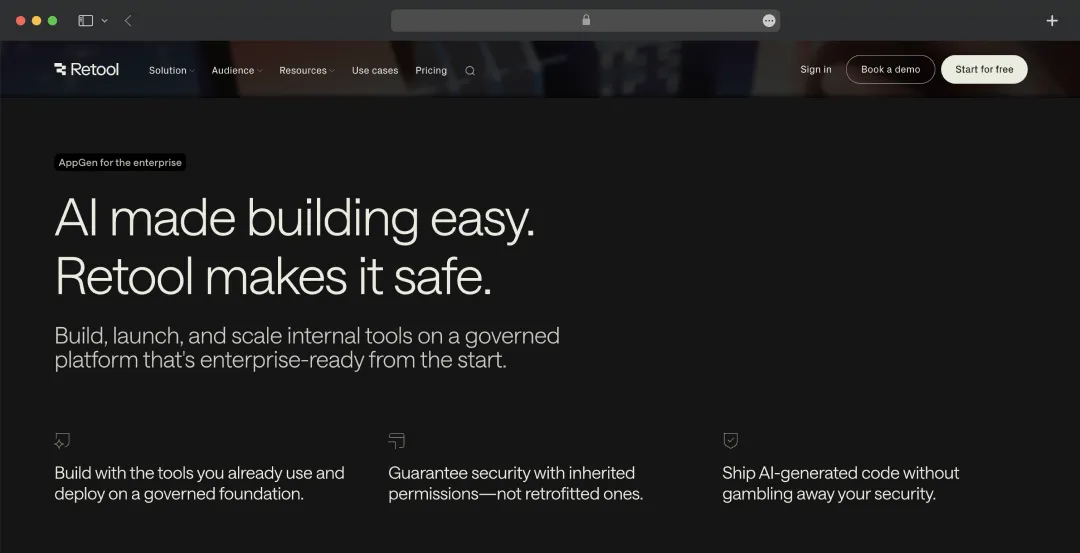
Retool checks all the right boxes, but what are the standout features that power its excpetional performance? Here’s a closer look at the capabilities that truly matter
1. Drag-and-Drop App Builder
Retool's visual canvas lets you assemble interfaces using pre-built components, tables, forms, charts, buttons, and more, without touching any HTML or CSS. You snap things together, connect them to your data sources, and you've got a working app.
It's the kind of tool that makes your frontend developer's life a lot easier, and your product manager feel dangerously empowered.
2. Universal Integrations
Retool connects to practically everything, PostgreSQL, MySQL, MongoDB, REST APIs, GraphQL, Salesforce, Stripe, Google Sheets, and dozens more. This means, setting up a new data source takes minutes, not days. Whether your stack is squeaky clean or a glorious mess of legacy systems, Retool will find a way in and make it usable.
3. AI-Powered App Generation (AppGen)
Retool's AppGen feature lets you describe what you want to build as a simple prompt, and the AI handles the scaffolding. It manages everything from generating queries to building UI components and logic that are actually aware of your schema and data model.
So, this is not a vague AI assistant; it's one that understands your context, so the output is editable and actually useful in production rather than a starting point you throw away.
4. Workflows & Automation
Beyond apps, Retool lets you build automated workflows that trigger on schedules, webhooks, or user actions. Think of it as lightweight process automation, run a script when a form is submitted, send a Slack alert when data crosses a threshold, or chain together a series of API calls. It keeps your internal operations moving without needing a separate automation tool bolted on.
5. Enterprise-Grade Security & Governance
Security isn't an afterthought at Retool, it's baked into the foundation. You get granular role-based access control, audit logs, SSO, and the option to self-host on your own infrastructure if cloud storage isn't an option for your compliance team.
Every app built on Retool inherits these guardrails automatically, so you're not scrambling to retrofit permissions after shipping.
6. Code-First Customization
When the drag-and-drop components aren't enough, Retool doesn't box you in. You can write custom JavaScript, run transformers on your data, embed custom React components, and hook into your existing CI/CD pipeline for version control.
It's a low-code platform that respects the fact that sometimes you just need to write code, and it gets out of your way when you do.
Bonus Read: AI Tools for Software Developers
Additional Features of Retool
In addition to the core features, Retool provides a comprehensive suite of advanced tools to handle more complex business needs. Whether you are looking to automate background tasks, integrate artificial intelligence, or build dedicated mobile interfaces, here is a breakdown of its extended capabilities:
| Feature | What it Means |
|---|---|
| App builder | Visual drag-and-drop interface to build dashboards with components like buttons, tables, and forms |
| Agents | AI assistants that autonomously perform tasks like categorizing emails and updating databases |
| AI primitives | Pre-built AI components for adding features like summarization, data extraction, and chatbots |
| Workflows | Automation tool to create background processes such as scheduled reporting and email delivery |
| Database | Built-in spreadsheet-style database to store and manage application data securely |
| External apps | Create secure portals for external users like customers, vendors, or partners |
| Mobile apps | Build custom applications optimized for smartphones and tablets |
| Self-hosting | Deploy and run the platform on private servers for enhanced security and compliance |
Understanding Retool’s Pricing and Subscription Plans
Retool offers a tiered pricing model that is primarily based on two types of users: Builders (the people who create and edit the apps) and Internal Users (the employees who just use the apps for their daily work).
Here is a simple breakdown of their plans (based on monthly billing):
| Plan | Builder Cost (per month) | Internal User Cost (per month) | Best For | Key Features |
|---|---|---|---|---|
| Free | $0 | $0 | Developers, hobbyists, and early exploration | • Up to 5 total users • Unlimited web & mobile apps • 500 workflow runs/month • 5GB database storage |
| Team | $10 | $5 | Growing, collaborative teams | • Unlimited users • 5,000 workflow runs/month • Staging environments • App release versions |
| Business | $50 | $15 | Teams who need more security and control | • Audit logging • Rich permission controls • External user portals (e.g., for clients/vendors) |
| Enterprise | Custom | Custom | Large organizations operating at scale | • Single Sign-On (SAML/SSO) • Full white-labeling (remove branding) • Source control (Git) • Dedicated support |
Also Read: AI Agents for Enterprises
Customer Reviews
How was your experience with the product?














