
We are not biased. We test and review every product. Here's our Methodology.

Get an in-depth look at OnlyDoc's document tools, conversion accuracy, pricing plans, and overall user experience in this detailed review.

MobileAppDailyCertified Rating
4.5 out of 5
Why Trust MobileAppDaily?

For us, Product Reviews mean diving headfirst into the functionality of each digital product, whether it's an app, software, or website. Our process centers around hands-on testing of each tool we pick. From scrutinizing features to testing vulnerabilities of security standards, the goal remains to help you find products that don't just work but truly elevate your experience. In a nutshell, if we're recommending a product, it's because we believe it'll genuinely make your digital life easier.

  • Products Reviewed - 4,000+
  • No. Of Experts - 20+
  • Categories - 65+
Explore Our Methodology
Riya

Written By Riya

Riya turns everyday tech into effortless choices! With a knack for breaking down the trends and tips, she brings clarity and confidence to your downloading decisions. Her experience with ShopClues, Great Learning, and IndustryBuying adds depth to her product reviews, making them both trustworthy and refreshingly practical. From social media hacks and lifestyle upgrades to productivity boosts, digital marketing insights, AI trends, and more—Riya’s here to help you stay a step ahead. Always real, always relatable!

Explore More By Author

OnlyDoc Review | The Free PDF Converter That Does Everything Without Asking for Your Credit Card
OnlyDoc

The PDF tool market is overcrowded, and most options ask for a subscription before letting you do anything useful. OnlyDoc takes the opposite approach; it offers a wide PDF conversion tool suite for free, without registration, and without watermarking the output.

Whether that translates into a genuinely useful PDF file converter or just another freemium product hiding the catch behind a button is the question this OnlyDoc review will answer.

OnlyDoc is operated by Lopital Limited, a Cyprus-based company, and its core promise is straightforward: upload a PDF, convert it to any of 40-plus file formats, perform common edits like compression and OCR, and download the result without paying. For users wondering how to convert PDF files quickly without installing software or creating an account, that's a compelling proposition.

The platform supports files up to 100 MB and works entirely in the browser across desktop and mobile. After spending time with the tool, here's where it actually delivers and where it falls short.

Pros and Cons of OnlyDoc

Pros

  • Genuinely free, no credit card, no trial expiry, no watermarks on output files
  • Free PDF converter without registration, the basic workflow doesn't require an account at all
  • Supports 40+ conversion formats, including Word, Excel, PNG, JPG, EPUB, MOBI, SVG, DXF, and HEIC
  • Industry-standard security badges (SSL, GDPR, Google Safe Browsing, Norton, DMCA) are visible on the homepage
  • AI tools include a PDF summarizer and image enhancement at no additional cost
  • Multilingual interface in English, Spanish, Portuguese, and French
  • Common PDF editing tool functions, such as compression, OCR, watermark removal, and unlocking, are all included
  • Direct conversion to and from PDF for nearly every consumer file format you'd realistically need

Cons

  • 100 MB file size limit excludes larger documents like high-resolution scanned books or multi-hundred-page reports
  • No desktop or mobile app, the entire experience runs through the web browser

Standout Features of OnlyDoc

OnlyDoc is built to be a single-stop PDF converter software for users who want to do the common jobs, convert, compress, OCR, translate, summarize, without paying or installing anything. Here's what makes this the best PDF converter-

1. 40+ Format Conversions To and From PDF

The breadth of supported formats is where OnlyDoc earns most of its value. The tool handles standard conversions like PDF to Word, PDF to Excel, PDF to JPG, and Word to PDF. Along with this, it also tackles less common ones like PDF to AZW3 for Kindle, HEIC to PDF for iPhone photo conversion, and DXF to PDF for CAD files. For a free PDF converter. This format range is unusually deep; most competitors at this price point cap at 10 to 15 formats.

2. AI-Powered PDF Summarizer

The summarizer condenses long documents into structured short text, typically returning a result in under thirty seconds. It works well on reports, research papers, and manuals where the goal is extracting key arguments, and less well on documents with heavy tabular data or mixed-language content.

For an unpaid AI tool inside an online PDF converter, it's a useful addition rather than a differentiator.

3. OCR for Scanned Documents

The optical character recognition engine turns scanned PDFs and image-based documents into searchable, editable text. Accuracy holds up well on clean printed text and degrades on handwriting or damaged scans, which is consistent with most OCR engines in this category.

The key value here is that it's bundled into the free tier; competitors typically charge for OCR access.

4. PDF Compression with Quality Preservation

The compression tool reduces file size while keeping text and visuals legible, with a dedicated mode that compresses any PDF to 100KB for situations like job applications and government portals where strict size limits apply.

The result quality holds up at standard compression and degrades noticeably at the 100KB threshold, which is unavoidable physics rather than a tool limitation.

5. PDF Translation Across Languages

The translation feature processes document text into different languages while preserving the layout. It's accurate enough for casual or reference use, though anyone using it for professional translation work should still verify the output against a native speaker.

The integration with the wider PDF editing tool suite means a scanned document can move from OCR to translation to download in one workflow.

6. E-Signature Functionality

A basic electronic signature feature is included for situations where a document needs to be signed and returned. It's positioned as “easy e-signature” on the site rather than a compliance-grade signing platform, meaning it works for casual signing needs but isn't a replacement for DocuSign or Adobe Sign in regulated industries.

7. Browser-Based Workflow with No Installation

Everything runs in the browser, which means no software downloads, no platform-specific apps, and no installation friction. The same workflow works identically on desktop and mobile, and the file is processed and made available for download without requiring an account for most operations.

OnlyDoc Pricing in 2026

OnlyDoc Pricing is unusual in this category; the tool is entirely free across every feature visible on the platform. There is no published paid tier, no premium subscription, no usage cap that triggers an upgrade prompt, and no watermark on output files to push users toward an upsell. 

A few things worth knowing about the free model:

  • The 100 MB file size limit applies to every user, regardless of account status
  • No watermark is added to output files, which is rare among free PDF tools
  • The free PDF converter without registration option means anonymous use is supported for most conversions
  • An account login exists for users who want it, though its current benefits are not clearly documented

Who OnlyDoc Is For

The tool works hardest for a specific set of use cases, and is the wrong choice for others.

User Type Why OnlyDoc Works for Them
Students and academic users Free, registration-optional, and supports the broadest range of formats, including EPUB and MOBI for ebooks and research papers.
Casual personal users Anyone needing occasional conversions for tax documents, resumes, or one-off file format issues gets what they need without any subscription.
Freelancers handling client documents A reliable browser-based PDF conversion tool that doesn't add watermarks is genuinely useful for client-facing work, with the caveat that sensitive documents should still be handled with care, given the third-party processing.
Small businesses with low-volume PDF needs Companies that only occasionally need to compress or convert documents can avoid the subscription costs of Adobe or Smallpdf.
Mobile-first users The browser-based design works the same on mobile as desktop, which is rare in this category; most competitors push toward a desktop app.

*OnlyDoc is not the right fit for users handling large files above 100 MB, teams that need collaborative PDF editing or shared workspaces. It is also not suitable for regulated industries that require audit-trail e-signatures or compliance-grade redaction, or organisations that need API access and bulk-processing capabilities.

Customer Reviews

Checking...

Rate the product based on your experience?

How was your experience with the product?

Also Reviewed By Us

MobileAppDaily’s Ratings for OnlyDoc

Expert Opinion
Feature

FEATURE

4.6

Extensive PDF toolset including conversion to/from 30+ formats, compression, translation, OCR, watermark removal, image enhancement, PDF summarizer, e-signatures, and AI-powered tools.

Pricing

PRICING

4.3

Core conversion and utility tools are available for free, making it accessible to all users without sign-up friction. Premium features may be gated, but the free tier is generous.

Performance

PERFORMANCE

4.7

Fast file processing with conversions completing in seconds. Works reliably across devices, including mobile, with up to 100MB file support.

UI/UX

UI/UX

4.5

Simple drag-and-drop interface that's easy to use on both desktop and mobile. Tools are well-organized by category, though the large number of format options can feel overwhelming at first.

How to Use OnlyDoc

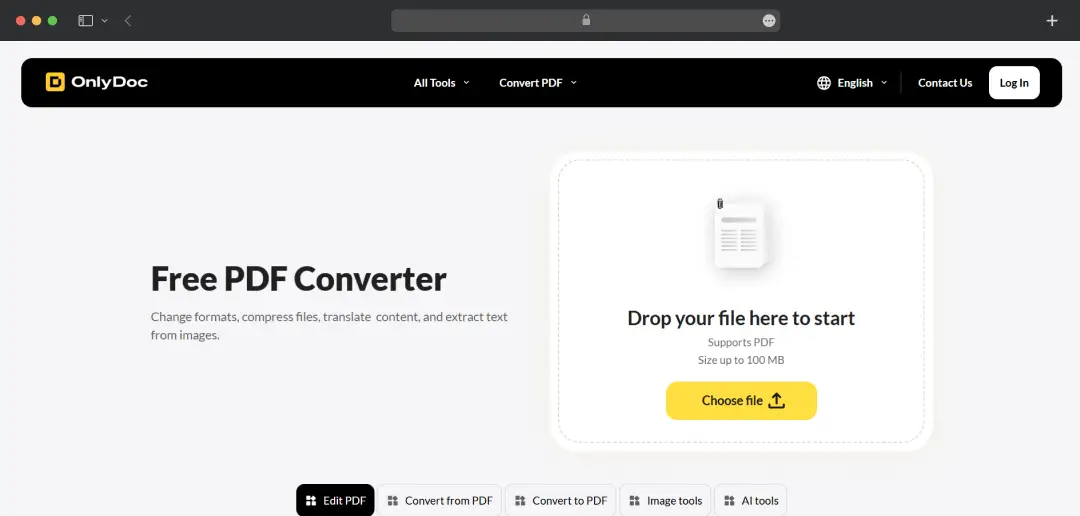
One of OnlyDoc's strongest design choices is that it doesn't require a tutorial. The flow is consistent across every tool on the platform, which means once you've used it for one conversion, you've used it for all of them. Here's how it works in practice.

Step 1: Open the OnlyDoc Website

Go to onlydoc.com in any browser on desktop or mobile. There's no app to download, no extension to install, and no account required for most operations.

Open the OnlyDoc Website

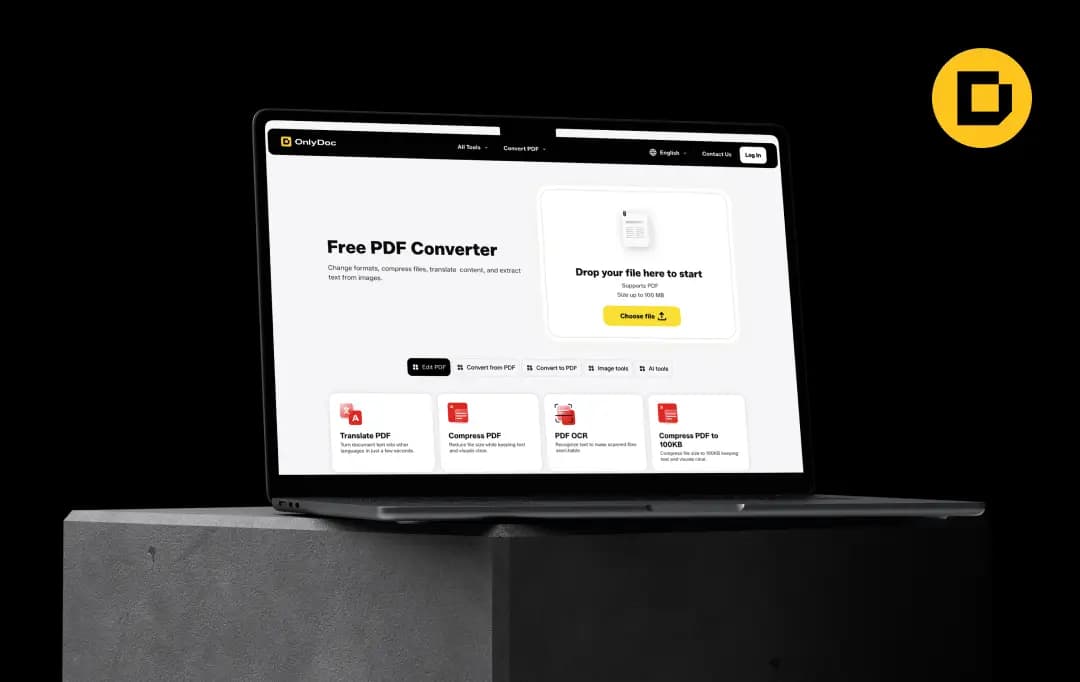
The homepage shows the primary file converter directly, with the full toolset accessible through the top navigation menu.

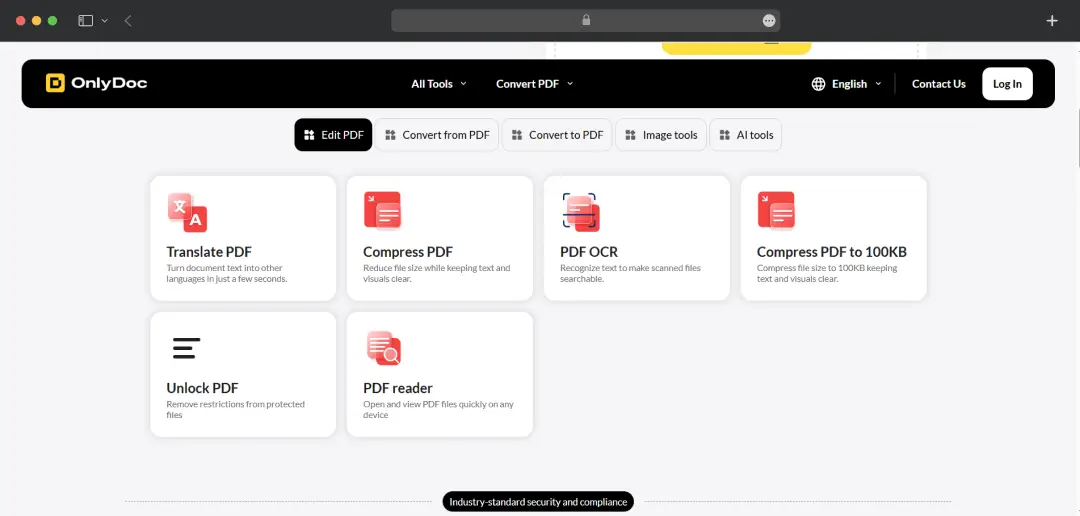
Step 2: Choose the Tool You Need

From the navigation, select the specific tool that matches your task, for example, PDF to Word, Compress PDF, PDF OCR, Translate PDF or Summarizer. Each tool has its own dedicated page with the same upload interface, which keeps the workflow predictable.

Choose the Tool You Need

The full list of tools is also accessible from the homepage menu, organised into categories like Edit PDF, Convert to PDF, Convert from PDF, Image Tools, and AI Tools.

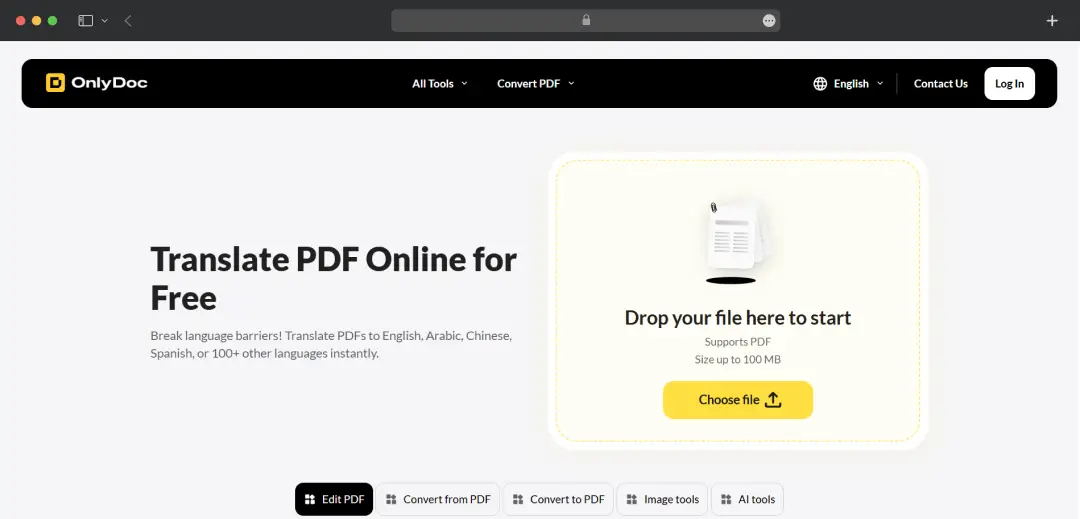
*For this review, we have used the PDF Translate tool.

Step 3: Upload Your File

Upload Your File

Drag and drop your file into the upload area or click "Choose File" to browse from your device. The supported file size is up to 100 MB, and OnlyDoc accepts the relevant input format for whichever tool you've opened. PDFs for conversion-from-PDF tools, Word documents for Word-to-PDF, images for image-based conversions, and so on. The upload happens over an encrypted connection.

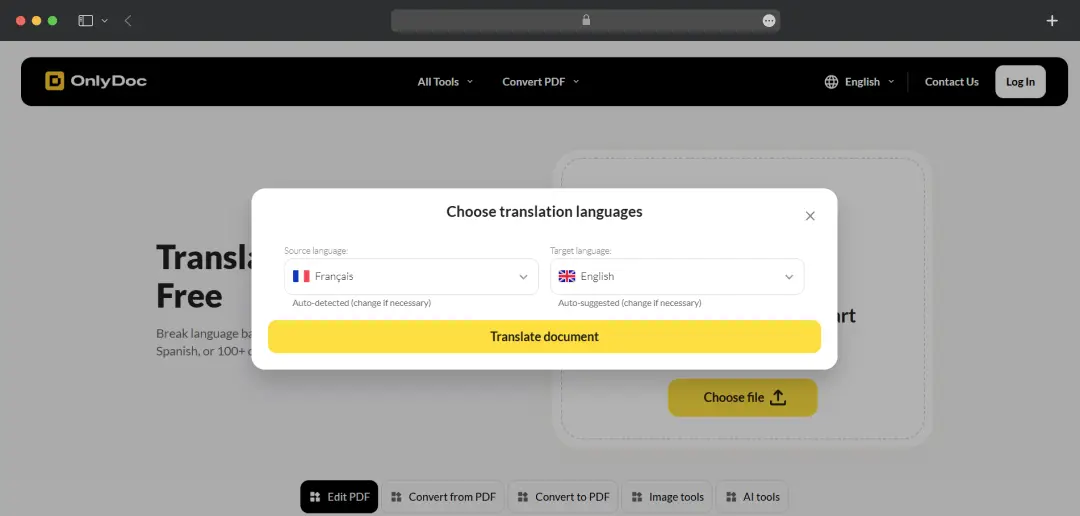
Step 4: Run the Edit

Once the file is uploaded, OnlyDoc processes it. For tools like the PDF summarizer or translation, you may be prompted to select a target language or summary length before processing.

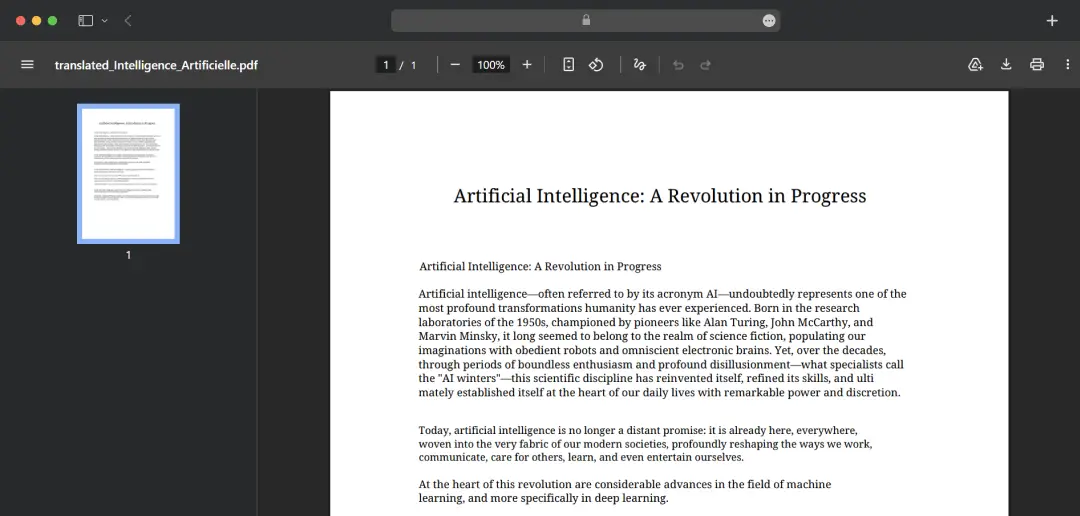
Run the Edit

Step 5: Download the Output

Download the Output

Once processing is complete, the result is available for direct download to your device. There's no watermark on the output, no email sign-up requirement to access the file, and no time limit before the download disappears.

A few practical notes from using the platform:

  • Mobile workflow is identical to desktop. The same five steps work on a phone browser without needing a separate app, which is unusual for PDF converter software in this category.
  • No account required for one-off use. The Log In option exists for users who want it, but the free PDF converter without registration model means you can complete almost any conversion anonymously.
  • Files are processed and downloaded immediately. OnlyDoc does not store files on its servers long-term — once you've downloaded the output, the file is no longer accessible through the platform, which is the right behaviour for a privacy-conscious workflow.

Is OnlyDoc Legit?

Is OnlyDoc Safe is one of the most common questions about any free file conversion service, and the answer is more nuanced than a yes or no. The platform displays standard security indicators on its homepage, SSL encryption, GDPR compliance, Google Safe Browsing certification, Norton, and DMCA.

The file processing happens over encrypted connections. The legal entity behind the platform (Lopital Limited, registered in Cyprus) is identifiable, which is more transparency than many free PDF tools offer. So, the tool is 100% legit.

MobileAppDaily's Final Verdict on OnlyDoc

After testing the platform across multiple conversion scenarios, document conversion, OCR on a scanned receipt, image compression, and AI summarization, the verdict is more positive than most free PDF tools usually earn.

What OnlyDoc gets right is the no-catch promise. The free tier genuinely delivers on what it claims: no watermarks, no aggressive upgrade prompts, no surprise registration walls mid-workflow.

The format range is unusually broad for a free PDF converter, and bundling OCR, translation, and AI summarization into the same tier puts it ahead of competitors that monetise those features. For everyday users, freelancers, and students, the value proposition is genuinely compelling.

Where OnlyDoc falls short is harder to ignore for power users. The 100 MB file size limit excludes larger documents that would be common in enterprise contexts. The browser-only design means no offline workflow, which matters for users with intermittent connections or sensitive content.

OnlyDoc is a strong, no-cost PDF conversion tool for users whose needs sit in the consumer-to-prosumer band, and a poor fit for users whose needs sit in the enterprise or regulated band.

This OnlyDoc PDF tool review concludes that the tool is approved by MobileAppDaily for personal use, student workflows, freelance document handling, and small businesses with light-to-moderate PDF needs. 

You should not rely on it as a primary tool for sensitive financial, legal, or medical documents, those workflows warrant a desktop tool with local processing. For everyone else, this is one of the most generous free offerings currently available in the online PDF converter category.

Let Your Product Take the Center Stage with Our Review

Share your product details and our team will get back with the next steps.

OnlyDoc
Frequently Asked Questions

FAQ
  • Is OnlyDoc Safe?

    Yes, OnlyDoc is generally safe to use for basic PDF conversions and document processing. As with any online file tool, avoid uploading highly sensitive or confidential documents unless you've reviewed the platform's privacy and data retention policies.

  • Is OnlyDoc Worth It?

    OnlyDoc is worth considering if you need quick PDF conversions, document editing, and file management without installing software. Its value depends on how often you work with PDFs and whether its feature set matches your workflow.

  • Can OnlyDoc Convert PDFs to Word?

    Yes, OnlyDoc allows users to convert PDF files into editable Word documents. The accuracy of the conversion typically depends on the complexity of the original PDF's formatting and layout.

  • Does OnlyDoc Work on Mobile Devices?

    Yes, OnlyDoc is browser-based, which means it can be accessed from smartphones and tablets without downloading dedicated software. This makes it convenient for managing documents on the go.

Delve into our comprehensive yet easy-to-consume guides, which provide insights that help scale business faster and prevent unseen pitfalls.

Related Products

Cut through the clutter and explore related digital products that deliver on performance.

OnlyDoc Review 2026: The Best PDF Converter for Everyday Users?