
We are not biased. We test and review every product. Here's our Methodology.

Filmora’s recent 14 update has gathered a lot of eyeballs because of its AI-infused features and attractive pricing. So, I tested the entire software to check out its new as well as old features and their compatibility with newbies and advanced edito

MobileAppDailyCertified Rating
4.4 out of 5
Available on:
Let Your Product Take the Center Stage with Our Review
Manish

Written By Manish

Meet Manish Chandra Srivastava, the Strategic Content Architect & Marketing Guru who turns brands into legends. Armed with a Marketer's Soul, Manish has dazzled giants like Collegedunia and Embibe before becoming a part of MobileAppDaily. His work is spotlighted on Hackernoon, Gamasutra, and Elearning Industry. Beyond the writer’s block, Manish is often found distracted by movies, video games, artificial intelligence (AI), and other such nerdy stuff. But the point remains, if you need your brand to shine, Manish is who you need.

Explore More By Author

Wondershare Filmora Review: What’s New in the Filmora 14 Update?
filmora reviews

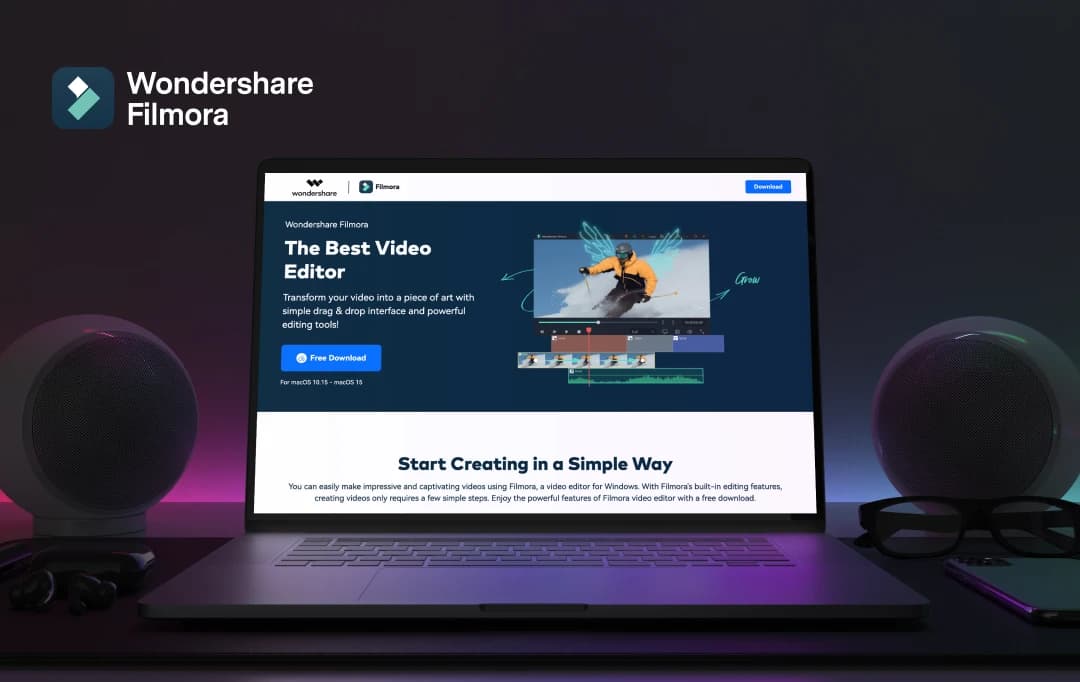
If you’re on the lookout for a video editing tool that is replete with features and (yet) won’t inundate you with complexity, Wondershare Filmora may just be the ideal choice. We’ve all encountered a daunting editing software that requires endless hours to unravel the basics. However, Filmora effectively bridges this gap, presenting a seamless blend of professional tools alongside an intuitive, beginner-friendly interface.

In this Wondershare Filmora review, I’ll help you know what distinguishes the platform from a plethora of options out there. I will also share my hands-on experience with the all-new Filmora 14 and give you a deeper insight into its features.

Although many tools exist, it is worth exploring why this particular software has emerged as a preferred choice for both novice editors and seasoned professionals.

Pros and Cons of Wondershare Filmora

Pros

  • An intuitive drag-and-drop interface, perfect for beginners.
  • Provides features like AI tools, motion tracking, green screen, and text-based editing.
  • Offers competitive pricing for the features provided.
  • Includes effects, transitions, and templates for creative projects.
  • It is a cross-platform solution available on Windows, Apple MAC, Android, and iOS.

Cons

  • The free trial exports with a watermark.
  • Lacks some of the deep, professional features found in other tools.
  • It can lag on low-end devices, especially with HD/4K footage.

Wondershare Filmora | Tech Specifications

There are certain requirements that your device needs to fulfill to use Filmora effectively. Here are the minimum requirements if you want to use Filmora on windows, Apple MAC, Android, and iOS.

Platform Specifications Details
Windows Operating System Windows 7 or higher
RAM 8GB of RAM (recommended), 16GB (ideal)
Graphics NVIDIA GeForce or AMD Radeon
MAC Operating System Mac with macOS 10.14 or later
RAM 8GB of RAM (recommended), 16GB (ideal)
Android Version 14.0.02
Android Version 7.0 and up
Size 93.25 MB
iOS Version 14.0.30
iOS Version Requires iOS 12.0 or later
Size 460.8 MB

Key Features of Wondershare Filmora

Wondershare Filmora with its Filmora 14, has released a pack full of new AI features that help make it a great place to start for beginners in video editing. These features are user-friendly and easy to understand. I personally reviewed all of Filmora’s features (new and old) to find out what the hype is all about. 

1. Smart BGM Generation

Amongst the most newbie-friendly features is the Smart BGM (Background Music) Generation. This AI-powered tool will analyze your videos and automatically create bespoke background music for your videos. During my Filmora review, I saw that without wasting hours searching for the right music or squaring copyright, it enabled me to elevate my videos with a high-quality audio treatment in just a few clicks.

2. AI Face Mosaic
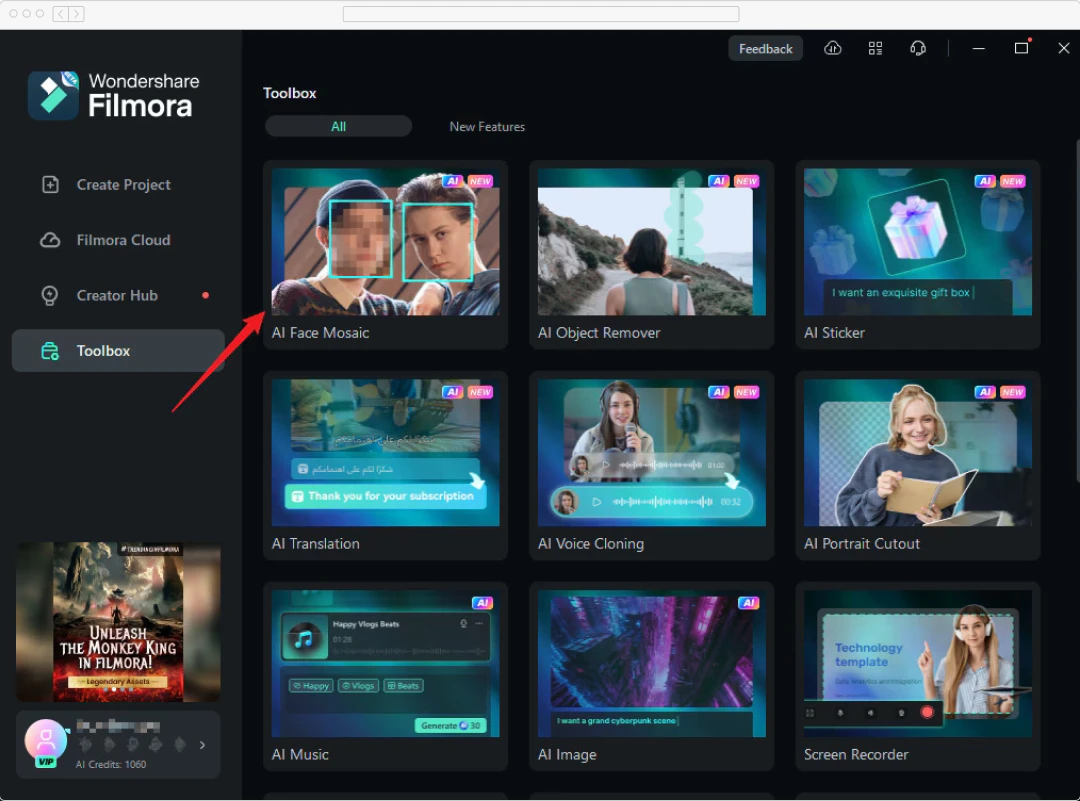
AI Face Mosaic

Privacy issues, especially when it comes to videos, are of a higher level of significance. And, I saw that Filmora 14 AI Face Mosaic automatically recognizes and blurs the faces in the footage. Hence, I didn't have to spend the time and effort to manually complete mosaic effects.

3. AI Voice and Video Enhancer

Even a good video is ruined by bad sound quality. Filmora 14’s AI Voice Enhancer auto-cleans the recorded voice, removes background noise, and accents speech. I observed that this is especially convenient for new players (like me) who do not have the luxury of professional recording equipment. Moreover, the AI Video Enhancer in FIlmora 14 is a game-changer for amateur users struggling with subpar footage. This feature applies powerful AI algorithms to sharpen, reduce noise, and balance the color of your video. 

4. AI Portrait Cutout
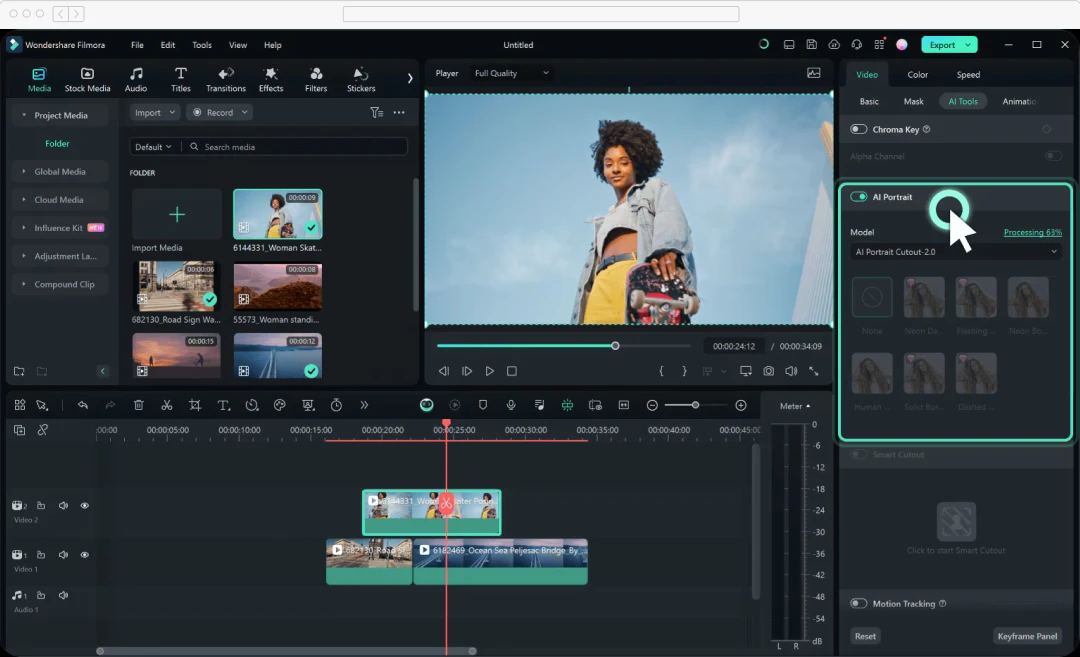
AI Portrait Cutout

The AI Portrait Cutout is revolutionizing a lot for those new users who want to make professional-looking videos with minimum effort. The tool consists of smart AI algorithms that automatically split the subject from the background of the image. I also found out through Filmora reviews that users appreciate the easy green screen effects, background replacement, or even fun compositing without needing advanced masking.

5. AI Color Palette

For novices like me, color grading is an intimidating experience but AI Color Palette in Filmora has made it a lot easier. It analyzed my footage and suggested appropriate color combinations to suit my video. Thus, I was able to give it a professional feel without a lot of color grading experience.

Advanced Features in the New Wondershare Filmora 14

Filmora has recently came out with its Filmora 14 update that includes a bucket-load of new features and functionalities. In fact, when I heard the news and explored the new offerings, I was enraptured with the sheer number and quality of the features. Here are some of the features that caught my eye.

  • Planar Tracking: Planar Tracking is a powerful technique by which I could move around points or spaces in a video and tie other components to them. Experts can employ this to add text, logos, or even 3D objects that animate with the object being tracked.
  • Filmora Copilot 2.0: With Filmora Copilot 2.0, you now have your own personal video editor on the side. This best AI art generator helped me throughout the editing process, suggesting cuts, transitions, and effects based on my footage.
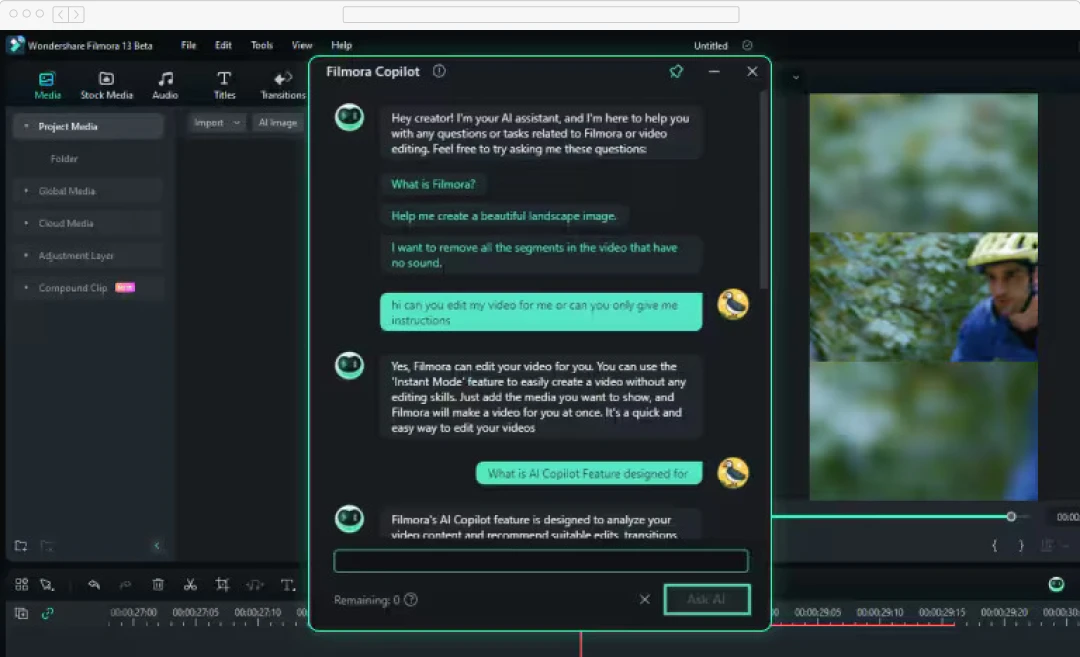
Filmora Copilot 2.0

  • Multi-Camera Editing: This is a boon for professionals who edit footage from more than one camera. In my experience, I could sync and manipulate clips from up to 100 camera angles in a row. It’s also been useful to me for combining live events, interviews, or any production that calls for multiple camera shots.
  • Keyframe Path Curve: The Keyframe Path Curve allows editors to have precise oversight of how things flow in the videos. In fact, professionals can easily achieve organic-looking animations and transitions by altering the curve of the keyframe path. That kind of control is critical for high-quality, professional video.
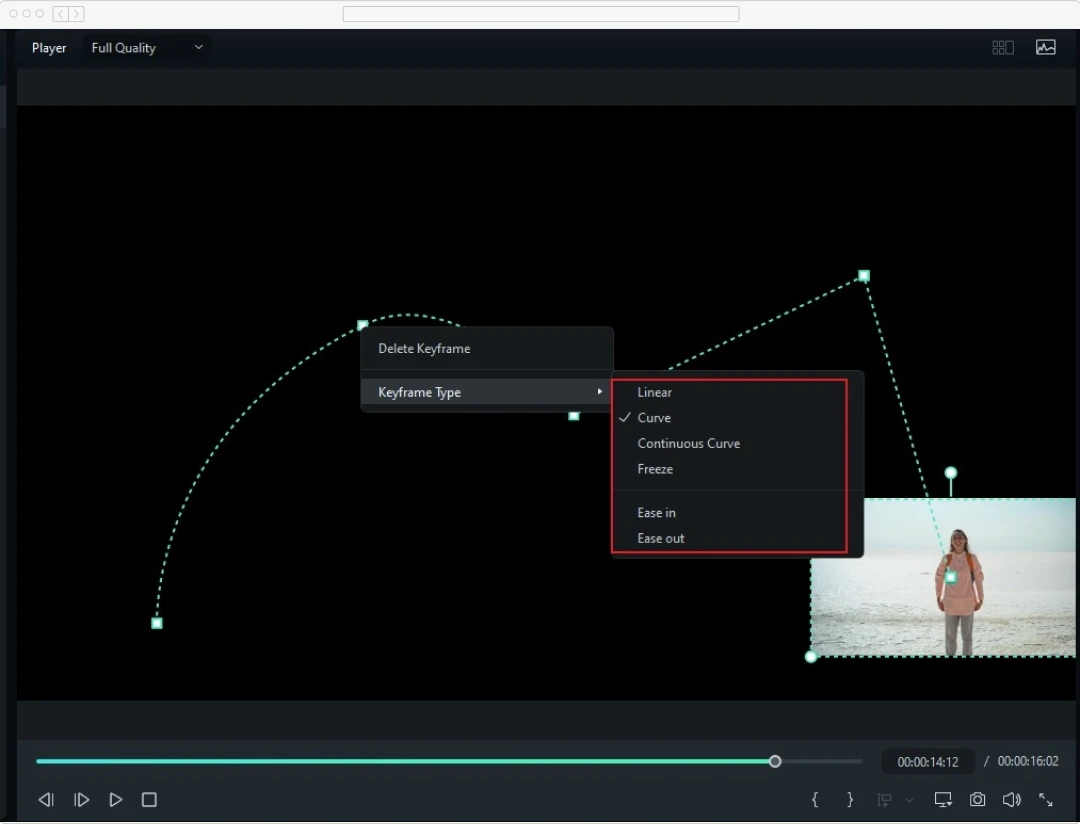
Keyframe Path Curve

  • AI Translation-Lip Sync: We live in a globalized world today and producing international content is more crucial than ever. Filmora 14 AI Translation - Lip Sync AI Translation algorithm takes the audio from your video and translates it into a different language. Also, it matches it with the original lip movement. This breakthrough capability allows professionals to quickly make localized edits of their content without any massive re-cutting or dubbing.
  • Advanced Compression: Size and video quality are always the most important considerations of an experienced video editor. Advanced Compression in Filmora 14 can be especially advantageous for professional people who have to publish high-quality material within certain file size constraints.

Wondershare Filmora Price and Plans

Pricing is an important aspect that has to be studied in this Filmora review. Compared to other alternatives, Filmora offers the full features at an affordable rate. Each of these plans includes a set of features so that you can select the ideal package. Here is a detailed breakdown below.  

Filmora Plans Filmora Pricing Filmora Payment Cycle
Basic $9.99 Every Month
Advanced $34.99 Every Year
Perpetual $49.99 One-time Payment

Why Trust MobileAppDaily?

For us, Product Reviews mean diving headfirst into the functionality of each digital product, whether it's an app, software, or website. Our process centers around hands-on testing of each tool we pick. From scrutinizing features to testing vulnerabilities of security standards, the goal remains to help you find products that don't just work but truly elevate your experience. In a nutshell, if we're recommending a product, it's because we believe it'll genuinely make your digital life easier.

  • Products Reviewed - 4,000+
  • No. Of Experts - 20+
  • Categories - 65+
Explore Our Methodology

Customer Reviews

Checking...

Rate the product based on your experience?

How was your experience with the product?

Also Reviewed By Us

Giving My ‘MAD’ Perspective: What I Think About Filmora?

Expert Opinion

Wondershare Filmora is an impressive blend of user-friendliness and professional-grade features, catering to both beginners and seasoned editors alike. Its intuitive drag-and-drop interface makes it accessible, while advanced tools like AI-driven features (AI Video Enhancer, AI Face Mosaic, and AI Sound Effects) provide powerful options for detailed editing. 

During my Filmora review, I also saw its seamless balance between simplicity and complexity—whether you’re crafting a quick social media video or a more intricate project, Filmora delivers. With over 10 million stock media assets, custom templates, and features like multi-camera editing and motion tracking, it offers professional results without overwhelming users. 

From beginners who need quick edits to professionals seeking powerful tools, Filmora has positioned itself as a go-to solution as one of the best video editing apps. In particular, its AI integrations make it a standout tool for anyone looking to streamline their workflow while maintaining creative control.

Feature

FEATURE

4.8
Pricing

PRICING

4.5
Performance

PERFORMANCE

4.2
User Feedback

USER FEEDBACK

4.0

How to Use Wondershare Filmora

Step 1 - Start a Project

Start a Project

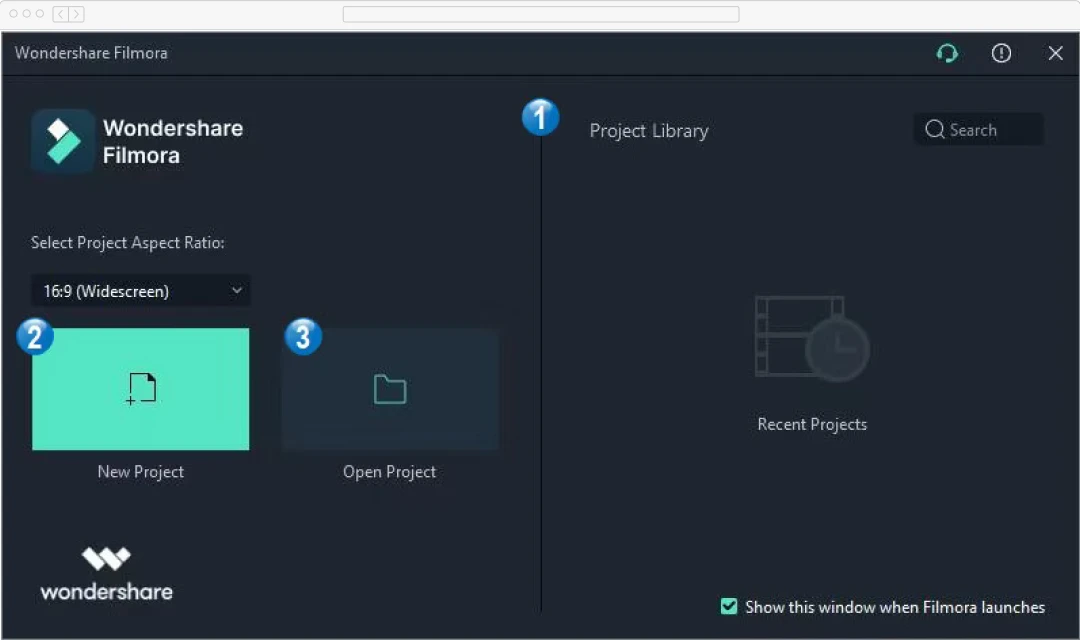
After installing and registering in Filmora, the first thing would be to start a “new project” or open an existing one. After logging in, I encountered the “project library” section, where I was able to choose the desired option. 

Step 2 - Import Media

Import Media

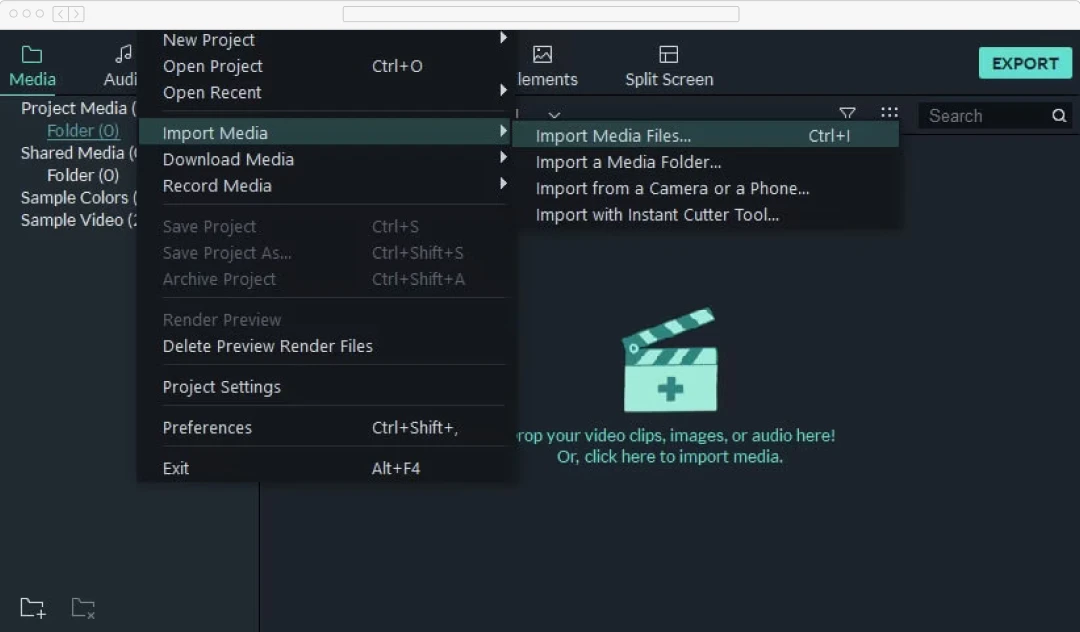
The next step is to add the media file (videos, audio, photos) to Filmora to start editing. You can find the option in the upper left corner named “Media” > ‘Import Media.” Click this to bring in your video, audio, and image files. You can also drag and drop files directly into the media library.

Step 3 - Add Effects, Transitions, and Filters

Add Effects, Transitions, and Filters

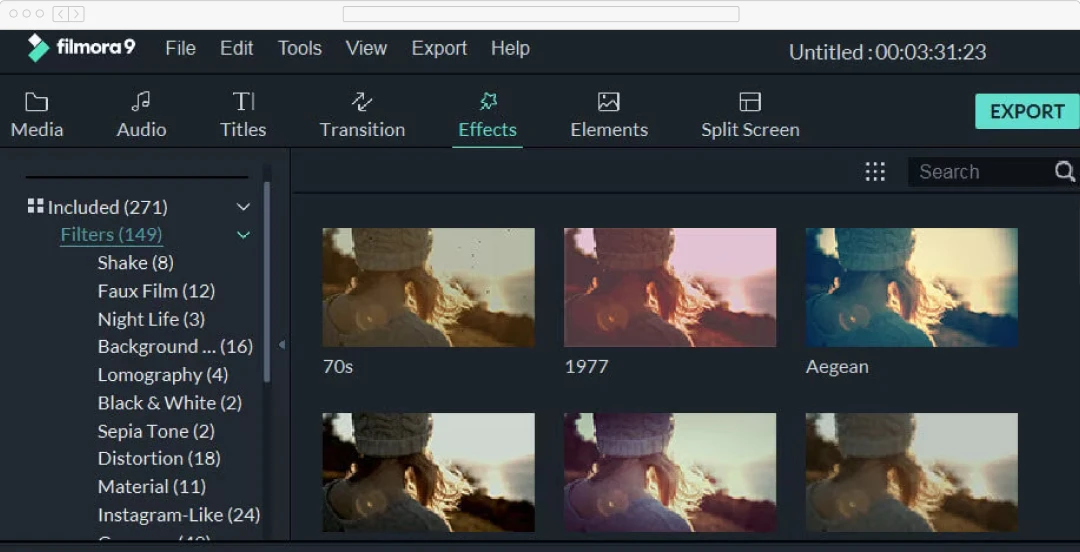
After adding all the necessary files, I was able to start with the editing process. Users can open the add effects, trim clips, and photos, and even add transitions in videos. These are just the most basic things you can do on the platform. Filmora offers many advanced features to professionals as well. All with the help of AI. 

Step 4 - Preview and Make Final Edits

Once your project is taking shape, you can preview the changes immediately, which will help you fine-tune your edits in real-time. The timeline lets you fine-tune cuts, transitions, and effects, giving you full creative control.

Step 5  - Export Your Project

Export Your Project

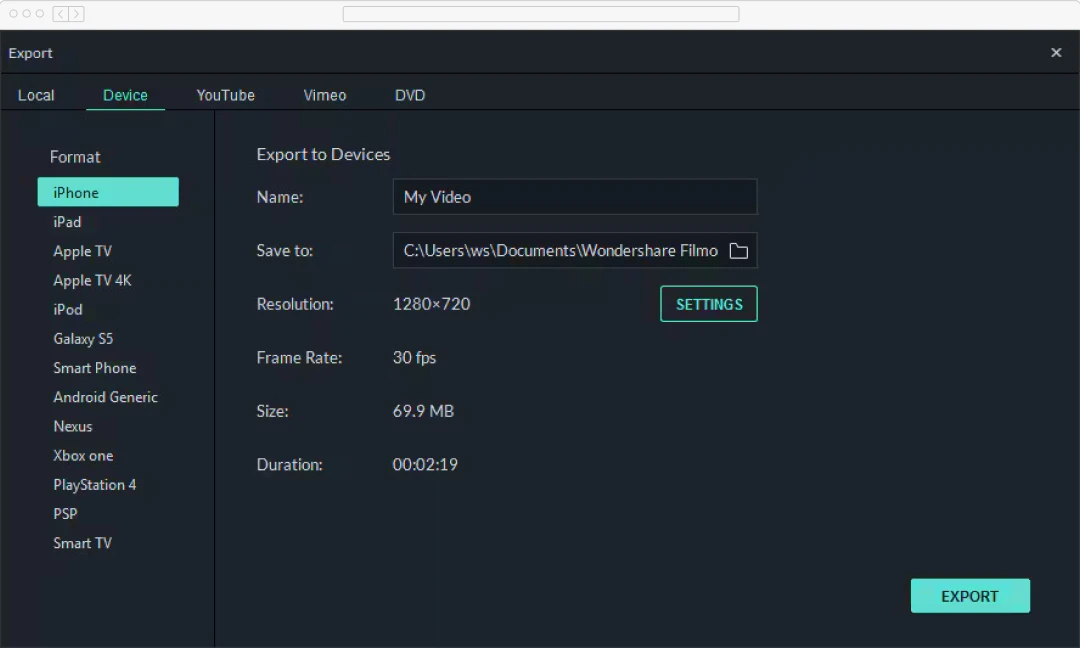
After you’re satisfied, click export to save your video. You can choose the device, resolution, and format (MP4, MOV, etc.), and the device you can save the file in.  

Conclusion

Wondershare Filmora 14 represents a big step in the video editing world, which bridges the divide between amateur and expert. Its AI-driven innovative capabilities have revolutionized video editing for anyone to use without the limited knowledge required by professionals and with the depth and automation that pros expect.

For newbies, I believe Wondershare Filmora to be a gentle introduction to video editing tools that allow you to be guided through and automate the process using AI-aided tools. For professionals, it’s full of advanced capabilities to streamline their processes. From next-gen tracking to AI-based translation and lip-syncing, Filmora gives you all you need to get the most complicated video editing projects under control.

Looking to the future, it’s clear generative AI will continue to take an increasing amount of space in video editing. Wondershare Filmora 14 is at the forefront of this revolution, a continuously evolving video editing tool, challenging the boundaries.

Wondershare Filmora
Frequently Asked Questions

FAQ
  • What is Filmora, and who is it best suited for?

    Filmora is a user-friendly video editing software designed by Wondershare. It caters to both beginners and professionals. The solution is perfect for anyone looking to produce high-quality videos without dealing with overly complex editing tools. Filmora offers a balance of simplicity and advanced features. For instance, AI text-based editing, green screen, and motion tracking. If you’re looking for an accessible tool that still packs a creative punch, Wondershare Filmora reviews often highlight its versatility across different users.

  • What features does Filmora offer?

    Filmora comes packed with an array of features like:

    • AI Text-based editing
    • Drag-and-drop interface
    • Green screen capabilities
    • Vast library of transitions,
    • Big library of filters and effects.
    • Motion tracking
    • Split-screen editing
    • Keyframing

    For audio editing, Filmora offers:

    • Sound equalizers
    • Denoise tools
    • Music libraries

    According to many Filmora video editor reviews, its standout features are its ease of use and powerful effects. Thus making it suitable for both quick edits and professional-level projects.

  • Is Filmora easy to use for beginners?

    Yes, Filmora is designed with beginners in mind. It offers an intuitive drag-and-drop interface that makes it easy to navigate. With a clean layout and helpful tutorials, it’s easy to learn without sacrificing advanced tools. Also, many Wondershare Filmora reviews emphasize how newcomers can quickly create polished videos. That too, without needing previous editing experience. However, it also offers advanced features for those ready to explore more complex editing techniques.

  • What are the system requirements for Filmora?

    To run Filmora, you’ll need a PC with Windows 7 or higher or a Mac with macOS 10.14 or later.

    For smooth performance, a minimum of 8GB of RAM is recommended. Although 16GB is ideal for editing HD or 4K videos. Furthermore, a modern Intel or AMD processor and at least 10GB of free disk space are required.

    For best performance, many Filmora reviews suggest using a computer with a dedicated graphics card, such as NVIDIA GeForce or AMD Radeon.

  • Can I use Filmora for text-based editing?

    Yes, Filmora offers a unique AI Text-based editing feature. This feature allows users to edit videos through text commands. Also, the tool simplifies the editing process. Thus enabling us to trim, cut, or organize video clips by simply interacting with the script. According to Wondershare Filmora reviews, this is particularly useful for creating videos with extensive dialogue. Ultimately, this allows users to focus on the narrative while making precise edits efficiently.

  • What are the alternatives to Filmora?

    If you’re exploring alternatives to Filmora, some popular options include:

    • Adobe Premiere Pro
    • DaVinci Resolve
    • HitFilm Express
    • iMovie (for Mac users)

    However, Filmora reviews highlight its ease of use and balance of features. This makes it stand out among users who want both simplicity and functionality.

  • Is there a free trial of Filmora available?

    Yes, Filmora offers a free trial that gives users access to most of its features. However, the trial version exports videos with a watermark. This is a great way to explore the tool before committing to a paid plan. According to many Wondershare Filmora reviews, users find the free trial a helpful way to test the software’s capabilities and see if it meets their editing needs before purchasing a full license.

  • Is Filmora considered a good editing software?

    Based on numerous Wondershare Filmora reviews, the software is highly regarded as a good editing software for both beginners and intermediate users. It combines an intuitive interface with powerful editing features. These features provide both basic edits and more complex projects. Moreover, its AI tools and vast library of effects make it a versatile option for many. It’s especially praised for being a great middle ground between basic and professional editing tools.

Delve into our comprehensive yet easy-to-consume guides, which provide insights that help scale business faster and prevent unseen pitfalls.

Related Products

Cut through the clutter and explore related digital products that deliver on performance.