
CleverGet
This CleverGet review contains honest testing results, pricing analysis, and performance evaluation.
CleverGet Review: My Experience with This All-in-One Video Downloader
The modern streaming space has created an interesting paradox: we have access to more content than ever before. Yet! We're constantly battling connectivity issues, data caps, and the frustration of content disappearing from platforms without notice.
This reality led me to explore video downloading solutions. And in the process, CleverGet caught my attention instantly. When I first heard about CleverGet, I was intrigued by its promise to be an all-in-one solution for downloading videos from virtually any streaming platform.
After three months of extensive testing across multiple platforms and use cases, I've developed a nuanced perspective on what CleverGet video downloader actually delivers versus what it promises. Here's what I discovered during my hands-on experience with this controversial yet capable video downloader.
Pros and Cons of CleverGet
Pros
- Supports up to 8K video downloads with 320 kbps audio - almost unique in the market
- Works with 1000+ websites including Netflix, Amazon Prime, Disney+, YouTube, and more
- Automatically detects and downloads entire TV seasons or playlists
- Download to MP4, MKV, WEBM, or extract audio in various formats
- Direct access to streaming platforms without copying URLs
- Download subtitles as separate SRT files or embed them in videos
- Fast download speeds with batch processing capabilities
Cons
- Annual plan costs $149.95, lifetime $229.95, with no monthly option available
The Standout Features That Actually Work
CleverGet is certainly a revered video downloading platform that offers features that take care of every need a user might have. Some of these most talked about features are.
1. Video Downloader Across Channels
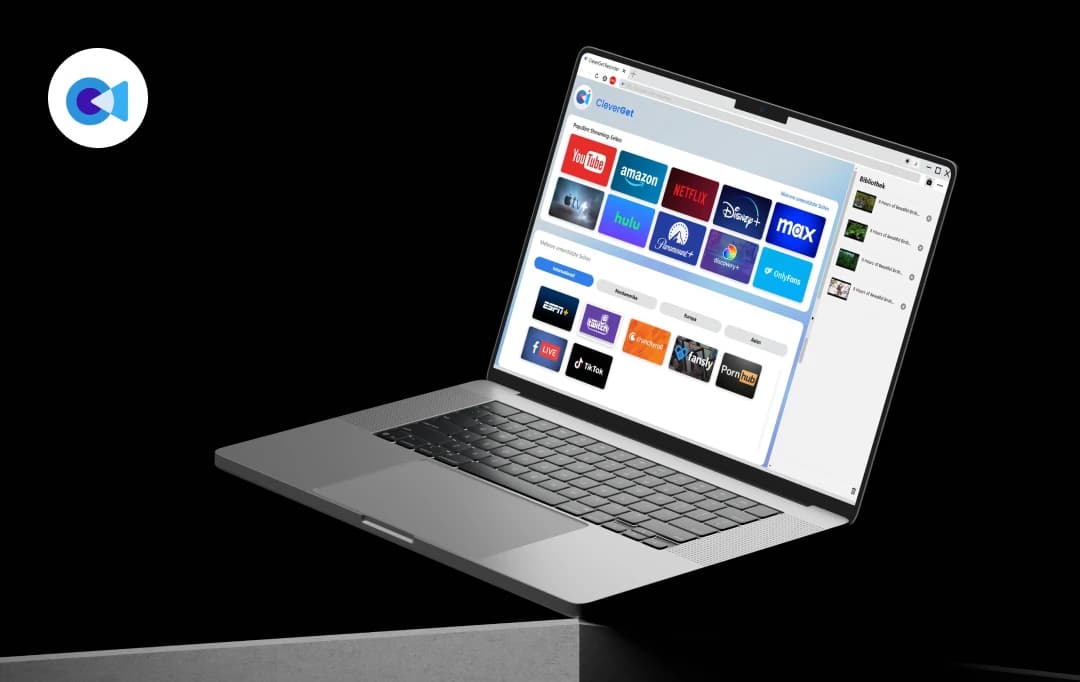
CleverGet positions itself as a comprehensive video downloader toolkit that combines multiple modules under one roof. The software includes Video Downloader, Netflix Downloader, MAX Downloader, Amazon Prime Downloader, Apple TV Plus Downloader, Disney+ Downloader, Hulu Downloader, Discovery+ Downloader, Twitch Downloader, and Video Recorder modules. What caught my attention initially was the sheer scope—they claim support for over 1000 websites.
2. Impressive Video Quality Support
One area where CleverGet genuinely shines is video quality. The software can download 8K videos with 320 kbps audio as long as they're available in source videos, making it probably the sole tool that can download 8K quality video and audio at 320 kbps. That too without quality loss. During my testing, I was able to download high-definition content that maintained excellent visual quality.
For most users, the 1080p Full HD support will be more relevant, and CleverGet handles this well across most supported platforms. The downloaded videos looked crisp and maintained the original quality I expected.
3. Smart TV Show Detection
The batch downloading feature for TV series impressed me most during testing. When you parse a single TV show episode, CleverGet video downloader can smartly detect and list all episodes from the same season or even all seasons, allowing you to download the current episode, selected episodes, entire seasons, or all seasons in a batch. This saved me hours compared to downloading episodes individually.
4. Multiple Format Options
CleverGet doesn't lock you into one format. The software enables you to download online videos to MP4, MKV, WEBM, or other available popular formats, and you can even download videos and save them in audio formats. This flexibility means your downloaded content works across different devices and media players.
5. Subtitle and Audio Track Handling
The subtitle management features work well in practice. CleverGet enables you to download or record online videos with selected subtitles and audio tracks, with streaming video downloader modules able to download multiple subtitles and audio tracks, saving subtitles as independent SRT/SUP files or packing them into output videos as internal subtitles.
6. The Built-in Browser Approach
CleverGet's unique approach as a browser-first tool has both advantages and drawbacks. CleverGet is primarily a browser that enables you to open a target streaming platform, search, play back and download online video easily. This means you don't need to copy-paste URLs constantly—you can browse naturally and download what catches your eye.
CleverGet Pricing Plans
| Plan Type | Price | Duration | Money-Back Guarantee |
|---|---|---|---|
| Annual Plan | $164.95 | 1 Year | 30 Days |
| Lifetime Plan | $249.95 | Lifetime | 30 Days |
For us, Product Reviews mean diving headfirst into the functionality of each digital product, whether it’s an app, software, or website. Our process centers around hands-on testing of each tool we pick. From scrutinizing features to testing vulnerabilities of security standards, the goal remains to help you find products that don’t just work but truly elevate your experience. In a nutshell, if we’re recommending a product, it’s because we believe it’ll genuinely make your digital life easier.
- Products Reviewed - 4,000+
- No. Of Experts - 20+
- Categories - 65+
Customer Reviews
How was your experience with the product?
“ Effective software and Superb Support I have a Clever Video Downloader, download and recording modules. The program is very good, I am satisfied. I needed to
“ Works well I have the Amazon module and it worked really well first time without any dramas. Quality is good (1280 x 800 or thereabouts). Also
“ i just wanna say THANK YOU TO CORAL!!! i just wanna say THANK YOU TO CORAL!!! Since u joined the cleverget team you UVE MADE THE DIFFERENCE
MobileAppDaily’s Ratings
FEATURE
Excellent 8K support, smart batch downloading, and comprehensive platform coverage.
PRICING
Relatively affordable software solution. However, users can benefit from a monthly option.
PERFORMANCE
Works well with fast speeds and good quality. Offers stream recording and video downloading with quickly and efficiently.
USER EXPERIENCE
The built-in browser approach is very convenient and the interface is intuitive.
How to Use CleverGet Download Videos from Premium Streaming Services: Step-by-Step Process
The process of downloading from premium streaming platforms like Netflix, Amazon Prime, and Disney+ follows a standardized approach within CleverGet.
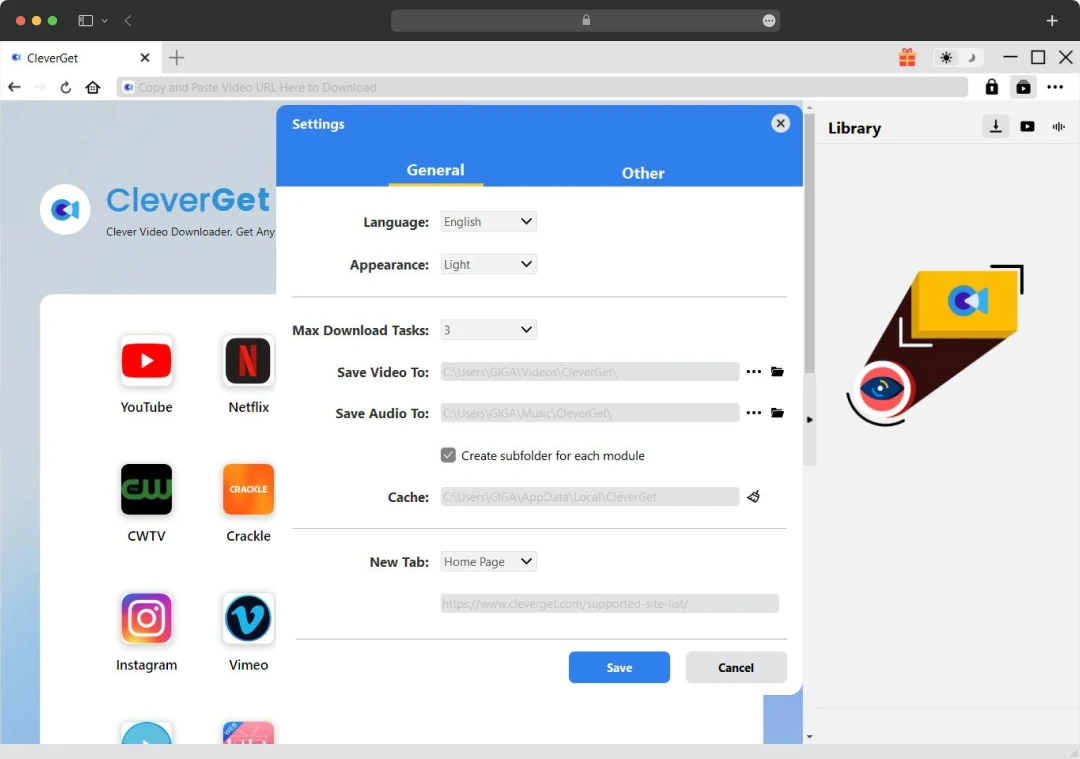
Step 1: Initial Setup and Configuration: Launch CleverGet and click the three-dot menu in the top-right corner. Then, select "Settings" and navigate to the "General" tab. You’ll need to set your preferred download directory in the "Save Video To" box.
Note: I recommend checking "Create subfolder for each stream service" to keep downloads organized. Click "Save" to apply changes.

Step 2: Navigate to Your Streaming Platform: Instead of copying URLs, use CleverGet's built-in browser to navigate directly to your target streaming service (Netflix, Amazon Prime, Disney+, etc.). Log into your account using your normal credentials—CleverGet supports standard authentication processes.
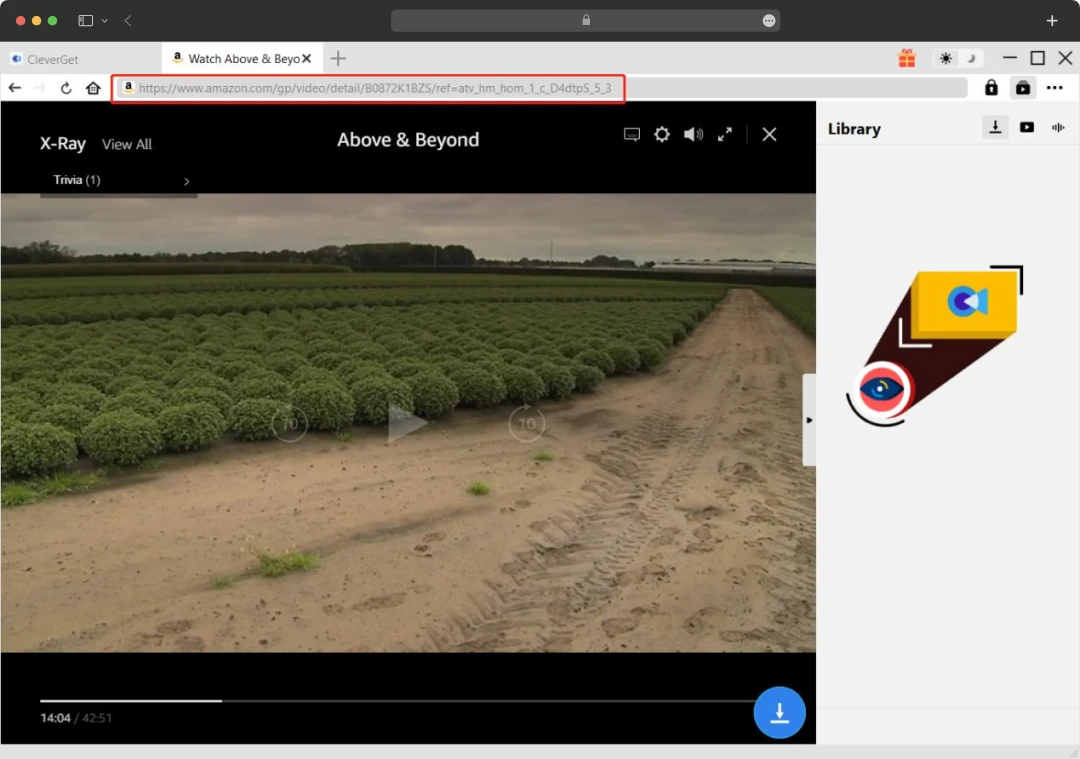
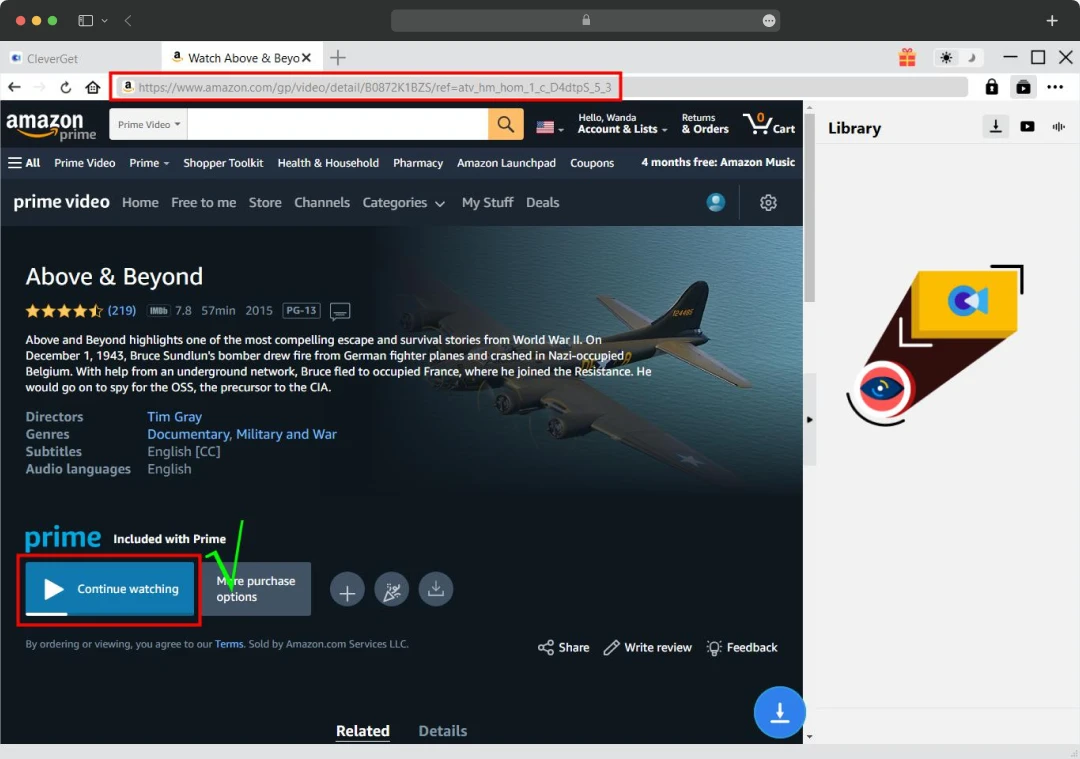
Step 3: Locate and Access Your Target Video: Here's where platform differences matter. For Amazon Prime Video, you must navigate to the video's detail page and click the play button before downloading. Simply clicking play from the homepage generates an error. For Netflix, Disney+, and other platforms, you can typically start playback from anywhere.

Step 4: Initiate Video Parsing: Once your video is playing, look for the download icon in the bottom-right corner of the video player. Click this icon to trigger CleverGet's parsing engine. The software will analyze the video stream and detect available download options.

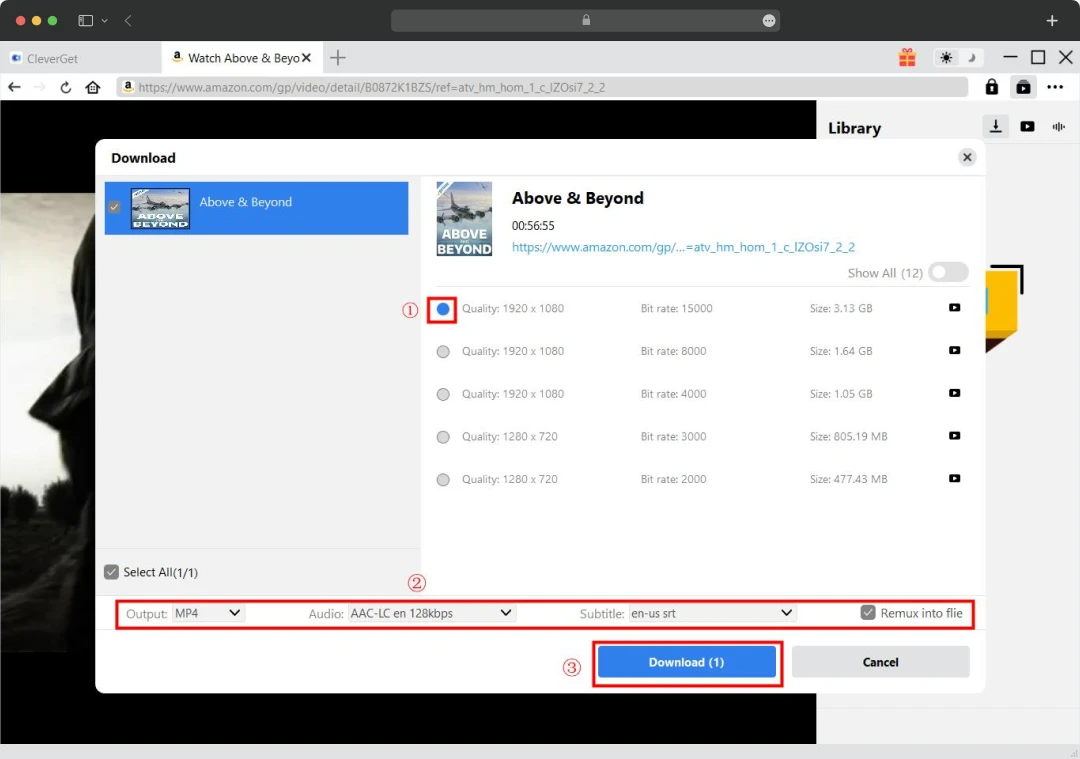
Step 5: Configure Download Settings: A popup interface will display all available configurations including quality options (720p to 1080p depending on platform), audio tracks, and subtitle languages. Select your preferred video quality, choose between MP4 or MKV output formats, and select audio tracks and subtitles.
Step 6: Handle Subtitle Options: Decide whether to embed subtitles directly into the video file by checking "Remix into File" or save them as separate SRT/SUP files. Embedded subtitles are more convenient for playback, while separate files offer more flexibility.
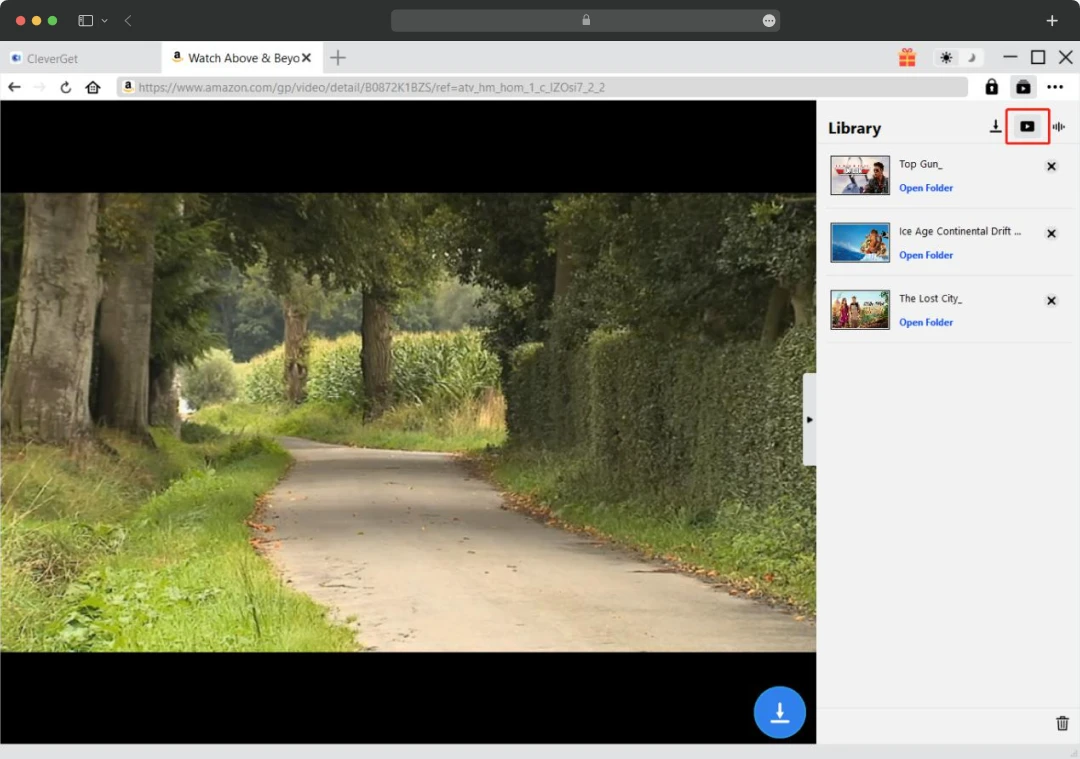
Step 7: Start the Download: Click the blue "Download" button to begin the process. A sidebar will appear on the right showing your active download tasks with progress indicators, download speeds, and remaining time estimates.

Step 8: Monitor and Manage Downloads: Use the sidebar to monitor progress, pause downloads if needed, or cancel problematic tasks. You can queue multiple videos simultaneously, though I recommend limiting concurrent downloads to 2-3 to avoid system strain or platform detection.

Step 9: Access Downloaded Content: Once complete, click the "Video" tab in the sidebar to access your downloaded files. You can play videos directly, open file folders, or use the built-in options to burn content to disc or play with external media players.
MobileAppDaily’s POV on CleverGet?
After extensive testing, I have mixed feelings about recommending CleverGet. Here's my honest assessment:
CleverGet streaming recorder represents an ambitious attempt to create an all-in-one video downloading solution, and in many ways, it succeeds. CleverGet works well when it works. The video quality is excellent, the interface is intuitive once you get used to it, and the batch downloading features can save significant time. The ability to download from such a wide variety of platforms in one tool is genuinely convenient.
The pricing reflects the comprehensive nature of the toolkit, positioning it as a professional-grade solution for users who prioritize reliability and extensive platform support. While CleverGet's Full HD 1080p output maintains impressive quality standards, the actual results will naturally depend on source material quality and individual platform specifications, which is typical across video downloading solutions in this category.
CleverGet
Frequently Asked Questions
-
Is CleverGet completely free to use?
No, CleverGet streaming video recorder isn't free software. To access full functionality and unlimited downloads, you must purchase either the annual ($164.95) or lifetime ($249.95) plan.
-
Can CleverGet download from Netflix and other major streaming platforms?
-
What video quality can I expect from CleverGet downloads?
-
Does CleverGet work on both Windows and Mac computers?
Latest Products
Delve into our comprehensive yet easy-to-consume guides, which provide insights that help scale business faster and prevent unseen pitfalls.
Related Products
Cut through the clutter and explore related digital products that deliver on performance.