- 1. Electronic Health Record (EHR) Software
- 2. Medical Practice Management Software
- 3. Telemedicine Software
- 4. Hospital Management Software (HMS)
- 5. Medical Billing Software
- 6. Remote Patient Monitoring (RPM) Software
- 7. Medical Imaging Software
- 8. E-Prescribing Software
- 9. Laboratory Information Management Systems (LIMS)
- 10. Patient Portal Software
- 11. Clinical Decision Support Systems (CDSS)
- 12. Medical Database Software
- 13. Pharmacy Management Software
- 14. Medical CRM Software
- 15. Healthcare Compliance Software
 Share It On:
 Everything you need to know about the crucial types of healthcare software to stay ahead in an increasingly digital industry.
The modern entrepreneur or established healthcare company struggles with a grave question: how to go digital without losing the "human" in the process. We’ve entered a time where AI in healthcare has shifted from a futuristic promise to a functional requirement, and "patient satisfaction" is tied directly to how many clicks it takes to see a lab result.
Choosing your types of healthcare software is a major strategic play. If you’re rolling with a system that’s clunky or doesn't play well with others, you're burning out your staff and frustrating your patients. It’s better to think of these tools as the "silent partners" in your practice that need to be selected carefully.
Below, we’ll deep-dive into the essential tools currently redefining care delivery—mapping out everything from back-office stabilizers to the advanced patient-facing tech that’s keeping everyone healthy and connected.
15 Types of Healthcare Software
1. Electronic Health Record (EHR) Software
This is the digital backbone of any modern medical practice. Electronic Health Record (EHR) Software keeps a patient's entire medical history—diagnoses, meds, and lab results—all in one place. By 2026, these are increasingly AI-integrated, providing real-time data analysis to assist clinicians in making faster, more informed care decisions across the board.
| Pros | Cons |
|---|---|
| Centralized patient data for better care coordination | High upfront implementation and licensing costs |
| Real-time updates with secure cloud access | Steep learning curve for staff using legacy tools |
| Reduces duplicate testing and manual errors | Requires heavy maintenance and constant security patches |
2. Medical Practice Management Software
Think of this as the "office manager" in code form. Medical practice management software handles the administrative side—scheduling, billing, and patient registration—so the docs can focus on, well, the patients. It’s the ultimate low-key hero for optimizing daily workflow and keeping the front-desk chaos at an absolute minimum.
| Pros | Cons |
|---|---|
| Streamlines daily admin tasks and scheduling | Can be overkill for very small, niche practices |
| Improves billing accuracy and immediate cash flow | Integration with legacy EHRs can be a bit tricky |
| Automated patient reminders drastically reduce no-shows | Needs regular updates to stay relevant with regulations |
3. Telemedicine Software
Since the world shifted to hybrid care, Telemedicine software has become a staple. It allows for virtual consultations via high-def video or secure chat. In 2026, these are integrated with remote vitals tracking, making it easier than ever to treat patients without them ever having to step foot in a waiting room.
| Pros | Cons |
|---|---|
| Increases patient access, especially in rural areas | Not suitable for all types of physical exams |
| Cuts down on overhead costs for physical clinics | Relies heavily on patient internet and tech quality |
| Flexible scheduling for both doctors and patients | Potential for lower patient-doctor bonding in-person |
4. Hospital Management Software (HMS)
When you're running a massive facility, you need Hospital management Software (HMS). It manages everything from bed occupancy and pharmacy stock to HR and laundry services. It’s the "big picture" tool for types of hospital software, ensuring that the complex gears of a large medical institution turn smoothly.
| Pros | Cons |
|---|---|
| Enhances overall operational efficiency at scale | Extremely complex to set up and fully customize |
| Better resource allocation for beds and staff | Very expensive for enterprise-grade versions |
| Securely stores massive amounts of institutional data | Can lead to "digital silos" if not integrated properly |
5. Medical Billing Software
Handling insurance claims is a total headache. This software automates the process, ensuring that codes are correct and claims are submitted without a hitch. It’s essential for a healthy revenue cycle, making sure the money flows in while you focus on providing top-tier medical services to your community.
| Pros | Cons |
|---|---|
| Speeds up the reimbursement process significantly | Coding errors can still happen without oversight |
| Tracks unpaid claims and denials automatically | Often requires a dedicated billing specialist on-hand |
| Reduces manual data entry errors and fatigue | High subscription fees for top-tier, AI-powered tools |
6. Remote Patient Monitoring (RPM) Software
With the benefits of mobile health apps and wearables, RPM is absolutely booming. It allows doctors to track a patient’s vitals (like heart rate or glucose levels) while they’re at home. This "always-on" care model is a game-changer for managing chronic conditions and preventing emergency room visits before they happen.
| Pros | Cons |
|---|---|
| Continuous monitoring helps prevent emergencies | Massive amounts of "noisy" data to sift through |
| Better management of long-term chronic diseases | Patient privacy concerns remain high in 2026 |
| Reduces hospital readmissions and costs | Requires a baseline level of patient tech-savviness |
7. Medical Imaging Software
Gone are the days of holding physical X-rays up to a light. This software processes and stores MRI, CT, and X-ray scans, often using AI in healthcare to highlight potential issues before a human eye even sees them. It’s about getting the most accurate picture possible for every single diagnosis.
| Pros | Cons |
|---|---|
| High-res images with zoom and 3D capabilities | Requires massive storage and high-end hardware |
| Faster diagnostic turnaround times for clinics | High licensing costs for AI-enabled features |
| Easy to share images with remote specialists | Integration with some older EHRs can be a pain |
8. E-Prescribing Software
No more trying to decipher a doctor’s messy handwriting. This software allows physicians to send prescriptions directly to a patient’s pharmacy of choice. It’s a cleaner, faster, and much safer way to manage medication, drastically reducing the risk of manual errors that could lead to dangerous drug interactions.
| Pros | Cons |
|---|---|
| Virtually eliminates errors from bad handwriting | System outages can stall the whole script process |
| Checks for drug-to-drug interactions instantly | Pharmacists still need to manually verify some data |
| Patients get their meds faster and more reliably | Can be frustrating if the database is outdated |
9. Laboratory Information Management Systems (LIMS)
For the lab teams, LIMS tracks samples and their associated data with surgical precision. It ensures that a blood sample from Patient A never ends up as a result for Patient B. It’s all about maintaining data integrity and meeting the strict regulatory standards required in a modern lab environment.
| Pros | Cons |
|---|---|
| Automates lab workflows and sample tracking | Interface is usually quite technical and clunky |
| Ensures strict compliance with lab standards | Customization for specific lab types is pricey |
| Improves data accuracy and reporting speed | High training time for new lab technicians |
10. Patient Portal Software
This is the patient-facing side of the tech stack. It gives people a secure login to view their own records, book appointments, and message their doctor directly. It’s about transparency and empowerment, letting patients take the wheel when it comes to managing their own health journeys 24/7.
| Pros | Cons |
|---|---|
| Empowers patients to manage their own health | Low adoption rates among some demographics |
| Reduces phone calls to the front desk daily | Security risks if patients have weak passwords |
| 24/7 access to medical info and results | Can lead to patient anxiety over raw lab results |
11. Clinical Decision Support Systems (CDSS)
Think of this as a smart co-pilot for doctors. Using AI in healthcare, it analyzes patient data and suggests potential diagnoses or treatments based on the latest medical research. It’s a safety net that helps prevent human error and ensures that care is always evidence-based and up-to-date.
| Pros | Cons |
|---|---|
| Reduces medical errors significantly in real-time | Risk of "alert fatigue" for busy clinicians |
| Keeps doctors up to date with new research | Only as good as the raw data it’s fed |
| Provides evidence-based recommendations | Can be seen as intrusive by some physicians |
12. Medical Database Software
This is essentially a digital library for the medical community. It stores everything from research papers to case studies and drug info. It’s the "Google" for medical pros but with strictly verified info, allowing doctors to deep-dive into complex cases without getting lost in unverified search results.
| Pros | Cons |
|---|---|
| Instant access to a world of medical knowledge | Can be difficult to navigate for beginners |
| Crucial for research and complex, rare cases | High subscription costs for premium databases |
| Regularly updated with new clinical findings | Information can sometimes be too academic/dense |
13. Pharmacy Management Software
This manages the inventory, pricing, and dispensing of medications in a pharmacy setting. It’s what tells the pharmacist they’re running low on a specific antibiotic or alerts them to an insurance issue. It’s essential for keeping the supply chain of life-saving medicine moving without any friction or delay.
| Pros | Cons |
|---|---|
| Tracks inventory and expiration dates accurately | Integration with various insurance providers is hard |
| Simplifies the checkout and billing process | Requires high security to prevent drug theft |
| Manages patient medication history seamlessly | Updates to drug catalogs can be frequent/annoying |
14. Medical CRM Software
Customer Relationship Management isn’t just for sales. Medical CRM software helps clinics track patient interactions, follow-ups, and marketing campaigns to keep people coming back. It’s about building long-term loyalty and ensuring that no patient falls through the cracks after their first visit to your clinic.
| Pros | Cons |
|---|---|
| Builds stronger patient-provider relationships | Can feel too "salesy" if not handled right |
| Automates follow-up emails and patient surveys | Requires consistent data entry from the staff |
| Helps track the ROI of your marketing efforts | Privacy rules make CRM usage more complex |
15. Healthcare Compliance Software
In an industry where a data leak can cost millions, this is a lifesaver. It ensures that your practice follows HIPAA compliant healthcare software standards and other local regulations. It automates the "boring" but vital stuff like audits and risk assessments so you can sleep easily at night.
| Pros | Cons |
|---|---|
| Automates audits and risk assessments for safety | Doesn't replace the need for a real DPO |
| Keeps you on the right side of the law always | Can be another layer of "boring" admin tasks |
| Protects sensitive patient data from breaches | Initial setup is usually a bit of a headache |
|
Looking for a Tech Partner That Gets It? Don't let legacy systems hold you back. Team up with the top Healthcare Software Development Companies in the USA to build custom, secure, and future-proof solutions. |
How to Choose the Right Healthcare Software for Your Needs
Picking the right software isn't just a technical choice; it’s a business strategy. If you choose wrong, you’re stuck with a system that your staff hates and your patients avoid. Here is how to nail the selection process.
1. Audit Your Daily Workflow
Before you even look at a list of healthcare software types, map out your current day-to-day. Where are the bottlenecks? If your reception is drowning in calls, you need a portal. If your billing is delayed, you need RCM tools. Don't buy a solution for a problem you don't actually have.
2. Prioritize Interoperability and Ecosystems
The biggest mistake in healthcare software development is building "islands." Your EHR needs to talk to your lab software, and your billing needs to talk to both. Look for systems that support HL7 or FHIR standards. If they don't play well with others, stay away.
3. Evaluate the "Human Factor" (UX/UI)
You can have the most powerful AI in the world, but if the buttons are too small or the flow is confusing, your nurses will bypass it. A "low-key" interface that feels intuitive is worth more than ten fancy features that nobody uses.
4. Assess Regulatory and Security Specs
Never cut corners on security. Any software you touch must be HIPAA compliant healthcare software. Ask for their encryption protocols, their backup strategy, and how they handle data breaches. If their answer is vague, they aren't ready for healthcare.
5. Weigh In-House vs Outsourced Development
Should you build it or buy it? For most, a hybrid approach is the winner. Buy the core "boring" stuff (like billing) and build the "magic" stuff (like a unique patient app).
6. Do a Reality Check on ROI
Don't just look at the price tag. Look at the return. Will this software allow you to see 2 more patients a day? Will it reduce your billing errors by 10%? If the math doesn't work out within 18 months, you might be over-buying.

Essential Features in a Healthcare Software
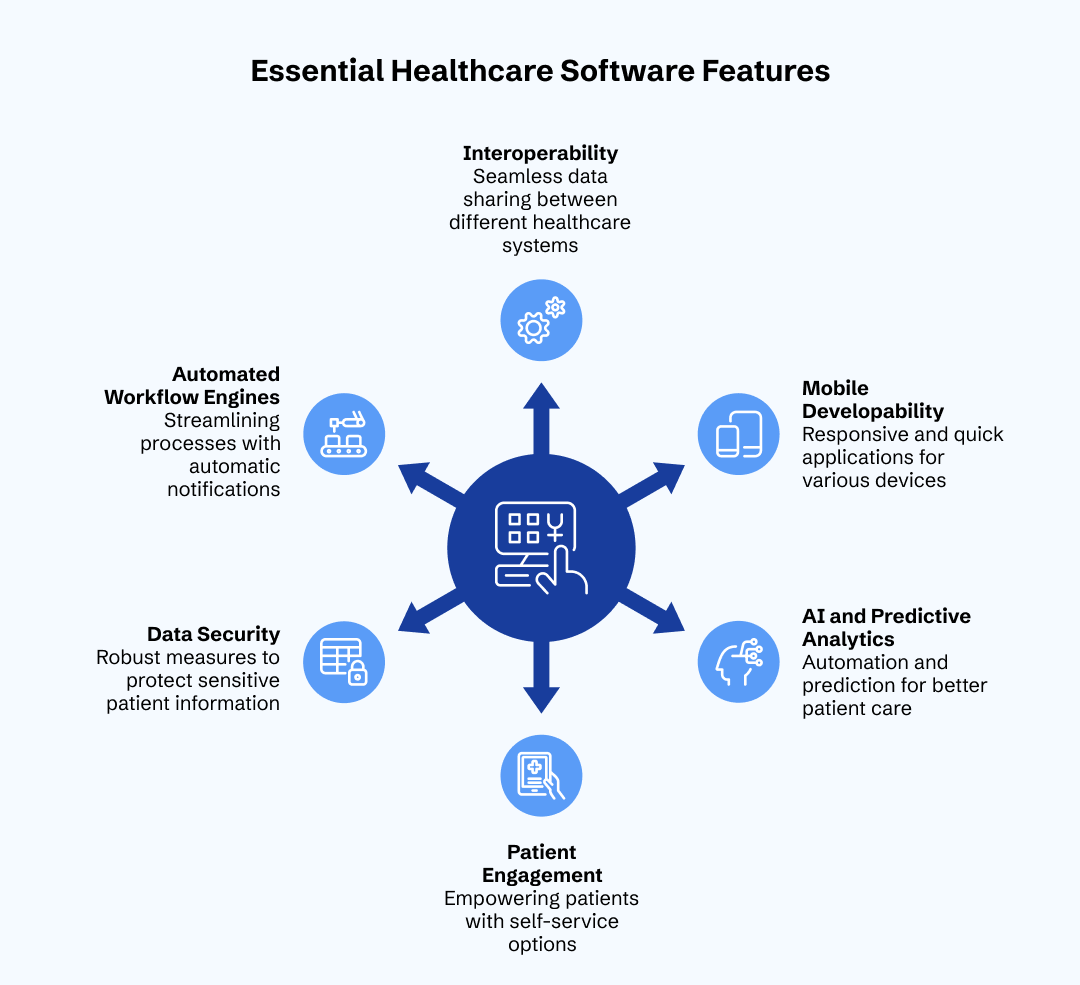
When you're vetting Healthcare Software Development Companies, don't just ask if they can build "healthcare software." Ask if they can build these specific, high-value features.
1. Strong Interoperability (FHIR/HL7)
This is the capability of various systems to share and consume information. Your patient data will not be free without this. The healthcare software examples as of today should be capable of pulling and pushing data to the pharmacies, labs and any other hospitals without any problem.
2. Native Mobile Developability.
We live on our phones. Healthcare applications need to be quick and responsive whether a physician is looking at a chart on an iPad or the patient is making an appointment on his or her iPhone. With a software that is desktop only, it has already become a fossil.
3. So-called Advanced AI and Predictive Analytics.
Automation is not what enables AI to be valuable in healthcare, prediction is. Your computer software must be capable of warning you of a patient likely to miss an appointment, or notice a pattern in vitals that indicates an impending health emergency.
4. Self-service and Patient Engagement.
Patients desire to be in the control. Such functions as online self-scheduling, online forms, and messages that are secure are a necessity. types of medical software do not only leave the patient happy; this is because they save your staff hours of hand work.
5. Multi-Layered Data Security
You must have biometric logins (FaceID/TouchID), multi-factor authentication (MFA), and end-to-end encryption in addition to simple passwords. Trust in 2026 will be based on security. Unless the information is secure, the enterprise is not sustainable.
6. Automated Workflow Engines
An effective system must not merely archive data it must transfer data. When a lab result is received positively, a system must provide automatic notification to the doctor, put a flag on the nurse, and provide a please call us message to the patient. It is the actual software in magic of software used in healthcare industry.
Conclusion
While the different types of healthcare software can seem overwhelming, the strategy is simple: solve the biggest pain points first, stay flexible, and always keep the human at the center of the tech.
In 2026, the real winners aren't those with the most expensive tech, but those who find the sweet spot between efficiency and empathy. Often, the smartest move is a hybrid approach which means combining powerful, ready-made platforms for your core needs with custom-built healthcare apps to differentiate your brand. It’s about building a system that lets doctors be doctors again.
Frequently Asked Questions
What are the predominant kinds of healthcare software nowadays?
The main types of healthcare software are EHRs, which are used to store clinical data, Medical Practice Management, which is an administration type, and Telemedicine, which is used to provide remote care. Also, such specific solutions as RCM (billing) and RPM (monitoring) are turning into the necessities of modern medical businesses.
What can AI in healthcare do to enhance software functionality?
AI in the medical field improves software, giving it predictive analytics, automatizes medical coding processes, and offer clinical decision support. It assists clinicians in identifying risk factors earlier and enables administrators to plan the schedule and resource distribution with a significantly greater accuracy.
What is the priority of HIPAA compliant healthcare software?
HIPAA compliant healthcare software is essential since healthcare information is a major target of cyberattacks due to its sensitivity. The adherence makes sure that the privacy of the patient is not violated legally, and he does not have to pay colossal fines in the case of legal violation, and the relationship between a patient and a provider will be preserved.
What are the greatest mobile health apps advantages?
The benefits of mobile health apps are based on the accessibility and engagement. They enable the patient to control his or her health no matter where he or she is, give physicians real-time vitals, and simplify the administration procedures such as booking, which makes healthcare more proactive and not reactive.
Which types of healthcare software do I select?
To decide on the healthcare software types, you have to first find out the biggest operation bottleneck in your operation. Pay attention to software with a high level of interoperability, high level of security, and easy interface. Never introduce complex features in tools when there is a gap in immediate efficiency.

Uncover executable insights, extensive research, and expert opinions in one place.
Related Content