Microsoft Edge’s New ‘Copilot Mode’ Is Revolutionizing Web Browsing with AI Assistance
Date: July 29, 2025
Microsoft introduces Copilot Mode, an AI-powered assistant that helps users navigate, research, and complete tasks while browsing.
Your daily searches on Microsoft Edge are going to be smarter and efficient with the introduction of Copilot Mode. This new feature has enhanced browsing by providing answers to questions and managing online tasks.
AI Integration Takes Over Web Browsing
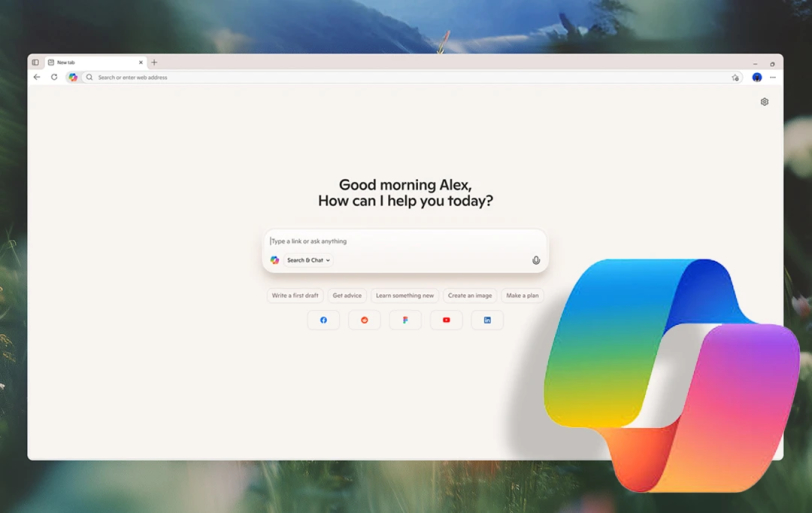
Edge users will now be greeted with a fresh tab page featuring a range of new capabilities powered by Copilot. The AI assistant is designed to help you with all aspects, such as answering simple questions about the pages they visit and providing deeper insights.
For example, users can ask Copilot about a recipe they’re viewing, such as asking if it can be made vegan, and Copilot will suggest possible substitutions. Sean Lyndersay, Vice President of Product for Microsoft Edge, mentions,
“The idea is that the AI can become a helper that can understand what the user is researching, predict what they want to do, and then take action on their behalf,”
You can now have Copilot handle everyday tasks like booking appointments, creating shopping lists, and drafting content. Its voice input makes Copilot a handy tool for people who might not be as comfortable navigating technology.
Comparing Copilot Mode to Other AI Browsers
While Copilot Mode offers a more personalized browsing experience, it's not the only browser introducing AI features. You might have also used Google's Gemini integration in Chrome and Comet’s AI browser. But they offer limited AI assistance. Contrastingly, Microsoft's implementation seems more extensive, combining browser functions with advanced AI-powered capabilities.
With Copilot, users can allow the assistant to access all their open tabs, enabling it to compare products, summarize content, or even recommend decisions based on data across multiple tabs. If you are someone who still prefers traditional browsing, turning off Copilot is always an option. Lyndersay notes,
“With Copilot Mode, you can also choose to turn the experience on and off as you wish through your Edge settings,”
The Future of Copilot Mode and User Privacy Concerns
Looking ahead, Copilot is set to improve further. Microsoft plans to incorporate features where Copilot will help users continue from where they left off, offering suggestions on what to do next based on previous browsing or research. Lyndersay adds.
“Copilot will soon be able to guide you in your tasks and organize your browsing—past and present—into helpful, topic-based journeys,”.
However, privacy remains a key concern. While Copilot will only access a user's browsing data with explicit permission, the idea of an AI that can listen to and view what users are doing online has raised some concerns.
As convenient as this may sound, the idea of an AI assistant tracking everything a user does may feel intrusive to some, especially when the experience is so intertwined with voice and data inputs.

By Manish
Meet Manish Chandra Srivastava, the Strategic Content Architect & Marketing Guru who turns brands into legends. Armed with a Marketer's Soul, Manish has dazzled giants like Collegedunia and Embibe before becoming a part of MobileAppDaily. His work is spotlighted on Hackernoon, Gamasutra, and Elearning Industry. Beyond the writer’s block, Manish is often found distracted by movies, video games, artificial intelligence (AI), and other such nerdy stuff. But the point remains, if you need your brand to shine, Manish is who you need.
// Recommended
Pinterest Follows Amazon in Layoffs Trend, Shares Fall by 9%
AI-driven restructuring fuels Pinterest layoffs, mirroring Amazon’s strategy, as investors react sharply and question short-term growth and advertising momentum.

Clawdbot Rebrands to "Moltbot" After Anthropic Trademark Pressure: The Viral AI Agent That’s Selling Mac Minis
Clawdbot is now Moltbot. The open-source AI agent was renamed after Anthropic cited trademark concerns regarding its similarity to their Claude models.

Amazon Bungles 'Project Dawn' Layoff Launch With Premature Internal Email Leak
"Project Dawn" leaks trigger widespread panic as an accidental email leaves thousands of Amazon employees bracing for a corporate cull.

OpenAI Launches Prism, an AI-Native Workspace to Shake Up Scientific Research
Prism transforms the scientific workflow by automating LaTeX, citing literature, and turning raw research into publication-ready papers with GPT-5.2 precision.

Have newsworthy information in tech we can share with our community?

Related Content