Google Announces Veo 3.1 with Enhanced Audio and Editing Controls for Flow Video Editor
Date: October 17, 2025
Listen to This Article
The latest update brings native audio generation, enhanced realism, and precise editing controls to Flow filmmaking platform.
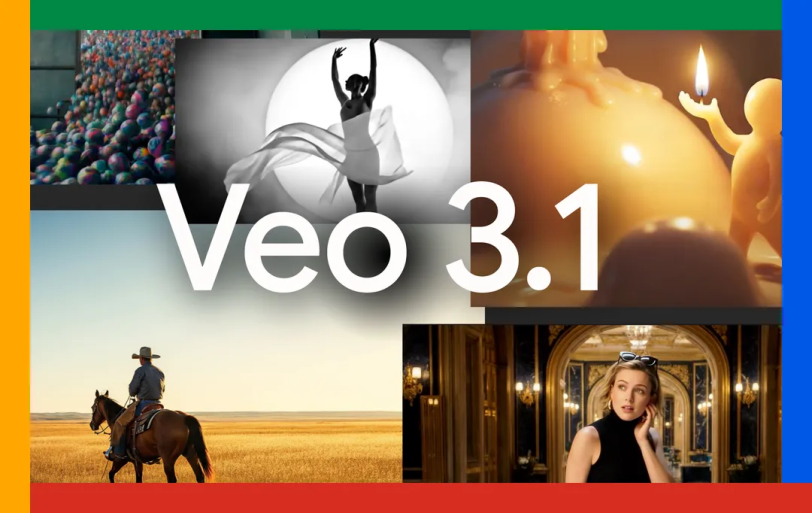
Google has unveiled Veo 3.1, its latest AI video generation model, bringing significant improvements to audio quality, narrative control, and editing capabilities to its Flow filmmaking platform, the company announced Tuesday.
The updated model, which builds on the Veo 3 release from May, features richer native audio generation, enhanced realism, and stronger prompt adherence when converting images into videos. According to Google, Veo 3.1 demonstrates state-of-the-art performance and captures "true-to-life textures" with improved understanding of cinematic styles and character interactions.
"We've heard that you want more artistic control within Flow, with increased support for audio across all features," Google stated in a blog post announcing the updates.
Audio Comes to Core Features
For the first time, Google is bringing audio generation to several existing Flow capabilities. The "Ingredients to Video" feature, which allows users to input multiple reference images to control characters, objects, and style, now generates accompanying soundtracks. Similarly, "Frames to Video," which creates seamless transitions between starting and ending images, and "Extend," which lengthens videos to a minute or more, both now include rich audio generation.
The Scene extension feature proves particularly useful for creating longer establishing shots, as each new video segment is generated based on the final second of the previous clip to maintain visual continuity.
Granular Editing Control
Flow is receiving new editing capabilities designed to give creators more precision throughout the production process. The "Insert" feature enables users to add new elements to any scene, from realistic details to fantastical creatures, with Google's AI handling complex aspects like shadows and scene lighting to ensure natural integration.
An upcoming "Remove" function will allow users to seamlessly delete unwanted objects or characters from scenes, with Flow reconstructing backgrounds and surroundings to eliminate traces of the removed elements.
Developer and Enterprise Access
Veo 3.1 and Veo 3.1 Fast are now available in paid preview through the Gemini API in Google AI Studio, as well as through Vertex AI for enterprise customers and the Gemini app. The models enable both text-to-video and image-to-video generation in horizontal and vertical formats.
Google highlighted early adoption by creative companies. Promise Studios, a generative AI movie studio, is using Veo 3.1 within its MUSE Platform to enhance storyboarding and previsualization for director-driven storytelling. Meanwhile, Latitude is experimenting with the model in its generative narrative engine to bring user-created stories to life instantly.
Developers can now guide video generation using up to three reference images of characters, objects, or scenes, helping maintain consistency across multiple shots or applying specific styles. The pricing for Veo 3.1 remains the same as its predecessor.
Google revealed that Flow has generated over 275 million videos since its launch five months ago, demonstrating significant user adoption of the AI filmmaking tool.
The rollout of Veo 3.1 represents Google's continued push into AI-powered video creation, competing with other tech giants developing similar generative video technologies. With enhanced audio capabilities and more precise editing tools, the company aims to provide creators with professional-grade AI video production capabilities accessible through consumer and enterprise platforms.
All Veo 3.1 features are now available in Flow, with the removal functionality expected to launch in the coming weeks.

By Arpit Dubey
Arpit is a dreamer, wanderer, and tech nerd who loves to jot down tech musings and updates. With a knack for crafting compelling narratives, Arpit has a sharp specialization in everything: from Predictive Analytics to Game Development, along with artificial intelligence (AI), Cloud Computing, IoT, and let’s not forget SaaS, healthcare, and more. Arpit crafts content that’s as strategic as it is compelling. With a Logician's mind, he is always chasing sunrises and tech advancements while secretly preparing for the robot uprising.
// Recommended
Pinterest Follows Amazon in Layoffs Trend, Shares Fall by 9%
AI-driven restructuring fuels Pinterest layoffs, mirroring Amazon’s strategy, as investors react sharply and question short-term growth and advertising momentum.

Clawdbot Rebrands to "Moltbot" After Anthropic Trademark Pressure: The Viral AI Agent That’s Selling Mac Minis
Clawdbot is now Moltbot. The open-source AI agent was renamed after Anthropic cited trademark concerns regarding its similarity to their Claude models.

Amazon Bungles 'Project Dawn' Layoff Launch With Premature Internal Email Leak
"Project Dawn" leaks trigger widespread panic as an accidental email leaves thousands of Amazon employees bracing for a corporate cull.

OpenAI Launches Prism, an AI-Native Workspace to Shake Up Scientific Research
Prism transforms the scientific workflow by automating LaTeX, citing literature, and turning raw research into publication-ready papers with GPT-5.2 precision.

Have newsworthy information in tech we can share with our community?

Related Content