

Fotor Review: Does This Photo Editor Tool Live Up to the Hype?
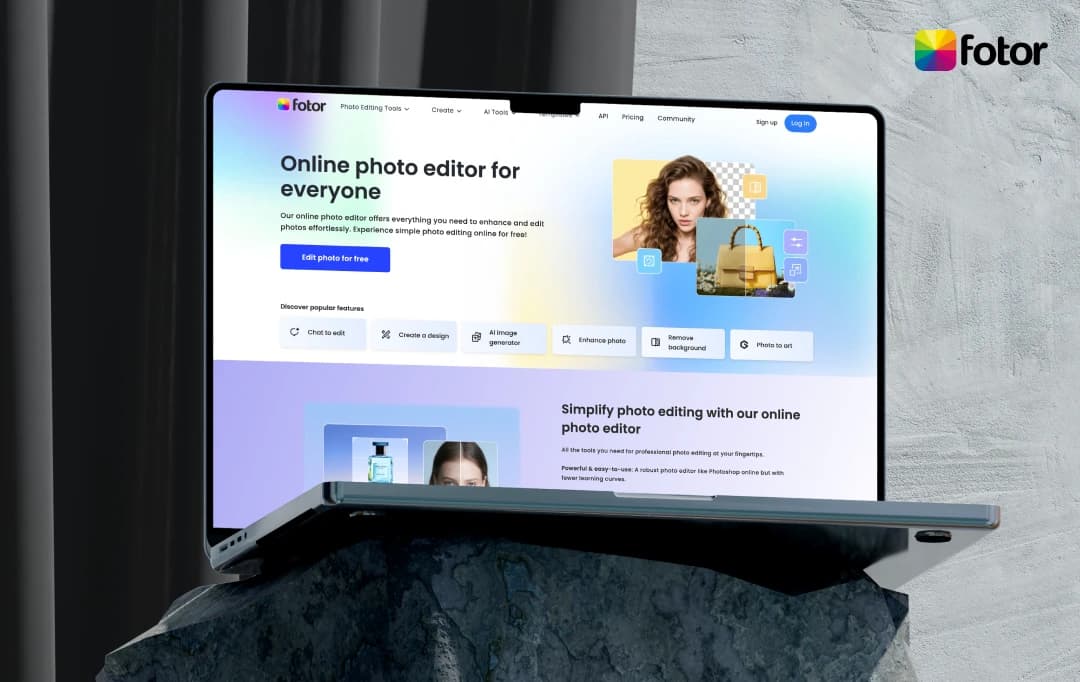
With innumerable AI photo editors claiming to transform your images from ordinary to extraordinary everywhere, you've probably stumbled upon Fotor. It’s an all-in-one platform that promises professional-grade editing, design, and AI magic without the Photoshop learning curve.
I've spent weeks diving deep into Fotor's ecosystem. Personally, I’ve tested everything from its one-click enhancements to its AI Agent that supposedly understands your editing commands like a human assistant. This Fotor review uncovers whether it's the creative powerhouse that can replace your entire editing toolkit, or another AI tool that sounds better in theory than in practice.
Let's explore what I found!
Pros and Cons of Fotor
Pros
- One-click enhancements deliver professional results instantly
- Chat-to-edit understands plain English commands
- Seamless sync across desktop, mobile, and web
- Batch edit 50 photos in minutes
- Free version exports without watermarks
- Templates look professionally custom-made
Cons
- The credit system limits even Pro users to a fixed credits monthly
- Complex prompts need specific phrasing to work properly
- Web version crashes with larger files, losing progress
- Can't match Lightroom's deep RAW processing power
- 70% of features are locked behind a paywall
- Performance slows with complex effects
Standout Fotor Features
Fotor is one of the best AI photo editing apps. It offers an entire creative ecosystem designed for those looking to easily and quickly solve their creative requirements. Here's a list of key Fotor features that made my photo editing journey fantastic.
1. Photo Editing Toolkit
Fotor's Online Photo Editor changed my entire approach to image enhancement. Within seconds of uploading my first photo, I had access to professional-grade tools that actually enhanced my images.
The go-to Fotor editing powerhouse includes:
Also, Fotor's AI Video suite transforms static content into engaging videos. It has tools like AI Enhancement for upscaling footage, Animation Generator for bringing still images to life, and Background Remover for instant green-screen effects. This tool is ideal for creating social media content without the need for expensive software.
4. Templates
Unlike those cookie-cutter designs everyone recognizes, Fotor's templates feel custom-made. With its template creation feature, you can create an unlimited number of templates for marketing and social media. These include posters, flyers, invitation cards, logos, and more. For social media needs, you can easily create Instagram stories, YouTube thumbnails, presentations, resumes, and more.
5. Chat to Edit
I typed, "Make the background blurrier and add warm sunset tones" – and Fotor's AI Agent quickly solved it. No searching for filters, no adjusting sliders. It's like having a professional editor who speaks and understands your requirements. Additionally, this conversational editing eliminates the biggest frustration: knowing what I wanted but not knowing the technical terms or steps to achieve it.
6. Image to Art
On Fotor, you can simply upload a simple photo and watch it transform into various artistic styles. The "Text to Image" feature enables you to describe concepts that didn't exist yet – such as a "minimalist coffee shop with plants and warm lighting" – and create exactly what you envision, tailored to the desired mood.
7. Turn Photos into Memorable Collages
Collage creation in Fotor transcends basic photo grids. This is an excellent tool for storytelling.
- Effortless photo collage creation: Here, you can combine multiple product angles into stunning showcase collages that customers can actually save and share.
- Custom collage templates: The endless layouts let you match your brand aesthetic perfectly. Next, you can easily adjust spacing and positions so that collages look like they’re professionally made.
8. Fotor Community
The Fotor community explore page showcases thousands of user creations, complete with visible prompts and settings, serving as both an inspiration gallery and a tutorial library. Users can remix any design, browse curated collections by theme, and learn advanced techniques through Fotor’s community-voted top creations.
How to Use Fotor for Photo Editing?
Fotor's online photo editor features numerous fantastic tools to help you enhance your images. A few clicks can be used to swiftly and easily edit images, retouch portraits, remove backgrounds, apply effects, and make photo collages. Let’s begin!
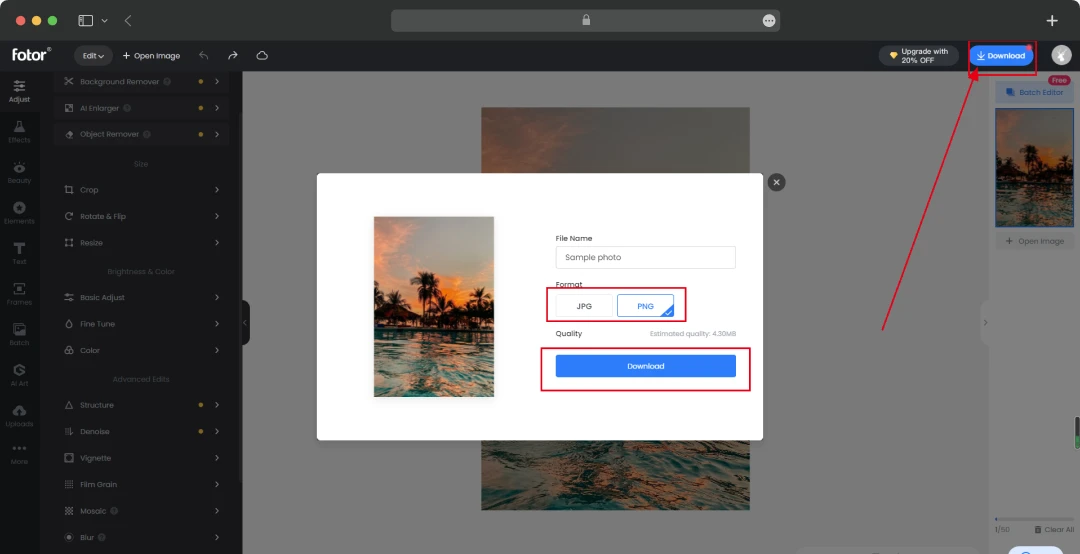
Step 1: To begin, upload a photo by clicking Edit a Photo on the homepage. You can either upload a photo by selecting a file from your computer or simply drag and drop it into the Fotor editor.
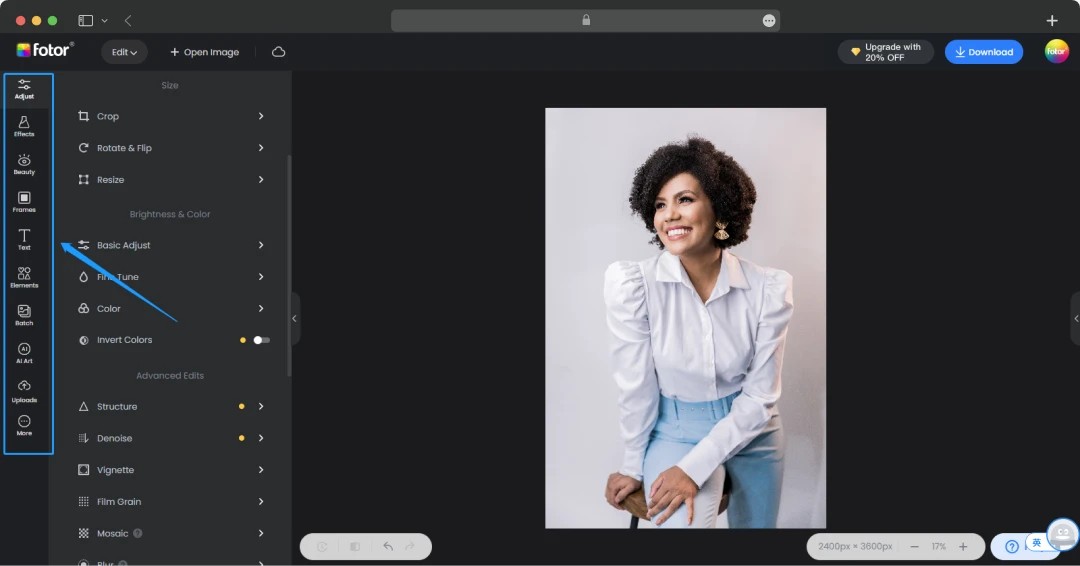
Step 2: Once your photo is loaded, explore the intuitive tools on the left-hand menu, which are categorized for basic adjustments, effects, and beauty retouching. You can also enhance your photo using Fotor's AI-powered features, such as the one-tap enhancer for automatic improvements or the background remover for quick and precise cutouts.
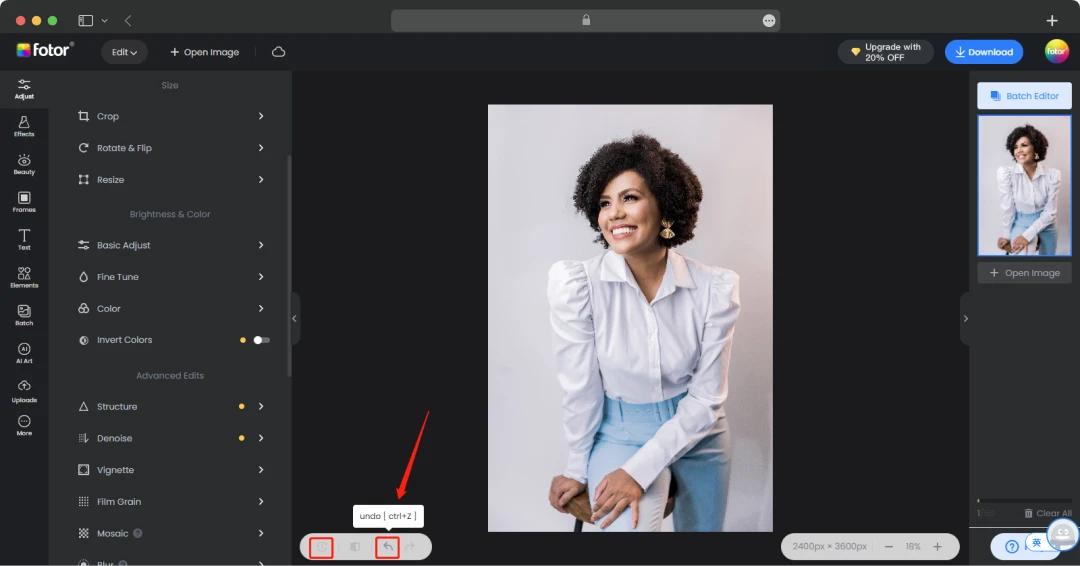
Step 3: Now, you can select ‘Original’ or ‘Undo’ if you do not wish to save the earlier changes and make a different set of changes or edits.
Step 4: After you've perfected your image, simply click Download to save the final, high-quality result to your computer. Next, choose the format to download the file.
Fotor Pricing
Fotor offers pricing plans ranging from the premium plan to credit plans, the AI headshot plan, and API plans. Let’s check them out here!
1. Fotor Premium Plans
| Plan | Price (Billed Monthly) | Price (Billed Annually) | Key Features |
|---|---|---|---|
| Fotor Basic | Free | Free | Basic editing features, limited design templates and resources, normal JPG/PNG/PDF download with watermark, and 512MB of cloud storage. |
| Fotor Pro | $10.99 | $3.99/month (billed annually) | All Basic features, plus advanced editing and AI tools, premium templates, batch editing, high-resolution downloads without watermarks, and 2GB cloud storage. |
| Fotor Pro+ | $23.99 | $8.33/month (billed annually) | All Pro features, plus stock photos for commercial use, upload fonts, multiple brand kits, and 10GB cloud storage. |
2. Fotor Credit Plans
| Plan Type | Credits | Price per Credit | Total Price | Key Details |
|---|---|---|---|---|
| One-time Payment | 100 Credits | $0.20 | US$19.99 | Credits available for use anytime within 2 years of purchase. Only available to Fotor Pro and Pro+ members. |
| 200 Credits | $0.135 | US$26.99 | ||
| 500 Credits | $0.108 | US$53.99 | ||
| 1000 Credits | $0.08 | US$79.99 | ||
| 2000 Credits | $0.06 | US$119.99 | ||
| Subscription Plan | 200 Credits/Month x 12 | $0.029 | US$69.99 | Unused credits roll over, up to 5 months of accumulation. |
| 500 Credits/Month x 12 | $0.024 | US$143.99 | ||
| 1000 Credits/Month x 12 | $0.022 | US$259.99 | ||
| 2000 Credits/Month x 12 | $0.019 | US$459.99 | ||
| 5000 Credits/Month x 12 | $0.018 | US$1,099.99 | ||
| 10000 Credits/Month x 12 | $0.017 | US$1,999.99 |
3. AI Headshot Plan
| Plan Name | Price | Key Features |
|---|---|---|
| 20 Image Package | $26.99 | 20 AI headshots, one free redo, quick turnaround time, HD high quality |
| 40 Image Package | $37.99 | 40 AI headshots, one free redo, quick turnaround time, HD high quality |
| 80 Image Package | $50.99 | 80 AI headshots, one free redo, quick turnaround time, HD high quality |
Note: Professional headshots for your team are available for $ 37.99 per user, with options for small teams and a quick 30-minute turnaround.
Customer Reviews
How was your experience with the product?
"This is a clever app. It does some things well. I tried animating one photo just to see what the app does. When I tried a second photo, I found out that credits were needed. The app requires ten credits to do another short video. Free credits are hard to get. By the time I accumulated 10 credits, the price to make a short video was 20 credits. This is ridiculous. And some of the credits expire the day after they're earned. Using the free version of this app is near impossible."
"Completey useless without signing up… Completey useless without signing up for the "trail" and it is essentially nothing but a pop up ad and harassment generator. You can't download your edits even with a watermark. I'm so angry. It was recommended by chatGTP and is the worst and most useless thing I have dealt with. Don't even bother. I could not hate it more."
"It's, good, alright?! FINE, okay: it's GREAT. Alright, FINE! I admit it, OKAY! It's great. Are you happy? This app, I gotta hand it to them, it's like a masterpiece of digital wizardry. The way it seamlessly combines artistry with raw power is downright impressive. I mean, I never thought I'd be so invested in an app, but here I am, eating my words. Let's talk about its A.I. capabilities. They're not just good, they're sexy. Yeah, I said it. This app's A.I. is like the James Bond of the digital world—smooth, sophisticated, and always one step ahead. It's like having a personal artistic/autistic assistant who can read your mind. It's suggesting the perfect filter for my photos. This app's A.I. is on point every time. And let's not forget about its artistic side. The designs, the interface, everything about it screams elegance. It's like using a work of art, but one that's also insanely functional. So yeah, I may have resisted at first, but now I'm a believer. This app? It's the real deal. From its artistic flair to its powerhouse A.I., it's changed the game for me. So to whoever's behind this masterpiece, kudos to you. You've won over this skeptic, and I'm not ashamed to admit it anymore. This app deserves all the praise it gets and then some."












Social Media Templates – YouTube thumbnail makers and Instagram post creators sized perfectly every time
3. AI Tools for Image and Videos
The AI Image features is a complete game-changer. Type "professional headshot with confident energy," and it delivered usable results. The AI art generator easily transforms sketches into illustrations. Additionally, the AI Photo Enhancer can also fix terrible phone photos. The Ghibli AI Generator even made my photos into whimsical artwork that went viral on Instagram.