
Thinking about Kapwing AI for video? Our hands-on Kapwing review reveals all from AI-generated content to Smart Cut. See if it lives up to the hype!
Kapwing Review | Is This the Best AI Video Editing Tool Out There?
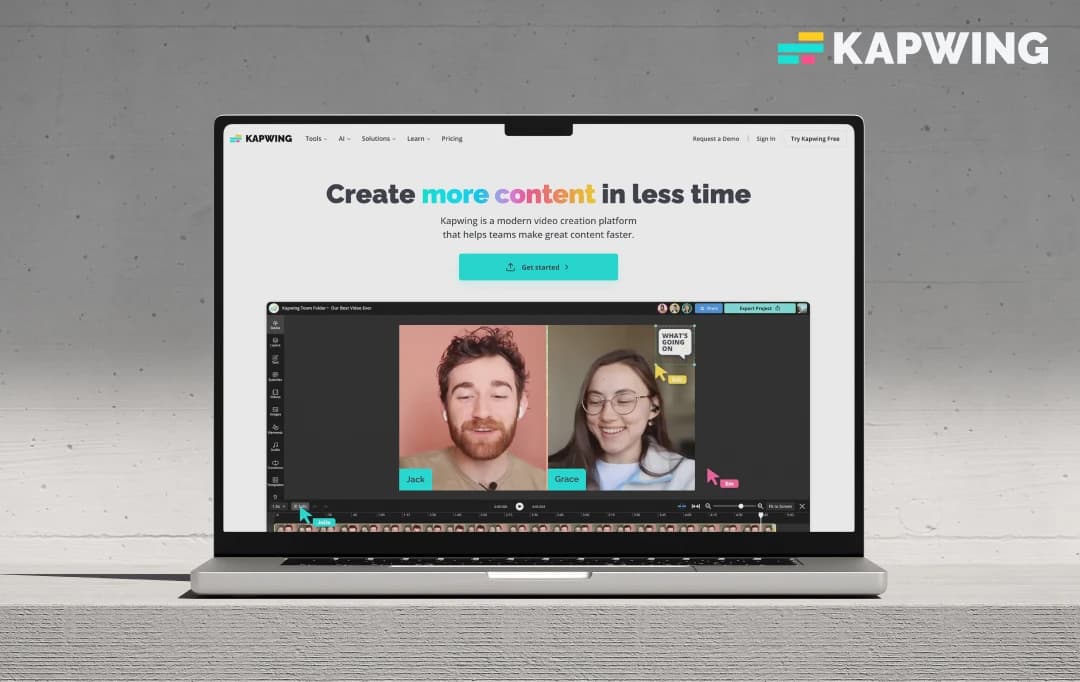
Ever feel like you're wrestling a digital hydra every time you try to edit a video? You chop one head, the awkward silence, and two more in the form of syncing captions and finding a B-roll sprout in its place. Yeah, us too!
With so much content all around, standing out with slick, engaging videos is now a necessity. But who has the time or the Hollywood budget? Enter the AI cavalry, with tools like Kapwing promising to be the savior we've all been searching for.
So, we decided to test this AI and see if it could really streamline the editing process and help us make killer videos without the usual headache. Here’s what we found out in our Kapwing review!
Pros and Cons of Kapwing
Pros
- Super intuitive interface, even for beginners
- Smart Cut, auto-subtitles, and AI video generation are big time-savers
- Offers a wide range of editing tools beyond just AI
- Great for teams working on projects together
- Being browser-based is super convenient
Cons
- Watermarks and restricted AI feature usage in the free plan
- It can sometimes slow down with larger files
- Extremely Internet-reliant, a stable connection is a must for good performance
- It can be a bit steep for very small budgets
- Even in paid plans, some AI tools have usage limits
A Look at Kapwing's Standout Features
Kapwing video editor isn't just a one-trick pony among the best video editing software, it's packed with features that are actually helpful! Here are some that really caught our eye while experimenting with this tool-
1. AI Video Generator & Script to Video
This is pretty cool (and useful, of course)! You can feed it a text prompt or a full script, and Kapwing's AI attempts to generate a video with stock footage, music, and even subtitles. We found it a decent starting point, especially for quick social media snippets or when you're blanking on visual ideas. It's not always perfect, but it gets the creative juices flowing.
2. Smart Cut (Silence Remover)
Oh, the hours we've spent manually cutting out awkward pauses! Smart Cut automatically detects and removes silences in your videos. We tried this on a few talking head videos, and it was a significant time-saver. It's not flawless and sometimes needs a little manual override, but it gets you 80-90% of the way there, which is fantastic.
3. Auto Subtitles & Transcription
This is a HUGE plus! Kapwing can automatically generate subtitles for your videos in multiple languages. The accuracy is quite impressive, though you'll likely need to make minor edits, especially with niche jargon. To top it off, the tool allows you to edit the video by making edits to the transcript itself. For anyone creating content for social media (where so much is watched on mute), this is an excellent feature.
4. Background Remover
Need to quickly ditch a distracting background without a green screen? Kapwing's AI-powered background remover does a respectable job. It's not always as clean as a dedicated green screen setup, especially with complex backgrounds or fast movement, but for quick jobs, it's surprisingly effective.
5. Clean Audio
This AI tool helps reduce background noise and enhance voice clarity. We found it helpful for recordings done in less-than-ideal audio environments. While it won't magically transform terrible audio into studio quality, it can certainly make your audio sound more professional.
6. Repurpose Studio & AI Clip Maker
This tool is gold for content creators looking to maximize their output. Kapwing AI can suggest and create shorter clips from longer videos, optimized for different social media platforms. This helps in getting more mileage out of your core content.
7. Collaborative Editing
Kapwing AI works like Google Docs but for video. Multiple team members can work on a project simultaneously, leave comments, and see changes in real-time. This feature really ensured a smooth experience for us when working on a joint project.
8. Templates & Stock Media
Kapwing video editor offers a good library of templates, stock photos, videos, and music to get you started quickly. This library of ready-to-use templates and stock media can be handy when you're short on time or original assets.
Who Is Kapwing AI Suitable For?
Kapwing AI is designed to cater to a diverse range of creative and professional needs. The platform offers tailored solutions to help various users achieve their specific video goals. Here's a closer look at who Kapwing is built for and how it supports them:
| Who It's For | Primary Focus |
|---|---|
| Marketing Teams | Equip your team with modern editing tools designed to accelerate content creation and effectively grow your brand's presence. |
| Training Teams | Efficiently create and edit essential learning materials such as screen recordings, comprehensive tutorials, and clear instructional videos. |
| Schools | Enhance the educational experience by bringing learning to life through engaging digital lessons and dynamic multimedia assignments. |
| Social Media Creators | Develop captivating and shareable video content specifically tailored to resonate with audiences on every social media platform. |
| Video Advertisers | Produce professional, attention-grabbing video advertisements that are designed to stop the scroll and effectively generate leads for your business. |
| Global Content Creators | Expand your reach and connect with a wider international audience by easily localizing your video content, including audio and subtitles. |
Understanding Kapwing’s Pricing and Subscription Plans
Kapwing offers different pricing tiers to meet the requirements of different users. Each plan is packed with advanced features to help you create and edit videos quickly and efficiently. Here is the complete information about the pricing plans of the Kapwing video editor.
| Plan Name | Price (Billed Annually) | Price (Billed Monthly) | Key Features |
|---|---|---|---|
| Free | $0 | $0 |
|
| Pro | $16 per member/month | $24 per member/month |
|
| Business | $50 per member/month | $64 per member/month |
|
| Enterprise | Custom pricing | Custom pricing |
|
For us, Product Reviews mean diving headfirst into the functionality of each digital product, whether it’s an app, software, or website. Our process centers around hands-on testing of each tool we pick. From scrutinizing features to testing vulnerabilities of security standards, the goal remains to help you find products that don’t just work but truly elevate your experience. In a nutshell, if we’re recommending a product, it’s because we believe it’ll genuinely make your digital life easier.
- Products Reviewed - 4,000+
- No. Of Experts - 20+
- Categories - 65+
Customer Reviews
How was your experience with the product?
MobileAppDaily’s POV on Kapwing AI
So, after putting the Kapwing AI video generator through its paces, what's our team's final take? Overall, the Kapwing review leaves us pretty impressed, especially with its ease of use and the practical application of its AI tools. Kapwing genuinely lowers the barrier to entry for video creation and editing. For content creators and small businesses who need to churn out quality video content regularly without getting bogged down in overly complex software, it’s a strong contender.
The AI features like Smart Cut, auto-subtitling, and the AI video generator, while not always 100% perfect, are massive time-savers and fantastic for idea generation and getting initial drafts done quickly. The collaborative features are also a big win for teams.
However, Kapwing is not all good, there’s still some room for improvement. The free plan, while a good taster, is fairly restrictive with its watermarks and AI limitations – you'll quickly want to upgrade if you're serious about using it.
We also experienced occasional sluggishness when working with larger video files, which can interrupt the creative flow. And while the AI is smart, it's not a complete replacement for human oversight; you'll still need to review and tweak the AI's output for the best results.
Despite these points, Kapwing offers a compelling package that genuinely streamlines many aspects of the video creation process. It’s a tool that empowers creators to do more, faster, and with less friction.
FEATURE
Strong AI & traditional tools; all in one with templates & collaboration. AI quotas can be limited.
PRICING
The free plan is limited, and while Pro offers value, per-member cost & AI limits are key factors. Fair overall.
PERFORMANCE
Speeds up workflow; AI capabilities are good, but they need oversight. Occasional lags with large files; internet reliant.
UI/UX
Exceptionally intuitive and user-friendly, browser-based convenience ensures a smooth experience.
Kapwing AI Vs. Its Competition
The Kapwing AI video generator has recently made waves with its intuitive approach and smart AI features, but how does it truly measure when placed side-by-side with other video creation platforms? Here’s a direct comparison of this AI tool with its competitors in the market.
| Basis of Comparison | Kapwing | Canva | VEED.IO |
|---|---|---|---|
| Primary Focus | Online video editing & AI tools | All-in-one design (graphics, video, docs) | Online video editing, subtitling & AI tools |
| Ease of Use (UI/UX) | Very intuitive, beginner-friendly | Extremely easy, drag-and-drop focused | Simple, user-friendly interface |
| AI Video Features | Smart Cut, AI script/video gen, auto-subtitles, AI B-roll, clean audio | Text-to-video, Magic Switch (reformat), Beat Sync, basic AI edits | Auto-subtitles, voice cloning, AI avatars, text-to-video, eye contact correction, AI clips |
| Range of Other Features | Good (image/GIF editing, some design) | Extensive (graphic design, presentations, print) | Primarily video-focused, some audio tools |
| Collaboration | Real-time and shared workspaces | Good for sharing & comments, some real-time | Real-time collaboration, shared projects |
| Pricing Model | Tiered (Free, Pro, Business) per member | Tiered (Free, Pro, Teams) | Tiered (Free, Basic, Pro, Business) per user |
| Best For | Quick AI-assisted video edits, social media, and collaborative teams | All-round design, social media graphics & quick videos, and presentations | Subtitling, accessibility, marketing & training videos, and AI avatar use |
| Unique Selling Point | AI-powered editing speed & simplicity | Integrated design ecosystem & massive template library | Strong subtitling/translation & broad AI video tools |
How to Use Kapwing AI?
Kapwing AI is designed to simplify the video creation process with smart, intuitive tools. Whether you're editing a video, adding subtitles, or generating content from text, Kapwing’s AI features make it easy, even if you’re a beginner.
In this section, we’ll walk you through the basic steps to get started and make the most of what Kapwing AI has to offer.
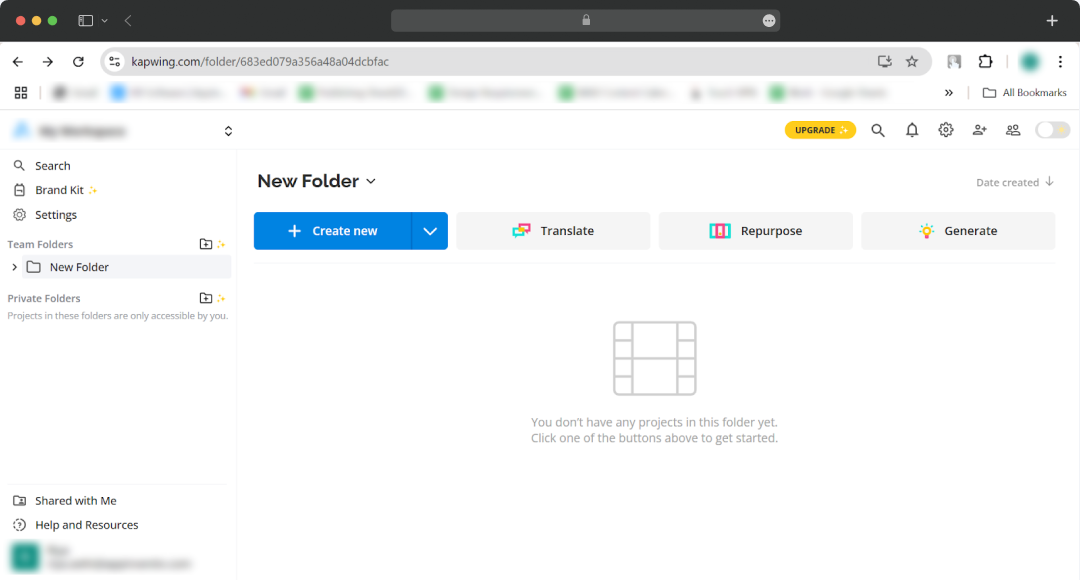
Step 1: Search for Kapwing AI and log in to your account to start working with this AI tool
Step 2: As soon as you log in, you will see a dashboard with different options, including translate, repurpose, and generate. Choose a suitable option as per your project requirements.

*For this experiment, we used the ‘generate’ tool offered by Kapwing
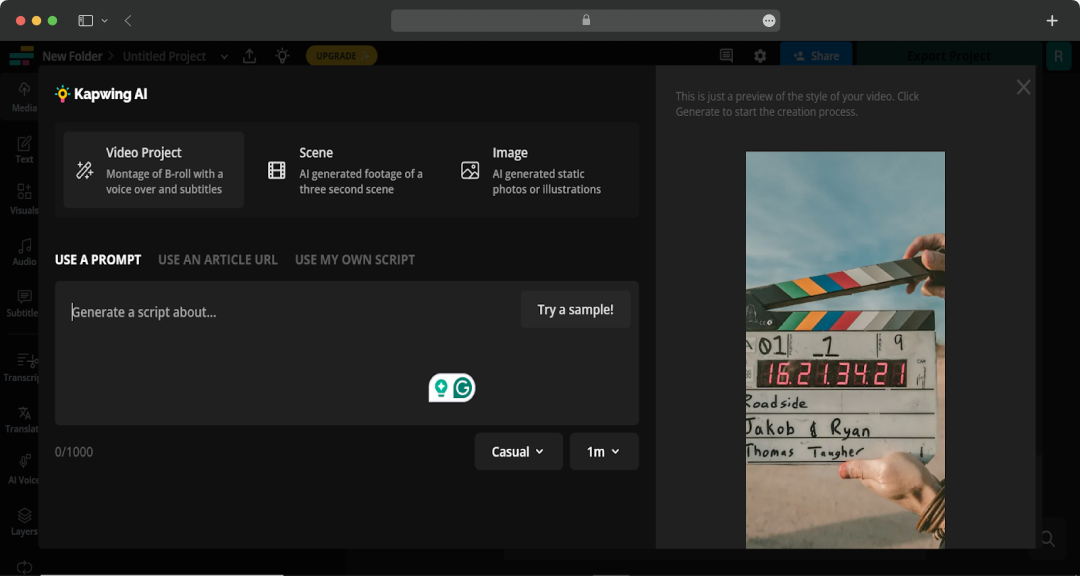
Step 3: Once you click on ‘generate’, you will see a dialogue box for the prompt. You can either use a prompt, directly paste an article URL, or simply write your own script.
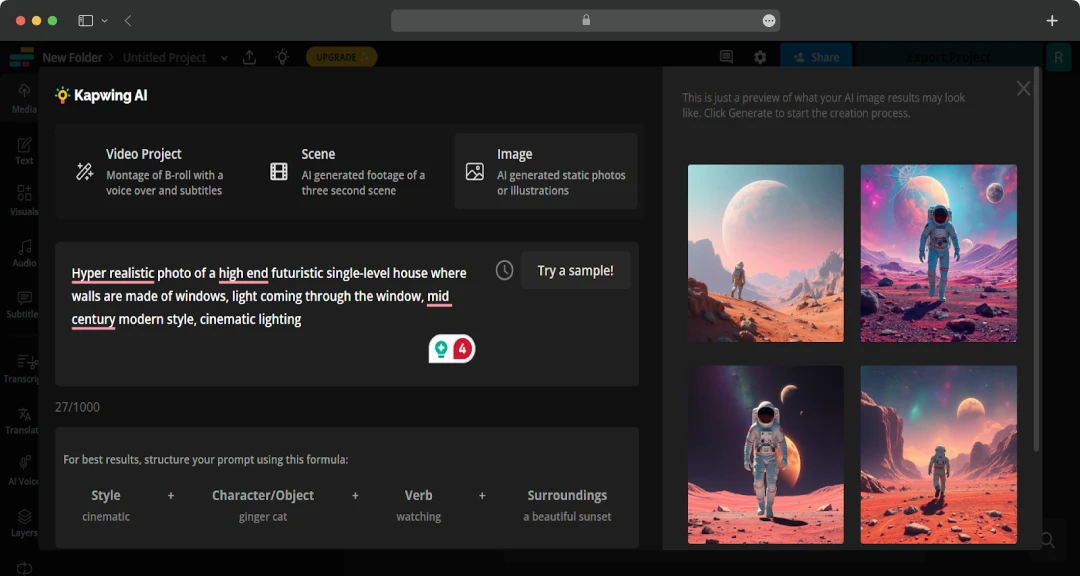
The tool gives you 3 different content generation options- Video project, Scene, and Image.

Step 4: Write a suitable prompt, choose a suitable style, and let Kapwing do its magic.
Sample prompt- “Hyper-realistic photo of a high-end futuristic single-level house where walls are made of windows, light coming through the window, mid-century modern style, cinematic lighting”

Additional Note
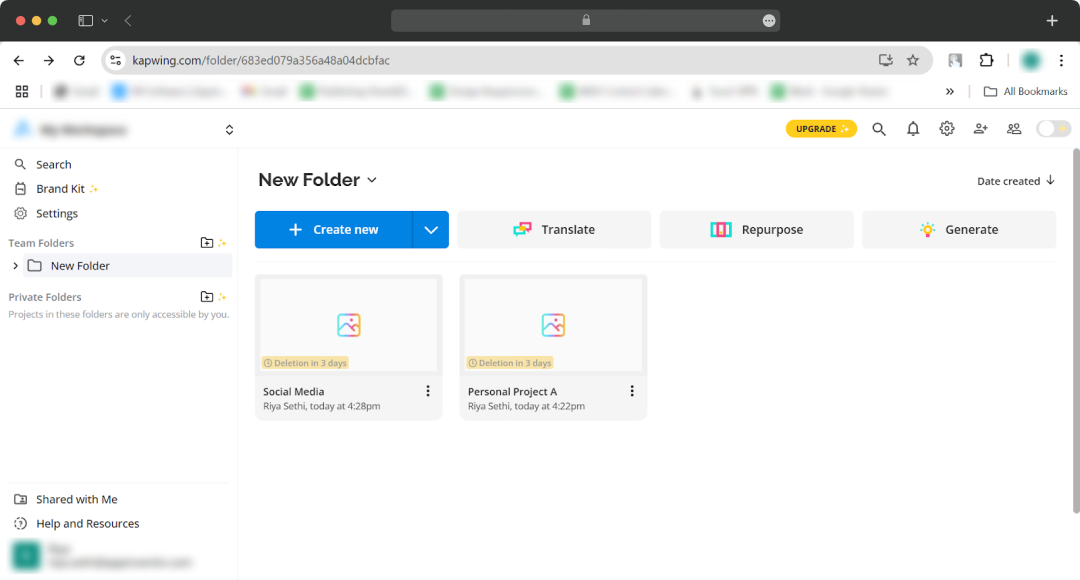
With Kapwing, you can track your projects easily through their intuitive dashboard. You can create new folders, customize names, and manage multiple projects easily at once.

Also Read: Best AI Video Translators
Final Verdict!
So, is this the ultimate video editing sidekick? Our Kapwing review shows it's a formidable contender, especially for creators aiming to slash editing time, harness intelligent AI, and collaborate seamlessly.
While every workflow has unique needs, Kapwing presents a remarkably streamlined path to professional-looking videos, sidestepping the complexities of traditional software.
The insights are clear, and the tool’s potential for your projects is significant. It won’t replace creativity—but it can certainly help bring your ideas to life, faster and with less hassle!
What is Kapwing used for?
Our reviewers primarily use Kapwing in the following areas:
Kapwing
Frequently Asked Questions
-
Is Kapwing truly easy for video editing beginners?
Absolutely! Kapwing shines with its incredibly intuitive, user-friendly interface. Many find it far simpler to learn than traditional complex editing software, making it perfect if you're new to video creation or editing.
-
What are some of Kapwing's most useful AI features?
-
Can I effectively use Kapwing's free version for my projects?
-
Who would benefit most from using Kapwing AI?
-
What are the main limitations to consider before choosing Kapwing?
-
How reliable is Kapwing's AI for tasks like generating subtitles?
Latest Products
Delve into our comprehensive yet easy-to-consume guides, which provide insights that help scale business faster and prevent unseen pitfalls.
Related Products
Cut through the clutter and explore related digital products that deliver on performance.