Share It On:
 JSON prompting is here to reshape how you use your chatbots. And it’s already turning out to be better than the traditional method of writing prompts. But how? Let me take you through all the details!
Imagine if Uber didn’t have GPS. Instead, you’d be in the backseat, screaming ‘Left! No, the other left!’, while the driver takes you on a sightseeing tour of the city. That’s exactly how AI works without JSON prompting—chaotic, exhausting, and definitely not getting you where you want to go.
And if you have been thinking that your chatbot doesn’t get you, even the premium ones, it might be because of the kind of prompt you’re using. So, if you do not want to rely on those Saridon tablets you need while using AI chatbots, let me help you out in understanding what JSON Prompting is and how exactly it is reshaping AI trends.
Let’s go!
What is JSON Prompting?
Simply put, JSON prompting is a technique where instructions for AI models are given in a structured JSON format, enabling clear, consistent, and machine-readable outputs.
Think of JSON prompting as the difference between:
- Telling a taxi driver, “Just head downtown.” (ambiguous, risky, possibly ending at a sketchy alleyway)
vs.
- Handing them the exact street address with coordinates. (precise, reliable, no scenic detours through regret-ville)
That’s JSON prompting. Instead of throwing casual English at Large Language Models (LLMs), you feed them instructions in a structured JSON format. This approach is widely adopted by modern artificial intelligence companies to ensure predictable and scalable AI outputs.
For example:
Regular prompt: “Write a product description for a coffee mug.”
→ You’ll get… something. It might be poetic, long, short, or written like Shakespeare discovered Starbucks.
A real JSON Prompt would look like this:
|
{ "task": "productDescription", "productName": "Coffee Mug", "features": [ "Microwave safe", "Dishwasher friendly", "Keeps drinks warm for hours" ], "callToAction": "Get yours today and sip in style!" } |
→ The AI follows your blueprint and hands you exactly what you need.
And here’s the kicker: businesses love this because it means AI-generated content can plug straight into apps, websites, or workflows without needing a cleanup crew.
Traditional Prompting vs. JSON Prompting Techniques
Before we dive deeper into the JSON prompt guide, it’s critical that you know how it differs from the traditional way of writing inputs for an AI.
Let’s have a look!
| Feature | Traditional Prompting | JSON Prompting |
|---|---|---|
| Structure | Unstructured, conversational language (plain text). | Highly structured, using key-value pairs (JSON format). |
| Precision | Low. Output can be unpredictable and vary in format. | High. You define the exact output schema, fields, and data types. |
| Consistency | Low. The same prompt can produce different results each time. | High. Delivers a consistent, machine-readable format every time. |
| Ease of Use | Very easy for anyone to write, requires no technical skill. | Requires basic knowledge of JSON syntax, has a steeper learning curve. |
| Best For | Creative tasks, brainstorming, content summarization, and general queries. | Automated workflows, API integrations, data extraction, and app development. |
| Integration | Difficult. Requires extra parsing logic to use the output in software. | Easy. The output is already structured for direct use in applications. |
1. Structure
Traditional Prompting is unstructured, just like talking to a person. You write your request in plain, conversational text without any specific rules.
- Example: Give me info on a product. It's a "Smart Mug," keeps coffee hot, and costs $129.
JSON Prompting is highly structured. You use a specific format with "keys" (labels) and "values" (the data) inside curly braces {}. It's like filling out a form where every field is clearly defined.
- Example:
|
{ "productName": "Smart Mug", "feature": "Keeps coffee at a set temperature", "price": 129 } |
2. Precision
Traditional Prompting has low precision. The AI interprets your conversational request, and the output format can be a guess.
- Example Request: Create a user bio for a developer named Alex who likes chess.
- Possible Output:
"Alex is a developer, and in his spare time, he enjoys playing chess."
OR
Name: Alex / Hobby: Chess / Job: Developer
You can't be sure if you'll get a paragraph, a list, or something else entirely.
JSON Prompting offers high precision. You tell the AI the exact "shape" of the data you want back.
- Example Request:
{
  "task": "createUserBio",
  "name": "Alex",
  "profession": "Developer",
  "hobby": "Chess",
  "output_format": {
    "fullName": "string",
    "jobTitle": "string",
    "bio": "string (max 20 words)"
  }
}
|
- Guaranteed Output Format:
{
  "fullName": "Alex",
  "jobTitle": "Developer",
  "bio": "Alex is a software developer who enjoys the strategic challenge of playing chess in his free time."
}
|
You always get back a JSON object with those specific keys.
3. Consistency
Traditional Prompting is inconsistent. If you run the same conversational prompt five times, you'll likely get five slightly different outputs in both wording and format. This makes it unreliable for automated processes.
JSON Prompting is consistent. While the text values might change slightly (e.g., a differently worded bio), the structure of the output will be identical every time. An application relying on this data will never break because the jobTitle field will always be there.
4. Ease of Use
Traditional Prompting is incredibly easy. Anyone who can type a question can use it. There is no learning curve.
JSON Prompting has a slight learning curve. You need to understand the basic syntax: curly braces {} for objects, quotes "" around keys and string values, and commas , between elements. It's simple for developers but can be a small hurdle for non-technical users.
5. Best For (Use Case)
Traditional Prompting is best for creative or exploratory AI use cases where format doesn't matter.
- Examples: Brainstorming ideas for a marketing campaign, writing the first draft of a blog post, or summarizing a long document for quick understanding.
JSON Prompting is built for tasks that feed into another piece of software. It excels when data needs to be predictable and machine-readable.
- Examples: Generating product descriptions to automatically populate an e-commerce website, extracting names and dates from a document to fill a database, or categorizing customer support emails to route them to the correct department.
6. Integration
Traditional Prompting is difficult to integrate. If your app receives the text "Alex is a developer", a developer has to write extra code (a "parser") to search that text for a name and a job. This is fragile and can break easily.
JSON Prompting allows for easy, direct integration. When your app receives {"jobTitle": "Developer"}, it can immediately grab the value associated with the jobTitle key. No extra parsing is needed. It's a "plug-and-play" solution for software.
7. Visual Stability

I tried generating videos on Veo-3 using one traditional prompt and one JSON prompt. Both results were decent. But, as you will see in the right GIF above, the JSON prompt offered better detailing and stability but got the spelling wrong.
The traditional prompt had the character taking a dive, which I hadn’t asked for. So, JSON prompt clearly works well and requires way fewer attempts to achieve the desired results.
In case you’re curious, here are the AI prompts I used:
Traditional Prompt
|
Create a 5-second photorealistic video of a cybertech robot made of wings flying across planets in open space. Show multiple cinematic shots: a long shot of the robot flying, a close-up shot, and finally a shot from behind. At the end, the robot floats still, staring at a planet that has "MobileAppDaily" text as glowing rings. The last perspective is from behind the robot, focusing on the planet with the text rings. |
JSON Prompt
|
Generate a video with these specifications:
{
  "video_length": "5 seconds",
  "style": "photorealistic",
  "subject": {
    "entity": "cybertech robot",
    "material": "made of wings"
  },
  "environment": "outer space with multiple planets",
  "shots": [
    {"type": "long shot", "action": "robot flying across planets"},
    {"type": "close shot", "action": "robot flying"},
    {"type": "behind shot", "action": "robot flying, then stopping"}
  ],
  "final_scene": {
    "robot_state": "floating still",
    "perspective": "from behind the robot",
    "planet": {
      "feature": "rings glowing with the text 'MobileAppDaily'"
    }
  }
}
|
I also tried using traditional vs JSON prompting to generate an image in GPT.
Traditional prompt
|
Create a photorealistic image of a cybertech robot made of wings flying across planets in open space. Show multiple cinematic shots: a long shot of the robot flying, a close-up shot, and finally a shot from behind. At the end, the robot floats still, staring at a planet that has "MobileAppDaily" text as glowing rings. The last perspective is from behind the robot, focusing on the planet with the text rings. |
JSON prompt
{
  "version": "1.0",
  "prompt": "Create a photorealistic cinematic sequence of a cybertech robot with glowing wings flying across planets in open space, ending with the robot staring at a planet that has 'MobileAppDaily' written as glowing rings.",
  "shots": [
    {
      "id": "shot_1",
      "description": "A photorealistic cybertech humanoid robot with metallic, glowing wings flying gracefully through open space across multiple planets and stars. Cinematic long shot showing the vast cosmic background.",
      "camera": {
        "type": "long_shot",
        "movement": "tracking",
        "focus": "robot flying across planets"
      },
      "style": {
        "visual": "cinematic, sci-fi, photorealistic",
        "lighting": "cosmic glow with contrasting shadows"
      }
    },
    {
      "id": "shot_2",
      "description": "Close-up of the cybertech robot’s head and chest, highlighting glowing blue circuits and reflective metallic textures on its faceplate and wings.",
      "camera": {
        "type": "close_up",
        "movement": "slow_zoom_in",
        "focus": "robot’s facial details and glowing circuits"
      },
      "style": {
        "visual": "high detail, cinematic",
        "lighting": "sharp highlights, cosmic reflections"
      }
    },
    {
      "id": "shot_3",
      "description": "A shot from behind the robot, wings spread wide as it glides toward a distant glowing planet.",
      "camera": {
        "type": "medium_shot",
        "movement": "tracking_from_behind",
        "focus": "robot’s wings and planet in front"
      },
      "style": {
        "visual": "cinematic silhouette, grand scale",
        "lighting": "backlit with planetary glow"
      }
    },
    {
      "id": "shot_4",
      "description": "The robot floats still in space, staring at a massive planet surrounded by glowing rings of text reading 'MobileAppDaily'.",
      "camera": {
        "type": "wide_shot",
        "movement": "static",
        "focus": "planet with text rings"
      },
      "style": {
        "visual": "epic cinematic finale",
        "lighting": "glowing rings illuminating space"
      }
    },
    {
      "id": "shot_5",
      "description": "Final perspective shot from behind the robot, focusing on the planet with glowing 'MobileAppDaily' rings. The robot appears small compared to the vast cosmic scale.",
      "camera": {
        "type": "over_the_shoulder",
        "movement": "slow_dolly_forward",
        "focus": "planet and glowing rings"
      },
      "style": {
        "visual": "cinematic, awe-inspiring, photorealistic",
        "lighting": "cosmic glow illuminating the rings"
      }
    }
  ]
}
|
Here’s the result showing the comparison between traditional (left) vs JSON prompt results (right).


How to Prepare a JSON Prompt: A Quick Tutorial
JSON prompting is a way of structuring your instructions for an AI model in a clean, machine-readable format. Instead of writing a long free-form text prompt, you break it down into key-value pairs, making it easier for both you and the model to understand. Here’s how you can prepare one step by step:
1. Define the Objective: Decide what you want the model to do. For example, generating a video script, summarizing text, or creating structured data. This will shape the structure of your JSON.
2. Use a Root Object: A JSON prompt always starts and ends with curly brackets { }. Inside, you’ll organize your instructions as pairs of "key": "value".
3. Create Clear Keys: Each key should represent a specific instruction or parameter. For example:
- "title" for the output title
- "description" for a summary
- "style" for tone or format
- "length" for word count
4. Add Values Carefully: The value is what you expect the model to generate or follow. Values can be strings ("professional"), numbers (500), or lists (["short", "engaging", "clear"]).
5. Keep it Simple and Valid: Every key must be enclosed in double quotes, and items should be separated with commas. Always validate your JSON with an online checker to avoid syntax errors.
Example JSON Prompt:
{
  "title": "Mobile App Development Trends 2026",
  "description": "Write an informative blog post explaining the top app development trends for 2026.",
  "style": "professional and engaging",
  "length": 700,
  "audience": "C-suite executives and decision-makers"
}
|
By following this structure, your prompts become consistent, reusable, and easier for AI models to interpret accurately.
How to Use JSON Prompt for Videos
Well, a JSON prompting tutorial can be as effective and creative as you can get. There are no rules, except for following the proper structure of the JSON prompt. So, I will take you through the steps based on the process that I followed.
Now, here’s what the processed looked like.
Step 1: First, an idea
Before I started working on the JSON prompt structure, the first thing I came up with was an idea that involved elements like:
- A concept (an unboxing video)
- The purpose (judging the quality of the outcome)
- Kind of shots I wanted (multiple shot types)
- A character (an old man)
- Objective of the character (unboxing the neon sign)
- Filler elements (birds and trees)
- Background (drop-dead gorgeous mountains and waterfalls)
Step 2: Now, draft a rough prompt
With every element now clear in your head, prepare a rough prompt. Make it as detailed as you can.
Here’s how my rough prompt looked!
|
Give me a ready-to-use video prompt for Veo 3 Gemini. An old guy living far off in a jungle surrounded by wild but beautiful as hell birds, greenery, waterfalls, and mountains in the background is unboxing and reviewing the product. In the box, there is a neon Red sign of MobileAppDaily. We see a shot that covers the man and the view around and behind him properly. When the man unboxed the video and held the sign in his hands, we see it from his POV, which shows his hands holding the sign. The video duration will be 10 seconds, and the colors are rich. |
Step 3: Convert the prompt into JSON
There are two ways to convert a normal prompt into JSON:
If you know the structure well, do it manually, but it’s time consuming.
I prefer the alternative. I ask GPT to convert my prompt into JSON prompting and edit it to refine it.
Let me show you how JSON based on the above output looked once I asked GPT to do the job for me.
{
  "video_length": "10 seconds",
  "style": "photorealistic, cinematic, rich colors",
  "setting": {
    "location": "remote jungle",
    "environment": [
      "wild exotic birds",
      "lush greenery",
      "waterfalls",
      "mountains in the background"
    ]
  },
  "character": {
    "type": "old man",
    "action": "unboxing a product in the jungle"
  },
  "props": [
    {
      "object": "box",
      "contains": "neon red glowing sign with text 'MobileAppDaily'"
    }
  ],
  "shots": [
    {
      "type": "wide shot",
      "description": "captures the old man, the box, and the surrounding jungle scenery"
    },
    {
      "type": "POV shot",
      "description": "from the man’s perspective as he lifts the glowing 'MobileAppDaily' sign from the box, showing his hands holding it"
    }
  ],
  "visual_tone": "immersive, cinematic, vibrant and detailed"
}
|
Step 4: Test and Adjust
Run the prompt and look at the output. Is the output right? Are details captured well? You can tweak your JSON—maybe add a rule to exclude certain terms—and try again. This back-and-forth is a core part of JSON prompting best practices.
Here’s how the final result looked!

How to Use JSON Prompt for Your Images
If you’re planning to integrate AI in marketing activities, you need good images too. Your prompt has to be perfect to achieve these images. While preparing a prompt, apart from including details of the visuals, you also need to ensure that the images are compliant with standards like WCAG.
- Start with an idea
- Convert it into a traditional prompt and then a JSON prompt manually or using GPT
- Don’t forget to review the prompt once before using it
The process of prompting with JSON almost looks the same as the one you explored for videos above. But upon testing tons of AI chatbots, AI image generators, and AI video generators, I found GPT’s Sora image generator the best.
I used these prompts for each result.
Traditional Prompt (left)
|
generate an image of a dragon surrounding Saturn, but it looks like it's the ring of Saturn, and it's also a dragon. Make it photorealistic, rich with colors, and add some gothic vibes into the picture. |
JSON Prompt (right)
|
{ "version": "1.0", "scenes": [ { "id": "scene_1", "description": "A photorealistic cosmic scene featuring Saturn. Instead of its natural ring, a massive dragon coils around the planet, forming Saturn's ring. The dragon has detailed scales, glowing eyes, and an ethereal aura, blending seamlessly with the planet's atmosphere. The colors are rich, with deep purples, silvers, and golds, and the scene has strong gothic vibes with dramatic lighting and shadows. The background shows a vast star field with nebula clouds for added mystique.", "style": { "realism": "photorealistic", "theme": "gothic", "color_palette": ["deep purple", "silver", "gold", "black"] }, "camera": { "type": "wide_shot", "focus": "Saturn with dragon-ring", "angle": "slightly tilted for dramatic effect" }, "lighting": { "type": "dramatic", "sources": ["cosmic light glow", "dragon’s glowing eyes"], "shadows": "enhanced gothic contrast" } } ] } |
Here’s how the results looked!

How to Build a Web Page using JSON Prompt?
Well, here you will have to get more detailed. To build a webpage, you will need to define the kind of webpage you want. Is it a game, or a marketing page to bring conversions? It’s all about the goal you want to achieve.
Here’s everything you need!
1. Core idea: You describe the page, sections, components, AI, and behavior in JSON. A renderer (your own script or a no-code/AI tool) reads that JSON and builds the actual page.
2. Additional details like:
- metadata – title, description, SEO
- theme – colors, typography, spacing
- layout – header, main, footer
- components – hero, cards, forms, CTA
- assets – images, icons
- interactions – onClick, animations
- data – content or API bindings
Steps to Build a Web Page Using JSON Prompt
1. Define the goal: What should the page help the user do? (e.g., sign up, read an article, buy)
2. Sketch sections: List the blocks you need: Hero → Features → Social Proof → CTA → FAQ.
3. Choose a schema: Decide on your property names and types (keep them consistent).
4. Write the JSON prompt: Capture copy, layout, and behavior in a single object.
5. Render
- Use a script that converts JSON → HTML/CSS/JS, or
- Paste the JSON into your generator/AI that supports JSON prompts.
6. Preview & iterate: Tweak text, spacing, and actions in JSON—re-render quickly.
For a demo, I tried to build an offline game that works on mainstream browsers like Chrome, even without the internet.
I first tried a traditional prompt on Grok’s free version, which auto-picks the model.
Traditional Prompt
|
Build a webpage game that works offline on any browser, preferably Chrome. The game is raining reads the Letters of "MOBILEAPPDAILY". A robot is trying to catch these letters. This robot can be controlled using the left and right arrow keys to catch the raining letters. The more letters the player catches, the more points they gain. There's a timer of 2 minutes that runs out. The player is supposed to capture as many letters as they can in 2 minutes. Players can also maintain a personal record, and whenever they overtake it, they get a pop-up with the robot showing them a thumbs-up. The pop-up says, Congrats on securing the highest score. Make sure it's visually rich and has beautiful scenery in the background that feels like another planet in distance, where waterfalls, trees, and weird animals exist. Keep everything 2D. |
JSON Prompt
|
{ "version": "1.0", "title": "Robot Catching Falling Letters", "platform": { "type": "web", "offline": true, "browsers": ["Chrome", "Firefox", "Edge"] }, "graphics": { "dimension": "2D", "style": "colorful, visually rich", "background": { "theme": "alien planet", "elements": ["waterfalls", "trees", "strange animals", "distant scenery"] }, "characters": { "player": { "type": "robot", "controls": ["left_arrow", "right_arrow"], "animations": ["move_left", "move_right", "thumbs_up"] }, "objects": { "falling_letters": { "sequence": "MOBILEAPPDAILY", "spawn_behavior": "random_x_position", "fall_speed": "constant" } } } }, "gameplay": { "objective": "Catch falling letters to gain points", "scoring": { "points_per_letter": 1 }, "timer": { "duration_seconds": 120, "end_behavior": "game_over" }, "high_score": { "storage": "local", "popup_on_new_record": { "message": "Congrats on securing the highest score!", "visuals": { "robot_action": "thumbs_up", "effects": ["glow", "celebration_animation"] } } } }, "replayability": { "restart_option": true, "loop_play": true } } |
Let me show you the difference between the results.
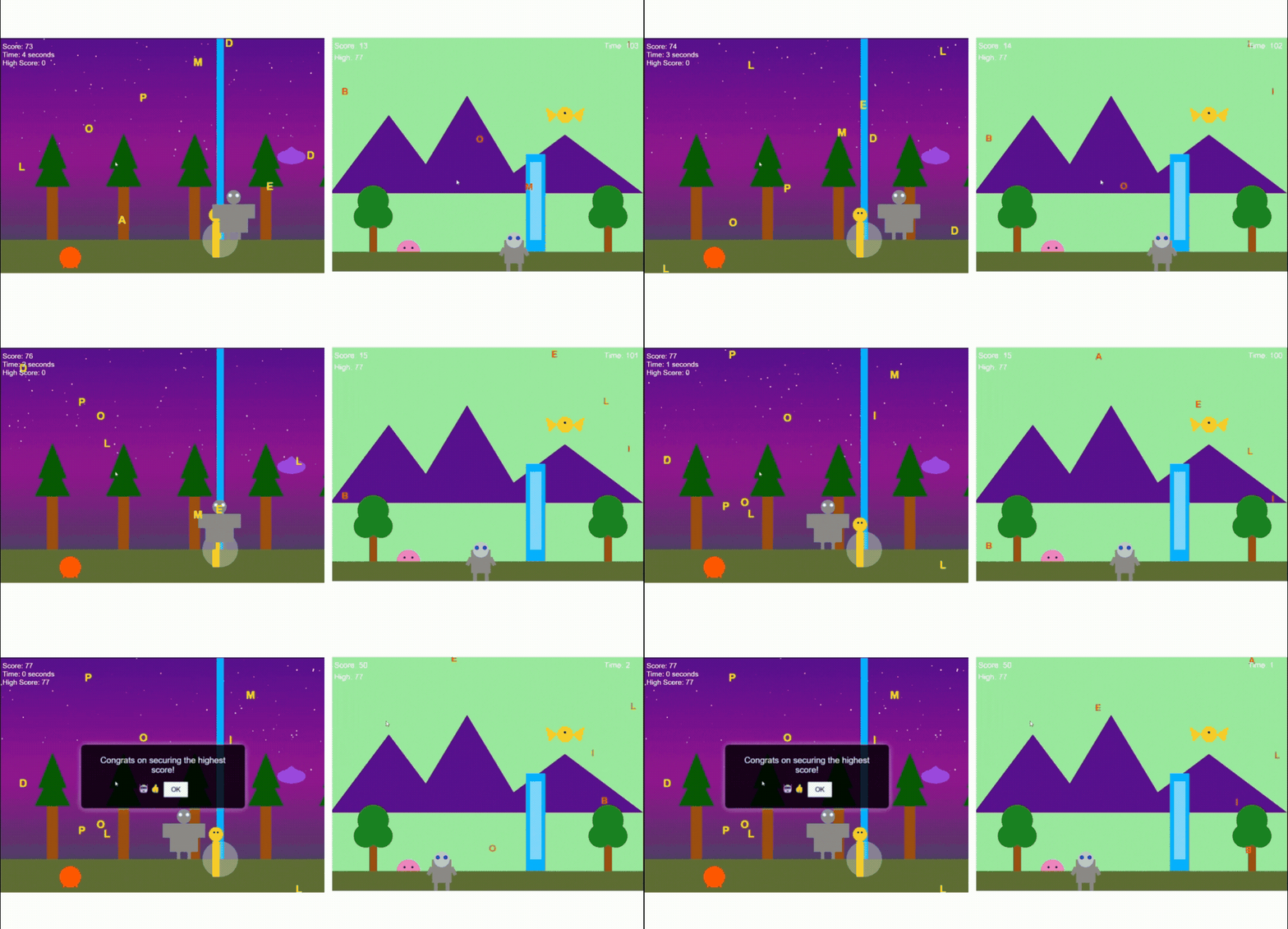
On the left side of the result, you will find better visuals, but it sacrifices frame rate. There are jerks that can be felt. It also missed elements in the background that I had asked for, like animals, mountains, etc.
The right side of the result was smoother, fulfilling its purpose, but lacked some details, too. But if you ask me, I will pick a smoother experience over extra visual aesthetics any day. So, JSON prompt worked better here as well, and this is how you can leverage AI in web development.
How to Use JSON Prompts to Draft a Blog
Beyond writing and structuring the blog, a JSON prompt can also tell the AI to fact-check online before finalizing the answer. This ensures your blog or FAQ is not just structured, but also accurate and up to date.
Here are the steps!
- Step 1. Define the task: Specify whether you want writing, outlining, or FAQs.
- Step 2. Create a JSON structure: Use fields like "task", "topic", "tone", and "length".
- Step 3. Add accuracy checks: Include a field such as "verify_sources": true or "cross_check": "latest stats". This instructs the AI to search the web before writing.
- Step 4. Run the prompt in your AI tool: Paste the JSON into a model that supports browsing or live data.
- Step 5. Review and refine: Check if the cited facts have timestamps, sources, or links. Adjust if needed.
I tried Gemini 2.5 Pro for this task with both types of prompts.
My prompts were:
Traditional Prompt
|
Draft me a 500-word SEO-friendly blog on How far are we from AGI? It has to be well-researched, properly structured, and do a competitor analysis to deliver the best value-driven blog. Keywords will be: future of AGI, AGI's abilities, AGI features |
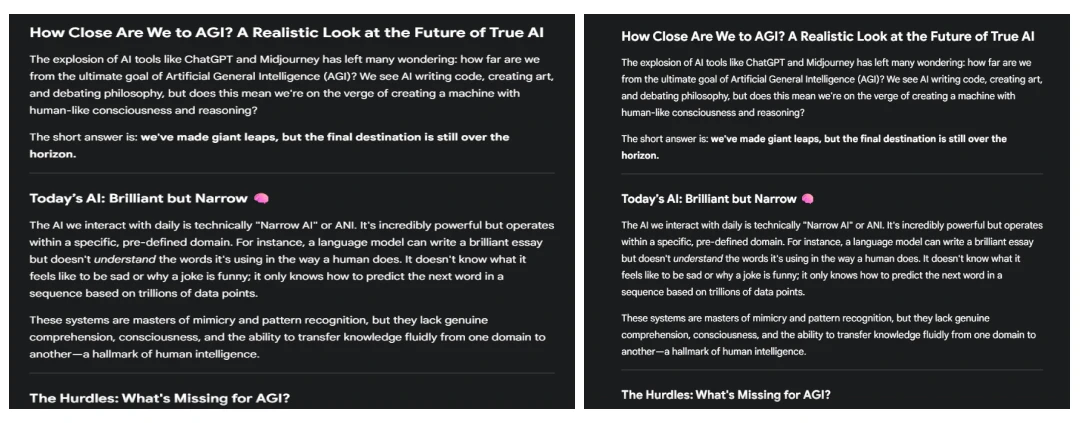
I faced certain challenges while drafting a blog. For instance, the final outcome was coming into JSON format as well, which made it difficult to paste the blog into a Google Doc. There were no research links either.
So, it’s definitely not for writing full, ready-to-use write-ups for now. But you can use the same process to draft e-mails, CTAs, marketing copies, and more such content that doesn’t require much research or SEO-friendliness.
I also checked the AI score using AI content detectors like ZeroGPT. The traditional prompt resulted in 48% AI content, while the result from JSON-prompt (on the right) resulted in 27% of AI content.
Benefits of JSON Prompting
Switching your method gives you some serious JSON prompting benefits, especially when you're trying to scale up your AI efforts. It turns your AI from a creative-but-unreliable brainstormer into a predictable workhorse.
Here are the main advantages of a JSON prompt:
- You Get Exactly What You Ask For. No more guesswork. When you define the output fields, data types, and even character limits, the AI has no choice but to give you exactly that. This is a huge deal for AI in Customer Service, where you might need structured data for support tickets.
- Consistency You Can Count On. Automated systems choke on inconsistent data. JSON prompting ensures the AI's output format never changes, making it perfect for feeding data into databases or other applications.
- It Plugs Right In. The AI's response is already in a format that machines understand. This saves your developers a ton of time and headaches, speeding up the entire process by integrating AI in App Development more smoothly.
- Fewer Weird Mistakes. By giving the AI a tight structure to follow, you limit its ability to go off-topic or "hallucinate" incorrect information. You're putting guardrails on its creativity, which is essential when you need factual, user-friendly AI Products.
- Scales Easily Across Teams. Once you define a JSON template, anyone on the team can reuse it—whether it’s for customer support logs, analytics summaries, or marketing copy. This means less “prompt engineering” guesswork every time.
- Easier Automation & Integration. JSON output drops directly into APIs, CRMs, or workflow tools without needing heavy post-processing. That’s a big win for businesses trying to automate reporting, content pipelines, or chatbot logs.
- Transparent for Debugging. If the AI produces a wrong answer, you can pinpoint exactly where it failed (e.g., wrong field, invalid data type) instead of sorting through vague paragraphs of text.
- Supports Multilingual & Multi-Domain Workflows. You can define language codes, tone styles, or domain-specific requirements right in the schema. That makes it practical for global businesses running the same AI across multiple markets.
- Predictable Training & Fine-Tuning. When you’re collecting data to improve your models, JSON outputs are gold—clean, structured, and ready for machine learning pipelines without human reformatting.
Challenges of JSON Prompting
Of course, it's not a silver bullet. There are a few things to keep in mind before you go all-in on this method.
- It's More Technical. Let's be honest, this isn't as simple as typing a sentence. You need to know how to write a valid JSON object, which can be a hurdle if you're not a developer.
- Your AI Model Matters. Not all Large Language Models handle structured inputs equally well. Some of the newer models have specific "JSON modes" that work beautifully, but others might struggle to follow your schema. Choosing the right AI development platform is key.
- More Upfront Work. Crafting a good JSON prompt takes more planning than writing a quick text prompt. You have to think through your data structure and define exactly what you need, which takes a bit more time at the start.
- Validation Errors Can Break Output. A single missing comma or mismatched bracket can cause the entire prompt to fail. Unlike natural language prompts, JSON demands perfect syntax, which means small mistakes can cost you a whole run.
- Limited Flexibility. JSON works best when you know exactly what you want. But if your request is more open-ended or creative, rigid structures can box in the model and reduce the variety of outputs.
- Harder for Non-Technical Teams. If you're collaborating with marketers, designers, or business managers, JSON prompting may slow things down because they can’t easily draft or tweak structured prompts without technical support.
- Scaling Gets Complex. The more attributes and nested structures you add, the harder it becomes to manage and reuse your prompts. Maintaining consistency across multiple JSON templates can feel like software development in itself.
- Not Always Human-Readable. Unlike plain prompts that anyone can skim and understand, JSON prompts can be harder to review quickly—especially for stakeholders who just want to check if the request makes sense.

Frequently Asked Questions
What is JSON?
JSON is short for JavaScript Object Notation. Think of it as a simple, text-based way to organize information so that computers can easily read it. It uses key-value pairs, which is just a fancy way of saying it labels every piece of data.
What is a JSON file?
A JSON file is just a text file that holds data organized in the JSON format. It ends with a .json extension and is commonly used to pass data between a server and a web application.
What does JSON stand for?
JSON mainly stands for JavaScript Object Notation, a light format to store and transport data.
Is JSON prompting better?
Yes, JSON prompting is clearer and more structured than plain text, making AI outputs more accurate.
What is JSON prompting most used for?
It’s mainly used to format AI prompts, automate tasks, and ensure consistent, error-free responses.
Can I use JSON prompting with any AI model?
Not every AI model supports JSON prompts. It mainly works with models designed to read structured inputs, like GPT-4 or custom enterprise setups.
How do I validate a JSON prompt?
You can validate JSON prompts using online JSON validators, code editors with linting, or schema validators to check formatting and structure.
What tools help create JSON prompts?
Common tools include code editors (VS Code, Sublime), online JSON generators/validators, and AI-specific SDKs or APIs that accept structured JSON.

Uncover executable insights, extensive research, and expert opinions in one place.
Related Content