- 1. Generative UI and the Collapse of Fixed Layouts
- 2. Hyper-Personalization
- 3. Spatial Design and the Infinite Canvas
- 4. Scrollytelling
- 5. Voice and Multimodal Interfaces (VUI)
- 6. Neobrutalism
- 7. Bento Grids
- 8. Dark Mode 2.0 (Deep Mode)
- 9. 3D Elements in Flat Design (Claymorphism)
- 10. Sustainable Web Design (Green UX)
- 11. Affective Computing (Emotion AI)
- 12. Passwordless and Biometric Authentication
- 13. Ethical Design and Accessibility
- 14. No-Code/Low-Code Influence
- 15. Advanced Micro-Interactions
 Share It On:
 UI/UX design trends are no longer driven by taste or visual cycles. User drop-off, platform shifts, and where companies are actually spending money are forcing design decisions to change. The datapoints below show how those pressures are shaping real
One bad experience is enough to lose nearly a third of users. That reality is quietly reshaping how digital products are built, which is why UI/UX design trends today feel less like style updates and more like course correction. Static pages, rigid flows, and menu-heavy layouts no longer survive real usage.
This shift isn’t about visuals aging out. It’s about pressure. Users move faster, tolerate less friction, and expect systems to respond instead of waiting. Clicking through layers and hoping for the right outcome is wearing thin. Interfaces are being judged on how quickly they adjust to intent.
The sections ahead unpack the numbers behind that change—where design is bending, where it’s breaking, and which decisions are already separating products people stick with from those they quietly abandon.
Latest UI/UX Trends Influencing the Global Market in 2026
Top UI/UX design companies providing UI design services are now beyond minimalism and designing for 5G servers. These maestros are now focused on making experiences more immersive, engaging, personalized, and accessible. Further insights will help you understand how. Let’s begin!
1. Generative UI and the Collapse of Fixed Layouts
For decades, interface design revolved around drawing boxes and locking them in place. That assumption is now under strain. Generative UI systems rebuild layouts dynamically instead of relying on static templates.
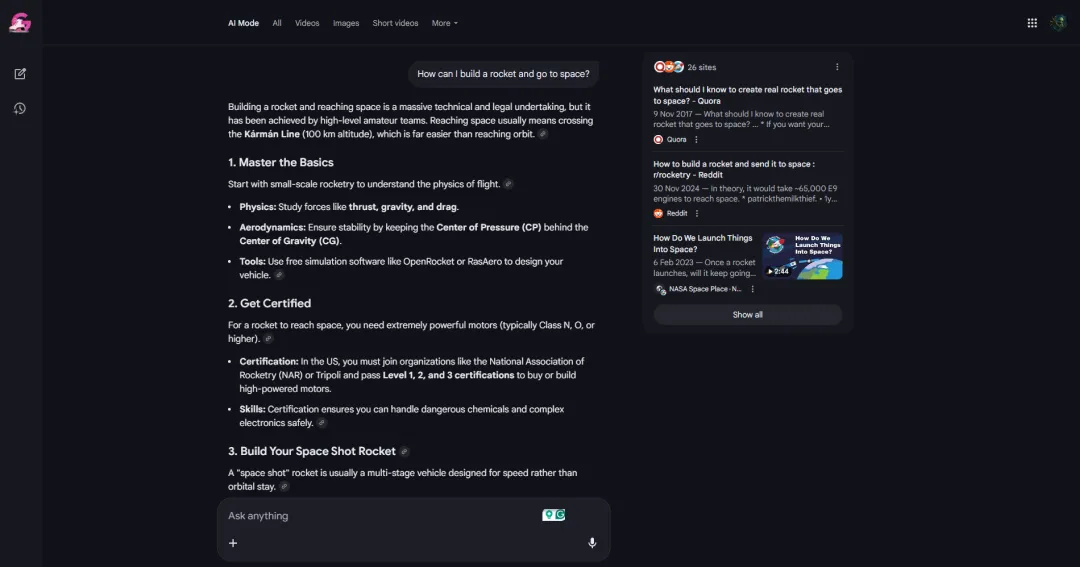
A dashboard can shift structure depending on who is using it, what they need, and how they are behaving. The same product may look different from one session to the next, not because of themes, but because the system recalculates intent in real time. The above screenshot shows Google’s AI mode search feature in action, a perfect example of Generative UI.
This introduces a different kind of design responsibility. Instead of crafting finished screens, teams define rules, constraints, and priorities. The interface becomes a result, not an artifact. Static handoffs and frozen mockups struggle to survive in this model. Products that cannot adapt begin to feel rigid very quickly.
Market signals reflect this shift clearly. Global Market Insights projects the generative AI market to grow from $53.7 billion in 2025 to nearly $1,206.4 billion by 2035. That scale suggests structural change rather than incremental adoption.
2. Hyper-Personalization
We are moving far beyond "Hello, [Name]." That was cute in 2015. Today, predictive experiences are the baseline of modern UI/UX trends. The interface needs to know what you want before you do. If you have to search for the "reorder" button, the design has failed. UI/UX design in web development has shifted from organizing content to predicting desire. It’s about reducing the cognitive load to near zero.
We see this failure everywhere. Apps that treat users like strangers, even though they've been a subscriber for five years. It’s insulting. The new standard is an interface that acts less like a tool and more like a mind reader, adjusting navigation paths based on users’ last three clicks.
The Business Research Company projects the hyper-personalization market will hit $58.34 billion by 2030. If you aren’t personalizing, you are just noise.
|
Some Interfaces Read Minds. Others Read Manuals. Where Does Your UI Fit? We know AI experts who can help you upgrade. |
3. Spatial Design and the Infinite Canvas
The screen has exploded. With the Apple Vision Pro and Meta Quest 3, we are entering the age of Spatial UI, where depth, shadow, and physics matter more than pixels. We are talking about mobile app UX design that doesn't just sit in your hand but floats in your living room.
It’s messy right now. We are figuring out gaze controls and hand gestures, but the potential is infinite. You aren’t limited by the bezel anymore. Content can exist peripherally. It can follow you. This is the most significant shift since the touchscreen, and most teams are woefully unprepared for it.
SkyQuest values the global spatial computing market at roughly $181.9 billion in 2024, expecting it to rocket to over $1,149 billion by 2033.
4. Scrollytelling
Scrolling has replaced clicking on long pages because it removes steps. Fewer decisions, fewer breaks in attention. When users are forced to choose what happens next, many stop reading.
Findings presented at the ACM Conference on Human Factors in Computing Systems compared static long-form layouts with scrollytelling formats. The study showed that scroll-driven progression improved reading continuity and reduced loss of context. Participants found long content easier to follow when the page advanced through scrolling instead of navigation actions.
Static layouts depend on navigation. Scrollytelling depends on movement. That difference changes how long users stay oriented on a page. When progression is tied to scrolling, readers spend less time re-evaluating where they are and more time continuing forward.
This is where data science in UI/UX design becomes practical rather than abstract. Scroll-depth data reveals where attention drops, not in theory but at specific points on the page. Those points can be corrected—less density, a pause, a visual break, a shift in pacing. No assumptions required.
Scrollytelling does not work by adding stimulation. It works by removing interruptions.
5. Voice and Multimodal Interfaces (VUI)
Typing is fast becoming a secondary input. As natural language processing hits a singularity of accuracy, voice user interfaces are moving from "command-based" to "conversational."
Microsoft CEO Satya Nadella recently declared this era the "Golden Age of Systems," noting:
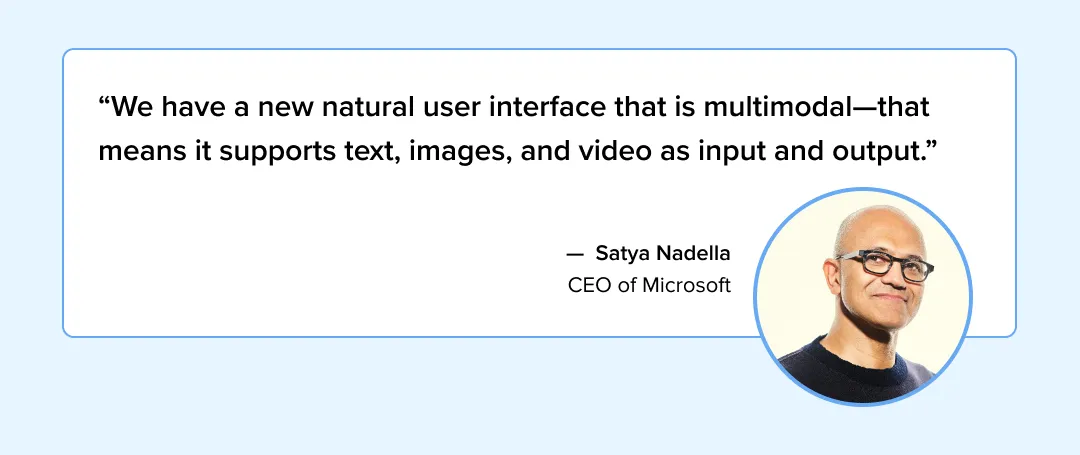
This means AI in web design must now account for a user who might start a task with a tap, continue it with a voice command, and finish it with a gesture. It’s fluid. It’s natural. And it’s incredibly hard to build.
The voice user interface market is surging, expected to grow to $224.85 billion by 2035.
6. Neobrutalism
For years, the internet looked like a sterile hallway. Everything was clean, sans-serif, and safe. Rebellion was inevitable. Neobrutalism is raw. It uses high-contrast colors, thick outlines, and a distinct lack of shadows. It screams "I am digital" rather than trying to mimic physical paper.
Users love it because it’s honest. It’s one of the web design trends that actually has a pulse. It’s not for everyone—banks should probably stay away—but for brands that want to signal authenticity and edge, it is the only way to go. It breaks the grid and demands attention.
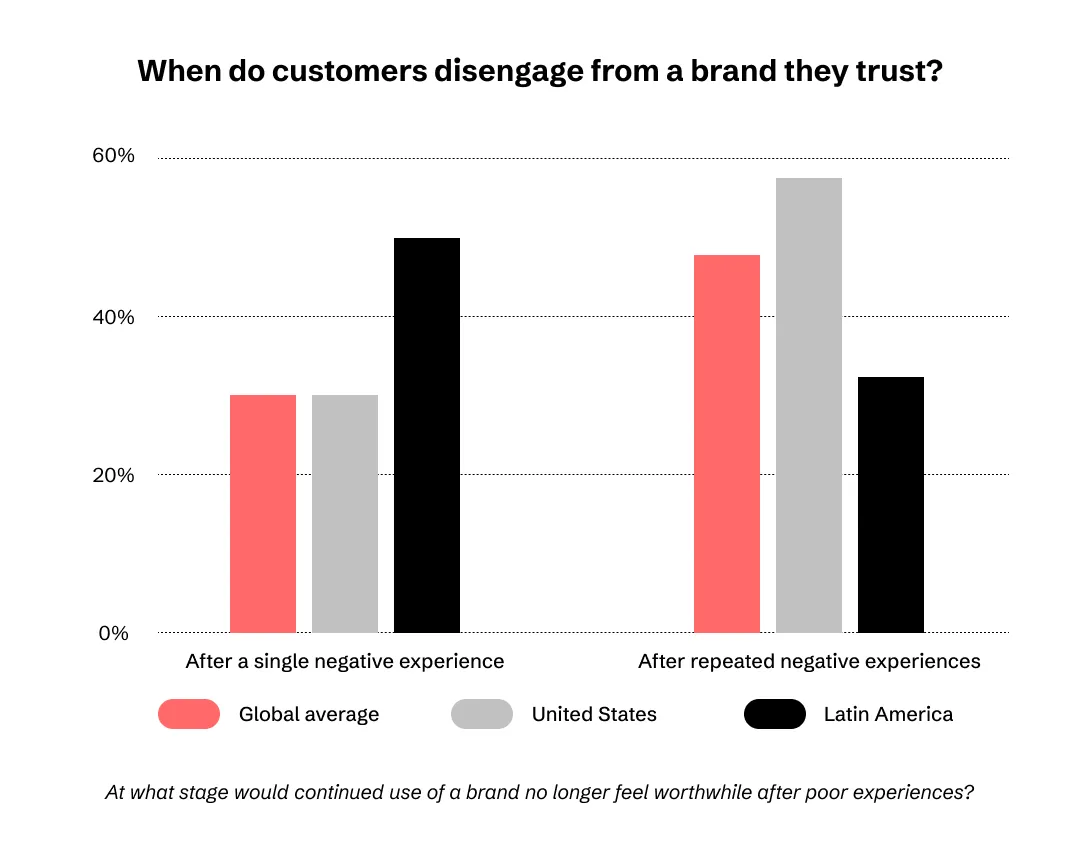
You have to understand the stakes here. We used to think we had seconds to grab attention. We were wrong. Google researchers found that users form an aesthetic judgment in just 0.05 seconds—faster than a literal blink. And once that snap judgment is made, it sticks.
PwC backs this up with a terrifying reality check: 32% of all customers would stop doing business with a brand they loved after just one bad experience. If your site looks generic or breaks, your business doesn't just lose a view; it loses the customer forever. Neobrutalism breaks that pattern. It forces an opinion. And in a sea of sameness, an opinion is the only thing that sells.
7. Bento Grids
Inspired by the Japanese lunchbox, this layout organizes complex information into modular boxes. It is responsive, scalable, and incredibly orderly without being boring. It creates a hierarchy that is easy to scan.
In the world of SaaS, where data density is high, the Bento Grid is a lifesaver. It allows you to present disparate data points—charts, maps, text—in a unified view. It’s a trend that respects the user's time. It says, "Here is everything you need, organized perfectly."
This isn't just about aesthetics; it is about cold, hard revenue. McKinsey & Company conducted a massive study tracking 300 companies over five years and found that those who prioritized rigorous design systems (like consistent, modular layouts) didn't just look better—they outperformed their industry peers in revenue growth by 32%. When you reduce the cognitive load for your user, you clear the path to their wallet.
8. Dark Mode 2.0 (Deep Mode)
It is no longer just about inverting colors to white-on-black. That is amateur hour. The new Dark Mode uses deep grays (#121212), desaturated accents, and careful contrast ratios to reduce eye strain while maintaining brand identity. It’s about depth, not just darkness.
We are seeing tech trends where "Deep Mode" is the default for high-focus applications. Developers love it. Designers love it. And frankly, if your app blinds me at 2 AM, I’m deleting it. It is practical luxury.
But forget the battery argument for a second. The real story is human performance. A 2025 empirical study published in the International Journal of Engineering, Management and Humanities tracked developers and found that those working in Dark Mode were significantly more productive. They wrote 32 lines of code per hour compared to just 27 for Light Mode users. Even more critical? Their error rates dropped from 6.1% to 4.3%.
This explains why 69% of developers now refuse to work on anything else. You aren't just optimizing for "cool"; by implementing a proper Dark Mode, you are optimizing for a user who works 17% faster and makes 30% fewer mistakes.
9. 3D Elements in Flat Design (Claymorphism)
We are seeing a resurgence of 3D objects floating in 2D space. It adds playfulness and depth without the heavy cognitive load of full skeuomorphism. It’s tactile. You want to touch it.
This style works incredibly well for AI trends in onboarding flows, where you need to explain complex concepts simply. A friendly 3D character or object can disarm a user and make a complex tool feel approachable. It’s the spoonful of sugar.
This isn't just about looking cool, though; it's about cold, hard conversion. Market.us data reveals that merchants using 3D product models see a massive 94% increase in conversion rates.
Why? Because when a user can spin, zoom, and interact with a product, their confidence skyrockets. It bridges the gap between the digital and physical, reducing that nagging "will this look good?" anxiety that kills sales.
10. Sustainable Web Design (Green UX)
Digital products consume energy. A lot of it. Sustainable web design focuses on lightweight code, dark modes, and efficient asset loading to reduce carbon footprints. It’s not just hippie signaling; it’s performance engineering.
A heavy site is a slow site. A slow site is a failed site. By stripping away the bloat, you aren’t just saving the planet; you’re saving your conversion rate. It’s a win-win that actually impacts the bottom line.
The cloud sustainability market is projected to grow from $30.28 billion in 2024 to over $175.82 billion by 2034.
11. Affective Computing (Emotion AI)
Systems are learning to read human emotions through typing speed, mouse movement, and facial recognition to adjust the UI accordingly. If the user is rage-clicking, the system should know.
This is the frontier of app design guidelines. Imagine a customer support chatbot that detects you are getting angry and automatically routes you to a human. That is the future. It’s an empathetic design powered by cold, hard code.
The affective computing market is estimated to reach $339.59 billion by 2031.
12. Passwordless and Biometric Authentication
Passwords are obsolete. They are a security risk and a friction point. The trend is toward passkeys, biometrics, and magic links that remove the login hurdle entirely.
Users have abandoned countless carts because they forgot their passwords. Don't let that happen to your users. Mobile app UI interactions should be seamless—face ID, thumbprint, done. Security shouldn't feel like a punishment.
There’s a report by Fortune Business Insights that says the passwordless authentication market is set to grow to $75.73 billion by 2034 (Fortune Business Insights).
13. Ethical Design and Accessibility
We have reached a tipping point where users are actively hostile towards "Dark Patterns." Trending UI/UX designs now prioritize "Ethical Design"—privacy by default and accessibility first.
It’s about respect. You can't trick people into loyalty. App designer tools are finally integrating accessibility checkers by default, making it harder to ship broken experiences. If you aren't designing for the 1.3 billion people with disabilities, you are leaving money on the table.
Following these user experience trends also aligns your product with compliances like WCAG, which, if violated, can attract millions of dollars in fines. Smart folks have already understood that. As a result, the digital accessibility software market is booming, projected to reach $1.89 billion by 2034.
14. No-Code/Low-Code Influence
Designers are now builders. The rise of sophisticated user interference trends like using no-code tools means web design companies can ship products faster, blurring the line between prototype and final product.
This scares some people. It shouldn't. It frees us from the drudgery of pixel-pushing and lets us focus on the architecture of the experience. It empowers the "hybrid" creative who can think and build simultaneously.
There’s no questioning the fact that folks are already moving towards these solutions to boost their productivity. The low-code/no-code development platform market is expected to reach $129.13 billion by 2030. The only question is, are you ready to join the race?
15. Advanced Micro-Interactions
Motion is information. A button that satisfies a click with a tactile thud or a loading bar that entertains reduces perceived wait time. It’s the difference between an app that feels broken and one that feels alive.
We are seeing a move towards "functional delight." Not animation for animation's sake, but motion that guides the eye and confirms the action. It’s the silent language of the interface.
Research shows that 41% of users will effectively walk away—using an app less or abandoning it entirely—if the interaction experience fails to land. Well-designed micro-interactions are not just aesthetic; they are the critical buffer that reduces perceived wait time and prevents that churn.

Summarizing Crucial 5 UI/UX Trends in 2026 for a Quick Scan
Before we conclude, here’s a quick scan of the datapoints you have read in this draft.
- Fixed layouts are fading as interfaces adapt in real time, pushed by a generative AI market heading past $1.2T.
- Screens are no longer the limit, with spatial computing projected to reach $7.1B by 2033.
- Subtle 3D is being used to add clarity and depth without making interfaces heavier.
- Passwords are dropping out as biometrics and passkeys drive a $75.73B market shift.
- Micro-interactions matter because users still leave after 3 seconds of waiting.
A Final Thought: The Invisible Future
The screen is a boundary, and responsive UI/UX design is the bridge we are currently burning. As we move forward, the best interfaces will be the ones that disappear completely, leaving the user alone with their intent.
The top UI/UX trends are not just about looking better; they are about thinking faster. To survive the best UI/UX trends cycle, one must stop designing for the device and start designing for the mind.
We are building the nervous system of the digital world. Try not to make it anxious.
Frequently Asked Questions
What are the latest trends in UI/UX design?
UI and UX design in 2026 does not point to a single clear direction. Different products are responding to different pressures at the same time. Interfaces are changing more often based on usage patterns instead of fixed layouts.
Personalization driven by AI exists in many products, although users may not always notice it happening. Some teams are experimenting with spatial or three-dimensional layouts, while others avoid them entirely.
Bento-style grids are appearing mainly where information density becomes difficult to manage. Interaction is also spreading across voice, touch, and visual focus, though adoption remains uneven across regions and devices.
How is AI impacting the future of UI/UX design?
AI is affecting interface behavior more than visual style. Layouts change, content rearranges, and flows adapt based on patterns that emerge after release. Some design systems are now partially maintained without manual intervention.
Predictive elements are becoming common, though not always accurate. This shifts design work toward oversight rather than constant production.
Why is accessibility counted among the top UI/UX design trends?
Accessibility is gaining attention because products are used in imperfect conditions. Many users face temporary, situational, or permanent limitations that affect interaction. Designing for those realities reduces confusion across wider audiences. Accessibility choices often solve problems that were previously blamed on user error.
What is the difference between Neobrutalism and Minimalism?
Minimalism removes elements until only the necessary remains. Neobrutalism keeps elements visible, sometimes aggressively so. One style relies on calm spacing and restraint. The other relies on contrast, tension, and deliberate roughness. The choice usually reflects brand intent rather than aesthetics alone.
Will UI designers be replaced by AI?
Full replacement is not the prevailing direction. Automation is absorbing repetitive execution work over time. Design roles are shifting toward decision-making and system control. Contextual judgment and prioritization still require human involvement.

Uncover executable insights, extensive research, and expert opinions in one place.
Related Content