- 1. Signal: No Baseline, No ROI Tracking
- 2. Signal: Data Debt and Fragmented Knowledge
- 3. Signal: Over-Scope or Under-Governance
- 4. Signal: Model Drift or Hallucination Spikes
- 5. Signal: User Resistance & Change Fatigue
- 6. Signal: Security or Compliance Incident
- 7. Signal: No Executive Sponsor or Cross-Team Ownership
 Share It On:
 While everyone was busy talking about AI art and chatbots, IT quietly became the proving ground for true intelligence. The integration of AI in IT services isn’t flashy — it’s foundational. And it’s already changing everything.
AI in IT services has gone from a “maybe someday” PowerPoint slide to the core engine of operations, seemingly overnight. If you’re in IT, you’re already feeling it. The pressure is on—not just to use AI, but to use it intelligently for everything from IT Service Management Automation to deep AI and IT system optimization.
This isn’t just about faster ticket resolution. It’s a total rethink of how IT delivers value. Forget the clunky, rule-based scripts of the past. The real conversation is about how AI and automation are transforming IT service management from a reactive cost center to a predictive, strategic partner. But what does that actually look like, day-to-day? And how do you get there without tripping over the hype?
All these questions are answered ahead!
What Does it Really Mean to Integrate AI in IT?
First, let’s clear the decks. This isn’t about rogue robots. For Artificial Intelligence in IT Services, it’s about practical tools that think, learn, and act.
The old way was dominated by Robotic Process Automation (RPA) — great for simple, repetitive tasks, but it breaks the second a button moves. The new way is built on generative artificial intelligence.
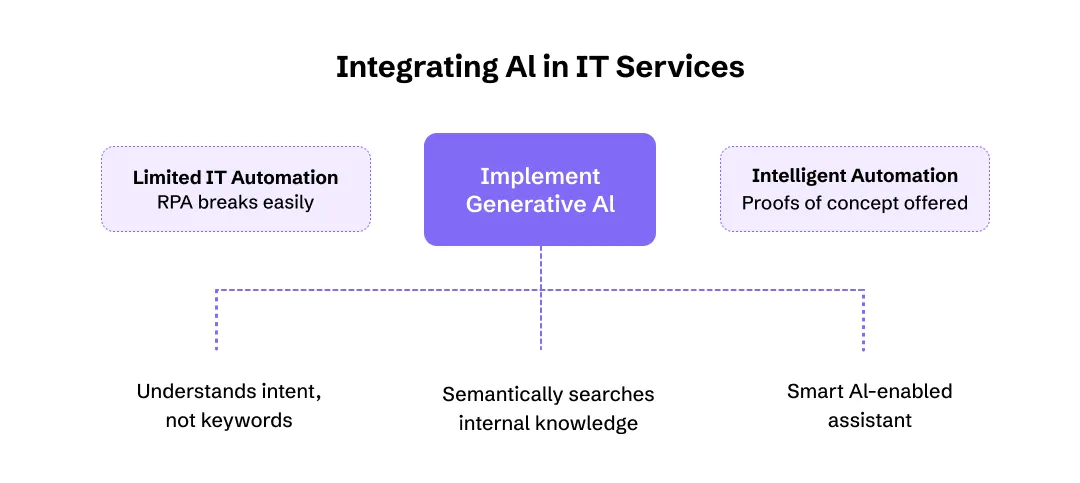
Think of it as upgrading your IT toolkit:
- The Brain (Generative AI): These are the models you’ve heard of, like those used on major cloud platforms. They understand intent, not just keywords.
- The Memory (Knowledge Management): This is where vector databases come in. Integration of AI in knowledge management allows it to search your entire internal knowledge portal semantically. An engineer doesn’t have to guess the exact title of a 5-year-old document; they can just ask what they need.
- The Interface (The “Agent”): This is what your employees see. It’s the difference between a dumb conversational bot and a smart AI-enabled assistant or internal chatbot that can actually solve a problem, not just log a ticket.
This tech stack is what allows IT consulting agencies to move beyond simple managed services to offering true proofs of concept for intelligent automation. It’s also the same core technology that’s revolutionizing AI in web development, where AI can now write and debug code.

The Real-World Wins: What AI Actually Improves
When you strip away the jargon, the benefits of AI are concrete. It’s about replacing friction with flow. We’re seeing a massive shift from slow, manual processes to fast, intelligent systems. This isn’t a small upgrade. It’s a fundamental change in capability, much like how AI in app personalization has changed user expectations for every app they use.
Here’s a simple breakdown of the “before and after”:
| Area of Friction | The Old Way (Rule-Based Engines) | The New Way (AI-Driven Tools) |
|---|---|---|
| Employee Support | A rigid script. “I do not understand. Please rephrase.” | Context-aware responses. “I see you’re in Marketing, and your project file won’t open. It’s likely a permissions issue from the server migration. I am running a fix now.” |
| Expert Knowledge | Your one senior database admin is a bottleneck. | Digital twins of internal expert trainers. The AI learns from your best people, scaling their expertise 24/7. |
| Ticket Queues | L1 support is buried in password resets. | AI-enabled assistants resolve 60–70% of L1 incidents instantly, freeing humans for complex problems. |
| User Search | “Your search for ‘VPN issue’ returned 3,422 results.” | Knowledge interfaces provide one synthesized, correct answer pulled from 10 different documents. |
This drive for a seamless experience is exactly what’s happening with AI in customer service across all industries—and it’s finally here for internal IT.
Beyond the Help Desk: What AI Can Do Right Now
The most exciting part? The use cases are exploding. Generative AI isn’t just for chatbots. It’s becoming a core tool for technical and business-focused use case families. Organizations are increasingly exploring various generative AI use cases to improve productivity, automation, and decision-making across departments.
1. For the Technical Teams
- Code Generation & Testing: AI can write boilerplate code, generate unit tests, and even handle complex documentation (the part everyone hates). This is a game-changer for AI in software testing and AI in app development, cutting down cycle times.
- Automation: This is automation on steroids. Think of AI agents that can provision a new cloud environment, diagnose a network slowdown, and then create the incident summary for management—all on their own.
2. For the Business Operations
- Back-Office Grind: This tech is crushing tasks like invoice processing. It can read a PDF, extract the data, check it against a PO, and route it for approval without a human ever touching it. This is the same efficiency boost we’ve seen from AI in manufacturing.
- Smarter Support: Contact centers are using AI to give agents real-time suggestions, and knowledge-management systems are becoming proactive, suggesting solutions to users before they even know they have a problem. This tech is also powering AI in sales by identifying the most promising leads.
3. For Marketing and Growth
- Outbound Marketing Automation: Generative AI can write 50 versions of an email, personalized for 50 different customer segments. This is a huge leap for AI in marketing.
- Customer Insights: AI can analyze support tickets and chat logs. Leveraging AI in social media can help you identify what customers really think—helping you leverage the abilities of AI in customer retention and engagement to its full potential.
Case Studies: Proven Wins in IT Service Context
Case Study 1: Global Recruitment Brand Secured $52 Million in Funding
A U.S.-based recruitment company, JobGet, hired Appinventiv to implement AI to smooth the job search process. They launched the product update and secured:
- $52 million in series B funding.
- 2 million+ app downloads.
- 150,000+ job seekers got jobs.
- Onboarded over 50,000 companies recruiting.
This shows that automation in IT service using AI can achieve measurable business value quickly.
Case Study 2: IT Consulting Firm – Service Desk Reinvented
CAI, a global systems integrator, migrated its legacy solution to a modern AI-powered service desk from Talkdesk, serving 500,000+ end users across EMEA/APAC. They used AI agents to:
Resolve routine tickets before a human touches them.
Automate after-call summarisation using GPT for knowledge capture.
The result: better user satisfaction, lower cost, and fewer escalations—proof that AI in IT services isn’t just hype.
Case Study 3: Retailer – Ticket Assignment & SLA Breach Reduction
A leading furniture retailer used NLP and ML in ticket triage via HCL Technologies to automate ticket assignment in their ITSM environment. They achieved a measurable reduction in resolution time and fewer SLA breaches.
This highlights how AI and IT system optimization deliver real operational improvements.
POC Playbook: From Friction to Full-Scale Strategy
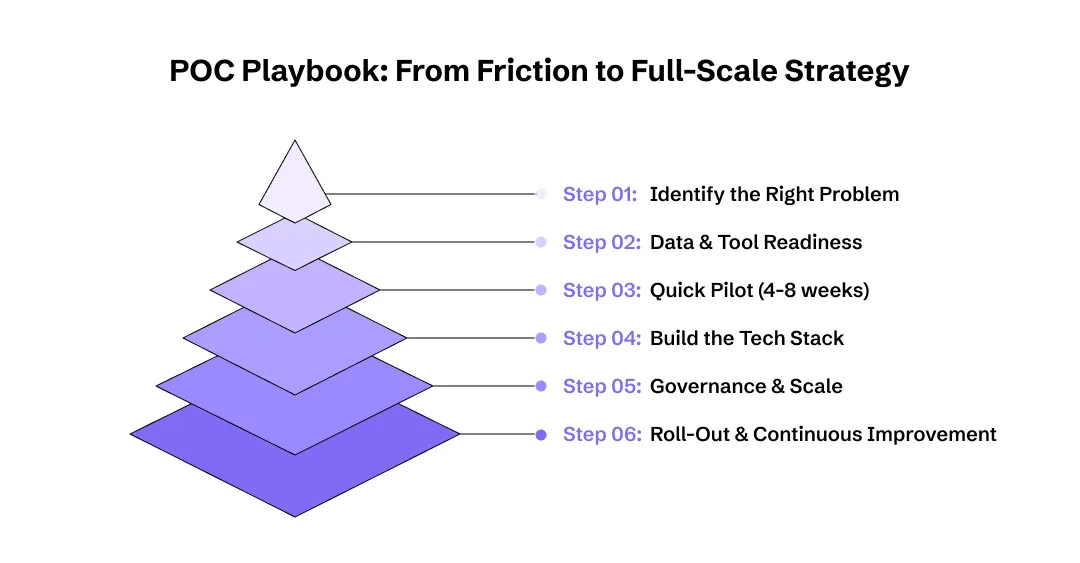
Use this roadmap when you’re building your own initiative with automation in IT services.
Step 1: Identify the Right Problem
Pick one high-friction, high-volume scenario: e.g., password resets, onboarding tickets, asset-related incidents.
KPI goal examples: deflection rate > 50%, MTTR reduction > 30%, user satisfaction +10 points.
Step 2: Data & Tool Readiness
- Gather 6–12 months of historic tickets, including metadata, resolution time,and escalation flags.
- Clean up your knowledge base so vector searches and semantic retrieval work.
- Choose a generative model or cloud AI service (e.g., a large language model from Azure AI, Amazon Bedrock).
- Set up a vector database for semantic search and knowledge management.
Step 3: Build the Tech Stack
- Agent/Interface: internal chatbot or ticket assistant.
- Memory/Knowledge layer: vector DB + internal docs.
- Brain: generative model + instruction sets + fine-tuning.
- Monitoring & feedback: dashboards measuring deflection, accuracy, and errors.
Step 4: Quick Pilot (4-8 weeks)
- Start small: one service domain (e.g., onboarding).
- Measure baseline metrics (ticket volume, MTTR, FCR).
- Launch the assistant internally, including human-in-the-loop for safety.
- Monitor outcomes and user feedback.
Step 5: Governance & Scale
- Define model usage policies, bias mitigation, and evaluation audits.
- Engage security/compliance teams (especially if you handle regulated data).
- When the pilot hits the target, expand to additional domains (change management, application support).
- Document cost-savings and service improvements for leadership buy-in.
Step 6: Roll-Out & Continuous Improvement
- Implement continuous training loops: monitor interventions, update the knowledge base, and refine prompts.
- Include metrics quarterly (deflection, user satisfaction, cost per ticket).
- Build a “CoE” (Center of Excellence) for AI in your IT-services practice.
Governance & Security Checklist for AI in IT Services
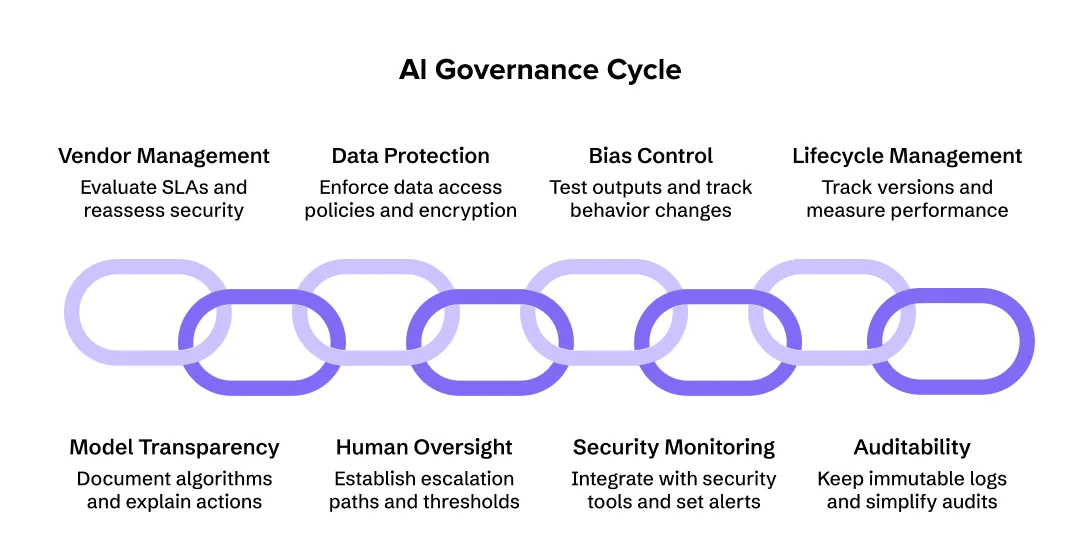
Implementing AI in IT services responsibly requires more than model selection and data pipelines — it demands continuous governance. The following checklist distills best practices from frameworks used by enterprise leaders, guiding some of the top AI development companies that have already scaled AI safely.
1. Model Transparency & Explainability
- Document which algorithms, embeddings, and models are in use (e.g., generative AI, vector search, or deep-learning classifiers).
- Maintain explainability logs: why an action was taken, what data influenced it, and when human validation occurred.
- Use interpretability tools or dashboards to visualize decision paths.
2. Data Protection & Classification
- Enforce tiered data-access policies: confidential, internal, public.
- Encrypt data in transit and at rest; never store credentials or sensitive logs in vector databases.
- Audit retention rules regularly — especially in regulated domains like AI in banking or AI in Healthcare.
3. Human Oversight & Fallbacks
- Every autonomous or semi-autonomous agent must have a clear human-in-the-loop escalation path.
- Establish confidence thresholds (e.g., “if model certainty < 0.7 → human review”).
- Maintain manual override mechanisms for critical infrastructure operations.
4. Bias, Ethics & Fairness Controls
- Test outputs across demographic or contextual data slices to catch skew.
- Track changes in behavior when fine-tuning or retraining models.
- Use external audits or peer reviews for high-impact workflows (such as employee performance, hiring, or customer decisions).
5. Security & Compliance Monitoring
- Integrate AI systems with your SIEM or incident-response tools.
- Set automated alerts for anomalies in model usage or token consumption.
- Validate that API calls respect least-privilege principles.
6. Lifecycle Management & Drift Detection
- Track model versions, training datasets, and retraining dates.
- Measure performance degradation (accuracy, latency, hallucination rate) every quarter. Regular evaluation of underlying machine learning models helps ensure reliability, accuracy, and long-term performance.
- Retire outdated or low-performing models; roll back safely if regressions occur.
7. Auditability & Traceability
- Keep immutable logs of model predictions, feedback, and corrections.
- Make audits simple: one click should reveal who did what, when, and why.
- This also helps comply with emerging global AI governance tools standards.
8. Vendor & Contract Management
- Evaluate SLA clauses from cloud or AI agent development companies: ownership of data, retraining rights, liability in case of bias or breach.
- Continuously reassess security posture after each vendor update.
A strong governance layer transforms automation in IT service from a technical project into a sustainable business capability — reducing compliance risk, strengthening trust, and preparing your organization for global AI regulations.
Failure Signals & Recovery: When AI Projects Go Off Track
Even with the best intentions, not every deployment of Artificial Intelligence in IT Services works on the first try. Recognizing early red flags helps avoid sunk costs and reputational damage.
Gartner warns that more than 40 % of agentic AI initiatives are likely to be scrapped by 2027 due to unclear objectives and poor governance — but these outcomes are preventable.
1. Signal: No Baseline, No ROI Tracking
You launched the pilot without defining “success.”
Recovery: Establish measurable KPIs (MTTR, ticket-deflection, SLA compliance, user-satisfaction). Benchmark before launch. Even a 20 % efficiency gain validates scaling.
2. Signal: Data Debt and Fragmented Knowledge
Your AI can’t find or trust the information it needs.
Recovery: Prioritize data readiness. Clean, de-duplicate, and label your internal documentation. Add a semantic layer using AI in knowledge management so the model retrieves accurately.
3. Signal: Over-Scope or Under-Governance
The team tried to “automate everything” before proving value.
Recovery: Refocus on one high-friction workflow. Re-implement human review, monitoring dashboards, and policy checkpoints before scaling again.
4. Signal: Model Drift or Hallucination Spikes
Your model’s accuracy or confidence suddenly drops, or it begins inventing information.
Recovery: Re-evaluate prompts, retrain on recent tickets, and deploy guardrails such as retrieval-augmented generation or fallback logic.
5. Signal: User Resistance & Change Fatigue
Agents are ignored, feedback loops go silent, and adoption plateaus.
Recovery: Run transparent communication campaigns, retrain staff, and integrate AI in gamification to re-engage users.
6. Signal: Security or Compliance Incident
Data leakage, unlogged actions, or API misuse occur.
Recovery: Trigger immediate containment; rotate keys, disable affected endpoints, and perform an after-action review. Update governance policy accordingly.
7. Signal: No Executive Sponsor or Cross-Team Ownership
The project stalls because AI remains “the tech team’s experiment.”
Recovery: Appoint a business champion, link results to P&L impact, and align with broader digital-transformation strategy.
Recognizing these signs early separates the pilots that fizzle from those that evolve into full-scale, trusted AI frameworks.

The Road Ahead: Scaling, Skills, and What’s Next
This all sounds great—but let’s be realistic. Scaling generative AI from a cool proof-of-concept to an enterprise-wide strategy is the hard part. The future trajectory hinges on solving a few key problems:
- The Talent Gap: Organizations need people who understand both AI and IT operations. This isn’t just about hiring data scientists; it’s about upskilling your current team in concepts like RunOps (running operations with an AI-first mindset). Outsourcing technical support can help.
- The Black Box: How do you govern a system that learns and adapts? This is where AI governance tools become critical for managing bias, security, and compliance. This is a problem every industry is facing, from AI in Healthcare to conversational AI in fintech.
- The Tooling: You can’t just plug this in like an app. It requires new architectures for application development and smart partnerships with AI development companies or more advanced AI agent development companies. As enterprises adopt more sophisticated AI workflows, understanding what is multi agent systems can help teams design scalable and collaborative automation frameworks.
- From Managed Service to Autonomous System: The winners will be the top AI companies and service providers who master this, moving from simple back-office automation to building fully autonomous systems. This is where you’ll see AI use cases like predictive SEO or highly secure AI in blockchain analysis become mainstream.
- Edge & Hybrid Considerations: If your IT estate spans on-prem, cloud, edge, and hybrid environments, you’ll need to work on how AI integrates with your IT services, governance, and security.
Why You Can’t Afford to Wait
Here’s the bottom line: for professional IT services, this is a “do or die” moment. Competitive advantage no longer comes from being the cheapest; it comes from being the smartest.
Your clients are already demanding this. Requests for Proposals (RFPs) are now explicitly asking for:
- Predictive Capability: Don’t just fix my server; tell me it’s going to fail before it does.
- AI-Driven Systems: Show us how you use AI to improve your own efficiency and our service.
- Intelligent Assessment: Use AI for system-upgrade assessment to model the impact before you break something.
- Modern Expertise: Clients expect you to understand how AI impacts their business—whether it’s integrating AI in Android app development, or delivering AI-powered IoT.
IT providers are now using AI to customize sales collateral in minutes and maintain vast success-story repositories to prove their technology capabilities. Even user education is being automated with AI in gamification to make training stick.
This isn’t a “nice to have.” It’s the new standard. Whether you’re dealing with the complexities of AI in banking, the physical-digital world of AI and robotics, or simply trying to differentiate between Narrow AI vs General AI for your team, the one thing you can’t do is ignore it.
Frequently Asked Questions
What’s the real difference between AI and traditional IT automation?
Think of it this way: traditional automation (like RPA) is a checklist. It does exactly what you tell it, in order. AI is a problem-solver. You give it a goal (for example, “This user can’t access the database”), and it uses its knowledge to figure out the steps to achieve it.
Will AI take away IT jobs?
It’s changing them. It’s aggressively automating the repetitive, high-volume tasks (like password resets) that burn out your L1 team. This frees up humans to work on complex, high-value problems like cybersecurity, cloud architecture, and managing the AI systems themselves.
We’re a small IT shop. Isn’t this AI stuff just for big enterprises?
Not anymore. With cloud platforms offering on-demand AI services, you don’t need to build your own models. You can access world-class AI on a pay-as-you-go basis. Small teams can now deploy internal chatbots and automation that were only available to Fortune 500s a few years ago.
What is the single biggest mistake companies make when starting with AI?
They try to boil the ocean. They aim for a massive, “change-the-whole-company” AI project. The smart move is to start small. Pick one high-friction, annoying problem—like invoice processing or a specific type of support ticket. Build a proof-of-concept, get a quick win, and then build momentum from there.

Uncover executable insights, extensive research, and expert opinions in one place.
Related Content