Share It On:
 Your mobile app’s user experience is a promise. It’s the digital handshake you offer millions of users, assuring them of a smooth, intuitive journey. But what if that handshake is weak—and hands over your keys too?
That’s the new reality. These are the mobile UX security risks when digital safety is considered an afterthought. We can no longer see a seamless user journey and robust security as opposing forces. They are, in fact, the same thing. The friction between them is precisely where attackers find their footing.
Let’s talk money, because that’s where the rubber meets the road. A 2026 Statista report puts the average cost of a data breach at a staggering $4.48 million, according to an analysis done in 2024.
This isn’t a small IT headache; it's a boardroom-level nightmare. And often, the breach doesn't start with a sophisticated server attack, but with a simple design choice in the app itself.
Think of it this way: the modern mobile application security requires absolute precision to prevent your handy machine from causing a disaster. Your app’s bad design choice isn't just clumsy; it's a vulnerability that can cost you and your users a fortune.

Let’s Discuss Some of the Core App UX Security Risks
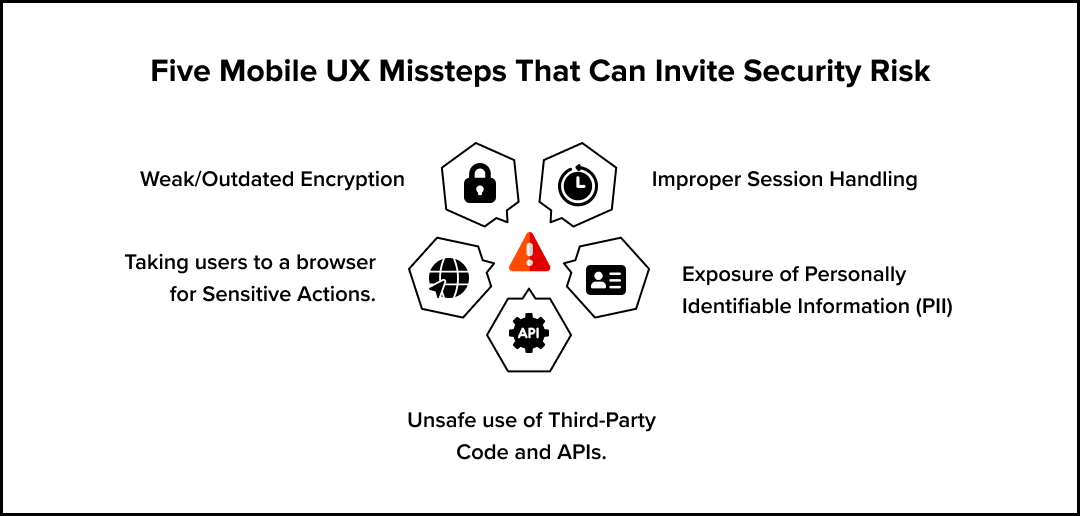
So, where are the cracks? Mobile UX security risks are the subtle flaws born from good intentions. They are the features designed for ease of use that accidentally create a loophole for an attacker. These aren't obscure coding errors; they are fundamental design problems.
1. Weak/Outdated Encryption
We’ve all done it. We chase that frictionless login. But that chase for convenience often leads us straight into a security minefield. Features like indefinite logins or flimsy password rules might please users in the short term, but they are an open invitation for trouble if a device is lost or an account is compromised.
Poor encryption techniques often result from developers prioritizing performance over security, assuming older encryption is "good enough." Often, using weak security protocols can leave your app users exposed to man-in-the-middle attacks, compromising user transactions.
Although many users may not immediately notice encryption strength until a breach occurs, you’re better off safe than sorry. Use modern encryption techniques to secure your apps and harden them from cyberattacks.
Where possible, build trust by displaying the security status of your application prominently in the user interface (UI). Display whether a password or an internet connection they’re using is secure, and warn them about risky permissions that can result in users engaging with unsafe networks or apps. Also, conduct regular updates of cryptographic libraries, which ensures your encryption stays robust for the future.
2. Exposure of Personally Identifiable Information (PII)
Personalization requires data. But a design that greedily collects user information upfront or plasters sensitive details across the screen is a ticking time bomb. This isn't just sloppy; with regulations like GDPR and HIPAA, it’s a direct compliance violation waiting to happen.
Some mobile applications request permission to access your contacts, camera, and location, even where they are unessential to core functionality. This misstep can create security vulnerabilities and increase the attack surface if the app's servers are ever compromised. Loss of user data as a result often leads to broken trust, and you may lose customers.
Cybercriminals often target apps with broad data access, as it increases the number of points of attack and the success rates of exploits. Additionally, unnecessary permission requests may cause app users to become desensitized, giving permissions to apps without scrutiny and increasing their exposure to threats.
To reduce the attack risk, take a minimalist approach, only asking for permissions relevant to the app. For instance, a calculator app should not request access to contacts.
Moreover, your apps should clearly explain the purpose of a data request in the UX, such as using permission rationale pop-ups. Institute transparent data policies and just-in-time permission requests to enhance customer trust and reduce exposure to cybersecurity risks.
3. Taking Users to a Browser for Sensitive Actions
Some applications may redirect users to external browsers for sensitive tasks, such as logging in or making payments through payment gateways. This UX mishap often heightens security issues, especially if the user is on an unsecured device or network. For instance, such practices can expose users to insecure websites or phishing scams, as browsers may lack the app’s security controls.
Suppose a user is redirected to a fake login page; they could lose their credentials, access to accounts, and potentially lose money and their identity. Using redirects, especially on unsecured networks, can exploit such vulnerabilities.
To secure users, keep sensitive actions within the app using secure APIs or embedded web views with strict content security policies. That creates a secure environment for users to make transactions and access accounts, preventing intrusion from outsiders.
Additionally, show the full URL to help users verify legitimacy. Also, enable cloud‑based filtering to stop risky domains and phishing scams. Help your users check for HTTPS and domain authenticity, ensuring they don’t fall victim to phishing or data theft.
4. Improper Session Handling
Failure to handle client sessions properly can open your app to unauthorized access and session hijacking, compromising user accounts. Attackers can steal tokens via network sniffing or malware, especially on unsecured Wi-Fi. For instance, if a shopping app on your phone doesn’t expire sessions, an attacker can access your cart and payment details post-logout.
Proper session handling balances convenience and security. For this reason, develop short-lived tokens and secure session expiration. Ensure users get clear logout feedback in the UI with a message confirming the end of a session.
5. Unsafe Use of Third-Party Code and APIs
Using insecure integrations, third-party code, and APIs in mobile apps can introduce unique security risks like malware injection. Although APIs can enhance functionality, like seamless Google login, some can expose users to backend risks, especially if APIs lack proper authentication.
Additionally, failing to disclose that your app uses third-party APIs can erode trust in your product. Where APIs share data with third parties, you may be in breach of app privacy polices, data privacy laws, and regulations.
Before using an API library, here’s what you need to do. First, vet it using cybersecurity tools like the OWASP Dependency-Check for exposure to risks. Beyond that, the critical task remains keeping your APIs up to date and minimizing their access to sensitive data.
Though the job doesn’t end there. You need to use clear privacy notices to help users understand data flows. Also, ensure your APIs use proper authentication techniques (e.g., OAuth 2.0).

Best Practices to Avoid Mobile UX Security Threats
Shifting from a reactive to a proactive security posture is critical to ensure your app UX offers a balance between safety and performance. The process of ensuring this involves embedding security into the design process from day one, a practice known as DevSecOps. To make your apps safer, here’s a series of steps you need to follow.
- Adopt a "Security First" Mindset: Your design team must understand that the security of a UX design is not a separate discipline. It is an integral part of creating a trustworthy and reliable user experience.
- Implement Principle of Least Privilege: Whether for users or system components, grant only the minimum level of access required to perform a task. Don't give a user admin rights if they only need to read data.
- Use Proven Cybersecurity Solutions: Don't reinvent the wheel for security. Employ robust authentication libraries, encryption tools, and security platforms. There are reputed cybersecurity vendors existing in the market to help you implement layers of endpoint protection, complementing your app’s internal security. One such example is ThreatLocker.
- Regular Security Audits and Penetration Testing: You can't fix what you don't know is broken. Regularly hire third-party experts to test your app's defenses and identify the very mobile UX security risks we’ve discussed.
- Educate Your Team: From designers to developers to product managers, everyone on the team should be trained on common security threats and best practices for mobile application security. The more they know, the better your defenses will be.
Your app must perceive threats, learn from user behavior, and act to protect itself and its users. The powerful analytical capabilities found in AI use cases can be leveraged to detect fraudulent patterns in real-time, much like how AI helps in industrial automation by spotting defects on an assembly line.
Wrapping Up
There’s a very thin line between a delightful user experience and a dangerous security flaw. These UX flaws that we discussed above are the common mistakes app developers often make. The best strategy is to brace yourselves before you transition your rough UX idea into a full-fledged strategy ready to become the face of your app.
By embedding security into the core of your design philosophy, you don't have to choose between a usable app and a secure one. The two are inextricably linked. Building a secure UX is about building trust. And in the digital economy, trust is your most valuable asset.
Frequently Asked Questions
What are some of the risks of mobile device security?
The primary risks include malware and spyware being installed through malicious apps, data leakage from unsecured Wi-Fi networks, phishing attacks delivered via SMS or email, and physical device theft leading to unauthorized data access. Weaknesses within the mobile apps themselves, such as the mobile UX security risks, represent a major vector for these threats.
Which one is the most common threat to mobile app security?
Insecure data storage is arguably one of the most common and damaging threats. According to the Open Web Application Security Project (OWASP), improper data storage on the device can expose user credentials, PII, and financial information. This is often a result of developers not using the platform’s secure storage APIs correctly, a mistake that a security-conscious UX/UI design process can help mitigate.
How to build safer apps?
Building safer apps requires a multi-layered approach. Start with secure coding practices, implement strong data encryption both in transit and at rest, and use a robust cybersecurity software stack. Crucially, integrate security into the UX design phase by following the best practices mentioned above.
Conduct regular code reviews, penetration testing, and use automated tools to scan for vulnerabilities in your code and third-party libraries. Finally, you have to ask questions like "Can AI control robots?" and apply the answer to your app; if AI can manage physical machinery with precision, it can also be trained to detect and respond to digital threats with superhuman speed, making AI in Education and training for developers a key strategy.

Uncover executable insights, extensive research, and expert opinions in one place.
Related Content