- Unpatched applications remain the most exploited vulnerability class
- Shadow IT has expanded significantly
- Third-party application dependencies are a growing attack surface
- The security liability of broad admin privileges
- Mobile and BYOD environments have increased application sprawl
- AI-assisted attacks are accelerating threat delivery
 Share It On:
 Application Management: The Security Layer Organizations Must Not Ignore
I've spent enough time looking at enterprise security to say that application management is the one layer organizations most consistently underestimate. It doesn't get the attention that firewalls or endpoint detection tools get, and yet in my view, it's just as foundational. Modern enterprises rely heavily on applications to power day-to-day operations.
Payroll, communication, project tracking, and customer data: virtually every business function runs on software spread across a mix of laptops, desktops, and mobile devices. Today, managing this software environment well is no longer just an operational concern; it is a crucial security mandate.
That's why I want to talk about what application management actually involves, why the 2026 threat landscape has made it non-negotiable, and what organizations stand to gain when they finally get it right.
What Is Application Management?
Application management is the practice of maintaining organizational control over software across every device in the enterprise. The definition sounds straightforward, but the operational reality is considerably more complex.
Applications are constantly changing: New versions are released, vulnerabilities are discovered, access requirements shift, and employees add or remove software independently of IT. Application management is what keeps that moving target within defined boundaries.
Three things define a mature application management posture:
- Complete visibility into what is running across the environment
- Consistent app policy enforcement regardless of device type or location
- The ability to respond quickly whenever an app vulnerability is discovered or a policy violation is detected
Organizations that enforce these practices hold a distinct security advantage over those that rely on reactive processes. Let's examine how attackers are targeting applications today to understand why baseline control is crucial.
The Application Threat Landscape In 2026
Enterprise security today is only as strong as the controls governing the applications in your environment. Attackers recognize this; the threat landscape in 2026 reflects a deliberate shift toward the application layer as the primary attack entry point into enterprise systems.
Below, we'll look more closely at the current threat landscape and the most common risks to keep in mind.
Unpatched applications remain the most exploited vulnerability class
Of all the vulnerability classes, the most exploited have been unpatched applications.
The 2026 Verizon Data Breach Investigations Report shows that many breaches stem from known vulnerabilities that have patches available but aren't being applied. On top of that, there's the rapid pace of threat actor timelines.
The median days from vulnerability publication to actual exploitation have declined from eight and a half days in the last report to just five days in Rapid7's newest Cyber Threat Landscape Report.
So, the old 30-day patch cycle is no longer a viable defense strategy. Now, security operations must shift to a “microremediation window” and consider each unpatched application as an active and measurable vulnerability.
Shadow IT has expanded significantly
Part of the issue is that employees in hybrid and remote work environments are often installing applications without IT approval, and that might be for a legitimate reason of productivity.
These applications are impossible for security teams to identify, are usually not compliant with the organization's security requirements, and can create vulnerabilities or data-handling risks that would be unacceptable to any formal review. If a small percentage of applications is unmanaged, that's a significant security vulnerability, even in an enterprise environment with many devices.
Third-party application dependencies are a growing attack surface
Enterprise applications don't always stand alone. They interface with APIs, use open source libraries and integrate with outside services. The SolarWinds and Log4Shell incidents were examples of how compromising a dependency can impact thousands of organizations at once.
Application management that does not account for the supply chain is only partially effective, and the enterprise security implications of a single compromised dependency can be severe.
The security liability of broad admin privileges
Applications operating with unnecessary admin privileges create a persistent security risk. If a vulnerable application is compromised, its administrative rights are inherited directly by the attacker. Many organizations are inconsistent with enforcing the principle of least privilege and stripping these broad access rights, leaving their endpoint security posture weaker than necessary.
Mobile and BYOD environments have increased application sprawl
Personal devices used for work frequently run applications that fall outside of IT's visibility and control. When work data flows through those applications, the risk profile for the organization extends beyond the managed fleet, creating gaps in enterprise security coverage that traditional perimeter defenses cannot address.
AI-assisted attacks are accelerating threat delivery
Attackers are increasingly using AI to generate phishing campaigns that target specific applications and user workflows, reducing the time and skill required to mount convincing, targeted attacks against enterprise software. Enterprise security teams now face a threat environment that moves faster and requires less specialized knowledge to exploit than it did even two years ago.
Foundations Of A Strong Application Management Framework
Each of these threats traces back to a gap in how applications are managed. A strong application management framework closes those gaps systematically and, in doing so, forms one of the most actionable layers of enterprise security an organization can build. The components below are what that framework looks like in practice.
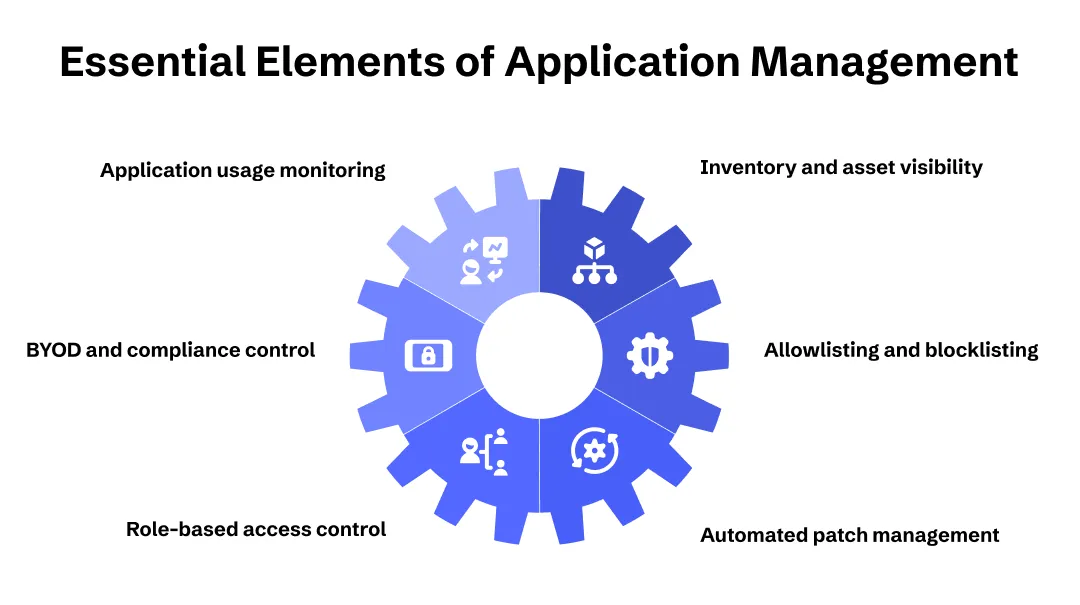
Application inventory and asset visibility are the foundation. You cannot secure what you cannot see. A complete, continuously updated inventory of every application installed across every managed device, including version numbers and installation dates, is the starting point for everything else. Without this, patch management is guesswork and policy enforcement has no baseline to work from.
Allowlisting and blocklisting define the boundaries of your software environment. Allowlisting specifies which applications are permitted to run and blocks everything else by default. Blocklisting identifies specific applications, whether known malware, unlicensed software, or policy violations, and prevents their execution. Together, they give IT a direct control layer over what can and cannot run in the environment.
Automated patch and update management is the most operationally critical component for security. The volume of patches released across operating systems and third-party applications makes manual management unsustainable at enterprise scale. Automation handles routine updates on a defined schedule while supporting prioritized deployment for critical security patches that need to be applied urgently.
Role-based access control at the application level ensures that users can access only the applications relevant to their role. This limits the blast radius of a compromise, reduces the risk of data exposure through over-permissioned accounts, and simplifies deprovisioning when roles change or employees leave.
App containerization and data separation is particularly relevant in BYOD and mixed-device environments. Containerization creates a separation between corporate applications and data on one side and personal apps on the other, ensuring corporate data cannot flow into personal applications. This makes it a practical enterprise security control in environments where full device management is not feasible.
Compliance and policy enforcement ties application management directly to enterprise security governance. Whether operating under HIPAA, ISO 27001, the GDPR, or internal security policies, organizations need to demonstrate that their application environment meets defined standards and that deviations are caught and remediated.
Application usage monitoring and anomaly detection closes the loop between deployment and ongoing security. To provide an early warning layer that complements perimeter and endpoint defenses, monitor application behavior for unusual activity, such as applications communicating with unexpected external addresses or accessing files outside their normal scope.
Implementing Application Management The Right Way
Understanding the components of application management is one thing. Operationalizing them across a distributed enterprise environment, one that typically includes Windows and macOS desktops, iOS and Android mobile devices, and remote endpoints, is another.
The challenge most IT teams face is not a lack of awareness. It is the fragmentation of tools across their operating environments: patch management runs through siloed platforms, application control relies on separate security agents and BYOD assets are often isolated in stand-alone MDM tools. Keeping these in sync requires constant manual effort, and the gaps between them are exactly where risk accumulates and productivity drops.
In such situations, it is always wise to invest in a unified endpoint management solution like ManageEngine Endpoint Central. Rather than coordinating across multiple tools, IT teams can utilize this solution to manage the entire application life cycle, from deployment and configuration to patching, access control, and removal, all from a single console and across all device types and operating systems.
For organizations that have historically managed application security through a collection of point tools, consolidating onto a unified platform reduces both operational overhead and the risk that comes from the gaps between disconnected systems.
The Enterprise Benefits Of Effective Application Management
Effective application management delivers measurable returns across security, compliance, and IT operations. Here are seven of the most significant benefits organizations see when they get it right:
1. Reduced attack surface.
Controlling what applications can run, keeping them patched, and enforcing least privilege access removes a large class of common vulnerabilities from the environment. Attackers prefer the path of least resistance, and a well-managed application environment removes many of the easiest entry points.
2. Faster response to zero-day vulnerabilities.
When a critical vulnerability is disclosed in a widely used application, organizations with automated patch management can deploy fixes across their entire fleet within hours. Organizations relying on manual processes or fragmented tooling often take days or weeks: a gap that attackers actively exploit.
3. Consistent compliance posture.
Application management creates the documentation trail that compliance audits require. Automated policy enforcement, continuous inventory updates, and patch logs provide auditors with evidence that the environment is being managed to standard, reducing the manual effort of audit preparation significantly.
4. Lower IT overhead.
Automating deployment, updates, and deprovisioning reduces the volume of manual tasks IT teams handle each day. This frees up capacity for higher-value work and reduces the risk of human error in routine operations.
5. Improved BYOD security without disrupting productivity.
App containerization and mobile application management allow organizations to enforce security policies on personal devices without controlling the personal portions of those devices. Employees retain privacy; IT retains control over corporate data and applications.
6. Improved device performance.
Controlling the application life cycle prevents endpoints from becoming bogged down by unauthorized software, bloatware, or conflicting applications. Keeping software updated also ensures performance bugs are patched, freeing up memory and processing power so devices run faster and more reliably for end users.
7. Better visibility for decision-making.
A complete application inventory with usage data gives IT and security leadership an accurate picture of the software environment. This supports decisions about license renewals, software standardization, and risk prioritization based on actual usage rather than assumptions.
Application Management Works Best When It Is Unified
Ultimately, whether you are securing point-of-sale systems in retail or booking platforms in hospitality, application management is the linchpin of your enterprise security. It transforms vulnerable endpoints into hardened assets by ensuring every piece of software is patched, compliant, and strictly controlled.
Fragmented tooling is no longer a viable long-term strategy. I've seen how much risk quietly builds up in the seams between separate patch management platforms, standalone security agents, and isolated MDM tools. Each one might work fine on its own, but the gaps between them are exactly where attackers get in, and I don't think most organizations realize how much exposure they're carrying until something breaks.
While achieving unified control across thousands of devices used to require a complex web of disjointed software, adopting a platform like ManageEngine Endpoint Central consolidates this entire life cycle into a single interface. This allows IT teams to strip away operational friction, close security gaps faster, and protect the organization's data without slowing down the business.
The organizations that treat application management as an afterthought are the ones I'd worry about most. The ones that treat it as core infrastructure are the ones built to last.

By Arjun Saiju
Product Marketer, ManageEngine Endpoint Central
Uncover executable insights, extensive research, and expert opinions in one place.
Latest Content