- 1. Ideation and Discovery: Defining the Scope
- 2. Design and User Experience (UX): Crafting the Interface
- 3. Picking the Tech Stack: Selecting Technologies
- 4. Hiring and Team Roles: Assembling the Project Team
- 5. Content Creation and Assembly (Development): Building the Website
- 6. Testing and Quality Assurance (QA): Ensuring Functionality and Performance
- 7. Deployment and Launch: Going Live
- 8. Maintenance and Post-Launch Activities: Ongoing Management
 Share It On:
 What if your website could redefine how the world sees you? Unleash your ideas with this blueprint to build a digital presence that demands attention—let’s start the journey now.
We stand at the edge of a digital frontier, where a website is more than code—it’s a bridge to your audience, your first impression, and your brand’s emissary. The intricate web development process is what shapes this critical first impression, a reality that can understandably keep even seasoned professionals on their toes.
Yet, a well-structured approach to this process is transformative, turning ambitious ideas into functional, engaging platforms that significantly drive results.
To give an overview of the impact that a website can make, we have a perfect example. Hukoomi, Qatar's government portal, needed a website improvement. Appinventiv took the helm, and their revamped process delivered: 2.6 million active users.
The website hosted over 1,900 services online, bringing nearly a million in traffic after the revamp. Such an impact is created once a clear path, from idea to impact, has been defined.
We'll show you that path.
So, buckle up and stay with us until the end of this blog.
Step-by-Step Web Development Process
Building a quality website requires a systematic execution of several key phases. Each stage is integral to the overall success of the project.
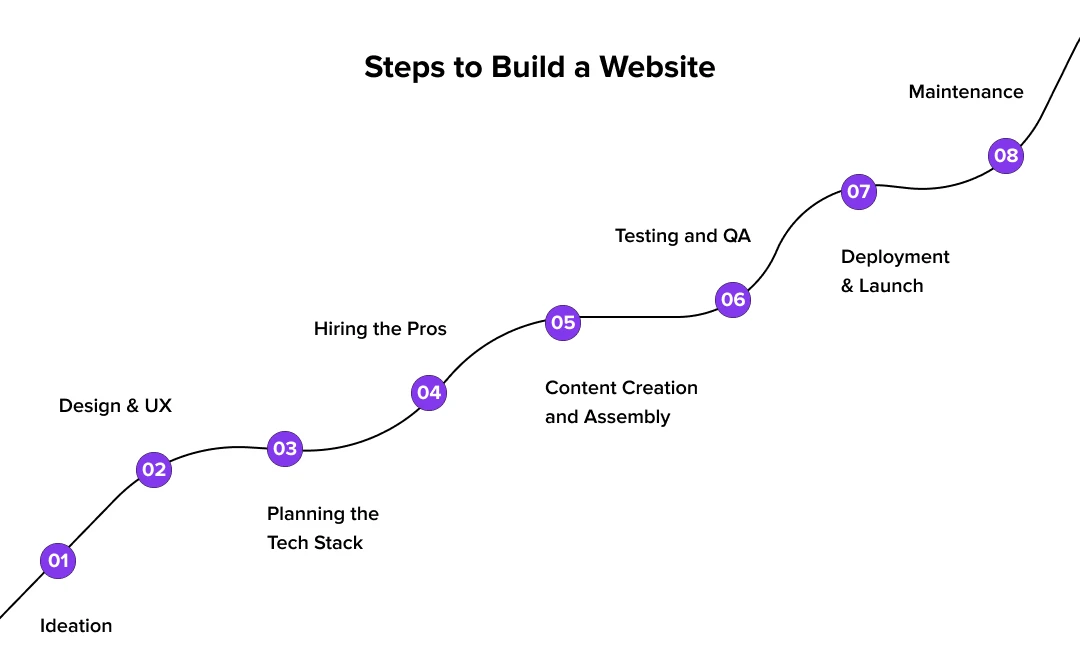
1. Ideation and Discovery: Defining the Scope
Every website project starts with an initial concept and a discovery phase. Here’s how you take care of the foundation that involves the major R&D.
a. Define Objectives: Identify the website's primary goals! (e.g., lead generation, e-commerce sales, information dissemination, brand building).
b. Target Audience Analysis: Who is the intended user? Develop user personas to understand their needs, preferences, and pain points.
c. Competitive Analysis: Evaluate competitor websites to identify strengths, weaknesses, and opportunities for differentiation.
d. Requirements Gathering: Document functional and technical requirements. What features should the website have? What performance benchmarks must it meet?
This initial website development plan forms the foundation for all subsequent web development strategies. Thorough documentation here is critical.
2. Design and User Experience (UX): Crafting the Interface
With requirements defined, the focus shifts to designing the user interface (UI) and overall user experience (UX). Make sure you’re well aligned with the evolving web design trends. That’s a critical parameter that will impact the growth of your digital presence.
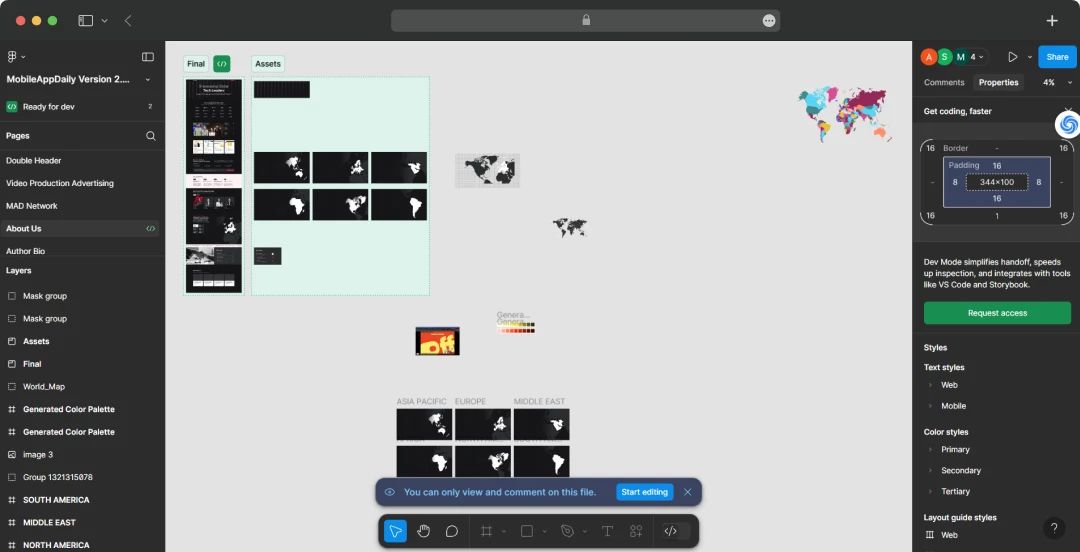
Beyond that, here’s what else you can do:
a. Sitemap Development: Create a hierarchical structure of the website’s pages and content.
b. Wireframing: Produce low-fidelity grayscale layouts of key pages, focusing on structure, content placement, and user flow without visual design elements.
c. Mockups: Develop high-fidelity visual designs that incorporate branding, color schemes, typography, and imagery. These provide a static representation of the final look.
d. Prototyping: Create interactive prototypes that allow stakeholders and test users to navigate key user journeys, providing valuable feedback before development begins.
A positive UX is paramount for user retention and conversion. These are critical website development stages.

3. Picking the Tech Stack: Selecting Technologies
The technology stack comprises the programming languages, frameworks, databases, and tools used to build and run the website. Depending on features which are powering your website, the tech stack will vary.
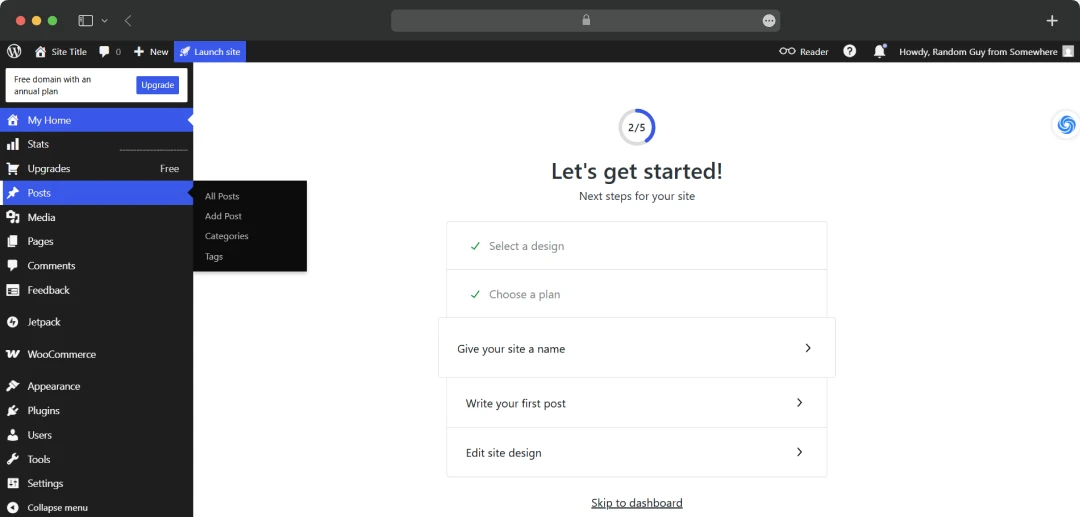
For AI-powered website features, you need to include programming languages for AI in your strategy. For gamification, JavaScript frameworks like Vue.js and React will become a major part of your tech stack.
Just like that, here are some more examples.
a. Frontend Technologies: Determine the client-side technologies (e.g., HTML5, CSS3, JavaScript, and frameworks/libraries like React, Angular, Vue.js).
b. Backend Technologies: Select server-side languages and frameworks (e.g., Node.js with Express, Python with Django/Flask, Ruby on Rails, Java with Spring, PHP with Laravel/Symfony).
c. Database Selection: Choose an appropriate database system (e.g., relational databases like PostgreSQL, MySQL; NoSQL databases like MongoDB, Cassandra).
d. Content Management System (CMS): Decide if a CMS is needed (e.g., WordPress, Drupal, headless CMS like Contentful or Strapi) based on content management requirements.
5. Hosting and Infrastructure: Plan server environment (cloud, dedicated, VPS) and necessary infrastructure components.
The choice of tech used in the web development process depends on project complexity, scalability requirements, performance needs, security considerations, budget, and available developer expertise. Consulting with expert web development companies can be invaluable here.
4. Hiring and Team Roles: Assembling the Project Team
A skilled team is essential for executing the web development project. Hiring developers, designers, or any kind of talent will incur costs. So have the right kind of budget ready which can help you afford the talent smoothly.
Some of the common roles of these individuals include!
Project Manager (PM): Oversees the project, manages timelines, resources, budget, and communication. Often employs Agile methodologies like Scrum or Kanban.
a. UX/UI Designer(s): Responsible for user research, information architecture, wireframes, mockups, and prototypes.
b. Frontend Developer(s): Implements the client-side interface and user interactions.
c. Backend Developer(s): Develops server-side logic, APIs, and database integration.
d. Full-Stack Developer(s): Proficient in both frontend and backend development.
e. QA Engineer/Software Tester: Develops and executes test plans to ensure quality and identify defects.
f. AI Experts(s): AI developers can build smarter websites and leverage AI APIs for enhanced functions.
g. DevOps Engineer (for larger projects): Manages infrastructure and deployment pipelines (CI/CD) and ensures scalability and reliability.
A clear definition of the role and effective communication channels are vital. For specialized needs or resource augmentation, web development outsourcing is a common strategy. When you decide to hire web developers, look for proven experience relevant to your project's scope.
5. Content Creation and Assembly (Development): Building the Website
This phase involves the actual coding and construction of the website based on the approved designs and specifications.
a. Frontend Development: You need to start by translating UI/UX designs into functional code using HTML, CSS, and JavaScript. Ensuring responsiveness across various devices and screen sizes is critical.
b. Backend Development: Here, you focus on building the server-side application logic, creating APIs for frontend-backend communication, and integrating with databases and third-party services.
c. CMS Implementation/Configuration: When a CMS is part of the plan, it undergoes installation, configuration, and customization. Subsequently, themes and plugins are developed or integrated to add desired functionalities and visual elements.
d. Content Integration: The stage involves populating the website with text, images, videos, and other media assets according to the content strategy and sitemap.
This is often the most resource-intensive part of the website creation process. Adherence to coding standards and regular code reviews is a good practice.
6. Testing and Quality Assurance (QA): Ensuring Functionality and Performance
Rigorous testing is performed to identify and rectify defects before deployment. Deploy end-to-end testing to ensure that you’re launching the product in its best shape. Here’s what else can be done!
a. Functional Testing: Verifying that all features and functionalities operate as specified in the requirements.
b. Usability Testing: Assessing the ease of use and intuitiveness of the website with actual users.
c. Performance Testing: Evaluating website speed, load times, scalability under stress, and resource utilization. Tools like Lighthouse or WebPageTest are often used.
d. Compatibility Testing: Ensuring consistent appearance and functionality across different web browsers (Chrome, Firefox, Safari, Edge), operating systems, and devices.
e. Security Testing: Conducting vulnerability assessments and penetration testing (if applicable) to identify and mitigate security risks (e.g., XSS, SQL injection).
f. Accessibility Testing: Verifying compliance with accessibility standards (e.g., WCAG, GDPR, HIPAA, etc.) to ensure the site is usable by people with disabilities, offers privacy control, and, if applicable, aligns with the guidelines of the healthcare industry.
Comprehensive QA is one of the most crucial website development steps to deliver a high-quality product.
7. Deployment and Launch: Going Live
This is the process of releasing the website to the public. In your deployment and launch strategy, a few things that will be included are:
a. Pre-Deployment Checklist: Final review of all components, configurations, and data.
b. Server Environment Configuration: Setting up the production hosting environment.
c. Database Migration: Transferring data to the production database, if necessary.
d. Code Deployment: Moving the codebase to the live server. CI/CD (Continuous Integration/Continuous Deployment) pipelines automate this.
e. Domain Name System (DNS) Configuration: Pointing the domain name to the new server.
f. Post-Launch Monitoring: Closely track website performance, server logs, and analytics immediately after launch to address any unforeseen issues. quickly
8. Maintenance and Post-Launch Activities: Ongoing Management
Launching the website is not the final step; ongoing maintenance is essential for its long-term success. There are some extra steps you will have to include in your strategy. For instance:
a. Software Updates: Regularly updating the CMS, plugins, libraries, and server software to patch security vulnerabilities and improve performance.
b. Performance Monitoring: Continuously monitoring website speed, uptime, and user engagement using predictive analytics tools like Google Analytics and application performance monitoring (APM) systems.
c. Regular Backups: Implementing and verifying automated backup procedures for website files and databases.
d. Content Updates and Management: Keeping website content fresh, accurate, and relevant.
e. User Feedback and Iteration: Collecting user feedback through various channels and using it to inform future improvements and feature enhancements.
f. Security Monitoring: Proactively monitor and address security threats.
As the digital landscape evolves; your website must too. The integration of AI in web development is increasingly offering tools for predictive maintenance and personalized user experiences.
Best Practices for Web Development Processes
Adhering to best practices can significantly improve the quality and efficiency of the development of website projects.
1. Mobile-First Design: Prioritize design and development for mobile devices first, then adapt for larger screens, given the prevalence of mobile Browse.
2. Web Accessibility (A11y): Design and build websites that are usable by people of all abilities, adhering to standards like the Web Content Accessibility Guidelines (WCAG).
3. Search Engine Optimization (SEO): Implement SEO best practices from the outset, including semantic HTML, optimized content, proper URL structures, fast loading speeds, mobile-friendliness, and leveraging AI in SEO. This directly ties into the importance of web development for online visibility.
4. Agile Development Methodology: Employ iterative development cycles (sprints), allowing for flexibility, regular feedback, and continuous improvement.
5. Version Control Systems (e.g., Git): Use Git for source code management to track changes, facilitate collaboration, and manage different versions of the codebase.
6. Scalable Architecture: Design the website architecture to handle growth in traffic, data, and functionality.
7. Security by Design: Integrate security considerations throughout the entire development lifecycle, not just as an afterthought.
Website Development Challenges and Tips
Web development projects can encounter various challenges. Awareness and proactive strategies are key. Here are some tips that can help.
| Challenge | Tip / Solution |
|---|---|
| Scope Creep (Uncontrolled Changes) | Establish a clear initial scope. Implement a formal change request process. Prioritize features using MoSCoW (Must have, Should have, Could have, Won't have). |
| Budget Overruns | Conduct a thorough upfront analysis and estimation. Track expenses diligently. Build in a contingency fund. |
| Missed Deadlines | Develop realistic timelines using project management techniques like PERT or Critical Path Method. Monitor progress regularly and address delays promptly. |
| Communication Gaps | Schedule regular status meetings (e.g., daily stand-ups in Agile). Utilize collaborative project management tools. Ensure clear documentation. |
| Technical Debt Accumulation | Prioritize writing clean, maintainable code. Allocate time for refactoring. Address known issues rather than applying quick fixes. |
| Evolving Technologies & Trends | Foster a culture of continuous learning. Evaluate new technologies for suitability before adoption. Focus on stable, well-supported solutions. |
| Security Vulnerabilities | Conduct regular security audits and penetration testing. Implement secure coding practices (OWASP guidelines). Keep all software updated. |
| Suboptimal User Adoption/Engagement | Conduct thorough user research and usability testing. Gather post-launch analytics and user feedback to iterate and improve the UX. |

Case Studies to Inspire Your Web Development Processes
Successful websites are products of well-executed development processes. Consider them while planning your strategy for some guidance from the real world.
Here are a couple of examples:

Netflix:
- Employs a sophisticated web development process focused on continuous improvement.
- Utilizes extensive A/B testing for UI/UX enhancements.
- Leverages complex algorithms for personalized user recommendations.
- Built on a microservices architecture, enabling scalability and independent updates.
- Their iterative approach is a key element of an effective web development strategy.
Amazon:
- Demonstrates a mature website development process refined over decades.
- Uses a continuous deployment model for rapid updates and feature releases.
- Prioritizes performance optimization, where even milliseconds impact user experience and conversions.
- Relies on a robust backend infrastructure to handle massive scale and traffic.
- Shows a relentless focus on customer experience enhancements driven by data.
These organizations understand that web development is a continuous cycle of innovation and refinement. Therefore, they never stop improving the digital experience they offer. That’s one of the massive secrets of the growth they have hacked in the market.
Wrapping Up
The web development process is a multifaceted endeavor requiring careful planning, skilled execution, and ongoing attention. By following structured website development stages—from ideation and design through development, rigorous testing, and post-launch maintenance—businesses can create powerful digital platforms.
A commitment to best practices, clear communication, and adaptability are essential for navigating the complexities of website creation and ensuring the final product meets business objectives and user needs effectively. This disciplined approach transforms a website from a mere online brochure into a dynamic tool for growth.
Frequently Asked Questions
What are the 7 stages of web development?
Web development typically unfolds in seven key stages:
1. Planning: Defining goals and scope.
2. Design: Creating the look, feel, and user experience.
3. Development: Writing the actual code (front and back end).
4. Content: Adding text, images, and media.
5. Testing: Ensuring everything works correctly.
6. Launch: Deploying the site live.
7. Maintenance: Ongoing updates and support.What are the three types of web development?
The three main types are:
Frontend Development: Building what users see and interact with (the visual interface).
Backend Development: Creating the server-side logic, databases, and APIs that power the site from behind the scenes.
Full-Stack Development: Combining both frontend and backend skills to build complete web applications.What is the backend in web development?
The backend is the engine room of a website. It’s the server-side technology—databases, server logic, and application programming interfaces (APIs)—that stores data, processes information, and makes the user-facing frontend work. Users don't see it, but it powers everything.
What does CSS mean in web development?
CSS stands for Cascading Style Sheets. Think of it as the "style guide" for a website. It tells the web browser how to display HTML elements, control layout, colors, fonts, and overall visual presentation, and make the site look good.

Uncover executable insights, extensive research, and expert opinions in one place.
Related Content