Share It On:
 Master the core languages and frameworks that power modern websites, from basic markup to interactive user experiences.
If you're an entrepreneur considering building a digital product, you need to understand web development technologies. Not because you'll necessarily code it yourself, but because this knowledge helps you make better decisions, communicate effectively with developers, and avoid costly mistakes.
Whether you're planning to hire a team, work with web development agencies, or eventually build something yourself, understanding the technical space gives you a significant advantage. This guide breaks down what you need to know about modern web development technologies without drowning you in jargon.
What You're Really Building When You Build a Website
Web development is just the technical side of creating products that live on the internet. When you look at a website or app, there's a lot happening that you don't see. Understanding the different layers helps you figure out what kind of help you need.
There's the frontend web development part (everything your users interact with). The buttons they click, the forms they fill out, and how things look on their screen. If your product looks janky or doesn't work on mobile, that's a frontend problem.
Then there's the backend. This is where the real work happens. Storing user data, processing payments, and all the business logic that makes your app actually do something useful. Your users never see your backend, but if it breaks, your whole product breaks.
Some developers do both (they're called full-stack developers), and honestly, for early-stage startups, finding a solid full-stack person can be a smart move. They're more expensive than specialists, but you're only managing one person instead of coordinating between frontend and backend teams.
The Core Technologies: HTML, CSS, and JavaScript for Web Development
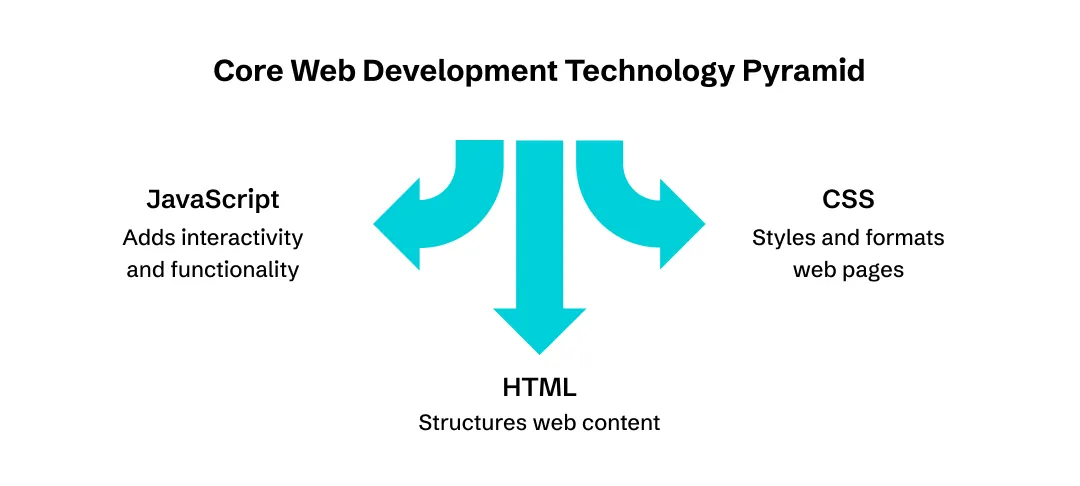
Every single website or app you've ever used is built on three technologies. Understanding what each one does helps you know what's actually possible and what's just smoke and mirrors.
HTML: The Building Blocks
HTML is the skeleton of a webpage. It defines what exists (a heading here, a paragraph there, an image, a form, etc.) Many entrepreneurs also wonder whether html required to develop mobile app projects, especially when exploring hybrid and cross-platform development approaches. It's not concerned with how things look, just what's there.
When developers talk about "semantic HTML" or "clean markup," they're basically saying the structure makes sense. Good HTML helps with accessibility (so people with disabilities can use your site) and SEO (so Google can understand what your pages are about). Both matter for business.
CSS: Making Things Not Look Like Garbage
CSS is what makes websites actually look good. Colors, fonts, layouts, spacing, animations—all of that is CSS. This is where design meets code.
Here's where Responsive Web Design comes in. Your site needs to work on phones, tablets, and computers. That's not optional anymore. More than half of web traffic comes from mobile devices, and if your site looks broken on someone's iPhone, they’ll leave. CSS is what makes responsive design happen.
Modern CSS is pretty powerful. Developers can build complex layouts, create smooth animations, and make interfaces that feel polished without needing a bunch of extra code. When you're evaluating developers, their CSS skills often show the difference between "this looks fine" and "wow, this is actually professional."
JavaScript: Where the Magic Happens
JavaScript for Web Development is what makes your site interactive. Anything that updates without reloading the page, validates what someone types into a form, or creates those smooth animations that make things feel modern, that's JavaScript.
JavaScript has gotten massive over the past decade. It used to just add little interactions, but now entire applications run on JavaScript. It works on both the frontend (in the browser) and backend (on your servers through something called Node.js), which is pretty unusual for a programming language.
For your business, JavaScript capabilities determine what kind of experiences you can build. Want real-time chat? JavaScript. Interactive dashboards? JavaScript. Basically, anything that feels dynamic and app-like needs solid JavaScript work.
The downside is that JavaScript is more complex than HTML or CSS. It's real programming, which means more can go wrong. Buggy JavaScript creates security vulnerabilities and performance problems. This is where having experienced developers really matters.
Bonus Read: Best Mobile App Development Languages In 2026
Frontend Frameworks: What You See
Once you start talking to developers, you'll hear about Web Development Frameworks constantly. React, Vue, Angular—these names come up in every conversation.
Frameworks are basically toolkits that make development faster and more organized. Instead of building everything from scratch, developers use frameworks that solve common problems and provide structure.
React
React is the biggest one right now. Facebook built it (well, Meta now), and it's everywhere. The ecosystem is huge, which means tons of developers know it, tons of resources exist, and if you hire someone who knows React, they can probably hit the ground running. For most business applications, React is a safe bet.
Vue.js
This is another popular option. It's got a reputation for being easier to learn than React, and the documentation is really good. It's super popular in Asia and growing everywhere else. Finding Vue developers might be slightly harder than React, but they definitely exist.
Angular
Developed by Google, Angular is more opinionated and comprehensive, which means it makes more decisions for you. You see Angular a lot in enterprise environments and larger companies. It's got a steeper learning curve, but if you're building something complex, that structure can be valuable.
Which one is "best"? Depends on your situation. React's usually the safest choice because of the talent pool. But honestly, any modern framework works fine if your developers know what they're doing. What matters more is that they're using something structured rather than just hacking together spaghetti code.
These frameworks are what make Modern Web Development possible and are driving many of today's most influential web development trends. They enable single-page applications (SPAs) that feel smooth and app-like instead of clunky and slow. Your users won't know or care what framework you used, but they'll definitely notice if your site feels fast and modern or sluggish and dated.
Backend Technologies: Where Your Business Logic Lives
The backend is where the serious business happens. This is where you're processing payments, storing customer data, handling authentication, and running your core business logic.
Different languages power different backends, and each has tradeoffs.
PHP
PHP still runs a massive chunk of the internet. WordPress is PHP, and that's like 40% of all websites. PHP developers are everywhere and generally affordable. If you're building on WordPress or similar platforms, PHP is practical. It's not sexy, but it works.
Python
This language has exploded in popularity (mainly because of its application in AI and ML). It's readable, versatile, and the ecosystem is incredible. Beyond web development (using Django or Flask), Python dominates in data science and machine learning. If there's any chance you'll want AI in web development or complex data analysis down the road, Python gives you options.
JavaScript via Node.js
JavaScript through Node.js lets you use the same language on the frontend and backend. This versatility is one reason why a javascript framework for mobile app development remains a popular choice among startups and enterprises alike. This can simplify hiring—you need JavaScript developers, period. Node.js is fast for certain types of applications, especially real-time stuff. Lots of startups go this route.
Java
Java is the enterprise choice. Banks, huge e-commerce sites, and banking platforms, Java is everywhere in that world. It's robust, it scales well, and there are decades of tools and expertise.
Also Read: Top Programming Languages for Artificial Intelligence
Databases Matter More Than You Think
Your database is where all your important data lives. User accounts, transactions, content, analytics—everything gets stored in a database.
There are two main types:
SQL databases (like MySQL or PostgreSQL) organize data in structured tables with clear relationships. They're great for most business applications—anything with transactions, user accounts, inventory, that kind of thing. The structure helps maintain data integrity.
NoSQL databases (like MongoDB) are more flexible. They handle unstructured data better and scale horizontally more easily. They're good for real-time applications, content management, or situations where your data structure keeps evolving.
Most applications use SQL. Unless you have specific reasons to use NoSQL, stick with SQL databases. They're better understood, there's more expertise available, and they're proven for business applications.
Database decisions stick with you. Changing databases later is expensive and risky. When reviewing technical proposals from web development agencies or developers, pay attention to database choices and make sure they match your actual needs.
API Integration in Web Development: Connecting Everything
API development and Integration in Web Development is how different systems talk to each other. APIs (Application Programming Interfaces) are basically contracts that define how software communicates.
For your business, APIs mean two things:
First, you can use other people's solutions instead of building everything yourself. Need to accept payments? Use Stripe's API. Want to send transactional emails? Mailgun or SendGrid have APIs. Social login? Google, Facebook, and Apple all provide APIs. This is way faster and cheaper than building these features from scratch.
Second, if you're building something that others might integrate with (or if you need mobile apps alongside your web app), you'll need your own APIs. Well-designed APIs make your product more flexible and valuable.
Modern web development is API-heavy. Your frontend probably talks to your backend exclusively through APIs. You're probably integrating multiple third-party services. Everything connects through APIs.
When evaluating developers, ask about their API experience. Can they integrate with third-party services cleanly? Do they understand RESTful design or GraphQL? API quality affects reliability and future flexibility, so this matters.
The Tools and Infrastructure Behind the Thing
Figuring out what tools developers work with gives you an idea of whether or not the team actually knows what they're doing.
- Version control (usually Git on GitHub or GitLab) is necessary. It keeps a record of every tweak to your code, allowing easy development without messing up servers. Any legit team uses it. If they are skipping, look elsewhere.
- Development environments separate development, staging, and production. Developers work in development environments, changes get tested in staging environments that mirror production, and only approved changes reach production. This prevents untested code from breaking your live application.
- CI/CD pipelines take care of the boring bit. It automatically runs the tests and, if everything is fine, deploys with the click of a button or even just automatically. It fast-tracks development and reduces mistakes.
- Monitoring and Logging keep you in the loop about production. You gotta know when bugs pop up, how the app is faring, and what users are actually doing. Smart teams hook that up from the get-go.
Should You Learn to Code?
Think about picking it up - if you're bootstrapping, need to build an MVP yourself, and have the time to go in and work on it. Basic HTML, CSS, and JavaScript aren't going to make you a pro dev, but they will let you prototype ideas or build simple products without having to hire anyone too soon.
Skip it if you've got the money to spend on hiring in. Your time is better spent on sales and business development, or if your product is so complex that self-taught skills just aren't going to do the job. A bunch of super-successful tech founders don't actually code. At a high level, understanding tech is more important than doing all the work yourself.
Making Smart Decisions with This Knowledge
Understanding Web Development Technologies helps you. You don't need deep expertise. But basic literacy (knowing HTML, CSS, and JavaScript), understanding frontend versus backend, and recognizing what APIs enable, changes everything.
The fundamentals aren't changing anytime soon. HTML, CSS, and JavaScript will still be foundational years from now. Frameworks and tools evolve, but if you understand the basics, you can adapt to whatever comes next.
So take these concepts, ask better questions when talking to developers, and make more informed decisions about building your product. The technical side becomes way less intimidating when you understand the fundamentals.
Frequently Asked Questions
Do I need to learn coding to build a successful tech startup?
No. Most successful tech founders don't code. What matters is understanding technology well enough to hire the right people, evaluate proposals, and make smart decisions. Technical literacy beats coding skills for entrepreneurs every time.
How much should I budget for web development?
Depends entirely on complexity:
- Simple landing pages run $5,000-$10,000
- Basic web apps start around $25,000-$50,000
- Complex platforms easily hit $100,000+
Anyone promising a full product for $5,000 is either cutting corners or misunderstanding your requirements.
Should I hire freelancers or work with a web development agency?
Freelancers cost less but require more management and carry risk if they disappear. Agencies provide accountability and full teams but charge premium rates. For MVPs, experienced freelancers work. For serious products, web development agencies reduce risk considerably.
What's the difference between a website and a web application?
Websites are mostly informational. You read content, maybe fill out a contact form. Web applications can interact (process transactions, manage data, provide tools). Example: company homepage vs Gmail. Applications require significantly more backend development and cost more.
How long does it actually take to build a web application?
Simple MVPs take 2-3 months minimum. More complex applications run 4-6 months or longer. Anyone promising a full application in weeks is either building something extremely simple or overpromising. Factor in testing, revisions, and deployment. Pro tip: always add buffer time.

Uncover executable insights, extensive research, and expert opinions in one place.
Related Content