The latest beta update delivers enhanced audio options, improved performance speeds, and polished visual design elements for developers.
Apple released the sixth developer beta of iOS 26 on Tuesday, introducing an unexpected collection of new ringtones, significantly faster app launch animations, and continued refinements to the controversial Liquid Glass design ahead of the operating system's September public launch.
The update, which also includes corresponding releases for iPadOS, watchOS, macOS, and tvOS, signals that Apple is entering the final stages of development for its most visually ambitious software update in years.
New Ringtones Strike a Chord
In a surprise addition that's already generating buzz on social media, iOS 26 beta 6 introduces seven new ringtone options, all variations of the default "Reflection" tune that iPhone users know well. The new options include Buoyant, Dreamer, Pond, Pop, Reflected, and Surge, along with an entirely new ringtone called "Little Bird."
Early adopters are particularly enthusiastic about the "Dreamer" ringtone, which has been described on social media as going "hard," being "crazy good," and "such a bop.” The positive reception might even encourage some users to take their phones out of silent mode for a change.
The ringtone previously labeled as "Alt 1" in earlier betas has now been properly named "Reflected," joining five brand new alternate takes on the default sound that offer users more personalization options without straying too far from the familiar iPhone aesthetic.
Camera App Controversy Resolved
Apple has reversed course on a controversial Camera app change that had frustrated users in previous betas. The company had initially altered how the Camera mode switcher responds to touch, reversing the scroll direction in a way that broke users' muscle memory and contradicted the design paradigm used in all other native Apple apps.
In beta 5, Apple had introduced a Settings toggle allowing users to switch back to "Classic Mode," which would restore the original swipe behavior. However, in what appears to be a recognition that the change wasn't worth the backlash, beta 6 removes the Settings toggle entirely and permanently reverts the scroll direction to its original state.
Performance Improvements and Visual Polish
Users testing beta 6 report that the update feels notably more stable and faster than previous releases, with particular improvements in app launch speeds. The new beta introduces refined open and close animations for launching apps, creating a more fluid experience that early testers describe as significantly snappier.
The performance improvements extend throughout the system, with users on social media reporting that this beta feels "much faster" than prior releases, suggesting Apple is nearing its optimization targets for the public launch.
Liquid Glass Design Evolution
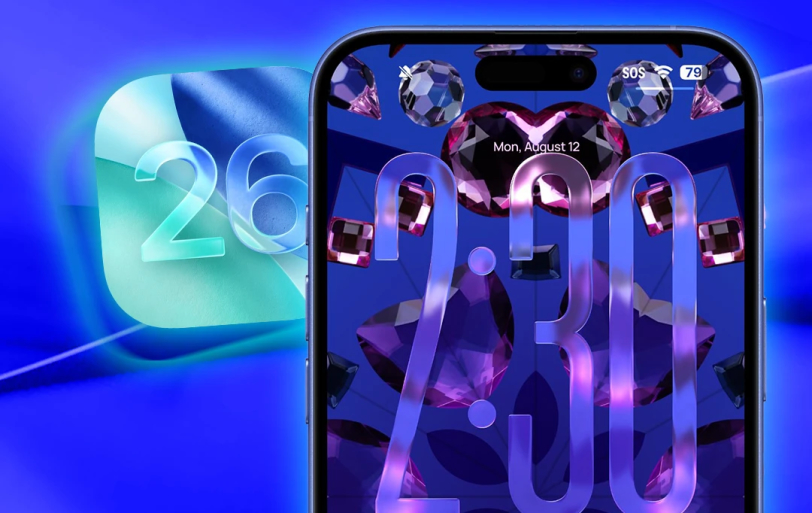
Apple continues to refine its ambitious Liquid Glass design language, the biggest visual overhaul since iOS 7. The latest beta brings subtle but meaningful changes to various interface elements, particularly the Lock Screen.
The Lock Screen clock has been updated with additional transparency, allowing more of the background to peek through while maintaining a 3D, floating appearance. The clock now features more of the translucent aesthetic that defines Liquid Glass, though this can make it somewhat harder to see on certain darker backgrounds.
The beta also introduces more color dispersion effects when moving between an app's tabs using the clear, magnifying glass-like selector. Lock Screen widgets and toggles have received Liquid Glass effects as well, creating a more cohesive visual experience across the operating system.
New Onboarding Experience
After updating to beta 6, users encounter a new startup and onboarding experience designed to introduce the Liquid Glass design and other iOS 26 features. This walkthrough showcases the dark and clear icons, redesigned interfaces in various apps, and helps users understand the new visual language Apple is implementing across its ecosystem.
The final version of iOS 26 is expected to launch in September alongside the anticipated iPhone 17 lineup, bringing these features to compatible devices, including iPhone 11 and newer models.