Share It On:
Listen to This Article
Have you seen the buzz around apps like Janitor AI chatbot app and thought, “I have a great idea for something like that”? AI companions, such as Janitor AI, are the future of interactive entertainment. But that initial spark of inspiration is often followed by a more practical question: What does it actually cost to build one?
The price tag for a custom AI app can feel like a huge, mysterious number. Don’t worry, we'll help you provide a phased cost analysis and explore the key factors that can raise or lower your cost to build an app like Janitor AI. We'll even examine how these apps generate revenue. By the end, you'll have a clear and realistic financial roadmap for turning your vision into a reality.
Janitor AI App Development Cost Breakdown
The generative AI market is projected to reach $66.89bn by the end of 2026. This whopping market size clearly indicates huge potential and profits if you decide to create your own generative AI. So, here’s a crisp AI app development cost breakdown that gives you a roadmap of your investment from start to finish.
1. Developer Salaries: Your Biggest Expense
Who you hire and where they live will have the biggest impact on your budget, which is why many businesses prefer working with top ai development companies that offer the right balance of expertise and cost-efficiency. The talent is global, but the rates vary wildly. Based on what we've seen recently, here's a rough guide for senior app developers per hour, although the cost of an AI-specialised app developer might vary slightly from this. That’s because AI app development requires specialized skills in machine learning, data science, and AI frameworks. Let’s have a look:
| Region | Hourly Salaries (Range) | Hourly Salaries (In USD) | Cost Paid to Companies |
|---|---|---|---|
| USA | $31.73/hr – $48.08/hr | $31.73/hr – $48.08/hr | $59.87/hr – $79.82/hr |
| UK | £12.98/hr – £22.12/hr | $16.35/hr – $27.87/hr | $40/hr – $45/hr |
| India | ₹1000/hr – ₹1200/hr | $12/hr – $14.40/hr | $36/hr – $43.20/hr |
| Australia | A$32.69/hr – A$48.08/hr | $21.25/hr – $31.25/hr | $39.38/hr – $52.50/hr |

2. App Complexity
A basic app with one or two core features will cost far less than a complex system with custom features, multiple AI integrations, and advanced moderation. More features simply mean more development hours.
| App’s Complexity | Number of Hours | Overall Costs (USD) |
|---|---|---|
| Low | 400 | $23,948 – $31,928 |
| Medium | 800 | $47,896 – $63,856 |
| High | 1200 | $71,844 – $95,784 |
3. Must-Have Features of a Janitor AI-Style App
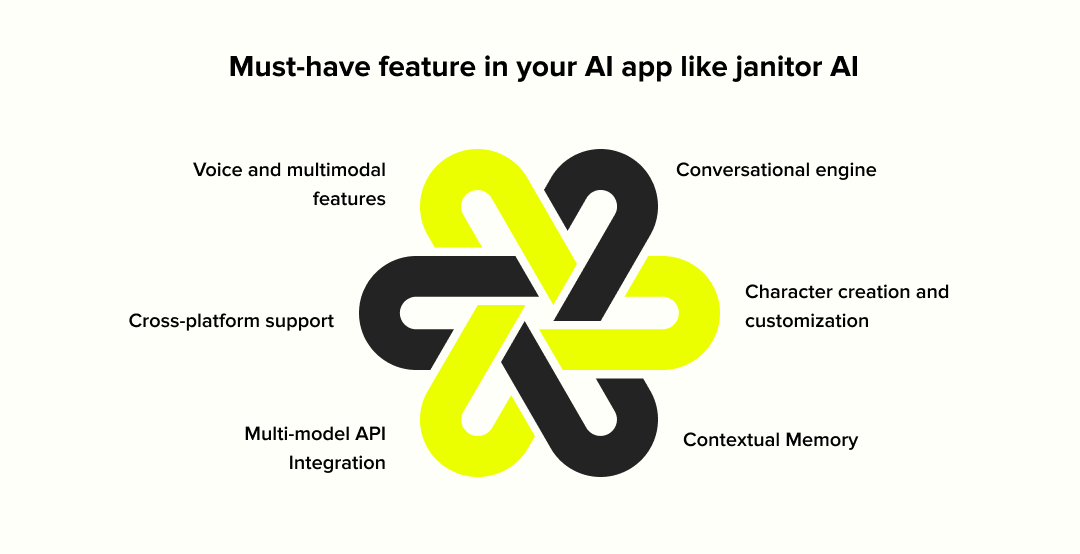
Now, let’s get straight to what standout features can make your dream app like Janitor AI sweep the market.
1. The Essentials (Core Functionality)
- The Conversational Engine: For an app like this, you need an AI that truly understands conversation—typos, slang, sarcasm, and all. This is what makes the chat feel real and not robotic. This wil take 80 - 150 hours. This timeline includes advanced NLP implementation, context understanding, sentiment analysis, and conversation flow management.
- Character Creation and Customization: Your AI needs to be able to define everything from scratch: personality quirks, detailed backstories, and even upload custom avatars. This is the creative core of the app. This can take about 140 - 220 hours. The cost includes user interface for character building, personality configuration systems, avatar upload/management, and backstory frameworks.
- Contextual Memory: Your AI chatbot recalls conversations from yesterday, last week, or even five minutes ago. It’s what makes a conversation feel like a continuous story, not a series of one-off questions, driving user engagement. This can take about 120 - 250 hours for conversation history storage, memory retrieval systems, context maintenance algorithms, and user session management.
2. The Upgrades (Advanced, Cost-Driving Features)
- Multi-Model API Integration: Think of this as giving your app the ability to swap between different AI "brains" (like GPT-4, Claude, Llama, etc.). Letting users choose their preferred AI model offers incredible flexibility. But it adds a serious layer of technical work and API management costs. This can take about 150 - 250 hours for API gateway development, model switching infrastructure, cost management systems, and performance optimization across different AI providers.
- Cross-Platform Support: Do you want your app to work seamlessly on a web browser, an iPhone, and an Android device? That’s cross-platform support we talked about earlier in this blog, remember? It's essential for reaching the widest audience, but it means designing, building, and maintaining separate versions of your app, which directly impacts the budget. This can take about 400 - 600 hours for separate development for iOS, Android, and web platforms, responsive design implementation, and cross-platform synchronization.
- Voice & Multimodal Features: This is about moving beyond just text. It means letting users talk to their AI with their voice or even have the AI recognize and react to images. It makes the entire experience far more immersive. This can take about 200 - 320 hours for speech-to-text integration, text-to-speech implementation, image recognition capabilities, and audio processing systems.
Note: Based on the estimates above, the total development time to build an application with all of these features would range from 1,090 to 1,790 hours.
4. UI/UX Design
A great app has to feel good to use. This isn't just about pretty colors; it's about creating an intuitive, engaging UI/UX design experience that keeps users coming back. Skimping here would be a mistake, and most importantly, good design isn't low, but bad design is a guaranteed way to lose users.
| UI/UX Complexity | Hours Required | Overall Costs | What’s Covered |
|---|---|---|---|
| Basic (Standard UI) | 50–100 | $1,250 – $4,000 | Basic layouts, standard templates, limited customization, simple navigation, minimal animations. |
| Moderate (Custom UI) | 100 – 200 | $4,000 – $19,800 | Custom branding, moderate navigation complexity, some animations, and visually appealing templates. |
| High (Advanced UI/UX) | 200 – 300 | $19,800 – $90,000 | Advanced custom designs, multi-layered navigation, high-quality animations, transitions, and gamification. |
5. API Costs
You're not building the AI models from scratch; you're "renting" access to them through AI APIs. This is an ongoing operational cost.
- OpenAI (for the chat): You pay per "token" (pieces of words). The more your users chat, the more you pay.
- Stripe: They take a percentage of every transaction and a small fixed fee.
- Other Third-Party Integrations: This is where you can add extra functionality. Want users to sign in with their Google account? That's an API. Want to let them upload custom avatars to cloud storage? That's another API. Each of these services has its own pricing, often a mix of free tiers and pay-as-you-go plans, and they are crucial for creating a modern, feature-rich experience.
To give you an example, here’s how much the Stripe API costs!
| Feature | Pricing | Notes |
|---|---|---|
| Standard Plan | 2.9% + $0.30 per successful charge (domestic cards) | Pay-as-you-go, no hidden fees. |
| Instant Bank Payments | 2.6% + $0.30 per transaction | Supports faster bank payments. |
| ACH Direct Debit | 0.8% per transaction (capped at $5) | Used for recurring charges or large payments. |
| International Payments | Starting at $0.80 for iDEAL | Supports global payment methods. |
| 3D Secure Authentication | $0.03 per secure authentication attempt | For added security. |
| Buy Now, Pay Later (Klarna) | Starting at 5.99% + $0.30 per transaction | Flexible installment options. |
| Card Account Updater | $0.25 per account update | Automatically update expired or renewed card details. |
| Adaptive Pricing | Conversion fees start at 2% | Supports local currencies globally. |
| Post-Payment Invoices | 0.4% per transaction total (capped at $2 per invoice) | Simplifies invoicing processes. |
| Sigma (Business Analytics) | Starting at $10/month + $0.02 per charge | Includes pre-built queries and custom reporting. |
| Radar (Fraud Management) | $0.05 per screened transaction | Advanced fraud detection tools. |
| Identity Verification | $1.50 per ID document verification | Includes biometric ID verification and database checks. |
| Instant Bank Account Verifications | $1.50 per successful verification | Free for micro-deposit verifications. |
| Billing (Recurring Revenue) | Starting at $620/month (or 0.7% of billing volume for pay-as-you-go) | Supports recurring billing models. |
| Revenue Recognition | 0.25% of transaction volume | Simplifies revenue tracking and compliance. |
| Data Pipeline | $0.03 per transaction | Sends data to your warehouse for analytics. |
| Disputes | $15 per dispute | Charged for handling chargebacks on card transactions. |
| Tax Automation | 0.5% per transaction (pay-as-you-go) or $90/month (yearly contract) | For global tax calculation and filing support. |
6. App Maintenance
An app is never "done." You need to budget for ongoing maintenance to fix bugs, release security patches, and keep it running smoothly. A good rule of thumb we recommend using is to budget about 15-20% of your initial development cost, per year, for maintenance.
Now, let’s just assume that the initial application development cost is $100,000. And it’s given at 15-20% of the total. So, the app maintenance cost should stay somewhere between $15,000 $20,000 per annum. This will ensure that your app runs smoothly and gives a seamless user experience. Here’s a slight breakdown of what’s included in the cost of maintaining an app.
| Maintenance Category | Percentage Cost | Total Cost |
|---|---|---|
| Bug Fixes | 15–25% of the maintenance cost | $2,812.50–$4,000 |
| OS Updates and Upgrades | 25–35% of the maintenance cost | $4,687.50–$5,600 |
| Server and Hosting Costs | 20–30% of the maintenance cost | $3,750–$4,800 |
| Security and Compliance | 10–15% of the maintenance cost | $1,875–$2,400 |
| Performance Monitoring and Analytics | 5–10% of the maintenance cost | $937.50–$1,600 |
| Third-party API Maintenance | 5–10% of the maintenance cost | $937.50–$1,600 |
| Total | 15–20% of $100,000 | $15,000–$20,000 |
7. Targeted Platforms
Do you want an app for just iPhones (Native iOS), just Androids (Native Android), or both?
1. Native
Building separately for each platform gives the best performance, but it is the most expensive route.
Android - Android apps use different technologies. These include Java, Kotlin, Python (through app development frameworks), C++, etc. Also, each of these technologies’ tentative cost can be diverse and can fall anywhere between $20,000 to $150,000 based on the project's complexity and what platform it’s being developed on.
iOS - For iOS apps, making an app can cost anywhere from $10,000 to $100,000. This cost includes using technologies such as Swift, Objective-C, Xcode, and more. Now, iOS apps are considered cheaper to build compared to Android apps because of the limited number of devices.

2. Cross-Platform
Apps that are designed to target multiple platforms are called cross-platform apps. Tools like React Native help you build that. While there are tons of cross-platform development frameworks present to speed up development and reduce overall costs, overall investment can still be dynamic.
These dynamic investments are based on the number of targeted platforms, features required in apps, etc. The cost can fall anywhere between $10,000 to $40,000 for a project that is 300 to 800 hours long, at a cost of $30 to $50 per hour.
3. Hybrid Apps
These apps use HTML/CSS/JS-based webview to offer their features. These are simpler apps that are designed to run on the internet. The major difference between hybrid apps and native apps is their ability to deliver quality.
As hybrid apps are supposed to be lighter, they offer fewer features and lower quality standards. A simple hybrid can cost as little as $10,000, and an app designed to offer a greater number of complex features can cost as much as $150,000.
8. Hosting, Security, and Notifications
These are the essential, non-negotiable operational costs.
Hosting: You can start with something affordable like HostGator or GoDaddy, but a powerful app will eventually need the scalability of a service like AWS, which is more expensive. To get a tentative estimate, we used the official AWS calculator. Hostgator begins hosting your app at $141.9. Whereas, GoDaddy's high-performance resources cost begins at $6.99/ month.
Security: You'll need an SSL certificate. You can find them from places like Comodo or SSL.com, with prices ranging from affordable to premium. For instance, the cost for SSL certification begins at $36.75/yr .
Push Notifications: Services like Brevo offer free tiers to start, but you'll need to move to a paid plan (starting around $8.08/ month) as your user base grows.
Other Costs: Don't forget about a Content Delivery Network (CDN) for speed, customer service tools, and the various development tools your team will need. Amazon CloudFront CDN’s Data transfer out costs are free for the first 1TB globally, with subsequent charges varying regionally from $0.085 per GB (US, Canada, Europe) to $0.120/GB (Southeast Asia). Customer Service like Zendesk, one of the popular customer solutions, costs between $55 and $115/ month per agent.
Also read: Tips to Host Your Business Mobile App in 2026
9. Compliance and Taxes
Finally, you have to play by the rules. Depending on where your users are, you'll need to comply with data privacy laws like GDPR or CCPA, which can involve legal costs. You'll also need a system to handle sales taxes and other financial regulations, which is a real but often overlooked expense.
Plus, Intellectual Property Protection trademarks cost between $350 and $850. Moving forward, getting an app or software development agreement drafted can attract some costs as well.
Calculating the Overall Cost of Developing an AI app
Calculating the cost of building a basic app with must-have features of a Janitor AI-style app, simple UI/UX designs, basic API integration, and nominal costs. Based on the above data, here’s a tentative breakdown of the cost to build the Janitor AI app:
- Base Development Cost: $12,692
- Including must-have features of a Janitor AI-style app: $34,585.7
- API Integration Cost (Google Maps, annual): $1,920
- Hosting Cost (GoDaddy Economy Plan, annual): $71.88
- SSL Certificate Cost (Basic SSL): $36.75
- Push Notification Cost (OneSignal Free Plan): $0
- Analytics Cost (Firebase Free Plan): $0
- Maintenance Cost (15% of Base Development Cost): $1,903.80
Total Cost: $51,210.13
Adding additional expenses to this cost
- Total Cost: $51,210.13
- GDPR Compliance: $5,000 (Tentative)
- HIPAA Compliance: $7,500 (Tentative)
- Trademark Cost (TEAS Plus): $250
- Agreements: $1,400
- AI Model Training & Fine-tuning: $3,000
- Data Labeling & Annotation: $2,500
- AI Ethics & Bias Testing: $4,000
- AI Model Licensing (if using proprietary): $2,000
- Data Storage & Processing: $800/month
- AI Performance Monitoring Tools: $300/month
Subtotal: Total One-Time Cost: $77,460.13 (Without tax).
+Add Taxes (7%): $77,460.13 × 7% = $5,422.209
After-Tax: $82,882.33
+Add Commission (10%): $82,882.33 × 10% = $8,288.23
After Commission: $91,170.56
+Add Platform Fees: Fixed Fee: $500
Final Cost: $91,670.56
Here’s a country-wise cost range to develop a Janitor AI chatbot.
| Country | App Development Cost |
|---|---|
| USA | $91,670.56 |
| U.K | $45,938.64 – $68,902.21 |
| Australia | $45,226.59 – $80,385.91 |
| India | $41,344.78 – $66,146.12 |
Note: The app development cost can vary depending on taxes applicable in the states or countries from which the services are provided.
Post-development Costs
Once the app is developed, there will be additional costs associated with its publishing to app stores and promotion. Here’s a tentative breakdown:
- The fee to submit an app to the Google Play Store is $25.
- The fee to submit an app to the App Store is $99.
- The costs of marketing an app can be ongoing, depending on your app's promotional strategy.
Smart Strategies to Reduce Your Cost to Build a Janitor AI App
We know those dollar estimates can be intimidating. Here are proven ways to be smart with the estimated cost of developing AI apps without building a low-quality product.
Here are the strategies we always recommend to save costs when building AI apps:
- Start with an MVP: Minimum Viable Product, or MVP, is a launch-ready version with only the absolute must-have features. This approach gets your product into the hands of real users faster, which means you can start learning from their feedback (and maybe even earning revenue) before you invest in the extras.
- Embrace Phased Development: Think of this as rolling out updates after you've launched. Once your MVP is live and generating feedback, we can add more complex features in stages.
- Build with Cross-Platform Frameworks: Instead of building two separate apps from scratch for both iPhone and Android, we can use smart tools like React Native or Flutter. These app development frameworks let you write the code once and deploy it on both platforms. These are massive time and money savers that can nearly cut your development work in half.
- Leverage Open-Source Technologies: The developer community has already built thousands of powerful, secure, and free tools and libraries. By strategically using these open-source solutions, we can significantly cut down on development time and, by extension, your costs.
- Strategic Team Outsourcing: A top-tier AI development company in the USA costs significantly more than an AI development company in Bengaluru with the same skill set. By looking for talent globally, you can assemble a world-class team at a fraction of the cost without ever compromising on quality.
- Tone down on your UI/UX without compromising the functionality: Using simple and intuitive designs is the secret sauce. That’s mainly because, flashy, too much detailing in designs can make the user go confused and ultimately drive them away. Ensure elegance, which will help you boost your overall AI app development ROI.
Hacks to Secure the Best ROIs on AI App Development Costs
We understand that building an AI app is a serious investment. And the last thing you would ever want is to pour money into a project that doesn't deliver a solid return. Here’s a go-to, no-nonsense strategy to secure the best ROIs on building a Janitor AI chatbot.
1. Solve One Specific Problem
Don't build a general AI chatbot. Instead, build an AI that specifically solves a user's problem or pain point, for instance, "an AI that helps authors beat writer's block." Now, this makes your app incredibly valuable to a targeted group and makes your marketing easier, and even creates a loyal user base.
2. Be Smart About Your AI Engine
For your initial launch, we would recommend a smaller, more cost-effective model—or maybe you can try an open-source model. Your API bill is a major ongoing cost, so being strategic here from day one is a huge financial win.
3. Build Your Cash Register From Day One
Don't treat monetization as an afterthought. How are you going to make money? Subscriptions? Pay-per-use credits? Know the answer before you start building. Make sure the payment gateways and subscription logic are part of your initial development plan. An app without a clear way to make money is just an expensive hobby.
4. Focus on Keeping Users, Not Just Finding Them
Getting a new user is expensive; keeping a repeat user is smart. What reason will people have to come back to your app tomorrow? Build in features that create community, track progress, or make the experience more personal over time. Now, how will you do that? Make sure you research well, gather user feedback, and incorporate and optimise your platform accordingly. That's how you build long-term, sustainable ROI.
How to Make Money From Your Janitor AI Clone
Honestly, what we feel is that a great app is only a great business if it generates a good amount of revenue for the amount of investments you have put in building, hosting, and maintaining it.
Janitor AI is free, where users can use the JanitorLLM Beta platform. But, if you want some really good output, users pay separately for OpenAI's API. OpenAI gives you a $5 trial (roughly 500 messages), but after that, you're on the hook for their API costs. The platform makes money by offering free basic features to attract users, then monetizing through API integrations for enhanced functionality.
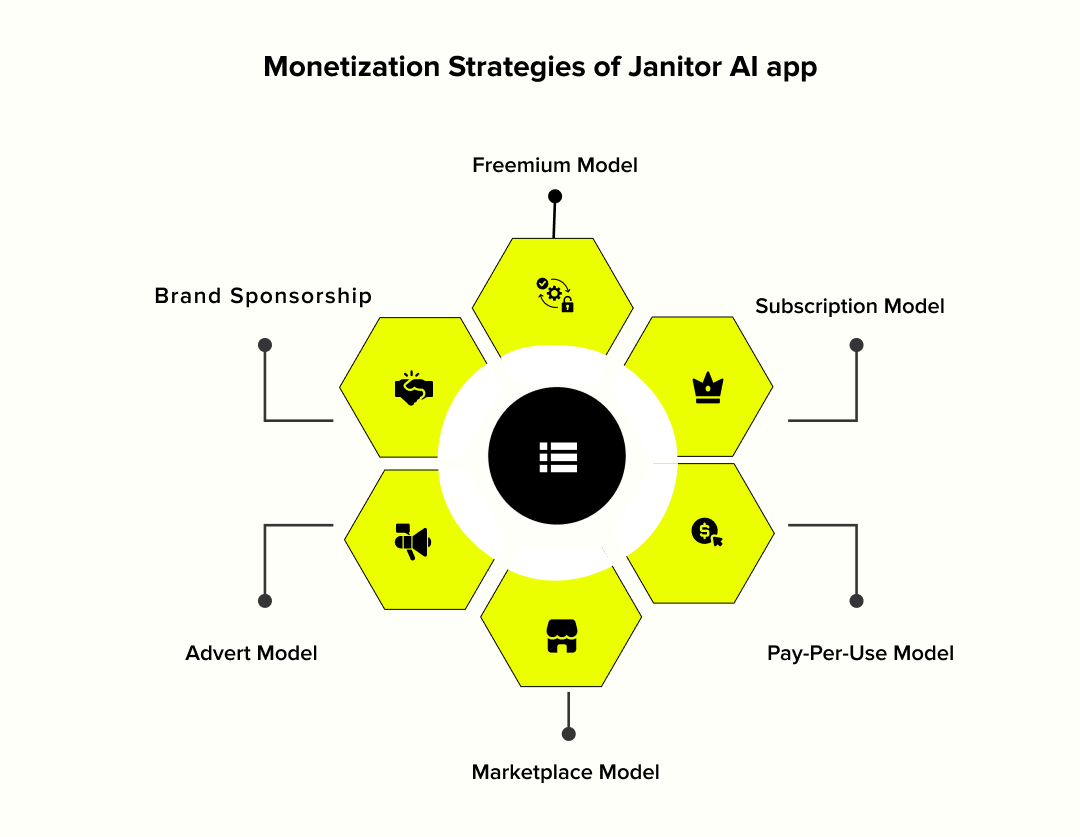
Based on current market trends, here are the most direct paths to profitability, you can choose from to monetize your AI app.
1. Subscription Model
This is one of the most common ways to earn. You offer the app for free to everyone, but lock the best features behind a monthly or annual fee. This creates a steady, reliable income stream you can forecast and build upon.
- What users pay for: They pay you for premium perks like access to the most advanced AI models, longer conversation memory so the AI never forgets. It's all about you offering a ‘Pro’ experience for your most dedicated users.
2. Freemium Model
This is slightly different from a subscription. Here, the core experience is free, but very specific, high-value capabilities are walled off. It’s less about a general ‘Pro’ tier and more about unlocking specific tools.
- What users pay for: This could be unlocking a specific filter, getting access to voice chat features, or the ability to use the multi-model integration we talked about earlier. You're selling access to powerful, distinct features one by one.
3. Pay-Per-Use Model
Instead of a flat monthly fee, users pay for what they consume. This model works great for attracting casual users who might be scared off by a monthly subscription but are happy to pay for a few hours of usage.
- What users pay for: You'd sell credits or tokens that get used up with each message sent or each hour of chat. It directly ties their spending to their engagement, which can be very profitable with an active user base.
4. Marketplace Model
Why do you do all the creative work yourself? Your users are going to build amazing AI characters and craft intricate storylines. The marketplace model allows you to empower those creators and take a small cut of their success.
- What users pay for: Here, you're not selling to users, but enabling them to sell to each other. When a creator sells their popular character preset or a custom role-playing scenario to another user, you take a small commission on the sale. It helps you build a vibrant community and creates a revenue stream that grows as your user base does.
5. Advert Model
Why put the entire financial burden on your users? The advertising model allows you to offer your core services—like chatting with diverse AI characters—completely free, while generating revenue from sponsors who want to reach your engaged audience.
- What users pay for: Instead of their money, users pay with their attention. Revenue comes from displaying targeted advertisements within the app experience. This could be a banner ad at the bottom of the chat screen, a full-screen video ad that plays before a new conversation starts, and more. This model is a straightforward way to monetize a large, active user base that might be hesitant to pay for a subscription.
6. Brand Sponsorship
The brand sponsorship model allows you to team up with companies that align with your audience, creating unique content that feels less like an advertisement and more like a core feature.
- What users pay for: In this model, users pay with their engagement, not their wallets. For instance, an outdoor gear company could sponsor an expedition for a famous explorer from history, like Amerigo Vespucci or Vasco Da Gama. Your mission would be to help them prepare for a journey, choosing from a list of the brand’s real-life jackets, tents, and equipment to ensure the adventure is a success.
Must read: How to Build an AI Chatbot from Scratch?
How to Make Your App Even Surpass Janitor AI
Now that you have looked at the must-have features for a Janitor AI-style app, here’s how you can build something better, and not just a clone. To surpass a giant like Janitor AI, here’s exactly where you can focus your efforts:
- Offer Super-Customizable Character Building: Give your users more granular control with advanced personality sliders, detailed memory management, and intricate appearance editors. Let them build truly one-of-a-kind AI companions.
- Integrate Real-Time Voice and Video: This is a true game-changer. Move beyond text and allow users to have actual voice conversations or even simulated video calls with their AI characters. This creates a level of immersion that text simply can't match.
- Build a Thriving Creator-Led Ecosystem: Don't just let users create content; empower them. Build a true marketplace where your community can share, promote, and even sell their best characters, story packs, and custom scenarios to other users.
- Turn the Experience into a Game: Introduce gamification to keep users hooked. Add features such as unlockable achievements, daily quests, and leaderboards that reward users for their creativity and engagement.
Your Path to Launching the Next Great AI Chatbot
Now that you know, Janitor AI app development costs up to $91,670.56. Remember, the biggest factors that will move that number are your app's complexity and where in the world you hire your development team.
We know that it's a significant investment. But creating the next great AI companion is about more than just the cost. It's about tapping into a rapidly growing market with huge potential for both community engagement and a real financial return. It's a big step, but it can be a game-changing one.
Frequently Asked Questions
How long does it take to build an app like Janitor AI?
A solid first version (MVP) typically requires 4 to 6 months. A full-featured app like Janitor AI, with all its complex features, can take 8 months or more.
Can a free AI model be used to build the app?
Yes, starting with open-source AI models can save money, but it's a trade-off. They often lack the power and advanced safety features of paid models like GPT-4, which can significantly impact the quality of the user's conversational experience .
What are the ongoing costs after the app is launched?
Beyond the initial build, there are ongoing costs for server hosting, regular software maintenance, and feature updates. The most significant recurring expense is usually the API fees paid to the AI model provider for each user interaction on the platform.
Is it better to build for the web or mobile first?
Starting with a web application is generally the recommended approach. It's faster and more affordable to build and offers instant access to users on any device. Learnings and revenue from the web app can then fund dedicated mobile versions later.
What are the main benefits of building an AI chatbot app?
The primary benefit is exceptional user engagement, as people enjoy immersive conversations. This high retention rate creates strong monetization opportunities and helps build a vibrant community around your product, ensuring long-term success and a solid return on investment (ROI).

Uncover executable insights, extensive research, and expert opinions in one place.
Related Content