- Step 1: Define Your Business Objectives and Use Cases
- Step 2: Choose the Right AR Technology Stack
- Step 3: Assemble Your Development Team
- Step 4: Design the AR User Experience
- Step 5: Develop a Prototype and Proof of Concept
- Step 6: Implement Core AR Functionality
- Step 7: Integrate With Existing Business Systems
- Step 8: Optimize Performance and Scalability
- Step 9: Test Thoroughly Across Devices and Environments
- Step 10: Deploy and Gather User Feedback
- Step 11: Maintain and Evolve Your AR Solution
 Share It On:
 Ready to build? Learn the complete AR app development process, discover effective and affordable tools, and examine case studies of AR apps that resonated with users.
By blending digital content seamlessly with our physical environment, AR apps are revolutionizing everything from retail experiences to education and beyond. Today, building AR applications means crafting solutions that truly deliver value and engage users in meaningful ways.
AR app development isn’t rocket science, but it does take clarity, the right tools, and a strong plan. Here’s a quick snapshot of the key steps involved:
- Identify the app’s purpose and user experience goals
- Choose the right AR development platform (like ARKit, ARCore, or Unity)
- Design and model the 3D content
- Integrate AR SDKs and set up environment tracking
- Test on multiple devices and optimize performance
- Launch and gather real-world feedback for iteration
In this guide, we’ll break down each of these steps, explore the top tools, and show you real-world examples of how businesses build AR apps that captivate and convert. Let’s get hands-on with the world of augmented reality and start with learning the types.
Types of Augmented Reality Apps You Must Know
Augmented Reality (AR) blends digital content with your real-world view. AR app developers are creating exciting applications in several forms, each offering unique experiences.
1. Marker-Based AR: These apps use a specific image, like a QR code or printed picture, to trigger the AR experience. When your device camera sees this marker, digital content appears on top of it.
2. Markerless AR: Unlike marker-based apps, these don't need a special image. These apps understand your surroundings using the device's sensors and camera, letting you place digital objects freely.
3. Projection-Based AR: This type projects digital images directly onto real-world surfaces, often using a projector. It creates the illusion that digital elements are part of your physical environment.
4. Superimposition-Based AR: These apps overlay digital content onto real objects, sometimes replacing part or all of their view. They use things like face tracking or object recognition for this overlay.
5. Location-Based AR: Using GPS and your device's location, these apps place digital content based on where you are in the real world. Think of virtual objects appearing at specific geographical points.

How to Build Augmented Reality Apps: The Development Process
Companies are starting to realize AR isn't just for games anymore—it's becoming a serious business tool. This guide breaks down the AR app development journey into actionable steps that will help your company navigate this innovative space effectively.
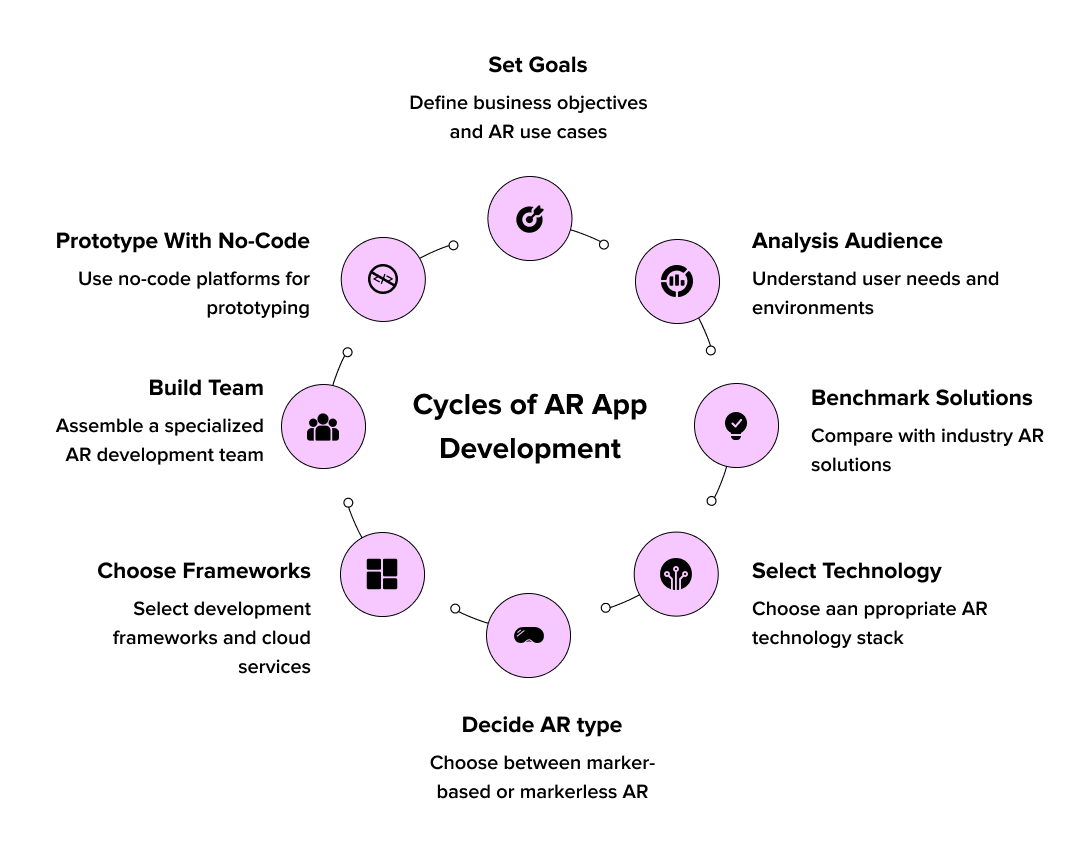
Step 1: Define Your Business Objectives and Use Cases
Before diving into development, clarity around your business goals is essential.
- Define the problem: Clearly identify what specific challenges your AR app will solve for users or teams, along with measurable success metrics.
- Understand your audience: Analyze your target users' technical skills and work environment to inform technical decisions (e.g., mobile vs. headset).
- Benchmark competitors: Research existing AR solutions in your industry to identify what works and where your app can fill market gaps
Step 2: Choose the Right AR Technology Stack
- Choose your AR type: Decide between marker-based AR (for specific image recognition) or markerless AR (for environmental mapping), influencing your AR app development approach.
- Select development approaches & core technologies: Opt for native (ARKit/ARCore for performance), cross-platform (Unity/Unreal Engine for reach), or hybrid frameworks (React Native for lighter integration), alongside libraries like 8thWall or WebXR, based on platform, complexity, and performance needs.
- Leverage cloud services: Consider platforms like Azure Spatial Anchors or Google Cloud Anchors for persistent and collaborative AR experiences.
Step 3: Assemble Your Development Team
- Build your AR team: Ensure your team includes AR/VR specialists, 3D artists, spatial UX designers, backend developers, and QA engineers.
- Consider external partners: If internal AR expertise is lacking, collaborate with specialized AR development companies; check their B2B case studies and tech stack experience.
- Explore no-code prototyping: For quick prototypes, use platforms like ZapWorks, Blippar, or Adobe Aero that allow AR app creation without coding.
Step 4: Design the AR User Experience
- Storyboard the user journey: Map out user interactions in the physical world with digital overlays, considering environmental factors.
- Account for hardware limitations: Design interfaces keeping device holding, one-handed operation, or headset field-of-view, and input methods in mind.
- Develop a clear visual language: Distinguish interactive elements using consistent cues like color, animation, or iconography.
- Prioritize accessibility and safety: Ensure legibility on varied backgrounds, provide alternatives for color-based info, and include warnings for physical hazards.
Step 5: Develop a Prototype and Proof of Concept
- Validate with an MVP: Start with a minimal viable AR experience to confirm core concepts before major investment.
- Prototype iteratively: Begin with paper prototypes for workflow testing, then move to digital wireframes for realistic AR overlays.
- Build and test core features: Develop a functional prototype focusing on a critical AR feature (e.g., object recognition), testing it rigorously in real-world conditions.
- Gather and analyze feedback: Collect structured feedback and performance metrics (e.g., recognition accuracy, tracking stability) from users and stakeholders.
- Refine based on data: Use collected data to refine your approach, potentially re-evaluating your AR technology stack if performance expectations aren't met.
Step 6: Implement Core AR Functionality
- Build AR Recognition & Tracking: Develop robust camera calibration, marker detection, or SLAM systems for reliable AR performance across devices.
- Implement 3D Asset Loading & Rendering: Optimize 3D models for performance on target devices while ensuring visual quality, possibly using level-of-detail systems.
- Develop Interaction Systems: Create intuitive ways for users to manipulate AR content, such as gestures, physics, or spatial audio.
- Build Backend Services (if needed): Establish support systems like content management, user authentication, or cloud anchors for persistent AR experiences.
Step 7: Integrate With Existing Business Systems
- Integrate with enterprise systems: Ensure your AR app development connects securely to CRM, ERP, or product databases via APIs for accurate real-time data.
- Enable collaboration: Develop integration with collaboration tools to facilitate shared AR experiences among remote teams.
- Prioritize security: Build your AR app development to comply with organizational security requirements, including encryption and authentication.
- Manage data formats: If needed, develop custom middleware to convert existing data into AR-compatible formats for seamless visualization.
Step 8: Optimize Performance and Scalability
Optimize AR app development for performance: AR apps are resource-intensive, requiring careful optimization.
- Implement asset streaming: Load content progressively to improve loading times and reduce memory usage in AR app development.
- Optimize rendering pipelines: Use techniques like occlusion culling, frustum culling, and level-of-detail systems for efficient rendering in AR app development.
- Develop intelligent caching: Create smart caching strategies for AR content, considering storage and update frequency.
- Monitor enterprise deployments: Build systems to track performance data and identify optimization opportunities in the development process.
Step 9: Test Thoroughly Across Devices and Environments
Beyond Traditional Testing: AR app development demands specialized testing methods beyond standard software validation.
- Cross-Device Performance: Systematically test your AR app across various devices, noting performance differences, especially on older hardware.
- Diverse Environments: Test in real-world physical environments (lighting, space, textures, movement) that mimic deployment scenarios for robust AR app development.
- Remote Diagnostics: Implement remote testing to gather detailed diagnostic data (logs, screenshots, environment info) from field testers during AR app development.
- AR-Specific Failures: Develop protocols for common AR issues like tracking loss, marker recognition, or spatial mapping errors, and document recovery behaviors.
Step 10: Deploy and Gather User Feedback
- Plan staged rollout: Begin with limited releases to gather feedback and monitor performance before broad deployment.
- Provide comprehensive onboarding: Create in-app tutorials, videos, and reference materials to guide users on technical operation and business context.
- Implement analytics: Track feature usage and interaction patterns to identify successful features and areas for improvement.
- Establish feedback channels: Set up clear ways for users to report issues or suggest improvements (e.g., in-app tools, reviews).
Step 11: Maintain and Evolve Your AR Solution
- Plan for regular updates: Schedule updates to integrate new AR features from platforms like ARKit and ARCore, enhancing app performance and capabilities.
- Monitor hardware trends: Keep an eye on new AR device form factors (e.g., smart glasses) and improved mobile hardware, and plan how your app can adapt.
- Refine based on feedback: Continuously improve 3D assets and interactions using user feedback and analytics to boost adoption.
- Document new use cases: Track unexpected ways users utilize your AR app to discover valuable enhancement opportunities or new product ideas.
AR Market Overview and Use Cases
Augmented Reality is rapidly transforming how we interact with the digital world, seamlessly blending virtual information with our physical surroundings.
The global AR market is experiencing substantial growth. Valued at approximately USD 69.8 billion in 2024, it’s now projected to see a growth of up to USD 2,795 billion by 2035, exhibiting a remarkable CAGR of 39.86% during this period. The consumer segment is currently leading the market, driven by the increasing demand for interactive and immersive experiences.
The potential to develop augmented reality apps is unlocking a myriad of use cases:
1. Healthcare: AR is revolutionizing medical education, surgical planning, and patient care. For instance, surgeons can utilize AR to overlay patient data directly onto their field of view during operations, enhancing precision and reducing risks. Medical students benefit from interactive AR simulations for practicing procedures and diagnoses. The AED4EU app, for example, uses AR to show the nearest defibrillator locations, potentially saving lives.
2. Retail: AR is transforming the shopping experience. Customers can virtually "try on" clothes, accessories, or makeup before buying, reducing returns and increasing satisfaction. Apps like IKEA Place allow users to visualize furniture in their homes, boosting sales and customer engagement. Retailers also use AR for in-store navigation, virtual try-on technology, and providing detailed product information with a quick scan.
3. Entertainment: Beyond immersive gaming experiences, AR is enhancing multimedia presentations and live events. From interactive concerts to virtual characters appearing in real-world settings, AR offers novel ways to engage audiences.
4. Tourism: AR apps enrich travel experiences by providing live information about historical landmarks, museums, and attractions. Tourists can overlay historical reconstructions onto current views or access detailed information about points of interest, creating a more engaging and educational tour.
5. Education: AR brings learning materials to life, making subjects more engaging. Students can explore 3D models of complex molecules, dissect virtual organs, or take virtual field trips to historical sites, offering hands-on learning experiences that transcend textbooks.
6. Manufacturing and Maintenance: Industries are leveraging AR to optimize workflows, improve productivity, and reduce operational costs. AR glasses can provide real-time guidance and instructions to technicians for complex repairs, reducing errors and downtime. AR apps enable remote assistance, allowing experts to guide on-site workers from any location.
Cost and Time Considerations
Embarking on AR app development requires a clear understanding of the investment. Costs typically range from $65,000 to $150,000, varying significantly with project scope and complexity. Knowing these factors upfront is crucial for a successful journey.
Here's a general overview of AR app development costs and their associated timelines:
| AR App Complexity Level | Estimated Cost (USD) | Estimated Timeline |
|---|---|---|
| Basic AR App | $65,000 | 3 - 6 months |
| Intermediate AR App | $70,000 - $130,000 | 6 - 12 months |
| Advanced AR App | $150,000+ | 12+ months |
These figures are quick estimates, and a detailed breakdown depends on your specific requirements. Several important factors contribute to the total cost and duration of an AR app project:
1. Number of Features: More features, especially complex ones like real-time object recognition, sophisticated animations, or multi-user experiences, directly increase development hours and cost.
2. Development Hours: The total time spent by the development team on coding, testing, and iterations is a primary cost driver.
3. Human Resource: The size, experience, and location of your development team (e.g., in-house, freelance, agency) significantly impact costs.
4. Hiring Locations: Development rates vary widely across different geographic regions.
5. Complexity of UI and UX Design: A highly polished, intuitive, and complex user interface (UI) and user experience (UX) design requires more design and development effort.
6. Tools and Technologies: The choice of AR frameworks (ARKit, ARCore), game engines (Unity, Unreal Engine), and other specialized software development toolkits can influence licensing costs and developer expertise requirements.
7. Cloud Services: For features like content delivery, user data storage, or backend processing, reliance on cloud platforms (AWS, Azure, Google Cloud) will incur ongoing costs.
8. Third-Party Integrations: Connecting your AR app with external APIs for services like payment gateways, social media, or analytics adds to development complexity and cost.
9. Database Services: The need for robust and scalable database solutions to manage user data, content, or application states can add to the overall expense.

Selecting AR SDKs and Tools
Choosing the right AR development tools is key to crafting impactful augmented reality apps. We'll explore top SDKs and platforms, evaluating their features, pricing, and low-code/no-code options. A smart selection streamlines development and elevates user experience.
| Tools | Low-Code/No-Code | Key Features | Pricing |
|---|---|---|---|
| ARKit | Low-Code | Motion tracking, face detection, Quick Look for 3D models, LiDAR support | Free |
| ARCore | Low-Code | Motion tracking, environmental understanding, light estimation, and cloud anchors | Free |
| Vuforia | Low-Code | Image/object recognition, 3D tracking, Unity integration, barcode scanning | Free (with watermarks), paid plans start at $99/month |
| Wikitude | Low-Code | Geo-based AR, image/object tracking, Unity support, web-based AR | €2990 (one-time license) |
| Unity | Low-Code | Robust game engine, AR Foundation for ARKit/ARCore, extensive asset store | Free (Personal), $40/month (Plus) |
| PlugXR | No-Code | Drag-and-drop interface, 3D asset integration, WebAR, cross-platform support | Free trial, plans start at $29/month |
| UniteAR | No-Code | No-code AR creation, WebAR, image recognition, branded AR viewer | $99/month (Starter) |
| ZapWorks | No-Code | Visual editor, WebAR, analytics, templates for marketing campaigns | $60/month (Starter), $150/month (Pro) |
Picking the perfect tool can feel like choosing the right wand in a wizarding world—exciting but critical! Ensure that you are choosing the right tool as per your
Challenges in AR Development
AR app developers face unique challenges in crafting immersive augmented reality experiences. These hurdles, from technical limitations to user experience considerations, are commonly navigated by mobile app development companies in the USA. Overcoming them is key to building truly functional AR applications.
Here are some key challenges you can encounter when you build AR apps:
1. Hardware and Device Fragmentation: AR apps demand high processing power and accurate sensors. Ensuring consistent performance across diverse devices with varying capabilities is a constant challenge.
2. Accurate Environmental Understanding and Tracking: Seamlessly blending AR content requires precise environment understanding and tracking. This is difficult in varied lighting, complex settings, or with rapid user movement.
3. User Experience (UX) and Interface (UI) Design: Designing intuitive AR UX/UI differs from traditional apps. It involves considering digital object interaction in physical space without cognitive overload or real-world disruption.
4. Content Creation and Optimization: Generating high-quality, optimized 3D models and animations for AR is resource-intensive. Ensuring realism and performance across devices without latency is a major undertaking.
5. Performance and Latency: AR apps are resource-intensive, requiring real-time rendering. Maintaining smooth frame rates and minimizing latency is critical for a believable and responsive experience, preventing motion sickness.
6. Privacy and Security Concerns: AR apps collect extensive user data, like location and environment scans. Robust privacy and security measures are crucial to build trust and comply with regulations.
7. Lack of Standardization: The nascent AR industry lacks universal design and development standards. This fragmentation complicates cross-platform development and widespread compatibility.
Future Trends in AR App Development: Taking the Next Step
Let's dive into the future trends shaping even more immersive and intelligent AR apps.
Here are some of the key future trends shaping AR app development:
1. Smarter AR with AI: AI is making AR apps more intelligent by enabling object recognition, gesture understanding, and predictive information delivery for highly contextual experiences.
2. Realistic 3D Models & Real-Time Interaction: Future AR apps will feature highly realistic and interactive 3D models, offering seamless integration and lifelike digital object interaction.
3. Rise of AR Glasses & Wearables: Dedicated AR glasses and wearables will provide natural, hands-free AR experiences, integrating digital information directly into your line of sight.
4. Seamless Real-World Integration (AR Cloud): The AR Cloud will create a persistent, shared digital layer mapped to the physical world, allowing multi-user, evolving AR experiences.
5. Web-Based AR (WebAR) for Easy Access: WebAR enables direct browser access to AR experiences without downloads, significantly increasing accessibility for various use cases.
6. 5G Connectivity & Cloud-Powered AR: 5G's speed and low latency will power smoother, more responsive AR experiences, enabling complex data processing and high-quality content rendering via the cloud.
ALSO READ: Importance of Integrating Mobile Apps with Wearables
Summing It Up
Developing Augmented Reality applications is an exciting journey that transforms how we interact with the digital world. By understanding the core steps—from conceptualization and design to development and deployment—aspiring creators can confidently build AR apps that captivate and innovate. The right tools, such as robust AR SDKs and intuitive 3D modeling software, are crucial in bringing these visions to life.
From revolutionizing retail with virtual try-ons to enhancing education with interactive lessons, the real-world applications of AR are vast and continually expanding. As technology advances, the potential for AR to redefine industries and enrich daily experiences will only grow, making it a truly compelling field for both developers and users alike.
Frequently Asked Questions
How to create AR apps without coding?
You can create AR apps using "no-code" or "low-code" AR platforms like PlugXR or Adobe Aero. These platforms often feature drag-and-drop interfaces and pre-built templates, allowing creators to design interactive AR experiences by simply uploading 3D models and defining interactions.
What are the essential tools for AR app development?
Essential tools include AR SDKs like ARCore (Android) and ARKit (iOS) for mobile AR, game engines like Unity or Unreal Engine for building the application, and 3D modeling software like Blender for creating AR assets.
How long does it typically take to develop an AR app?
The development time for an AR app varies significantly based on complexity. A simple AR app with basic features might take 4-6 months, while highly complex applications with advanced functionalities like AI integration could take 9 months to over a year.
What are some common real-world uses for AR apps?
AR apps are widely used in retail (virtual try-ons, furniture placement), education (interactive learning), healthcare (surgical training, medical imaging), and entertainment (AR games like Pokémon Go), enhancing user experiences across sectors.
Is AR app development difficult for beginners?
AR app development can be complex, requiring skills in 3D modeling, spatial computing, and user experience design. However, the increasing availability of user-friendly tools and no-code platforms is making it more accessible for beginners to start creating AR experiences.

Uncover executable insights, extensive research, and expert opinions in one place.
Related Content