

Suru App Review: What You Need to Know
Isn’t making a todo list a part of life, for every unproductive day that you spend, you often come with an idea of creating a todo list the next day and adhere to it sincerely.
You go out and buy all those fancy sticky notes and designate work to yourself while sticking it on the wall or your cupboard.
But guess what, those were the old days and now when the technology is reaching zenith and trying its best to make our days a lot more productive through apps. These apps have really helped many people out in organizing, storing, and sorting out their day to day activities making them feel good.
Today, we have one such app to introduce that is enchanting, colorful, and one of the best to-do list app, Suru. with this app, your days can be more productive and orderly.
Without taking any time ahead let’s see what this task organizer has more to offer in our detailed Suru app review.
What Is Suru App All About?
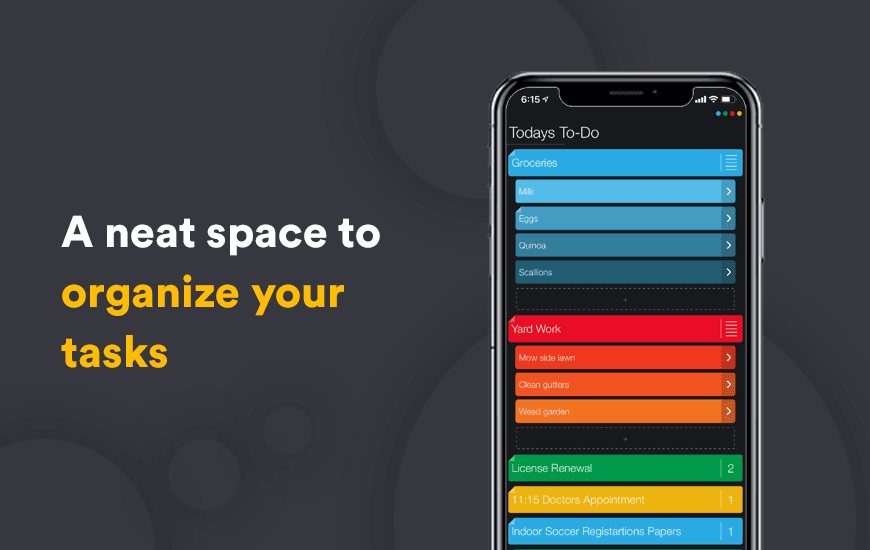
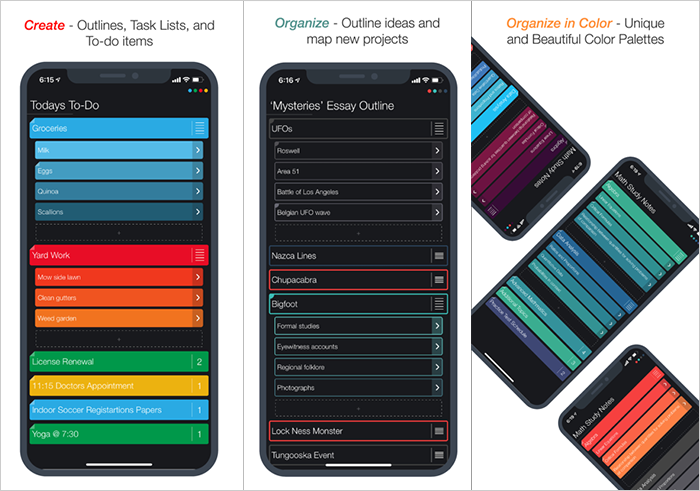
Suru is an easy to use app that organizes all your tasks and projects in one space and allows you to create multiple to-do lists with pictures, and mind maps in different hues of color that looks extremely soothing and coordinated.
This app also allows you to create outlines that can help you while you are trying to pen down your essays and go on a smooth writing flow as per your outlines without any thought interruption.
Pros and Cons of Suru
Pros
- A beautiful and minimalist user interface that makes planning feel smooth
- Color-coded task organization enhances visual clarity
- Easy drag-and-drop functionality for rearranging tasks and projects
- Combining notes and to-do lists in one seamless platform
- Perfect for creatives who love visual planning
- Lightweight and fast with no learning curve
Cons
- The free version has limited features compared to the premium
- Lacks integration with popular third-party calendar or to-do apps
- No desktop or web version available—mobile-only experience
- Lacks advanced reminders or recurring task options
- Not ideal for large, complex project management
- Syncing across devices can be inconsistent at times
Key Features of Suru App
There are several features that the app garners which makes it one of the best task manager apps:
1. Attractive User Interface
The UI of the app is extremely user friendly, clean, and organized which catches the attention of users using this app.
2. Beautiful Hues
The app allows the users to personalize the color they want their todo list to have and once you add your own colors you can see the gradient effect on your lists. There are 7 color pallets provided by the app.
3. Organize your task
Your everyday tasks can be organized, changed, recolored, or deleted any time you like and you can also set a priority color for yourself so that you never miss out on any important thing.
4. Outline your idea
While you are doing something important that requires a planned execution, you can do this with the outline feature of the app which allows you to add pointers so that your task goes peacefully and not becomes chaos.
5. Create Sub pointers
You may have ideas that have their own ideas, this app makes it possible for you to add subtasks after every heading that you have written in order to give more structure to your information.
These features can make you hold onto your task very efficiently. From PDF exports to setting up reminders, the Suru app has got you all covered.
How to Use Suru task manager app?
Suru is a productivity app that ensures that you are not easily deviated and do your task with utmost sincerity. Below mentioned ways can get you started with the app right away:
- Download and install Suru App from Apple App Store.
- Sign up through your email account
Now you can get started with the Suru app and create your to-list or outlines with ease. The beautiful UI of the app helps you focus in a better way.
Why Do You Need the best task organizer app like Suru?
Suru app makes your task facile for you through organized notes and it is nowadays important to keep track of everything as there are heaps of information that can slip out of your mind but a project task organizer can never let that happen.
An app like Suru can help you to do your task seriously and not get distracted by anything that comes to your way by asking you to formulate a set of guidelines for yourself.
Are Organizers Like Suru Essential?
Organizers app can really sort things out for you in an effortless manner and apps like Suru can be your best companion, the app has a lot more to offer than just task organizations. It allows you to take down notes and create guidelines to help you stay on track while you are penning down an essay or giving a presentation.
These apps are helpful and will let you instantly jot your ideas down that hit you while walking down a road or driving your car. You can create a space for yourself where you can harbor your thoughts easily. With Suru app, you can stay on top of the task always and never run out on ideas.
What Makes Suru Different?
Exceptional features like choosing a color theme for creating perfect notes, curating guidelines, writing projects make this unique. But there is an additional list of features that can interest you even more:
- Productivity Reminder: The app will keep on reminding you within every 3 days that you are not being productive.
- Passcode: Suru will help you to set a passcode for the app so that no one is able to sneak into your thoughts.
- Theme: Apart from the beautiful colo theme this app has to offer for your notes curation you can also choose between dark and light mode.
One of the points that can drive your attention towards the app is its ability to look presentable enough which means that the app can be used in sudden presentations where you don’t have much time to formulate an official one.
Customer Reviews
How was your experience with the product?
Also Reviewed By Us