
Car Launcher Pro Review: Pros, Cons, Features, and More
Today, iPhones, as well as Android smartphones, have been completely transformed, all thanks to mobile apps. Since the inception of applications, things that were hard to imagine earlier are now being accomplished almost instantly with mobile apps.
That’s why in order to praise this change in technology there is another Android car launcher app in the Google Play Store that is handcrafted especially for the time period that car driving period.
The best car launcher app is designed in such a way that it eases the use of Android smartphones while on the way. The Car Launcher Pro application not only provides a convenient way to interact with the phone but also measures the passable distance covered by you via car. The app can also be used on smartphones, smart pads, and devices running on Android.
What Exactly Does a Car Launcher Pro Do?
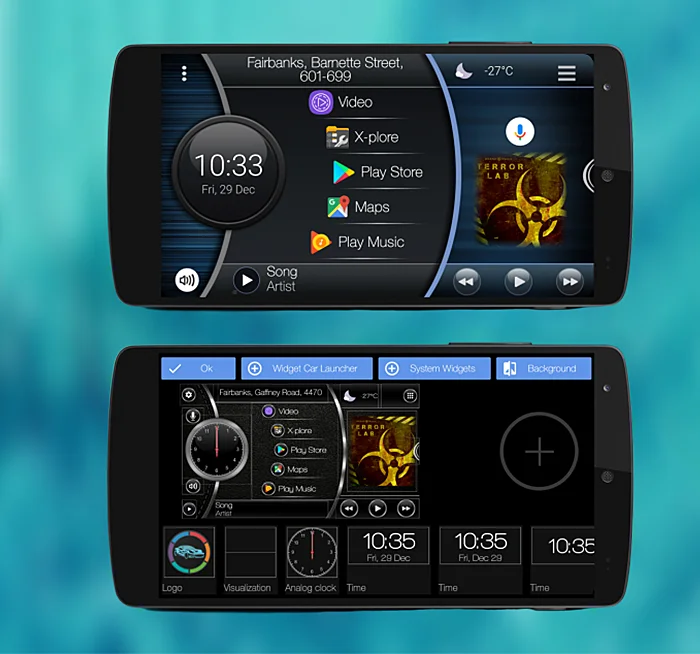
With the help of the Car Launcher Pro app review, you can easily learn to set the car audio launcher to open just by clicking on the main home screen. You can also manage the app and customize them on the screens accordingly so you can access them instantly. The app gives an opportunity to add a number of applications on the principal screen.
In addition to this, it also shows you all the details such as distance covered, speed and other parameters of every trip. If you feel that using a smartphone is a bit of a hustle while you are in the car then it's time to install the Car Launcher Pro.
Pros and Cons of Car Launcher Pro
Pros
- Add unlimited apps, organize them into folders, and use third-party themes, icons, and widgets to personalize your dashboard.
- Displays your car’s speed using GPS on the main screen and in the status bar for real-time driving feedback.
- View travel stats like distance, max speed, acceleration times (0-60/100/150 km/h), and more with customizable timeframes.
- Displays real-time weather and lets you set your city manually or via GPS. Refresh rates are also customizable.
- Quickly view and manage apps, sort by install/update date or name, and long-press for uninstall options.
Cons
- Folder switching and more advanced customization options are exclusive to the Pro version.
- Weather updates and location details only work with an active internet connection.
- While it supports third-party music players, cover display may not work consistently across all apps.
- Some features like auto startup are best suited for radio head units and may not be useful on regular phones.
- The rich feature set and deep customization may take time to fully understand and optimize.
About the Car Launcher Pro App
Logo of Car Launcher App:
In all honesty, the logo of Car Launcher Pro does feel a little out of style, especially in terms of current design trends. The brand can easily boost its logo by switching up to some pastel or bright colors while maintaining its true essence.
Features of Car Launcher App:
The Car Launcher Pro application is one of the top-notch Android apps in the Google Play store that is known for its interesting features. The functionality of the app that differs it from other available car launchers is the combination of both launcher program and trip parameters measuring option.
Apart from being a unique launcher, the Car Launcher Pro lets you explore the different parameters of every trip within the app. With that being said, now let's look at the key features that are being offered by this car dashboard application to its app users:
- Speed display in the status bar.
- A fast call option on the list of all applications.
- Quickstart menu options with the sorting feature.
- Edit the Theme as per your preferences.
- A personalized menu slides with onboard computer support.
- Customize all apps directly on the home screen.
- Displays current speed, passable distance, and other details.
- Get all the trip parameters in just one click.
The trip menu option Displays the current speed, the passable distance, average rate, the general operating time, maximum speed, and acceleration from 0 km/h to 60 km/h, 0 km/h to 100 km/h, 0 km/h to 150 km/h. You can also prioritize the time for displaying details for each of the parameters for a trip, for today, in a week, in a month, during all the time in this digital car launcher application for your car stereo.
Along with the trip details and additional themes for the launcher, you will get a number of options that you can use to customize the app’s default setting with this car launcher Android. If the internet connection is available the principal screen will display the weather information.
How Much Does The Car Launcher Pro App Cost?
The Car Launcher Pro is a paid Android application but it doesn’t range among the super expensive ones. In order to enjoy all the features provided by Car Launcher Pro for your car stereo, users need to spend less than three dollars, well $2.99 to be exact.
In addition, this Android car launcher app will also keep you updated with your real-time location on the map along with the other app features. So if you prefer to change the color of the wallpaper or add any different wallpaper, the car launcher Android app does that for you with just a click or two.
Customer Reviews
How was your experience with the product?
Also Reviewed By Us