
Airbrush
See how Airbrush stacks up: bold tools, slick results, and honest insights in this review. Get the full scoop on this app and learn to perfect your photos with ease.
Airbrush App Review: Everything That You Need to Know

Photo editing can undoubtedly make even the most ordinary picture look extraordinary. Be it holiday pictures, party pictures, or family pictures, photo editing can make any event look more vibrant and fun.
With the advent of easy-to-use AI photo editing apps, we are no longer required to do the heavy lifting. This article talks about a popular app for photo editing, Airbrush.
Airbrush is a photo editing app with a number of features and effects to get that perfect picture anytime. The main idea behind the inception of this app is to create the most reliable, efficient, and simple photo editing experience.
The app makes photo editing easy and achievable for everyone. But wait, there's more! So, what are we waiting for? Let’s quickly get started with the Airbrush app review.
Pros and Cons of Airbrush
Pros
- AI Retouching for detailed and realistic facial enhancements
- Blemish and Wrinkle Removal tools ensure polished portraits
- Background Removal & Photo Cleaner for seamless object elimination
- Filters, Effects, and AI Style Tools to unlock creative expression
- Easy-to-use interface makes it accessible for casual users
Cons
- May promote unrealistic beauty standards if overused
- Some premium features may require in-app purchases or subscriptions
- High dependency on AI can reduce user control in creative edits
- Performance may vary across different devices, especially older models
A Look at AirBrush: Photo/Video Editor’s Standout Features
Curious about what makes AirBrush: Face Photo Editor a go-to for stunning edits? Let’s dive into its standout features that elevate your photos with ease.
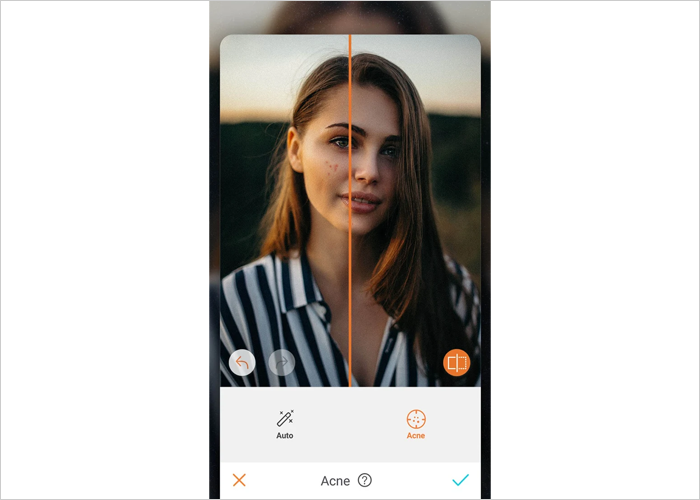
1. Removes pimples and blemishes
This photo editing app features a blemish remover to eliminate pimples and unwanted spots with the tap of your finger. You can add a swipe of blush to increase radiance and charm.
2. Get a perfect photo
Using this photo editing app, retouch, edit, and even tan your skin in just a few swipes to make your skin look naturally radiant in all of your selfies and photos. You can also swipe on a cool blush or rouge to give your cheeks an extra glow.
3. Artistic retouching features
In addition to HD editing features, the AirBrush editor also includes tools that let you blur, crop, stretch, slim, and tune your pics for an artistic touch. You can choose to retouch your pictures or fix them manually.
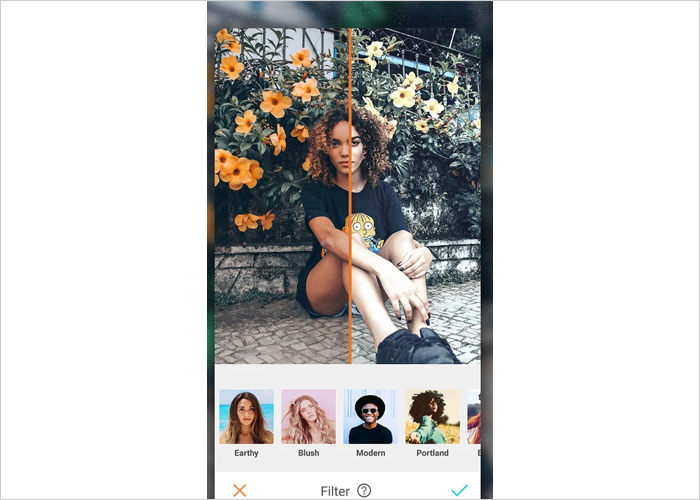
4. Natural filters:
AirBrush beauty filters help enhance even the best pictures and selfie photos for a perfect, beautiful finishing touch. Some filters can add natural-looking makeup to your pics, like blush or mascara!
5. Add style and depth to your photos:
The ‘Blur’ editing tool lets you retouch any photos to give them more depth and keep only the things that matter in focus. Your photos will get the perfection seen in professional photography.
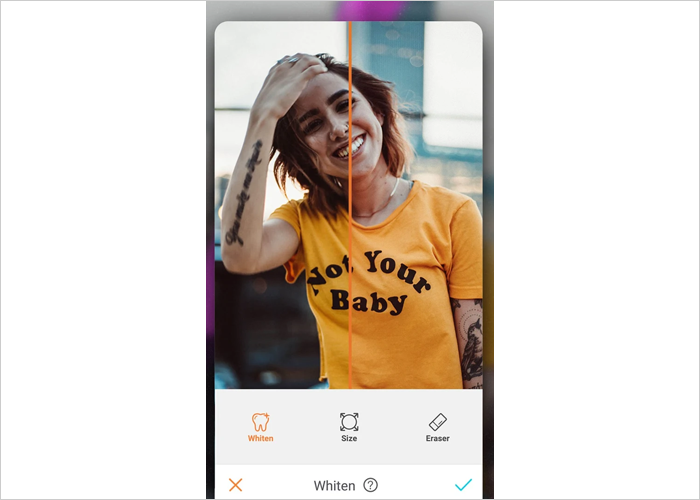
6. Teeth whitening feature:
Whitening your teeth takes your smile to the next level. This feature helps brighten your smile without over-whitening.
7. Editing hacks:
To learn how to use the Airbrush app and more about editing, you can read the blogs in the ‘Editing Hacks’ section. These blogs will make you well-acquainted with all the features and tools used for editing photos.
8. Share with friends and family:
The edited pictures can be shared directly from the app itself with peers on social media platforms like Facebook, Instagram, Twitter, and Snapchat.
Understanding the Pricing and Subscription Plans for the AirBrush App
Navigating the cost of AirBrush can feel tricky with its various plans. Here’s a clear breakdown of the pricing and subscription options to help you decide.
| In-App Purchase | Price (USD) |
|---|---|
| 1 Month of Perfect Photos | $10.99 |
| 1 Year of Perfect Photos | $28.99 |
| Edit Perfect Photos Instantly | $43.99 |
| Firm Filter | $6.99 |
| Edit Your Photos for 1 Month | $5.49 |
For us, Product Reviews mean diving headfirst into the functionality of each digital product, whether it’s an app, software, or website. Our process centers around hands-on testing of each tool we pick. From scrutinizing features to testing vulnerabilities of security standards, the goal remains to help you find products that don’t just work but truly elevate your experience. In a nutshell, if we’re recommending a product, it’s because we believe it’ll genuinely make your digital life easier.
- Products Reviewed - 4,000+
- No. Of Experts - 20+
- Categories - 65+
Customer Reviews
How was your experience with the product?
Wondering how AirBrush: Face Photo Editor performs in real hands? Here’s what other users say about its features and results.
“ AMAZING I honestly have owed you guys a review for years. I have been using AirBrush for years and it is by far the most advanced
“ Started out great but unfortunately as greed set in,👎hill This is the best photo editing app and has some awesome features & tools, but the costs
“ IF IT ISN'T BROKE DON'T TRY TO FIX IT! This WAS my favorite editor, but once again the devs have absolutely RUINED the app with
MobileAppDaily’s PoV on AirBrush: Photo/Video Editor
At MobileAppDaily, we believe in hands-on experience before putting out our verdict, so our content and social media teams collectively spent a few days experimenting with the AirBrush app. We tried it across different use cases—editing selfies for LinkedIn headshots, polishing Instagram travel photos, and even testing its video retouching capabilities for Reels.
Right off the bat, what stood out was how beginner-friendly and intuitive the UI is. The AI Retouch feature worked surprisingly well, enhancing facial details without making the edits look artificial. Tools like blemish removal, skin smoothing, and virtual makeup came in clutch for quick touch-ups, and the pro headshot generator was a favorite across the team.
Where AirBrush really impressed us was with its creative flexibility. The background remover, filters, and AI-based expression changers (like the Mood Swapper) allowed us to play around with different moods and styles without switching apps. We also liked the ability to edit selfie videos—something most traditional photo editors miss out on. Features like the AI Repair and Object Removal saved a ton of time in post-editing, especially for our content that needed to go live quickly.
That said, the tool isn’t without its downsides. Some features, like advanced filters and HD retouching, are locked behind a paywall. Additionally, while the app promotes “natural” edits, going heavy on tools like Reshape or Eye Enhancer can result in overly polished, almost unrealistic results if you're not careful. Still, for social media creators, marketing teams, or anyone who just wants to look a little sharper in their photos, AirBrush is a solid choice.
FEATURES
Offers a wide range of AI-powered photo and video editing tools, though overuse can lead to overly retouched results.
PRICING
The freemium model is accessible, but essential tools like HD retouching and advanced filters require a pricey subscription.
PERFORMANCE
Offers a smooth editing experience with fast processing and real-time previews, though performance may vary on older devices.
USER FEEDBACK
Users love the ease of use and natural-looking edits, with strong praise for its features. However, many are unsatisfied with the recent updates.
Final Verdict!
AirBrush strikes a solid balance between user-friendly functionality and advanced editing tools, making it a great pick for casual users and content creators alike. While its AI-powered features and creative flexibility stand out, the app does come with a few caveats—especially around pricing and occasional over-editing.
If you're seeking a quick, reliable, and intuitive photo editing app that delivers polished results without much effort, AirBrush is certainly worth considering. However, it may not fully satisfy those seeking complete control or a truly free experience. But the app is definitely worth giving a try!
Airbrush
Frequently Asked Questions
-
Is the AirBrush photo editor free?
Yes, the AirBrush photo editor offers a free version with basic features, but premium tools and ad-free access require a paid subscription.
-
Is AirBrush available on Android?
-
What makes AirBrush the best photo enhancer app?
-
Does AirBrush offer AI photo filters?
-
Can I use AirBrush as a beauty photo editor online?
Latest Products
Delve into our comprehensive yet easy-to-consume guides, which provide insights that help scale business faster and prevent unseen pitfalls.
Related Products
Cut through the clutter and explore related digital products that deliver on performance.