
WorkDo Review: Task, HR & Team Chat in One App?
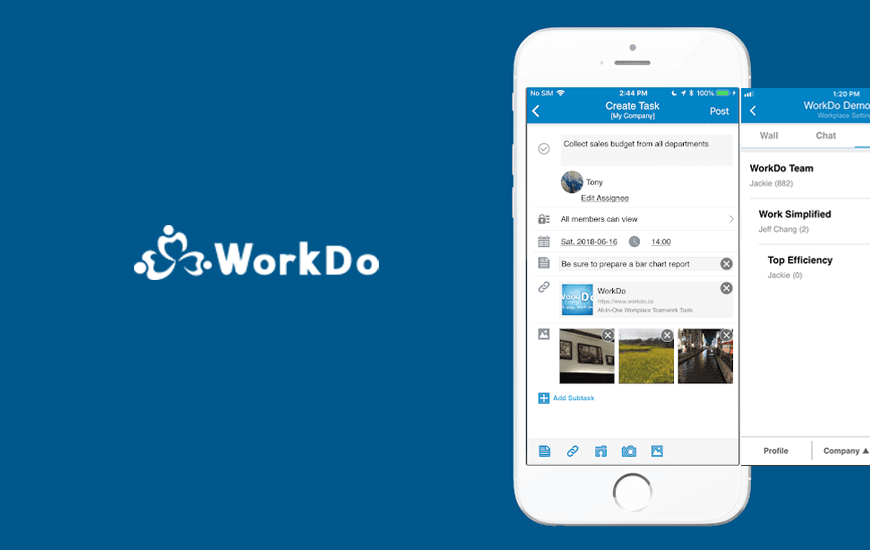
Whether it’s a newly founded startup or a corporate whale, everyone aspires improvement in their team’s productivity. Our today’s App Review of WorkDo features one such productivity booster app of 2019 that strengthens a company’s workflow with better communication. It could be a small-group collaboration or a company-level environment, from one on one discussions and task assignment in small groups to HR management and enterprise IM in big firms, WorkDo productivity App makes all communications, seamlessly productive.
Pros and Cons of WorkDo
Pros
- Combines communication, task management, HR, and CRM into one unified platform
- Offers both company-bound and unbound workplaces—great for flexible team setups
- Allows seamless collaboration through tasks, events, notes, polls, and shared files
- Built-in HRMS features like leave, attendance, and timesheets streamline internal operations
- Easy dashboard view with upcoming events, task status, and real-time engagement tracking
- Offers group and one-on-one chat with read receipts and post analytics
Cons
- The interface may feel cluttered due to the large number of integrated features
- Might have a learning curve for first-time users or smaller teams
- Limited customization or integrations with third-party apps
- Not ideal for teams looking for lightweight or minimalist solutions
- Performance may vary depending on team size and usage load
Features of the WorkDo App
WorkDo productivity App offers a robust range of workplace productivity tools that work just as good for small workspaces as they do for bigger scale projects. The features are pretty self-explanatory but since there are so many, it might take a little getting used to.
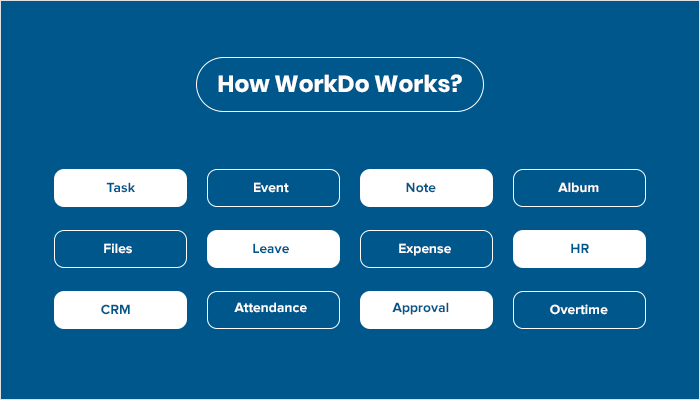
- Task: You can assign tasks, track, and comment on them, so your work is always on schedule.
- Event: Now plan company-wide events with attendance list to manage event budget and activities on WorkDo.
- Note: WorkDo productivity app lets you share important announcements with anyone- the entire company, your group or just between you and your buddies.
- Album: WorkDo helps you capture work moments and offers the option to share them with anyone including your company, groups or your buddies.
- Files: You can upload any files and share relevant information.
- Leave: A team on WorkDo can apply for leave so managers can coordinate in advance.
- Human Resource (HR): WorkDo lets you manage all employee information so HR can reach employees easily during emergencies. This tool is also the engine which drives WorkDo. Once the organizational structure is set, tools like Approvals, Leave, Expenses, Overtime, Shift will follow this workflow for appropriate approvals and sign-offs.
- Conf. Rm.: You can book and manage conference room schedules on WorkDo.
- Expense: With this WorkDo tool, you can apply for expense write-offs and keep track of expenses easily.
- Customer Relations (CRM): Manage your accounts with WorkDo’s CRM tool.
- Attendance: Clock in/out to track work hours with post clock in/out and appeal available along with the respective reports are all available on WorkDo.
- Approvals: WorkDo’s basic tool for any and everything that requires multiple personnel approvals.
- Overtime: Applying for overtime pay or compensatory leave is simple with WorkDo’s Overtime tool. Managers can also view how much additional time his/her team put in.
- Shift: You can easily schedule and manage employee work shifts and review scheduled shifts.
How WorkDo works?
For Big Businesses
WorkDo offers wide-scale businesses, secure and safe space with:
1. Individual workplaces for different subsidiaries
2. Option for teammates working with other subsidiaries can switch to different workplaces
For Small Teams
WorkDo productivity App offers small teams that don't have a company-wide email address some of the most lucrative features found in best apps for startups.
1. The option to create their own workplace with any email address
2. Invite team members to join
3. Ability to create groups and add buddies
4. Have small-group collaborations and one-on-one meetings
For End Users
Besides being one of the top productivity apps, WorkDo is also a great organizer App that offers:
1. Dashboard function to view all your tasks, events and polls related to you along with viewing all posts from your groups and buddies
2. Instant status update on any item with information such as read, task completion, and event attendance list
3. My Upcoming feature to view upcoming items lined for the next seven days
Customer Reviews
How was your experience with the product?
Also Reviewed By Us