- 1. *#06#: Display your IMEI number
- 2. *#*#4636#*#*: Open the hidden Testing menu
- 3. *#0*#: Hardware diagnostic menu (Samsung only)
- 4. *#*#34971539#*#*: Camera firmware information
- 5. *#*#232339#*#*: Wi-Fi test
- 6. *#*#1472365#*#*: GPS test
- 7. *#*#2664#*#*: Touchscreen test
- 8. *#*#0842#*#*: Vibration and backlight test
- 9. *#*#0588#*#*: Proximity sensor test
- 10. *#*#232338#*#*: Show Wi-Fi MAC address
- 11. *#*#232337#*#*: Show Bluetooth MAC address
- 12. *#0228#: Detailed battery information
- 13. *#7353#: Quick test menu (Samsung)
- 14. *#9090#: Diagnostic configuration
- 15. *#0011#: Service mode (Samsung)
 Share It On:
 Tested Android secret codes for 2026 to unlock hidden menus, run diagnostics, and check your phone's IMEI in seconds.
Type *#06# into your Android dialer right now. Before you even hit call, your phone's IMEI number flashes on the screen. That's not a glitch, it's one of dozens of hidden Android codes baked into your device by manufacturers, carriers, and the Android system itself. Some open secret diagnostic menus. Some run a hardware test. A few will even factory reset your phone if you're not careful.
These are called Android secret codes (or MMI and USSD codes if you want the technical names), and they've been around since the GSM phone days. Most users have never typed one. But once you know which ones work on your phone, you can check battery health, test the touchscreen, find the GPS, or pull up your IMEI in less time than it takes to find the right settings menu.
This guide covers every working Android code we tested in 2026 (universal codes, manufacturer-specific dialer codes for Samsung, Google, Xiaomi, OnePlus, Oppo, Vivo, Realme, Motorola, Honor, and more, plus carrier USSD codes for the major US networks). We've flagged the codes that no longer work on Android 12+, so you don't waste time, and added a few Easter eggs at the end.
Disclaimer: A small number of these codes can change settings or wipe data. We've marked those clearly. Stick to the display-only codes if you're new to this.
What Are Android Secret Codes?
Android secret codes are short sequences of numbers and symbols (typically *, #, and digits) that you type into your phone's dialer to trigger hidden actions. Unlike a regular phone number, you don't press the call button, the dialer recognises the pattern the moment you finish typing and runs the command directly.
These codes are not malware or hacks. They're built into Android by Google, by your phone's manufacturer, or by your mobile carrier. Engineers use them for diagnostics. Repair technicians use them to test hardware. And anyone with a few minutes can use them to peek under the hood of their own phone.
The same code can do different things on different phones. *#0*# opens a full hardware diagnostic menu on most Samsung Galaxy phones, but does nothing on a Google Pixel. That's why this guide is split by manufacturer.
Mmi Vs Ussd Vs Dialer Codes: What's The Difference?
People use these terms interchangeably, but they're not the same thing. Here's a quick comparison so you know what you're typing.
| MMI codes | USSD codes | Manufacturer dialer codes |
|---|---|---|
| What it talks to Your phone |
What it talks to Your carrier's network |
What it talks to Your phone (OEM-specific) |
| Works offline? Yes |
Works offline? No (needs network) |
Works offline? Yes |
| Example *#06# (IMEI) |
Example *225# (AT&T balance) |
Example *#0*# (Samsung diagnostic menu) |
| Universal across phones? Mostly yes |
Universal across phones? Carrier-dependent |
Universal across phones? No (OEM-specific) |
| Typical use Hardware tests, device info |
Typical use Account balance, data usage, call forwarding |
Typical use Engineering menus, advanced diagnostics |
In everyday conversation, all three get lumped together as "Android secret codes" or "secret phone codes." For this guide, we use the proper name where it matters and the casual name where it doesn't.
Also Read - 2026 Mobile Security Trends: Safeguarding Your Apps and Data
How to Use Android Secret Codes? Steps to Use Secret Codes for Android
Using Android secret codes is surprisingly straightforward, but let me walk you through the process step by step so you can do it safely and effectively.
Step 1: Open Your Phone's Dialer
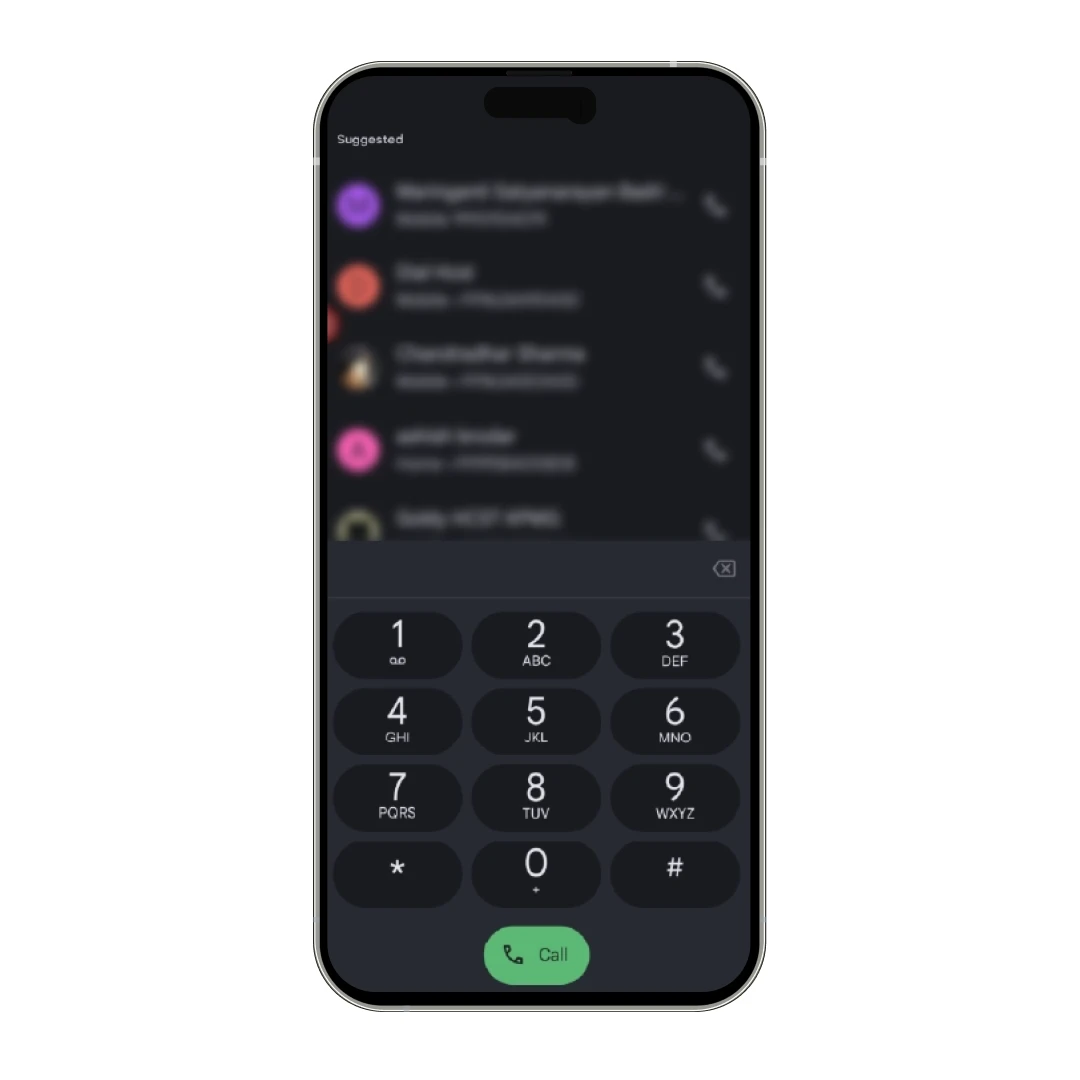
Start by opening your phone's default dialer app – the same one you use to make phone calls. You'll find this app on your home screen or in your app drawer, usually represented by a phone icon.
Step 2: Enter the Secret Code
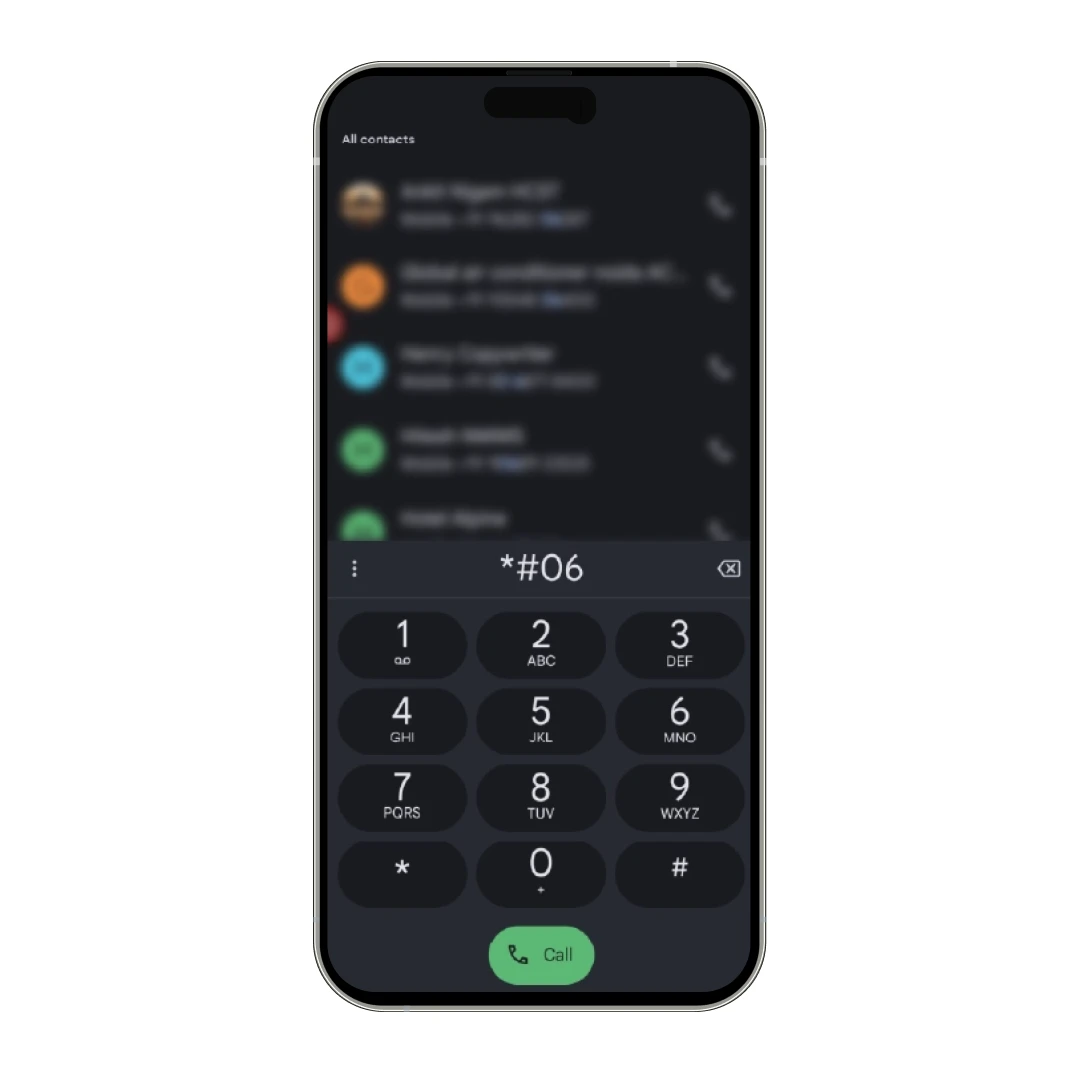
Here's where it gets interesting. Simply type the secret code exactly as it appears, including all asterisks (*) and hash symbols (#). For example, if you want to check your phone's IMEI number, you would type *#06#. Don't worry about pressing the call button – most codes will execute automatically as soon as you finish typing them.
Step 3: Wait for the Response
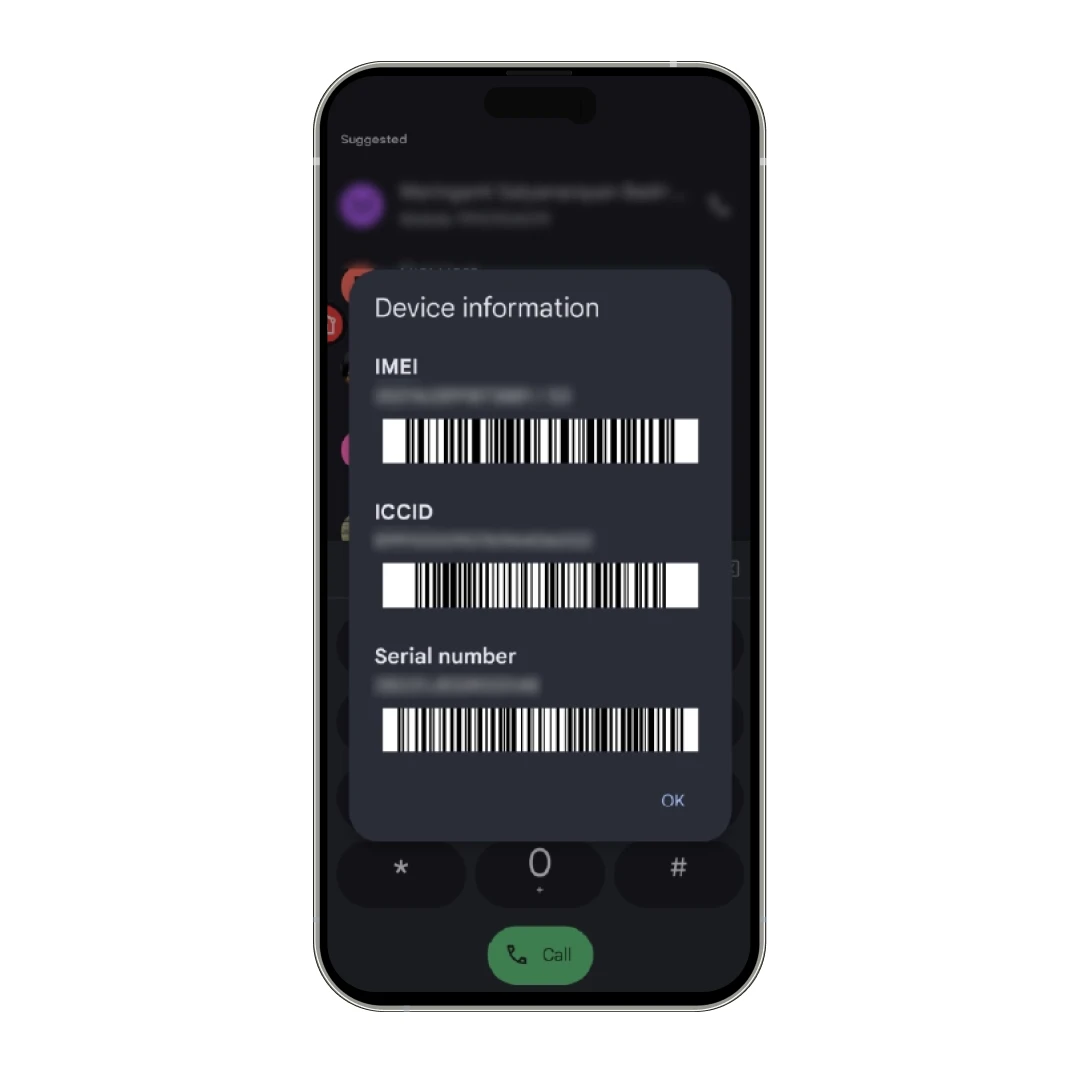
Depending on the code you've entered, you'll either see an immediate pop-up with information, be taken to a hidden menu, or see the information displayed on your screen. Some codes work instantly, while others might take a few seconds to process.
Step 4: Exit Safely
When you're done exploring, simply press the back button or home button to return to your normal phone interface. Most secret code interfaces are designed to be temporary, so they won't interfere with your phone's regular operation.
The 15 Universal Android Codes Everyone Should Know
These are the codes we tested across multiple Samsung, Pixel, OnePlus, and Xiaomi devices and confirmed working as of May 2026. They cover the things most people actually want (IMEI, battery health, hardware tests, network info) without doing anything destructive.
1. *#06#: Display your IMEI number
What it does: Instantly shows your phone's IMEI (International Mobile Equipment Identity), a unique 15-digit number that identifies your device on any cellular network. On dual-SIM phones, you'll see two IMEIs.
Why you'd use it: To check if your phone is the real, registered device (matches the box and packaging). To report a lost or stolen phone to your carrier so they can blacklist it. To check the authenticity when buying a second-hand phone.
Tested on: Every Android phone we've ever touched. This is the one truly universal code.
2. *#*#4636#*#*: Open the hidden Testing menu
What it does: Opens an internal Testing menu with Phone Information (V2 on newer Android builds), Usage Statistics, Wi-Fi Information, and, on dual-SIM phones, a second Phone Information tab.
Why you'd use it: To check signal strength in dBm (more accurate than the bars), see exactly which network type you're connected to (LTE / 5G NSA / 5G SA), pull app usage time, or force a preferred network type.
Important for 2026: Google has restricted this code to Android 12 and later. On many Samsung Galaxy phones running One UI 6 or 7, dialling *#*#4636#*#* does nothing — Samsung wants you to use the Samsung Members app instead. On Google Pixels running Android 14 and Android 16, it still works. On Xiaomi running HyperOS, mileage varies. If it doesn't work, that's not a bug on your end.
Fun fact: 4636 spells "INFO" on an old keypad (4=I, 6=N, 3=F, 6=O)
3. *#0*#: Hardware diagnostic menu (Samsung only)
What it does: Launches a full hardware test suite — red/green/blue screen tests, vibration, speaker, receiver, sensors, touch, sleep mode and dimming.
Why you'd use it: This is the gold-standard Samsung secret code. If you're buying a used Galaxy phone, this is the first code to run. It'll surface a dead pixel, a broken vibration motor, or a non-functional proximity sensor in under two minutes.
Tested on: Samsung Galaxy S22, S23, S24, S25.
4. *#*#34971539#*#*: Camera firmware information
What it does: Opens a camera information menu showing firmware version, the number of times each camera has been used, and options to update camera firmware.
Why you'd use it: To check whether a used phone's cameras are genuine and unmodified. The "image count" is the closest thing Android has to a shutter count.
Caution: Do not tap "Update camera firmware" unless you know what you're doing, you can brick the camera.
5. *#*#232339#*#*: Wi-Fi test
What it does: Opens a Wi-Fi testing utility. You can run signal tests, check supported frequencies, and verify connectivity.
Why you'd use it: Diagnose a flaky Wi-Fi connection without installing a third-party network analyser.
6. *#*#1472365#*#*: GPS test
What it does: Opens a GPS test menu. Your phone will try to lock onto satellites and display the count, signal strength, and your coordinates.
Why you'd use it: If Maps is struggling to find you, run this first. If GPS won't lock even with a clear sky, you've likely got a hardware issue.
7. *#*#2664#*#*: Touchscreen test
What it does: Runs a touchscreen responsiveness test. Drag your finger across the screen and watch it register every pixel.
Why you'd use it: Quickest way to confirm a dead spot on a touchscreen, especially after a drop.

8. *#*#0842#*#*: Vibration and backlight test
What it does: Runs a quick vibration motor test and a backlight test in one go.
Why you'd use it: If your phone has gone silent on notifications, run this first. Vibration motors can fail without an obvious cause.
9. *#*#0588#*#*: Proximity sensor test
What it does: Tests the proximity sensor (the thing that turns off your screen when you hold the phone to your ear).
Why you'd use it: If your screen stays on during calls and your face keeps muting the call, your proximity sensor may be dead.
10. *#*#232338#*#*: Show Wi-Fi MAC address
What it does: Displays your phone's Wi-Fi MAC address.
Why you'd use it: Setting up a network with MAC filtering, or troubleshooting a router that won't recognise your phone.
11. *#*#232337#*#*: Show Bluetooth MAC address
What it does: Same as above, but for Bluetooth.
Why you'd use it: Useful for some IoT pairing scenarios and Bluetooth troubleshooting.
12. *#0228#: Detailed battery information
What it does: Opens a battery info screen with voltage, temperature, current, and capacity.
Why you'd use it: If your battery drains fast or runs hot, this gives you real numbers rather than the "Battery health: Normal" placeholder Android shows.
Tested on: Works on Samsung. Mostly doesn't work on Pixel without root.
13. *#7353#: Quick test menu (Samsung)
What it does: Opens a faster version of the diagnostic menu — vibration, speaker, sub-key, touch, sleep mode, sensors.
Why you'd use it: Quicker alternative to *#0*# when you only need to test a few things.
14. *#9090#: Diagnostic configuration
What it does: Shows diagnostic configuration data. USB and serial diagnostic settings.
Why you'd use it: Mostly for developers and repair technicians.
15. *#0011#: Service mode (Samsung)
What it does: Opens the field service menu with detailed cellular radio info, RSRP, RSRQ, SINR, cell ID, and band.
Why you'd use it: Engineers and serious signal-troubleshooters use this to figure out which tower they're connected to and whether they're being handed off properly between 4G and 5G.
Android Codes List: Full Table For Quick Reference
For everyone who just wants the complete android codes list in one place, here it is. Test these on your own device and verify in advance — some won't work on your specific Android version or OEM skin.
Universal Hidden Codes For Android
| Function | Code |
|---|---|
| IMEI number | *#06# |
| Testing menu (phone, battery, Wi-Fi info) | *#*#4636#*#* |
| Hardware diagnostic menu (Samsung) | *#0*# |
| Camera information | *#*#34971539#*#* |
| Wi-Fi test | *#*#232339#*#* |
| GPS test | *#*#1472365#*#* |
| Touchscreen test | *#*#2664#*#* |
| Vibration + backlight test | *#*#0842#*#* |
| Proximity sensor test | *#*#0588#*#* |
| Light sensor test | *#0589# |
| Audio test | *#*#0673#*#* or *#*#0289#*#* |
| Real-time clock test | *#*#0782*#*#* |
| Packet loopback test | *#*#0283#*#* |
| Bluetooth MAC address | *#*#232337#*#* |
| Wi-Fi MAC address | *#*#232338#*#* |
| Battery info | *#0228# |
| Quick test menu | *#7353# |
| Service / field test mode | *#0011# |
| Diagnostic configuration | *#9090# |
| USB logging control | *#872564# |
| Firmware information | *#*#4986*2650468#*#* |
| RF band selection | *#2263# |
| RIL dump menu | *#745# |
| Debug dump menu | *#746# |
| GCF mode status | *#3214789# |
Call And Message Management Codes
| Function | Code |
|---|---|
| Show call forwarding status | *#67# |
| Activate call waiting | *43# |
| Deactivate call waiting | #43# |
| Caller ID on (per call) | *31# + number |
| Caller ID off (per call) | #31# + number |
| SMS message centre number | *5005*7672# |
Reset and backup codes (use with extreme caution)
| Function | Code | Risk level |
|---|---|---|
| Factory reset (no warning) | *#*#7780#*#* | High (wipes apps, accounts, settings) |
| Full firmware reinstall | *2767*3855# | Highest (wipes everything including internal storage) |
Do not type either of those last two unless you're certain you have a current backup. There is no "are you sure?" prompt.
Bonus Read: Best cybersecurity tools you can run from your phone
MMI codes for Android by manufacturer
OEM-specific codes — the engineering menus and hardware diagnostics each manufacturer adds on top of Android.
Samsung Galaxy secret codes
The most complete OEM list. Tested on Galaxy S24, S25, A55, and Z Flip 6.
| Function | Samsung code |
|---|---|
| IMEI | *#06# |
| Phone information/testing menu | *#*#4636#*#* |
| Hardware diagnostic | *#0*# |
| Quick test menu | *#7353# |
| Service mode (field test) | *#0011# |
| Battery info | *#0228# |
| Firmware version | *#1234# |
| PDA, phone, CSC, build info | *#*#1111#*#* and *#*#2222#*#* |
| Soft reset (settings only) | *#*#7780#*#* |
| Factory reset (everything) | *2767*3855# |
| Product code | *#272*[IMEI]# |
| Auto SIM lock | *#7465625# |
| Camera firmware version | *#*#34971539#*#* |
Google Pixel secret codes
Pixel runs near-stock Android, which means most generic codes work but there aren't many Pixel-specific ones.
| Function | Pixel code |
|---|---|
| IMEI | *#06# |
| Testing menu (Phone Information V2) | *#*#4636#*#* |
| Hardware diagnostics | *#*#7378423#*#* (some models) |
| Field test/service mode | *#*#197328640#*#* |
| Soft factory reset | *#*#7780#*#* |
| Android Easter egg | Settings → About phone → tap "Android version" 4–5 times |
Xiaomi / Redmi / POCO secret codes
Xiaomi runs HyperOS (formerly MIUI). Most codes work, but Xiaomi has its own diagnostic menu called CIT.
| Function | Xiaomi code |
|---|---|
| IMEI | *#06# |
| Phone info | *#*#4636#*#* |
| CIT hardware diagnostic menu | *#*#6484#*#* |
| Alternative diagnostic menu | *#*#64663#*#* |
| Alternative engineering mode | *#*#3646633#*#* |
| Service mode | *#*#13491#*#* |
| MIUI version | *#*#284#*#* |
OnePlus secret codes
OnePlus runs OxygenOS (and ColorOS in some regions). Codes vary by version.
| Function | OnePlus code |
|---|---|
| IMEI | *#06# |
| Encrypted IMEI | *#66# |
| Engineer mode (PCB number) | *#888# |
| Software version | *#1234# |
| Diagnostic / engineering menu | *#808# |
| Calculator Easter egg ("Never Settle") | In calculator app, type 1+= |
| Wipe internal memory | *#*#2947322243#*#* (use with caution) |
Oppo / Realme secret codes
Realme UI is forked from Oppo's ColorOS, so most Oppo codes also work on Realme.
| Function | Oppo / Realme code |
|---|---|
| IMEI | *#06# |
| Engineering mode (basic) | *#800# |
| Engineering mode (network) | *#803# |
| GPS test | *#802# |
| Bluetooth test | *#805# |
| Screen test | *#99# |
| Hardware version | *#888# |
Vivo secret codes
| Function | Vivo code |
|---|---|
| IMEI | *#06# |
| IMEI QR + barcode | *#09# |
| Phone information | *#*#4838#*#* |
| Engineering mode | *#*#558#*#* |
| FCM diagnostic | *#*#426#*#* |
| Calendar | *#*#225#*#* |
Motorola secret codes
| Function | Motorola code |
|---|---|
| IMEI | *#06# |
| Programming menu | *#*#2486#*#* |
| Bootloader mode (some models) | *#*#7378423#*#* |
| Software / hardware info | *#*#4636#*#* |
Honor secret codes
| Function | Honor code |
|---|---|
| IMEI | *#06# |
| Engineer mode | *#*#2846579#*#* |
| Project menu | *#*#14789632#*#* |
Huawei secret codes
| Function | Huawei code |
|---|---|
| IMEI | *#06# |
| Project menu | *#*#2846579#*#* |
| Background settings | *#*#14789632#*#* |
| Field test mode | *#*#197328640#*#* |
Asus secret codes
| Function | Asus code |
|---|---|
| IMEI | *#06# |
| Hardware test | .12345+= (calculator app) |
| ZenUI info | *#*#7378423#*#* |
Nothing Phone secret codes
| Function | Nothing code |
|---|---|
| IMEI | *#06# |
| Calendar | *#*#225#*#* |
| Software information | *#6776# |
| Engineer mode | *#888# |
| Feedback | *#800# |
| SAR level | *#07# |
| Firmware version | *#1234# |
USSD codes for Android by US carrier
These are the carrier-specific codes — the ones that talk to your network rather than your phone. Verified May 2026.
| Function | AT&T | Verizon | T-Mobile | US Cellular |
|---|---|---|---|---|
| Check account balance | *225# or #BAL | #225 or #BAL | #BAL# | *123# |
| Check data usage | *data# or *3282# | #DATA or #3282 | #WEB# | #DATA# |
| Check minutes remaining | n/a | #MIN or #646 | #MIN# | #MIN# |
| Pay my bill | *BILL# or *729 | #PMT or #768 | #PAY# | *611# |
| Voicemail | *86 | *86 | *86 | *88 |
| Customer service | 611 | *611 | 611 | 611 |
| Test call | n/a | #832 | n/a | n/a |
| Block caller ID (one call) | *67 + number | *67 + number | *67 + number | *67 + number |
| Unblock caller ID (one call) | *82 + number | *82 + number | *82 + number | *82 + number |
| Forward all calls | *72 + number | *72 + number | *72 + number | *72 + number |
| Cancel call forwarding | *73 | *73 | #73# | *73 |
Note on Dish/Boost Mobile: Dish Wireless absorbed Boost in 2021, and most Dish-branded USSD codes piggyback on T-Mobile's network. Use the T-Mobile column above as your reference.
Note on Sprint: Sprint was fully merged into T-Mobile in 2020, and Sprint-branded codes were retired. If you still see them in older guides, they won't work.
Codes that no longer work in 2026
Most "Android secret codes" articles still online were written between 2018 and 2022 and recycle codes that Google or OEMs have since disabled. Here's what we tested and confirmed is no longer reliable.
- *#*#4636#*#* on Samsung Galaxy: Disabled on most One UI 6+ devices for security. Samsung wants you to use the Samsung Members app instead. Still working on Pixels.
- *#*#197328640#*#* (Service Mode Main Menu): Was a universal Android code. Disabled on Android 11+ on most phones. Still works on some Huawei and older Samsungs.
- *#*#7594#*#* (Change power button to direct power off): No longer functional on modern Android — Google removed the underlying flag.
- *#*#273282*255*663282*#*#* (Backup): Outdated. Use the modern Settings → System → Backup option instead.
- *2767*3855# (Hard reset): Still works on some Samsungs, but Google has stripped support on many Android 13+ devices. Don't rely on it.
If a code in this guide is marked "tested on Samsung S25" and it doesn't work on your S22, your carrier or OS update may have locked it. That's not unusual.
Before you use these codes: 5 things to know
- Stick to your phone's manufacturer. Samsung codes don't work on Pixels. OnePlus codes don't work on Xiaomi. Mixing them up won't break your phone, but it'll waste your time.
- Don't dial codes you don't understand. A 10-second search will tell you what any code does before you type it. Treat the reset codes (*#*#7780#*#*, *2767*3855#) with the same care you'd treat the Format button on a hard drive.
- Start with display-only codes. *#06#, *#*#4636#*#*, *#0*# — these just show information. They're the right place to start.
- Watch your battery and your screen. Diagnostic menus run real hardware tests, which can warm up the phone and drain the battery faster. Don't run a deep diagnostic when your battery is at 5%.
- Some codes log a request to your carrier. USSD codes literally ask your carrier's network for an answer. That's normal and not a problem, but worth knowing if you're in a region with restrictive telecom policies.
If a code puts your phone into an unfamiliar mode, the back button or a quick restart will get you out. We have not bricked a phone testing any of the display-only codes in this guide.
The Hidden Language in Your Pocket
As you're reading this, you're carrying around a device more powerful than the computers that sent humans to the moon. Yet most of us barely scratch the surface of what our phones can actually do. These secret codes represent the bridge between the human world and the digital realm, a direct line of communication with the silicon brain that fits in your palm.
Your phone isn't just getting smarter – you are too. So, the next time your phone acts up, instead of feeling helpless or frustrated, you'll have these tricks handy.
Frequently Asked Questions
Are Android secret codes safe?
Most are. Display-only codes like *#06# or *#*#4636#*#* only show you information — they don't modify anything. A small number of codes (the reset codes and a few engineering-mode codes) can change settings or wipe data, and we've flagged each of those in this guide. As long as you know what a code does before typing it, you're fine.
Why are some secret codes not working on my Android phone?
There are four common reasons. First, the code may be OEM-specific (a Samsung code won't work on a Pixel). Second, Android 12 and later have disabled several diagnostic codes for security — *#*#4636#*#* is the most-affected. Third, your carrier may have stripped the code in their firmware. Fourth, a third-party dialer app can intercept the code before it reaches the system; switch to your default dialer and try again.
Do Android secret codes work on Verizon, AT&T, and T-Mobile?
The MMI codes (hardware tests, IMEI, diagnostic menus) work on all carriers because they're handled by your phone, not the network. USSD codes (balance, data usage, bill pay) are carrier-specific — use the USSD table above for your carrier.
Can secret codes damage my phone?
The display-only codes can't. The reset codes (*#*#7780#*#* for soft reset, *2767*3855# for hard reset) will erase data — they can't physically damage the phone, but they can cost you everything on it. Two engineering-mode codes can change radio settings in ways that might require a factory reset to undo. Stick to the codes labelled "display" or "test" in this guide and you're safe.
What's the difference between MMI codes for Android and USSD codes?
MMI codes (Man-Machine Interface) are processed by your phone and work offline. USSD codes (Unstructured Supplementary Service Data) go through your mobile carrier's network. Both look similar (* digits #)but MMI codes give you device info (IMEI, hardware tests), while USSD codes give you account info (balance, data usage, voicemail).

Uncover executable insights, extensive research, and expert opinions in one place.
Related Content