- 1. Salaries of Developers
- 2. App Complexity
- 3. UI/UX Design
- 4. Costs of APIs
- 5. Google Maps API
- 6. OpenAI’s GPT API
- 7. PayPal API Costs
- 8. Maintenance Costs
- 9. Targeted Platforms
- 10. Native Apps
- 11. Cross-Platform Apps
- 12. Hybrid Apps
- 13. Recurring Costs
- 14. Hosting
- 15. Security Certifications
- 16. Push Notifications
- 17. Performance Analytics
- 18. Additional Costs
 Share It On:
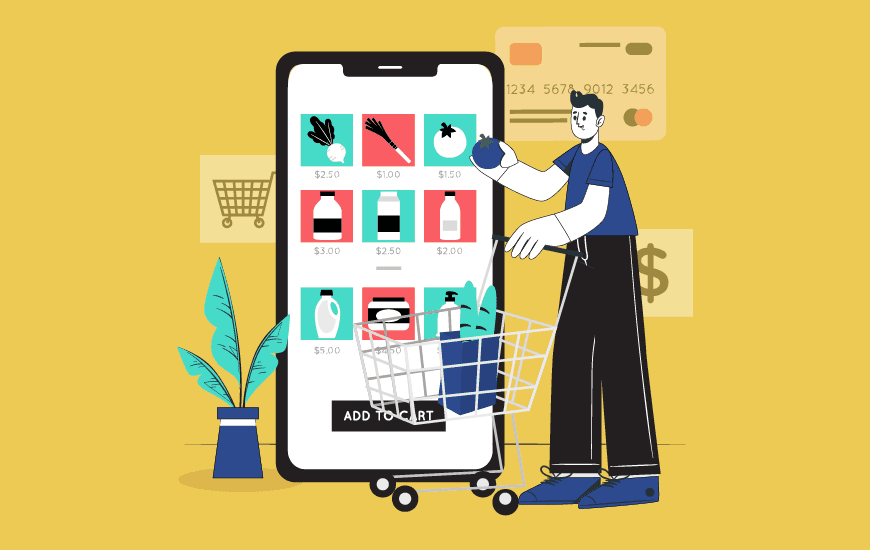 One wrong move and your budget’s toast—don’t wing it. Here’s a guide that breaks down the whole game of planning grocery development costs.
If you’re not careful, building a grocery app could turn into a money pit just like it turned out for PepperTap, a company that raised millions in 2015 but crashed in 2016. The app they built was too technical for the vendors the company was supposed to work with. That led to layoffs, halted operations, and caused major financial losses.
Here’s the deal: the grocery delivery app development cost can fall between $24,000 and $95,000.
Planning a solid app with stunning UI, animations, real-time tracking features, and more could shoot up the cost, but it also boosts the experience. However, it’s not only the app budget that decides your app’s ROI; it’s also the way you present it, make it usable, and tell potential users about it.
So, once you’re done with planning the budget and breaking down the overall cost, here’s a guide you should dig a little deeper into mobile app marketing strategies.
But first, let’s break down the cost of the grocery app development!
Factors Influencing the Grocery Delivery App Development Cost
The cost of building a grocery app is heavily driven by many factors influencing it at each layer.
These factors determine if your app development project is going to fit into a small budget or if you might need to dry out your pockets to the very last coin.
Before we begin, here’s the thing: most of these costs take into account that you are hiring an internal team for the development.
If that is something you are looking forward to exploring, here’s everything you need to know.
1. Salaries of Developers
The major factor that gives your overall grocery mobile app development budget wings is the salary paid to the folks you’re hiring.
These folks get paid based on:
- Where they’re from
- The kind of experience they have
- Perks offered to these developers
Based on Glassdoor, here’s the tentative salary paid to mobile app developers in the USA, the UK, India, and Australia.
| Region | Hourly Salaries (Range) | Hourly Salaries (in USD) | Cost Paid to Companies |
|---|---|---|---|
| USA | $31.73/hr – $48.08/hr | $31.73/hr – $48.08/hr | $59.87/hr – $79.82/hr |
| UK | £12.98/hr – £22.12/hr | $16.35/hr – $27.87/hr | $40/hr – $45/hr |
| India | ₹1000/hr – ₹1200/hr | $12/hr – $14.40/hr | $36/hr – $43.20/hr |
| Australia | A$32.69/hr – A$48.08/hr | $21.25/hr – $31.25/hr | $39.38/hr – $52.50/hr |
Note: The cost paid by companies is calculated using the average hourly salary paid throughout locations and the perks provided. Based on taxes, reputation, inflation, and more, these salaries can be dynamic.
2. App Complexity
The complexity of grocery delivery application development depends on how convenient you want to make it.
The convenience is powered by technologies like GPS, AI-powered app personalization, and more. Live-tracking the order status and AI-powered personalized recommendations are a couple of examples of grocery app features that boost the app's user-friendliness.
Even though these features might sound complex to implement and increase the grocery mobile app development budget, top grocery apps already in the market, such as Doordash, Instacart, Walmart, etc, are leveraging them.
So, if you’re ready to counter these grocery giants, here’s how the complexity of your grocery app will decide your budget:
| App’s Complexity | Number of Hours | Overall Costs (in USD) |
|---|---|---|
| Low | 400 | $23,948 – $31,928 |
| Medium | 800 | $47,896 – $63,856 |
| High | 1200 | $71,844 – $95,784 |
Note: Based on the data mentioned under salaries, we calculated these ranges to identify final costs. Before calculating the final amount, perks (15 % of the base salary) and profit margins (10 % of the base salary) were added.
3. UI/UX Design
The next layer that decides how much app development is going to charge is the efforts you’re planning to put into design trends.
You need an app that doesn’t just do the job; it keeps the user journey interesting and easy.
Your budget will decide how close you get to achieving that goal.
But don’t fret, having less money doesn’t mean you’re not going to get access to a good user experience. You can easily make your app beautiful, intuitive, and engaging by adopting UI design trends like minimalism.
To ensure a good design experience is implemented while keeping the cost of making an app in check, here’s what you can do:
- Outsource the designing part to app design companies in cost-effective locations like India, Ukraine, etc.
- Get WCAG and ADA-compliant designs ready to avoid future penalties.
- Adopt design trends like minimalism to keep resources to a minimum.
- Keep only critical grocery app features in focus instead of cluttering the app with everything.
Typically, depending on the strategy you adopt to design your app, the cost can fall anywhere between $1,250 and $90,000.
Here’s a breakdown with some more details!
| UI/UX Complexity | What’s Covered | Hours Required | Overall Costs |
|---|---|---|---|
| Basic (Standard UI) | Basic layouts, standard templates, limited customization, simple navigation, minimal animations. | 50–100 | $1,250 – $4,000 |
| Moderate (Custom UI) | Custom branding, moderate navigation complexity, some animations, and visually appealing templates. | 100–200 | $4,000 – $19,800 |
| High (Advanced UI/UX) | Advanced custom designs, multi-layered navigation, high-quality animations, transitions, and gamification. | 200–300 | $19,800 – $90,000 |
4. Costs of APIs
Post-designing, your next worry should be identifying the right APIs for apps.
What APIs are necessary for the elements you picked in the design, and how much these APIs will cost are a couple of questions you need to ask yourself.
Remember, most APIs are available based on subscriptions. Some have fixed periodic costs, others offer customized solutions. It’s your call on what fits your budget the best.
For a hint, we have curated some popular APIs powering smart grocery apps.
Let’s have a look!
5. Google Maps API
To integrate geolocation in the mobile app, you need solutions that fuel GPS capabilities.
Integration of GPS enables grocery app features like real-time tracking. 4over claims that 96% of consumers like to track package deliveries.
In that case, you need GPS in your online grocery app.
If you choose Google Maps API, here’s how much you might have to pay.
| Product | Requests | Monthly Cost (In USD) |
|---|---|---|
| Dynamic Maps | 80,000 | $560 |
| Dynamic Street View | 80,000 | $1,120 |
| Map Tiles | 80,000 | $48–$480 |
| Aerial View API | 80,000 | $1,280 |
| Static Maps API | 80,000 | $160 |
| Static Street View API | 80,000 | $560 |
6. OpenAI’s GPT API
Once the app is deployed, it needs a smart chatbot to solve user queries, help them out with glitches, see if there’s a problem with products, and more.
GPT can be a good deal but always compare your options. Tons of AI chatbots are now available in the market with competitive costs.
So, go for what fits your budget while keeping user resolution quality-driven.
For GPT, here are the prices that will impact the development cost of a grocery delivery app.
| Model | Token Type | Cost (per 1M tokens) | With Batch API (USD) |
|---|---|---|---|
| GPT-4o | Input Tokens | $3 | $1.25 |
| Output Tokens | $10 | $5.00 | |
| GPT-4o Mini | Input Tokens | $0.15 | $0.08 |
| Output Tokens | $1 | $0.30 | |
| GPT-4o Mini (Audio) | Input Tokens | $10 | $5.00 |
| Output Tokens | $20 | $10.00 | |
| o1 (General Reasoning) | Input Tokens | $15.00 | $7.50 |
| Output Tokens | $80.00 | $40.00 | |
| o1 Mini | Input Tokens | $3.00 | $1.50 |
| Output Tokens | $12.00 | $6.00 |
7. PayPal API Costs
Your grocery app needs a payment processing system. PayPal stands among the most popular payment gateways.
If you’re going for it, here’s the cost you might need to take care of.
| Method | Domestic Fee | International Fee | Example ($50 Order) | Notes |
|---|---|---|---|---|
| PayPal Checkout | 3.49% + $0.49 | 4.99% + $0.49 | $2.24 (Dom) / $2.99 (Int) | Standard online payment method. |
| QR Code Transactions | 2.29% + $0.09 | 3.79% + $0.09 | $1.24 (Dom) / $1.99 (Int) | For in-app QR payments (e.g., pickup). |
| PayPal Braintree | 2.89% + $0.29 | 2.89% + $0.29 + extras* | $1.74 (Dom) / Varies | Alternative gateway; *1% for non-. |
| Micropayments | 4.99% + $0.09 | 6.49% + $0.09 | $2.58 (Dom) / $3.34 (Int) | For small orders (<$10), approval is required. |
| Chargeback Fee | $20 | $20 | $20 per incident | Applies if a customer disputes the payment. |
| Dispute Fee (Standard) | $15 | $15 | $15 per incident | For buyer disputes via PayPal. |
| Currency Conversion | 3–4% spread | 3–4% spread | Varies | If converting to/from. |
8. Maintenance Costs
Once the app is launched, the real struggle begins: the race to keep it stable, smooth, and running. Even a slight downtime can harm your business and your vendor’s sales.
So, you need a maintenance team on standby, which will also add some app maintenance costs to your budget.
Often, the cost falls between 15% and 20% of total app development costs.
Here’s how much maintenance of a grocery mobile app can cost:
| Maintenance Category | Percentage of the Maintenance Cost | Total Cost |
|---|---|---|
| Bug Fixes | 15–25% | $2,812.50–$4,000 |
| OS Updates and Upgrades | 25–35% | $4,687.50–$5,600 |
| Server and Hosting Costs | 20–30% | $3,750–$4,800 |
| Security and Compliance | 10–15% | $1,875–$2,400 |
| Performance Monitoring and Analytics | 5–10% | $937.50–$1,600 |
| Third-party API Maintenance | 5–10% | $937.50–$1,600 |
| Total | 15–20% of $100,000 | $15,000–$20,000 |
Note: The app maintenance cost breakdown above is based on 15-20% of an app development budget amounting to $100,000.
9. Targeted Platforms
If you’re juggling between whether native apps are best or the hybrid ones, here’s something you should know: both have their perks, in terms of reach, but also in terms of budget.
Native isn’t getting outdated, but folks are loving hybrid for the simple fact that they need fewer development resources. So, if your budget is low, you should go for an app that helps you maximize your market but without limiting its reach.
Let’s help you understand the hooks and cruxes of making a choice when it comes to picking an app for target markets.
10. Native Apps
If you’re going for a native app strategy, you will need to build Android apps and iOS apps separately. That demands more money.
The cost of building an Android app can fall between $20,000 and $150,000. There are app development frameworks that often help reduce the price, but that’s the range you need to keep in mind while planning Android app development.
To build an iOS app, you might have to spare a range of $10,000 to $100,000. Developers you hire will use technologies like Swift, Objective-C, Xcode, and more. But here’s the best part: iOS devices are limited; therefore, the cost remains lower compared to most Android app projects. But again, exceptions can always be there.
11. Cross-Platform Apps
These are optimized for multiple devices.
The same app can run on Android as well as on iOS. There are cross-platform app development frameworks out there to help you build them. So, you get to save money by hiring fewer developers, even if you’re going for a strategy that requires an element of the app to be customized.
Here’s the deal, though: cross-platform apps come with limitations. Most devices running separate brands of operating systems do not offer great compatibility with each other. As a result, there are fewer opportunities to leverage.
It also gets trickier to make the app compatible with multiple devices, so a good fraction of the budget goes into the app testing process.
Now, if you’re picking a team to develop your cross-platform app at $30 per hour and the process requires 1000 hours, you will have to pay $30,000 + taxes and additional expenses.
12. Hybrid Apps
These might sound the same as cross-platform, but there’s a gap that cross-platform apps don’t fill.
Hybrid apps use a web view. So, any changes made to the code or frontend get applied as soon as the app is connected to the internet. Most modern businesses are using it.
Here’s the challenge: you get to keep a number of features limited even further. That also leads to lower costs. For simple apps, you might have to pay an approximate cost of just $10,000, and for an app that is designed to be feature-loaded, the price might even go to $150,000.
Also Read: Hybrid vs Native: What Fits Your Business Better?
13. Recurring Costs
An app is powered by a multitude of resources.
These resources can demand recurring costs. For instance, hosting services, security certificates, push notification tools, and more.
Tools come with their privileges but also with their prices. If you have a lower budget, you might need to sacrifice some plans and go for cheaper alternatives.
But to give you a demonstration, here are some tools that might affect the overall development cost of a grocery delivery app.
14. Hosting
You need a hosting client to put life into your app. The service provider should be performance-driven and safe to use.
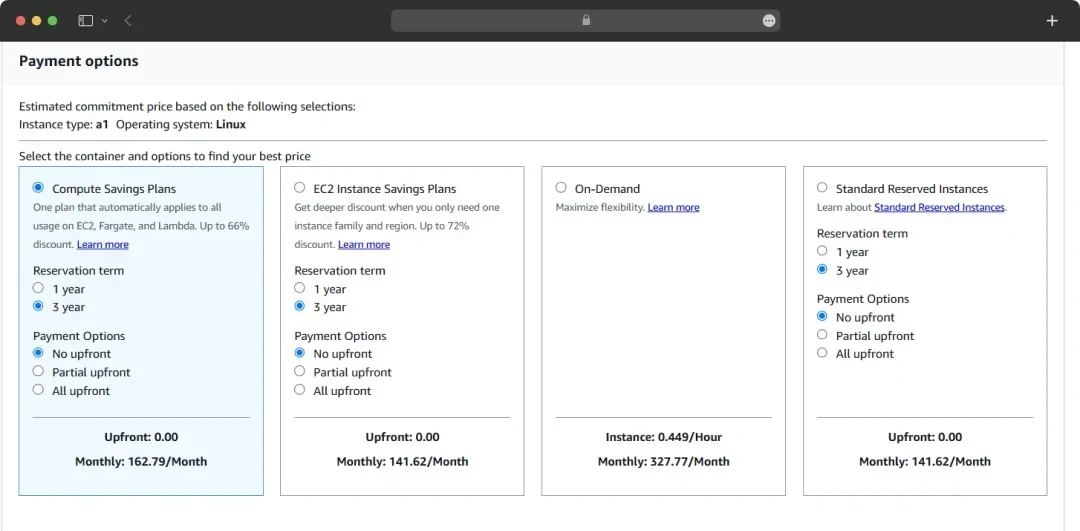
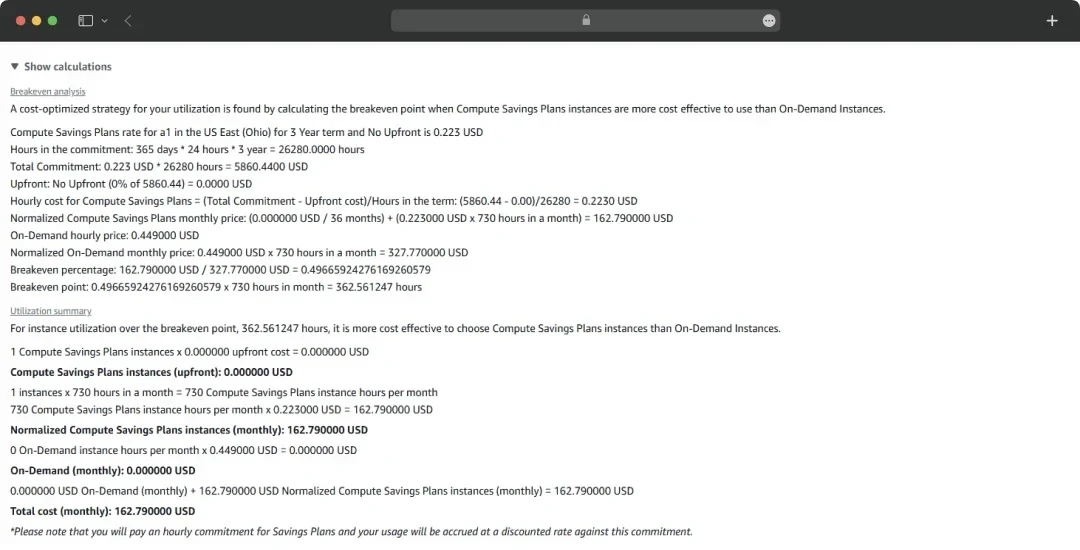
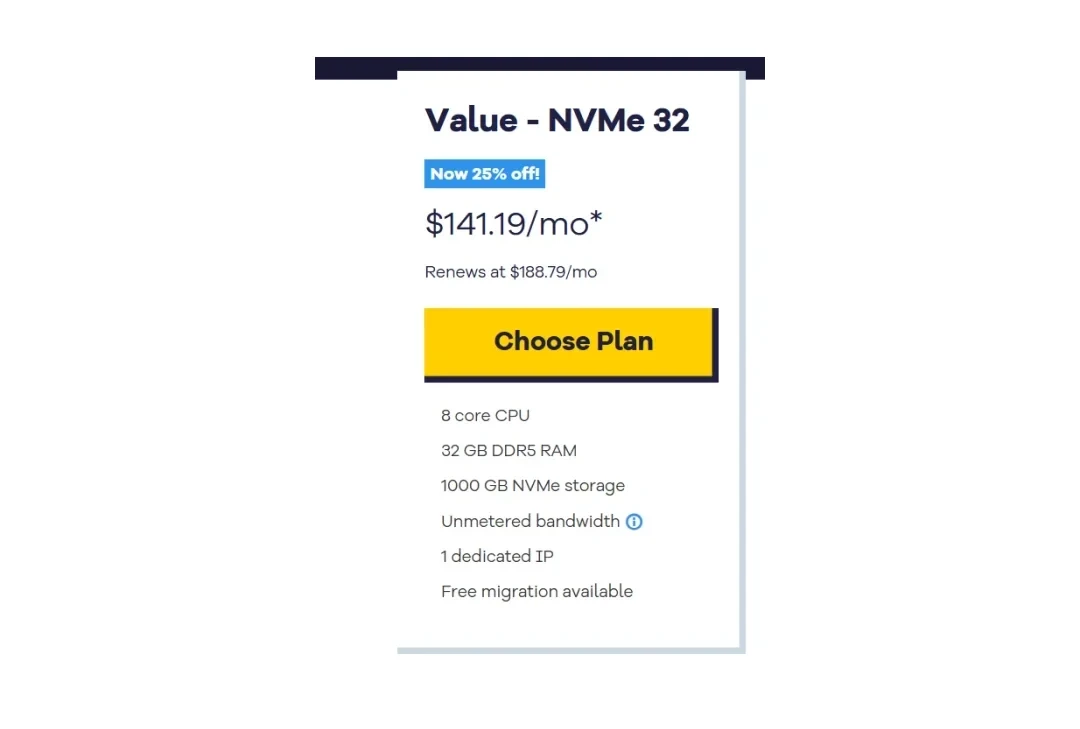
There are tons of options out there that provide app hosting services like HostGator, GoDaddy, AWS, and WordPress, among others.
Here’s the cost of the top three hosting service providers:
1. AWS
2. Hostgator
3. GoDaddy
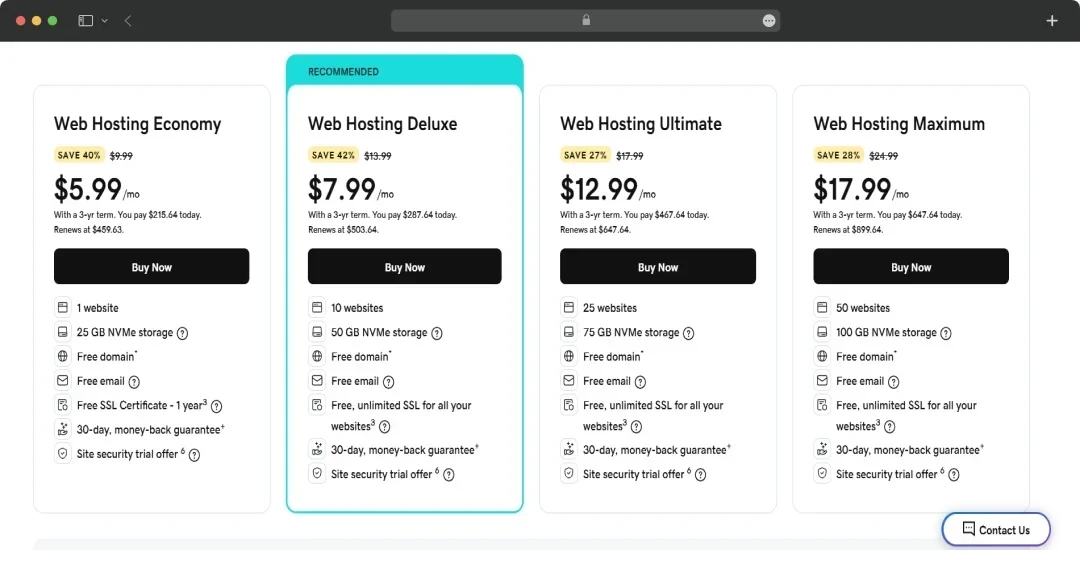
Note: These costs can be dynamic in nature. It’s advisable to check the official website in real-time or connect with the sales teams of the tool you’re planning to use.
15. Security Certifications
To keep your app running smoothly, it needs a defense system to block possible cyberattacks. Security certifications exist to ensure that. These certifications also make the app comply with the laws and regulations of its target markets.
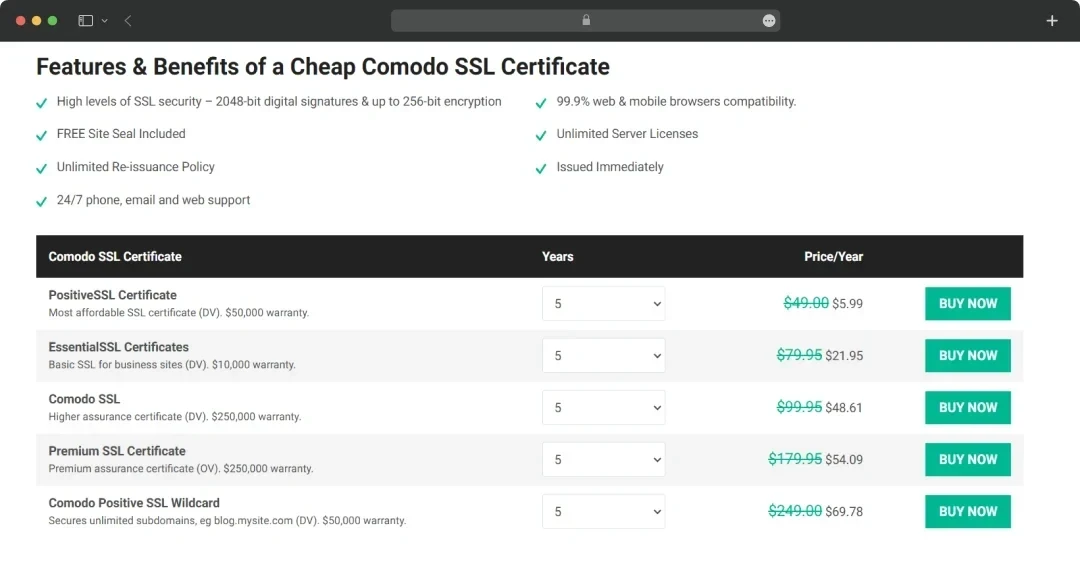
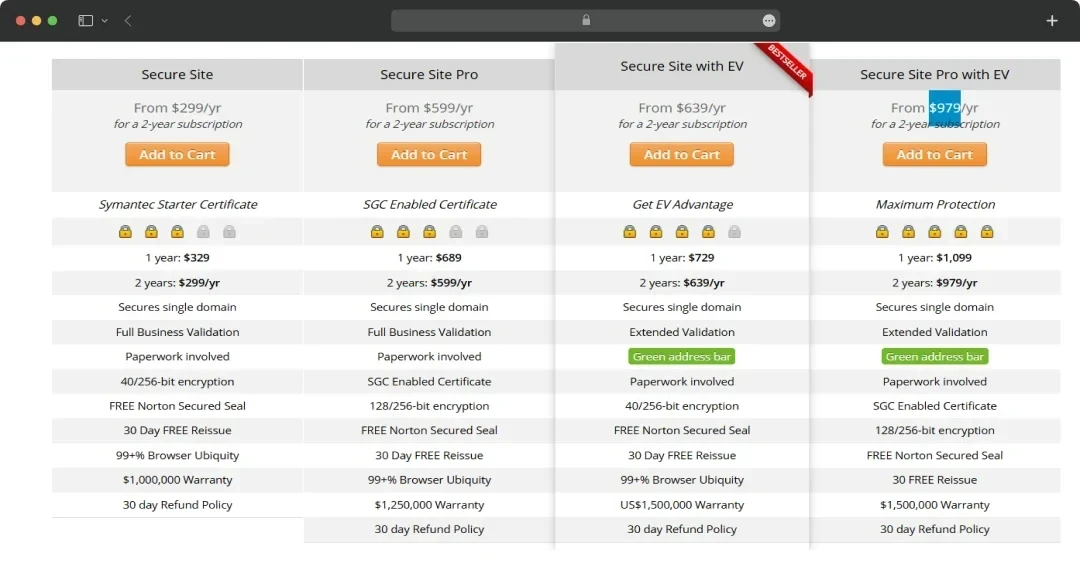
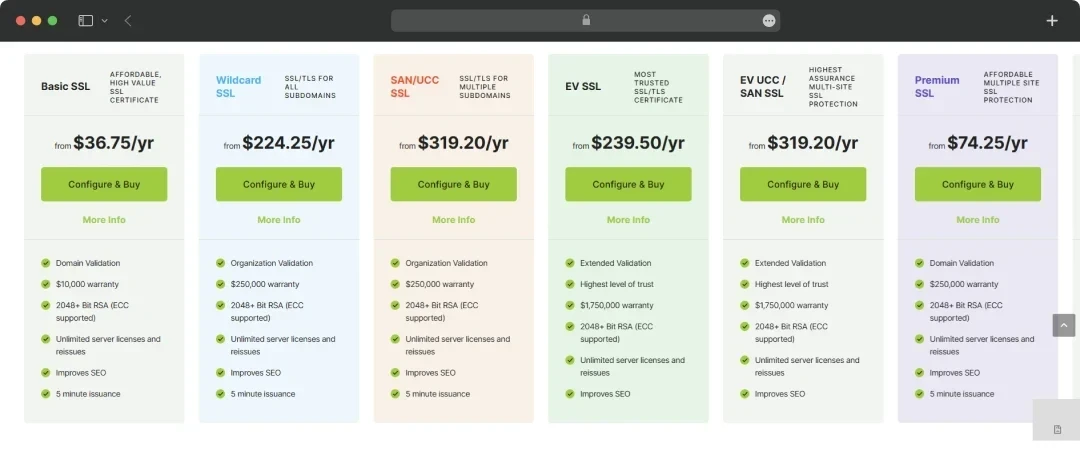
Here are the top three SSL certificate providers and their respective costs.
1. Comodo SSL Store
2. Symantec SSL Certificates
3. SSL.com
16. Push Notifications
You need push notifications to drive engagement.
But that’s not it; every time items are restocked, discounts are launched, or more important events happen, push notifications become critical.
To enable push notifications in your app, you might need a third-party notification tool.
Optimize the strategy for better efficiency by diving deeper into this in-depth guide on Using Push Notifications to Drive Retention.
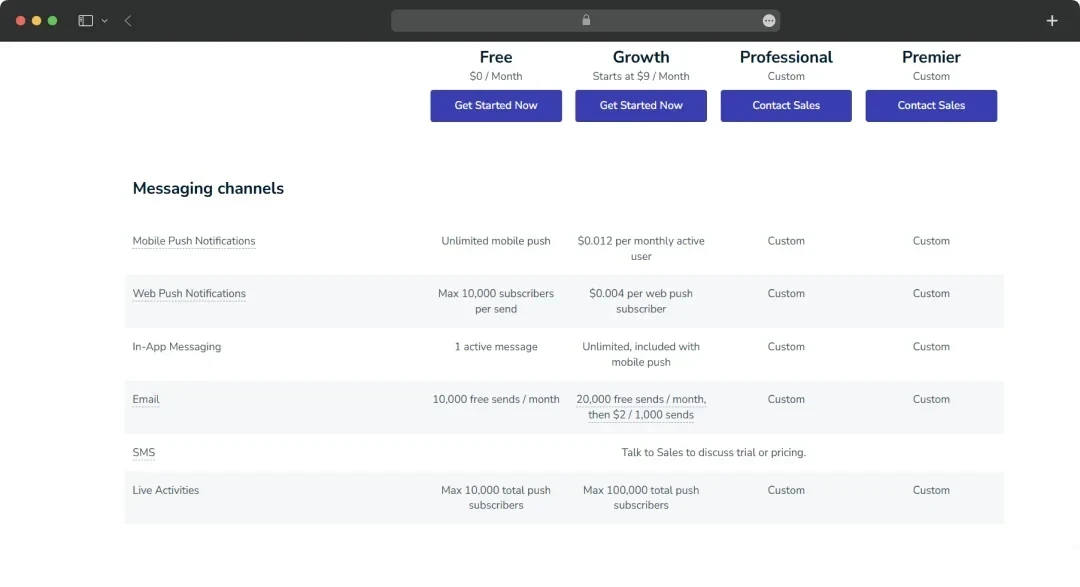
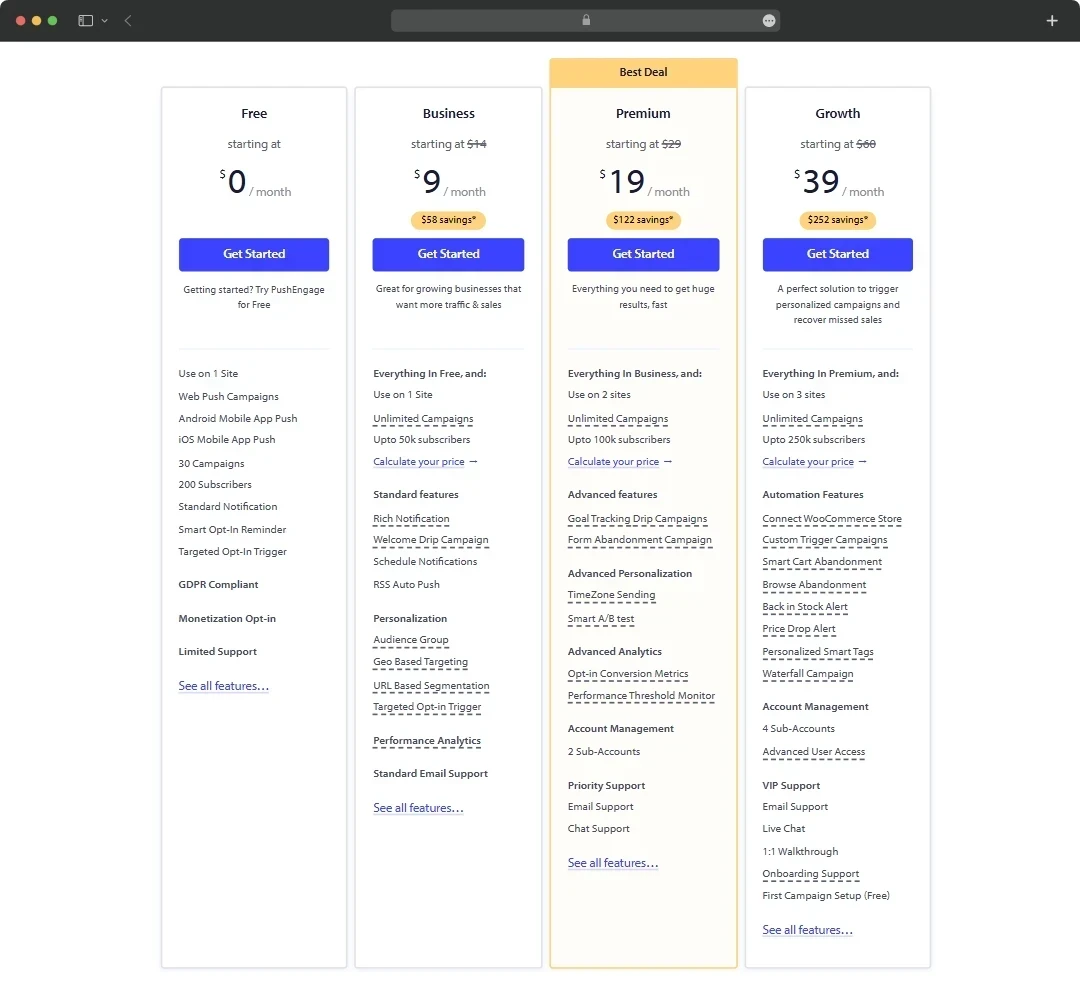
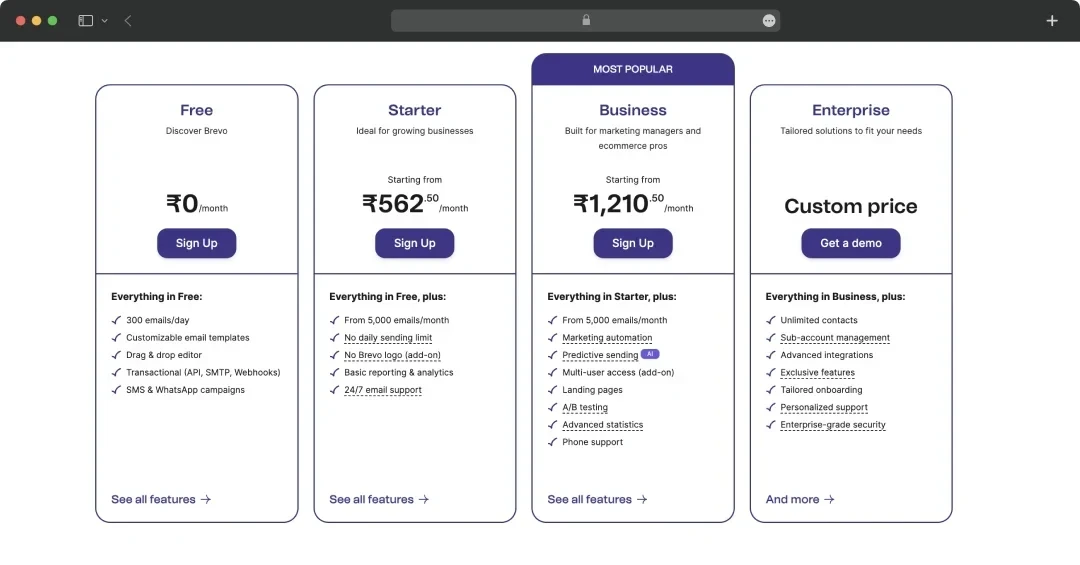
When ready, here are some options you might want to check out!
1. OneSignal
2. PushEngage
3. Brevo
17. Performance Analytics
An online grocery app is entirely dependent on user behavior. To gather that, you need performance analytics tools. These tools will help you identify where your users are spending more time, what items they are buying, and more.
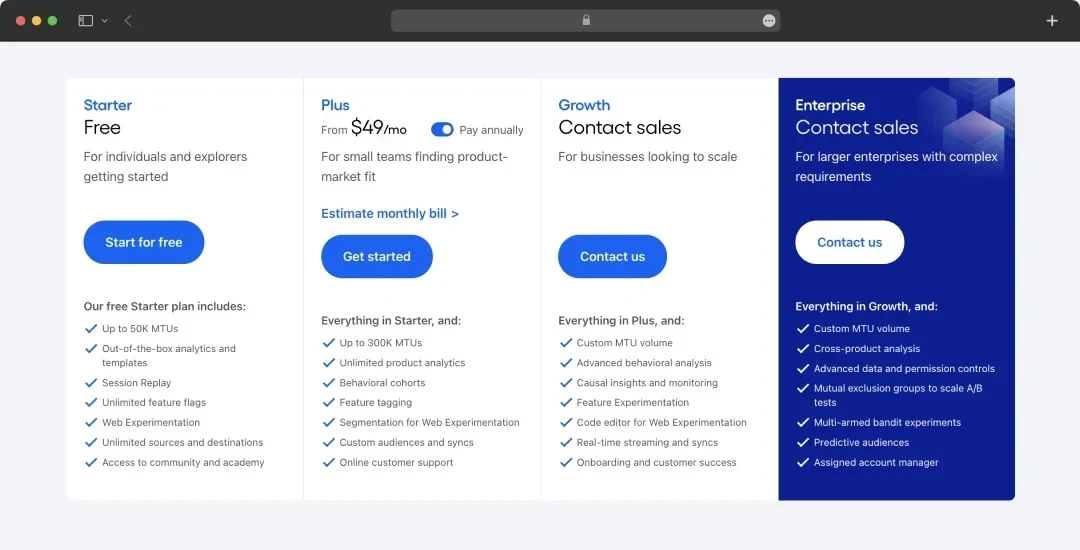
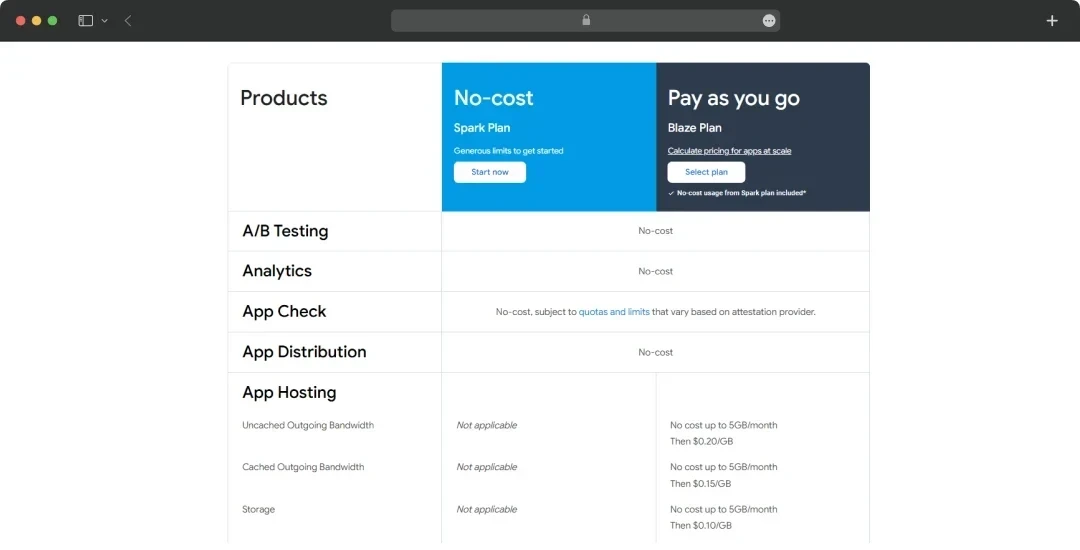
As for the cost, here are a few examples, along with their prices.
1. Amplitude
2. Firebase Analytics
3. Google Analytics
It remains among the most popular data analytics tools due to its free nature. GA 4 supports smooth app tracking, so if you have a lower budget, go for it.
18. Additional Costs
Now, once the core elements of an app have been identified, you need some additional resources to boost its usability further. Naturally, the cost of grocery delivery application development will rise as well.
These resources can be:
1. Content Delivery Network (CDN)
For instance, Amazon CloudFront CDN’s Data transfer costs are zero for the first 1TB worldwide. Beyond that, charges can vary depending on the region.
For instance, $0.085/GB (US, Canada, Europe) to $0.120/GB (Southeast Asia).
The cost of CDN will remain dynamic as your user base and data size grow. Using one will help you deploy images, data, and updates faster to your app to keep it functioning and trendy.
2. Customer Service
Shopping apps are incomplete without a customer resolution environment in place. Thankfully, there are ways to leverage AI in customer service nowadays.
An example of a customer service solution is Zendesk, a customer service solution that costs between $55 and $115 per month.
The best part is that Zendesk has customized options. So, if you’re looking to scale up in the future, get in touch with their sales team, and you’ll be all set!
3. Compliances
There are certain compliances to regulate apps. The goal of these compliances is to ensure the app remains inclusive and fair.
While building an online grocery app, compliance will demand recurring costs. So, your budget will have to be ready for the same.
These compliances we are talking about are WCAG in the USA, GDPR in Europe, PCI DSS for payments, and more. You will need a regular app testing strategy to ensure your app remains current with evolving compliance requirements.
You might also need to spend some money on trademarks and patents to keep your app’s idea safe. Two types of trademarks currently exist in the market: TEAS Plus, which costs $250, and TEAS Standard, which costs $350.
Calculating the Grocery App Development Cost Estimation
Until now, we have gone through everything that would influence the overall cost of building a grocery mobile app. Now comes the point when we finally calculate a tentative cost.
To give a little context, we are making a few assumptions based on the above data to calculate a tentative amount.
Stay with us as we take you through the details.
Assumptions
For better accuracy, we are going for a Postmates-like app development strategy. This way, we can keep things more real.
Here’s everything we have gathered so far.
- Complexity: Medium, requiring 800 development hours for core features like tracking, payments, and a custom UI.
- Team: India-based developers at $39.60/hr (midpoint of company rates: $36-$43.20/hr), cost-effective and inclusive of perks.
- UI/UX: Moderate design, 150 hours, for a branded, user-friendly interface.
- Tools: One from each category (e.g., Google Maps, GPT-4o Mini, PayPal) at the lowest viable cost.
- Platform: Hybrid app for iOS and Android, coded within 800 hours.
- Maintenance: 15% of the development cost annually.
- Recurring Costs: Estimated for Year 1, assuming moderate usage (e.g., 10,000 $50 orders).
- Currency: All in ($).
Cost Breakdown
Development (One-Time):
- Developers: 800 hrs × $39.60 = $31,680 (coding, testing).
- UI/UX: 150 hrs × $39.60 = $5,940 (custom design).
- Trademark: $250 (basic protection).
- Subtotal: $37,870
Annual Recurring Costs:
- Google Maps API: $6,720 (Dynamic Maps, 80,000 requests/month).
- GPT-4o Mini: $7 (10M input + 5M output tokens, minimal chatbot use).
- PayPal Fees: $22,350 (3.49% + $0.49 on 10,000 $50 orders).
- Maintenance: $37,620 × 0.15 = $5,643.
- CDN (CloudFront): $87 (1TB free, 1TB at $0.085/GB).
- Push Notifications (OneSignal): $0 (free tier).
- SSL: $50 (basic certificate).
- Analytics (Google): $0 (free GA4).
- Customer Service (Zendesk): $660 ($55/month).
- Compliances: $1,000 (WCAG/GDPR audits).
- Subtotal: $36,517
Total (Year 1): $37,870 + $36,517 = $74,387 (Before Tax)
Add 7% Tax:
- Tax = $74,387 × 0.07 = $5,207.09
- New Total = $74,387 + $5,207.09 = $79,594.09
Add 10% Commission:
- Commission = $79,594.09 × 0.10 = $7,959.41
- New Total = $79,594.09 + $7,959.41 = $87,553.50
Add $500 Platform Fees:
Final Total = $87,553.50 + $500 = $88,053.50 (Including Tax)
Note: This cost is based on an assumption. Tons of factors like scalability requirements, fees involved, tax inflation, and more can impact the price in the future.
Also, you need to keep these costs in account to make your app reach the folks:
- $25 fee to submit an app to the Google Play Store
- $99 fee to submit an app to the App Store
- And, the costs of marketing an app that will be dynamic based on how popular you want to make it.
Expensive Mistakes to Avoid
While planning your grocery app development cost, you need to keep yourself clear of expensive mistakes. Some of these mistakes can hamper your app’s ROIs in the future, while others could attract penalties in millions of dollars.
What are these mistakes? Let’s have a look!
1. Skimping on UI/UX Design
A poor UI/UX design can drive your users away, hamper the app loading time, reduce the user retention rate, and boost the bounce rate. Even if the app manages to survive, you will have to spend money on UI/UX redesign later.
Redoing a moderate UI/UX (150 hours) at $39.60 per hour (India rate) is $5,940, but in the USA ($69.85 per hour midpoint), it’s $10,477.50—nearly double if rushed initially.
The solution? If you’re new, explore ideal app UI design examples existing in the market. Research, observe, consult, and then proceed to the development stage.
2. Ignoring Compliance (WCAG, GDPR, PCI-DSS)
Non-compliance can lead to fines. For instance, GDPR penalties could cost up to €20M or 4% of annual revenue, with the possibility of lawsuits.
Defaulting to WCAG guidelines blocks a huge chunk of users by making your app invisible and also invites some legal trouble. If violations happen, you might have to pay millions in fines.
So, a periodic budget of $5,000 and $10,000 should be set aside to keep compliance-based audits in practice.
3. Not Giving Maintenance Enough Attention
Focusing too much on the development strategy and not making the maintenance stage a part of it can hurt user ratings. Ratings and reviews are of major importance to your app, as they boost its popularity. But if you ignore it, bugs, crashes, and downtimes could frustrate users.
Sudden incidents might also demand costlier resolutions. Often, premium rates fall within the cap of 15-20% of the development budget. Suppose an app development happened at $37,620. The app’s maintenance cost could touch $5,643/year, but unplanned fixes could double that to $10,000+ annually.
4. Overloading Features
Adding too much to your app boosts your app’s size, slows down the performance, and multiplies the overall cost. If your plan has some features that aren’t critical for its functionality or user experience, put them on hold to avoid bloating budgets.
If you’re boosting your app’s features by transitioning the development process from medium to high complexity (1200 hours) at $39.60 per hour, this action would add over $15,840 to the budget.
5. Choosing the Wrong Platform Strategy
Not picking the right platform can be money-draining. For instance, if every feature you’re planning to deploy can be achieved using a hybrid or cross-platform app, and you still go for native apps to target multiple platforms, that’s a waste of money- unless you have a justifiable reason.
Native dual-build could hit $60,000+ versus $31,680 for hybrid, wasting a grocery delivery application development cost of $28,000+ if misjudged.
Tips to Trim Down the Overall Development Cost of a Grocery Delivery App
While preparing your budget, keep your options open to identify any opportunities for reducing the cost while ensuring that not even a single parameter of quality is sacrificed.
To help you out, we've got tips.
Let’s have a look!
Use Frameworks and Pre-built Templates
There are tons of low-code development frameworks in the market. Picking them can save time and money. These frameworks, like Appian, Microsoft PowerApps, and more, are equipped with pre-built templates to speed up the whole app development process. You can pick some of these options for as low as $20 per month.
Outsource to Affordable Markets
If you own or are planning to launch a business in European countries or the USA, it might be very expensive to hire an internal team. The solution? Outsource app development to countries with competitive rates.
But rate isn’t the only reason why you should outsource to other countries. Take quality into consideration. Outsource to companies where you find a good balance between cost and quality.
You get to outsource not only every glitch in the code but also the responsibility of building a responsive, feature-rich, and performance-driven app.
For instance,
1. Outsource to App Development Companies in India
India is one of the most preferred markets for outsourcing IT projects like app development, software development, blockchain, etc. Apart from competitive hourly costs charged by local companies, the reason remains perks like discounted taxes in Special Economic Zones (SEZs).
SEZs are certain locations where taxes are charged less if you hire companies from there. You can leverage that.
These locations include Chennai, Gurugram, Pune, Kochi, and more.

2. Outsource to App Development Companies in The UK
Outsourcing grocery app development to the UK saves money by avoiding high internal salaries (£50,000-£70,000/year, roughly $63,000-$88,200 USD) and overhead costs, while tapping into a skilled pool of 1.7 million tech workers.
It’s faster; external firms start in weeks, not months, and offer flexibility without long-term commitments. The R&D Tax Relief (up to 33% credit) can lower costs further, though it’s not outsourcing-specific.

3. Outsource to App Development Companies in Poland
Poland has a competitive app development landscape. As a result, companies are keeping how much they charge hourly in control. That leads to a controlled cost of building an online grocery app. The cost typically falls between $25 and $60 per hour (30-50% cheaper than Western rates). But there are exceptions as well, going up to $149 per hour.
Beyond that, perks include a strong 510,900-strong IT workforce. Teams in the country can scale quickly, and the close time zone (CET) ensures smooth collaboration for UK/US clients.
There are also tax exemptions in Special Economic Zones, like Kraków Technology Park, that can reduce costs, benefiting outsourced projects indirectly.

Use AI-powered Bots to Speed Up Development
“Automation is the heart of any digital transformation. There is no software development team that can cope with the huge demand for app creation out there. Around the world, teams have huge backlogs of development and maintenance tasks delayed and stocking up.”
Gaston Milano, GeneXus’s CTO, in an Interview with MobileAppDaily
With smart chatbots in existence, it’s much easier and faster to build an app today. Not to forget, cheaper as well.
If it fits your development plan, create an app using GPT, Grok, GitHub Copilot, or any such tool that can help you write code, review it, or even fix it, and witness the cost of making an app go magically down.
Now’s the Time to Nail the App Development Budget
Well, you have everything you need to plan a budget that covers the cost of making an app. But here’s the deal: don’t forget the marketing budget, or the money you’re going to spend on upgrading the app in the future.
Toss in AI tools like GPT or Grok to zip through coding and keep that on-demand grocery delivery app development cost tight.
When you have found answers to the questions like:
How do you develop a grocery app to achieve your goals?
- Or how much the app development will cost.
- The best tactic is to add a percentage to the buffer in the whole calculation.
If you have a limited budget, don’t forget to put whatever you can on hold without touching components impacting the ROI of your app.
If you need more tips, we have a couple of options for you to read to help you plan the budget better:
Frequently Asked Questions
How much does on-demand grocery delivery app development cost for Android devices?
At the lower end, if you find a company charging $39.60 per hour in countries like India, the labor cost for a 400-hour-long project could reach $15,840. Top that with UI/UX, APIs, and other fees, and you will pay approximately $20,000 for the price of making an app. If development hours for a complex app increase to 1200, you might be looking at a budget of $150,000.
How much does grocery delivery app development cost for iOS?
For iOS platforms, the grocery app development process could cost between $10,000 and $100,000 for a project requiring 400 to 1200 hours of development.
How much does it cost to build a hybrid app for grocery deliveries?
For a simple app, you might have to pay as little as $10,000 if you’re keeping it minimal, but for a complex app, it might even go to $150,000.
What Factors Drive Up Grocery App Development Costs?
Well, factors like the number of folks involved in the development process, their hourly charges, licensing fees, taxes, costs of technologies and tools, UI/UX requirements, the complexity of the app, APIs, and plenty of other stuff.
Can I build a grocery app on a tight budget?
Start with a Minimum Viable Product (MVP) development focusing on core features. Then compare and outsource the development process to cost-effective locations like India. Leverage local special economic zones (SEZs) to secure further discounts on taxes.
How Long Does It Take to Develop a Grocery App?
An app of medium complexity can take up to three to six months to develop. However, before launching and shaping the app into a ready-to-use product, it might take an extra month to get the final touch.
What’s the Deal with Maintenance Costs for a Grocery App?
Maintenance costs are crucial, and most folks like to plan ahead to safeguard the app against possible downtimes. Typically, a fee of 15-20% is kept per year for the maintenance part to ensure the app remains trendy and no glitch can remain on the app for long enough to be noticed.
Are Hybrid Apps Cheaper for Grocery Delivery Development?
Yup! You build a single app that runs across multiple operating systems. The result? A larger user base without the headache of numerous development or maintenance projects. Simply launching an app could help you achieve the ROIs you have targeted at a lower cost.
What APIs Should I Include in My Grocery App Budget?
Generally used APIs in grocery apps like Google Maps ($560/month for 80,000 requests), GPT-4o Mini (as low as $7 for minimal use), and PayPal (3.49% + $0.49 per transaction) are key.
How Can I Avoid Expensive Mistakes in Grocery App Development?
Don’t sacrifice the quality of your app to save money. Do a competitive analysis and try to come up with an app idea that is better and more useful. If you’re going for services that are already tackled by established brands, it might get trickier to grow. Beyond that, don’t forget compliances either. It’s not just about the penalty, it’s about the trust of consumers.
How to develop a grocery app for free?
Developing a grocery app for free is challenging but possible using free tools: learn coding (e.g., Python, Flutter), use open-source platforms (like Firebase), and leverage free templates online. Expect time investment and limited features.

Uncover executable insights, extensive research, and expert opinions in one place.
Related Content