Date: November 29, 2024
Notification about your last car space will be quite helpful.
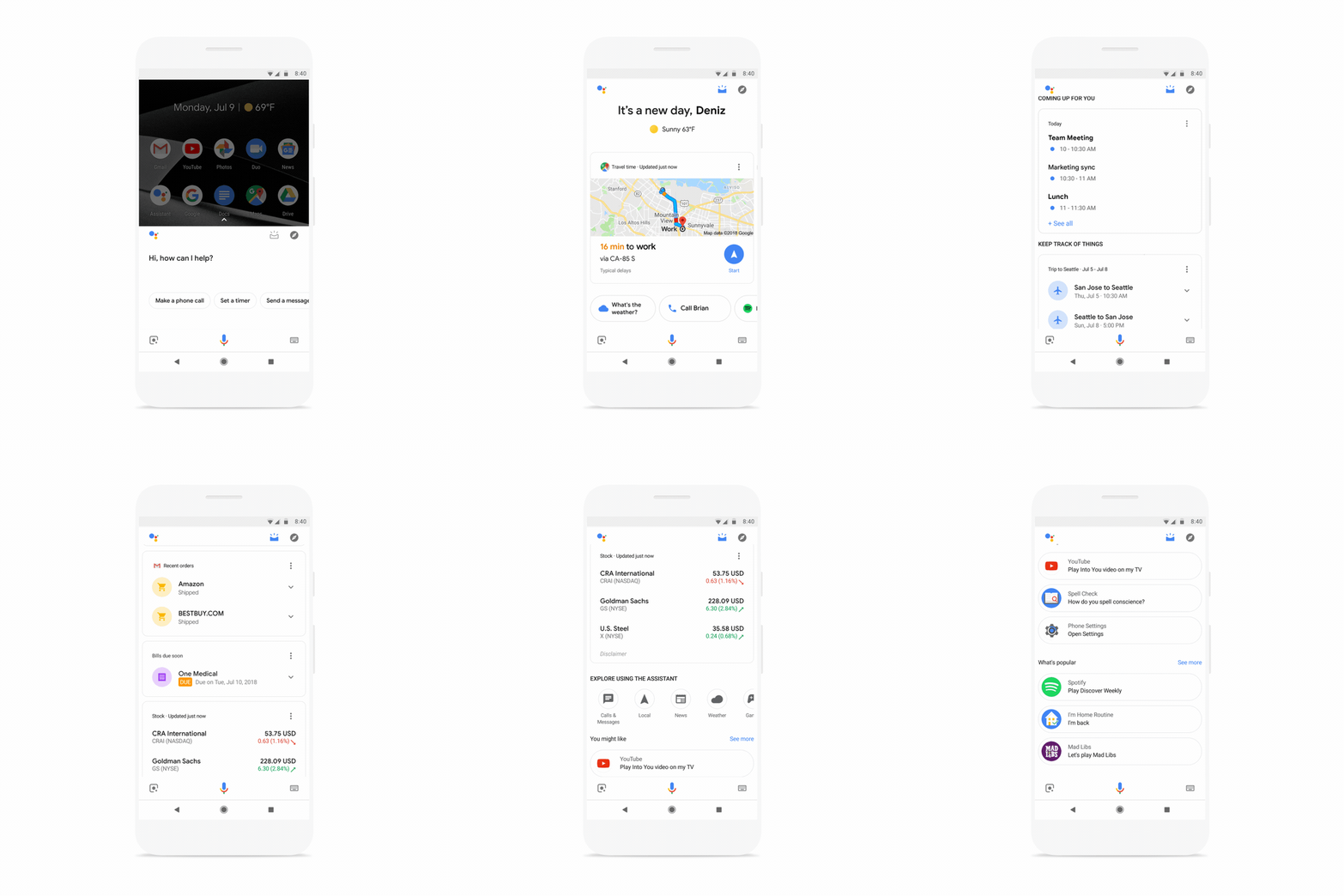
Google is up to assist you in mending your day in a better way. In a recent move, the tech giant has rolled out “visual snapshot” feature in its Assistant that offers to administer your personal information into a single interface. It will include everything from traffic updates to your parcels and from your next flight to the cheese-burst pizza, the Assistant will stuff you with proactive tips throughout the day.
The user information will be based upon day, location, and any recent interactions with the Assistant. To cater to everyone, it will further support multiple languages.
“This week, we’re rolling out a new visual overview of your day when you open the Google Assistant app on your phone, with proactive suggestions and personalized information to help you stay on top of your day. Google stated in a blog post. “The new visual snapshot provides curated, helpful information based on the time of day, location, and your recent interactions with the Assistant, and will be available on Android and iOS devices in all languages supported by the Assistant.”
The new experience by Google will offer you updates about nearby activities, reminders, your car parking space, track recommendation, and much more.
“We’ll continue to add more useful features to your snapshot over time—for example, an overview of your notes and lists from Google Keep, Any.do, Bring!, Todoist and others; a new discovery section to help you find activities nearby; reminders on where you parked; personalized recommendations for music and podcasts; and much more.”

Not only this, the Assistant will send specified notifications for all the upcoming events, which will act as a reminder for the user.
“The Google Assistant can also send proactive notifications on your phone to remind you of important upcoming events. You can get notifications for upcoming bills, packages, even an alert that your flight has been delayed—your Google Assistant will keep track, so you don’t have to.”
The new feature will be made available on Android and iOS platforms starting this week. As a user, you just need to update your app from the respective app stores. Once updated, you can find the new feature in the app by tapping on the new icon in the top right corner of the screen after you’ve activated your Google Assistant on your Android device. In the case of an iOS device, your personal updates will be shown as soon as you open the Assistant app.
By Arpit Dubey
Arpit is a dreamer, wanderer, and tech nerd who loves to jot down tech musings and updates. With a knack for crafting compelling narratives, Arpit has a sharp specialization in everything: from Predictive Analytics to Game Development, along with artificial intelligence (AI), Cloud Computing, IoT, and let’s not forget SaaS, healthcare, and more. Arpit crafts content that’s as strategic as it is compelling. With a Logician's mind, he is always chasing sunrises and tech advancements while secretly preparing for the robot uprising.
OpenAI Is Building an Audio-First AI Model And It Wants to Put It in Your Pocket
New real-time audio model targeted for Q1 2026 alongside consumer device ambitions.
Nvidia in Advanced Talks to Acquire Israel's AI21 Labs for Up to $3 Billion
Deal would mark chipmaker's fourth major Israeli acquisition and signal shifting dynamics in enterprise AI.
Nvidia Finalizes $5 Billion Stake in Intel after FTC approval
The deal marks a significant lifeline for Intel and signals a new era of collaboration between two of America's most powerful chipmakers.
Manus Changed How AI Agents Work. Now It's Coming to 3 Billion Meta Users
The social media giant's purchase of the Singapore-based firm marks its third-largest acquisition ever, as the race for AI dominance intensifies.